Radial Tree Layout in WPF Diagram
18 Nov 201818 minutes to read
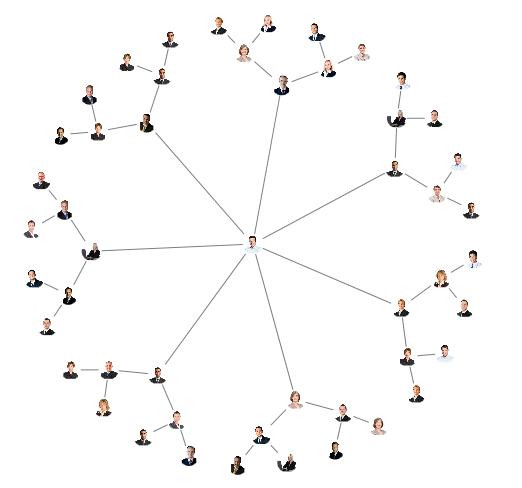
The Radial Tree layout is a specialization of the Directed Tree Layout Manager that uses a circular algorithm for locating diagram nodes. It arranges nodes in a circular pattern, positioning the root node at the center of the graph with child nodes in a circle around the root. Sub-trees are placed radially around their parent.
The arrangement produces ever-expanding concentric rings; the radial distance from the root indicates the node level in the hierarchy. You must specify a layout root because the radial tree layout positions the nodes based on the LayoutRoot property of RadialTreeLayout. LayoutRoot is of type object and accepts either an INode instance or an id string that matches a node’s Id.
DataSourceSettings.RootandRadialTreeLayout.LayoutRootserve different purposes.DataSourceSettings.Root(a string) identifies the record in the data source that should be treated as the data-level root.RadialTreeLayout.LayoutRoot(anobject) identifies the rendered node around which the layout is positioned. In the examples below we useDataSourceSettings.Root="1"to select the root record and let the layout pick the corresponding node automatically.
<!--Initialize employee collection-->
<local:Employees x:Key="employees">
    <local:Employee EmpId = "1" ParentId = "" Imageurl = "./Assets/Thomas.png" />
    <local:Employee EmpId = "2" ParentId = "1" Imageurl = "./Assets/Clayton.png" />
    <local:Employee EmpId = "3" ParentId = "1" Imageurl = "./Assets/eric.png" />
    <local:Employee EmpId = "4" ParentId = "1" Imageurl = "./Assets/John.png" />
    <local:Employee EmpId = "5" ParentId = "1" Imageurl = "./Assets/image12.png" />
    <local:Employee EmpId = "6" ParentId = "1" Imageurl = "./Assets/image2.png" />
    <local:Employee EmpId = "7" ParentId = "1" Imageurl = "./Assets/image3.png" />
    <local:Employee EmpId = "8" ParentId = "1" Imageurl = "./Assets/image50.png" />
    <local:Employee EmpId = "9" ParentId = "2" Imageurl = "./Assets/image51.png" />
    <local:Employee EmpId = "10" ParentId = "2" Imageurl = "./Assets/image53.png" />
    <local:Employee EmpId = "11" ParentId = "3" Imageurl = "./Assets/image54.png" />
    <local:Employee EmpId = "12" ParentId = "3" Imageurl = "./Assets/image55.png" />
    <local:Employee EmpId = "13" ParentId = "4" Imageurl = "./Assets/image56.png" />
    <local:Employee EmpId = "14" ParentId = "4" Imageurl = "./Assets/image57.png" />
    <local:Employee EmpId = "15" ParentId = "5" Imageurl = "./Assets/images7.png" />
    <local:Employee EmpId = "16" ParentId = "5" Imageurl = "./Assets/images9.png" />
    <local:Employee EmpId = "17" ParentId = "6" Imageurl = "./Assets/Jenny.png" />
    <local:Employee EmpId = "18" ParentId = "6" Imageurl = "./Assets/John.png" />
    <local:Employee EmpId = "19" ParentId = "7" Imageurl = "./Assets/eric.png" />
    <local:Employee EmpId = "20" ParentId = "7" Imageurl = "./Assets/Maria.png" />
    <local:Employee EmpId = "21" ParentId = "8" Imageurl = "./Assets/image12.png" />
    <local:Employee EmpId = "22" ParentId = "8" Imageurl = "./Assets/Paul.png" />
    <local:Employee EmpId = "23" ParentId = "9" Imageurl = "./Assets/Robin.png" />
    <local:Employee EmpId = "24" ParentId = "9" Imageurl = "./Assets/smith.png" />
    <local:Employee EmpId = "25" ParentId = "10" Imageurl = "./Assets/Thomas.png" />
    <local:Employee EmpId = "26" ParentId = "10" Imageurl = "./Assets/Clayton.png" />
    <local:Employee EmpId = "27" ParentId = "11" Imageurl = "./Assets/eric.png" />
    <local:Employee EmpId = "28" ParentId = "11" Imageurl = "./Assets/images7.png" />
    <local:Employee EmpId = "29" ParentId = "12" Imageurl = "./Assets/image12.png" />
    <local:Employee EmpId = "30" ParentId = "12" Imageurl = "./Assets/image2.png" />
    <local:Employee EmpId = "31" ParentId = "13" Imageurl = "./Assets/image3.png" />
    <local:Employee EmpId = "32" ParentId = "13" Imageurl = "./Assets/image50.png" />
    <local:Employee EmpId = "33" ParentId = "14" Imageurl = "./Assets/image51.png" />
    <local:Employee EmpId = "34" ParentId = "14" Imageurl = "./Assets/image53.png" />
    <local:Employee EmpId = "35" ParentId = "15" Imageurl = "./Assets/image54.png" />
    <local:Employee EmpId = "36" ParentId = "15" Imageurl = "./Assets/image55.png" />
    <local:Employee EmpId = "37" ParentId = "16" Imageurl = "./Assets/image56.png" />
    <local:Employee EmpId = "38" ParentId = "16" Imageurl = "./Assets/image57.png" />
    <local:Employee EmpId = "39" ParentId = "17" Imageurl = "./Assets/images7.png" />
    <local:Employee EmpId = "40" ParentId = "17" Imageurl = "./Assets/images9.png" />
    <local:Employee EmpId = "41" ParentId = "18" Imageurl = "./Assets/Jenny.png" />
    <local:Employee EmpId = "42" ParentId = "18" Imageurl = "./Assets/John.png" />
    <local:Employee EmpId = "43" ParentId = "19" Imageurl = "./Assets/Clayton.png" />
    <local:Employee EmpId = "44" ParentId = "19" Imageurl = "./Assets/Maria.png" />
    <local:Employee EmpId = "45" ParentId = "20" Imageurl = "./Assets/image55.png" />
    <local:Employee EmpId = "46" ParentId = "20" Imageurl = "./Assets/Paul.png" />
    <local:Employee EmpId = "47" ParentId = "21" Imageurl = "./Assets/Robin.png" />
    <local:Employee EmpId = "48" ParentId = "21" Imageurl = "./Assets/smith.png" />
    <local:Employee EmpId = "49" ParentId = "22" Imageurl = "./Assets/Thomas.png" />
    <local:Employee EmpId = "50" ParentId = "22" Imageurl = "./Assets/John.png" />
</local:Employees>

<!--Initializes the DataSourceSettings -->
<syncfusion:DataSourceSettings x:Key="DataSourceSettings"
                               ParentId="ParentId" Id="EmpId"
                               DataSource="{StaticResource employees}"
                               Root="1"/>
<!--Initialize the Layout. HorizontalSpacing controls the radius step;
    VerticalSpacing controls the angular step between sibling nodes.-->
<syncfusion:RadialTreeLayout x:Key="treeLayout"
                             HorizontalSpacing="30"
                             VerticalSpacing="50" />
<!--Initialize the Layout Manager-->
<syncfusion:LayoutManager x:Key="layoutManager" Layout="{StaticResource treeLayout}" />

<!--Bind the diagram to the DataSourceSettings and LayoutManager defined above-->
<syncfusion:SfDiagram x:Name="diagram"
                      DataSourceSettings="{StaticResource DataSourceSettings}"
                      LayoutManager="{StaticResource layoutManager}">
    <syncfusion:SfDiagram.Nodes>
        <syncfusion:NodeCollection/>
    </syncfusion:SfDiagram.Nodes>
    <syncfusion:SfDiagram.Connectors>
        <syncfusion:ConnectorCollection/>
    </syncfusion:SfDiagram.Connectors>
</syncfusion:SfDiagram>
//Add the required using directives at the top of the file:
//using Syncfusion.UI.Xaml.Diagram;
//using Syncfusion.UI.Xaml.Diagram.Layout;
//using System.Collections.ObjectModel;
//Initialize the Diagram instance
SfDiagram diagram = new SfDiagram();
//Initialize the employee collection
Employees employee = new Employees();
employee.Add(new Employee() { EmpId = "1", ParentId = "", Imageurl = "./Assets/Thomas.png" });
employee.Add(new Employee() { EmpId = "2", ParentId = "1", Imageurl = "./Assets/Clayton.png" });
employee.Add(new Employee() { EmpId = "3", ParentId = "1", Imageurl = "./Assets/eric.png" });
employee.Add(new Employee() { EmpId = "4", ParentId = "1", Imageurl = "./Assets/John.png" });
employee.Add(new Employee() { EmpId = "5", ParentId = "1", Imageurl = "./Assets/image12.png" });
employee.Add(new Employee() { EmpId = "6", ParentId = "1", Imageurl = "./Assets/image2.png" });
employee.Add(new Employee() { EmpId = "7", ParentId = "1", Imageurl = "./Assets/image3.png" });
employee.Add(new Employee() { EmpId = "8", ParentId = "1", Imageurl = "./Assets/image50.png" });
employee.Add(new Employee() { EmpId = "9", ParentId = "2", Imageurl = "./Assets/image51.png" });
employee.Add(new Employee() { EmpId = "10", ParentId = "2", Imageurl = "./Assets/image53.png" });
employee.Add(new Employee() { EmpId = "11", ParentId = "3", Imageurl = "./Assets/image54.png" });
employee.Add(new Employee() { EmpId = "12", ParentId = "3", Imageurl = "./Assets/image55.png" });
employee.Add(new Employee() { EmpId = "13", ParentId = "4", Imageurl = "./Assets/image56.png" });
employee.Add(new Employee() { EmpId = "14", ParentId = "4", Imageurl = "./Assets/image57.png" });
employee.Add(new Employee() { EmpId = "15", ParentId = "5", Imageurl = "./Assets/images7.png" });
employee.Add(new Employee() { EmpId = "16", ParentId = "5", Imageurl = "./Assets/images9.png" });
employee.Add(new Employee() { EmpId = "17", ParentId = "6", Imageurl = "./Assets/Jenny.png" });
employee.Add(new Employee() { EmpId = "18", ParentId = "6", Imageurl = "./Assets/John.png" });
employee.Add(new Employee() { EmpId = "19", ParentId = "7", Imageurl = "./Assets/eric.png" });
employee.Add(new Employee() { EmpId = "20", ParentId = "7", Imageurl = "./Assets/Maria.png" });
employee.Add(new Employee() { EmpId = "21", ParentId = "8", Imageurl = "./Assets/image12.png" });
employee.Add(new Employee() { EmpId = "22", ParentId = "8", Imageurl = "./Assets/Paul.png" });
employee.Add(new Employee() { EmpId = "23", ParentId = "9", Imageurl = "./Assets/Robin.png" });
employee.Add(new Employee() { EmpId = "24", ParentId = "9", Imageurl = "./Assets/smith.png" });
employee.Add(new Employee() { EmpId = "25", ParentId = "10", Imageurl = "./Assets/Thomas.png" });
employee.Add(new Employee() { EmpId = "26", ParentId = "10", Imageurl = "./Assets/Clayton.png" });
employee.Add(new Employee() { EmpId = "27", ParentId = "11", Imageurl = "./Assets/eric.png" });
employee.Add(new Employee() { EmpId = "28", ParentId = "11", Imageurl = "./Assets/images7.png" });
employee.Add(new Employee() { EmpId = "29", ParentId = "12", Imageurl = "./Assets/image12.png" });
employee.Add(new Employee() { EmpId = "30", ParentId = "12", Imageurl = "./Assets/image2.png" });
employee.Add(new Employee() { EmpId = "31", ParentId = "13", Imageurl = "./Assets/image3.png" });
employee.Add(new Employee() { EmpId = "32", ParentId = "13", Imageurl = "./Assets/image50.png" });
employee.Add(new Employee() { EmpId = "33", ParentId = "14", Imageurl = "./Assets/image51.png" });
employee.Add(new Employee() { EmpId = "34", ParentId = "14", Imageurl = "./Assets/image53.png" });
employee.Add(new Employee() { EmpId = "35", ParentId = "15", Imageurl = "./Assets/image54.png" });
employee.Add(new Employee() { EmpId = "36", ParentId = "15", Imageurl = "./Assets/image55.png" });
employee.Add(new Employee() { EmpId = "37", ParentId = "16", Imageurl = "./Assets/image56.png" });
employee.Add(new Employee() { EmpId = "38", ParentId = "16", Imageurl = "./Assets/image57.png" });
employee.Add(new Employee() { EmpId = "39", ParentId = "17", Imageurl = "./Assets/images7.png" });
employee.Add(new Employee() { EmpId = "40", ParentId = "17", Imageurl = "./Assets/images9.png" });
employee.Add(new Employee() { EmpId = "41", ParentId = "18", Imageurl = "./Assets/Jenny.png" });
employee.Add(new Employee() { EmpId = "42", ParentId = "18", Imageurl = "./Assets/John.png" });
employee.Add(new Employee() { EmpId = "43", ParentId = "19", Imageurl = "./Assets/Clayton.png" });
employee.Add(new Employee() { EmpId = "44", ParentId = "19", Imageurl = "./Assets/Maria.png" });
employee.Add(new Employee() { EmpId = "45", ParentId = "20", Imageurl = "./Assets/image55.png" });
employee.Add(new Employee() { EmpId = "46", ParentId = "20", Imageurl = "./Assets/Paul.png" });
employee.Add(new Employee() { EmpId = "47", ParentId = "21", Imageurl = "./Assets/Robin.png" });
employee.Add(new Employee() { EmpId = "48", ParentId = "21", Imageurl = "./Assets/smith.png" });
employee.Add(new Employee() { EmpId = "49", ParentId = "22", Imageurl = "./Assets/Thomas.png" });
employee.Add(new Employee() { EmpId = "50", ParentId = "22", Imageurl = "./Assets/John.png" });
//Initialize the DataSourceSettings. EmpId is the unique key.
diagram.DataSourceSettings = new DataSourceSettings()
{
Id = "EmpId",
ParentId = "ParentId",
DataSource = employee,
Root = "1",
};
//Initialize the LayoutManager with a RadialTreeLayout.
diagram.LayoutManager = new LayoutManager()
{
Layout = new RadialTreeLayout()
{
// HorizontalSpacing controls the radius step; VerticalSpacing
// controls the angular step between sibling nodes.
HorizontalSpacing = 10,
VerticalSpacing = 30,
}
};
Customizing the bounds of the layout
The Bounds property of RadialTreeLayout defines the rectangular region in which the layout is rendered. It accepts a System.Windows.Rect value (x, y, width, height). This property applies only to RadialTreeLayout. The default value is Rect.Empty, which lets the diagram page size determine the bounds.
<syncfusion:RadialTreeLayout Bounds="0,0,1000,1000"/>diagram.LayoutManager = new LayoutManager()
{
Layout = new RadialTreeLayout()
{
Bounds = new Rect(0,0,1000,1000),
},
};See Also
How to arrange the Nodes in Circular(Radial) mode in WPF Diagram?