Leaf Nodes Customization in WinForms TreeMap
18 Nov 201817 minutes to read
Leaf nodes can be customized by raising the LeafItemDrawing event of the tree map control.
Code sample
TreeMap TreeMap1 = new TreeMap();

PopulationViewModel data = new PopulationViewModel();

TreeMap1.ItemsSource = data.PopulationDetails;

TreeMap1.WeightValuePath = "Population";

TreeMap1.ColorValuePath = "Growth";

TreeMap1.ItemsLayoutMode = Syncfusion.Windows.Forms.TreeMap.ItemsLayoutModes.SliceAndDiceAuto;

TreeMapFlatLevel treeMapFlatLevel1 = new TreeMapFlatLevel();

treeMapFlatLevel1.GroupPath = "Continent";

treeMapFlatLevel1.ShowLabels = true;

TreeMap1.Levels.Add(treeMapFlatLevel1);


TreeMapFlatLevel treeMapFlatLevel2 = new TreeMapFlatLevel();

treeMapFlatLevel2.GroupPath = "Country";

treeMapFlatLevel2.ShowLabels = true;

treeMapFlatLevel2.HeaderHeight = 25;

TreeMap1.Levels.Add(treeMapFlatLevel2);


RangeBrushColorMapping rangeBrushColorMapping = new RangeBrushColorMapping();

rangeBrushColorMapping.Brushes.Add(new RangeBrush() { Color = System.Drawing.ColorTranslator.FromHtml("#77D8D8"), From = 0, To = 1, LegendLabel = "1% Growth" });

rangeBrushColorMapping.Brushes.Add(new RangeBrush() { Color = System.Drawing.ColorTranslator.FromHtml("#AED960"), From = 0, To = 2, LegendLabel = "2% Growth" });

rangeBrushColorMapping.Brushes.Add(new RangeBrush() { Color = System.Drawing.ColorTranslator.FromHtml("#FFAF51"), From = 0, To = 3, LegendLabel = "3% Growth" });

rangeBrushColorMapping.Brushes.Add(new RangeBrush() { Color = System.Drawing.ColorTranslator.FromHtml("#F3D240"), From = 0, To = 20, LegendLabel = "20% Growth" });

this.TreeMap1.LeafColorMapping = rangeBrushColorMapping;

void treeMap_LeafItemDrawing(object sender, LeafItemDrawingEventArgs e)
{

	e.Cancel = true;

	if (e.Graphics != null && e.Cancel)
	{

		e.Graphics.FillRectangle((e.Color), e.RectSize);

		e.Graphics.DrawRectangle(new Pen(new SolidBrush(Color.White), 5), e.RectSize);

		e.Graphics.DrawString(e.Label, new Font("Segoe UI", (float)12), new SolidBrush(Color.White), e.RectSize.X, e.RectSize.Y);

		Image image = (e.Data as OlympicMedals).GameImage;

		if (image != null)
		{
			e.Graphics.DrawImage(image, new Point(e.RectSize.X + (e.RectSize.Width / 2) - image.Width / 2, e.RectSize.Y + (e.RectSize.Height / 2) - image.Height / 2));
		}

	}

}

#region View Model

public class OlympicMedalsViewModel
{

	public ObservableCollection<OlympicMedals> OlympicMedalsDetails { get; set; }

	public OlympicMedalsViewModel()
	{

		var directoryPath = Application.StartupPath.Replace("bin\\Debug", "Images"); ;

		this.OlympicMedalsDetails = new ObservableCollection<OlympicMedals>();

		this.OlympicMedalsDetails.Add(new OlympicMedals { Country = "US", GameName = "Swimming", GoldMedals = 16, SilverMedals = 9, BronzeMedals = 6, TotalMedals = 31, GameImage = this.GetImage("Swimming") });

		this.OlympicMedalsDetails.Add(new OlympicMedals { Country = "US", GameName = "Track and Field", GoldMedals = 9, SilverMedals = 13, BronzeMedals = 7, TotalMedals = 29, GameImage = this.GetImage("TrackAndField") });

		this.OlympicMedalsDetails.Add(new OlympicMedals { Country = "US", GameName = "Gymnastics", GoldMedals = 3, SilverMedals = 1, BronzeMedals = 2, TotalMedals = 6, GameImage = this.GetImage("Gymnastics") });

		this.OlympicMedalsDetails.Add(new OlympicMedals { Country = "US", GameName = "Boxing", GoldMedals = 1, SilverMedals = 0, BronzeMedals = 1, TotalMedals = 2, GameImage = this.GetImage("Boxing") });

		this.OlympicMedalsDetails.Add(new OlympicMedals { Country = "US", GameName = "Cycling", GoldMedals = 1, SilverMedals = 2, BronzeMedals = 1, TotalMedals = 4, GameImage = this.GetImage("Cycling") });

		this.OlympicMedalsDetails.Add(new OlympicMedals { Country = "US", GameName = "Shooting", GoldMedals = 3, SilverMedals = 0, BronzeMedals = 1, TotalMedals = 4, GameImage = this.GetImage("Shooting") });

		this.OlympicMedalsDetails.Add(new OlympicMedals { Country = "US", GameName = "Wrestling", GoldMedals = 2, SilverMedals = 0, BronzeMedals = 2, TotalMedals = 4, GameImage = this.GetImage("Wrestling") });

		this.OlympicMedalsDetails.Add(new OlympicMedals { Country = "US", GameName = "Archery", GoldMedals = 0, SilverMedals = 1, BronzeMedals = 0, TotalMedals = 1, GameImage = this.GetImage("Archery") });

		this.OlympicMedalsDetails.Add(new OlympicMedals { Country = "US", GameName = "Soccer", GoldMedals = 1, SilverMedals = 0, BronzeMedals = 0, TotalMedals = 1, GameImage = this.GetImage("Soccer") });

		this.OlympicMedalsDetails.Add(new OlympicMedals { Country = "US", GameName = "Diving", GoldMedals = 1, SilverMedals = 1, BronzeMedals = 2, TotalMedals = 4, GameImage = this.GetImage("Diving") });

	}

	public Image GetImage(string image)
	{

		Image _image = null;

		   try
		   {
			   _image = Image.FromFile(@"..\..\..\..\..\images\" + image + ".png");
		   }

		catch{}

		   return _image;

	}

}


public class OlympicMedals
{

	public string Country { get; set; }

	public string GameName { get; set; }

	public double GoldMedals { get; set; }

	public double SilverMedals { get; set; }

	public double BronzeMedals { get; set; }

	public double TotalMedals { get; set; }

	public Image GameImage { get; set; }

}

#endregion
Dim TreeMap1 As New TreeMap()
Dim data As New PopulationViewModel()
TreeMap1.ItemsSource = data.PopulationDetails
TreeMap1.WeightValuePath = "Population"
TreeMap1.ColorValuePath = "Growth"
TreeMap1.ItemsLayoutMode = Syncfusion.Windows.Forms.TreeMap.ItemsLayoutModes.SliceAndDiceAuto
Dim treeMapFlatLevel1 As New TreeMapFlatLevel()
treeMapFlatLevel1.GroupPath = "Continent"
treeMapFlatLevel1.ShowLabels = True
TreeMap1.Levels.Add(treeMapFlatLevel1)
Dim treeMapFlatLevel2 As New TreeMapFlatLevel()
treeMapFlatLevel2.GroupPath = "Country"
treeMapFlatLevel2.ShowLabels = True
treeMapFlatLevel2.HeaderHeight = 25
TreeMap1.Levels.Add(treeMapFlatLevel2)
Dim rangeBrushColorMapping As New RangeBrushColorMapping()
rangeBrushColorMapping.Brushes.Add(New RangeBrush() With { .Color = System.Drawing.ColorTranslator.FromHtml("#77D8D8"), .From = 0, .To = 1, .LegendLabel = "1% Growth" })
rangeBrushColorMapping.Brushes.Add(New RangeBrush() With { .Color = System.Drawing.ColorTranslator.FromHtml("#AED960"), .From = 0, .To = 2, .LegendLabel = "2% Growth" })
rangeBrushColorMapping.Brushes.Add(New RangeBrush() With { .Color = System.Drawing.ColorTranslator.FromHtml("#FFAF51"), .From = 0, .To = 3, .LegendLabel = "3% Growth" })
rangeBrushColorMapping.Brushes.Add(New RangeBrush() With { .Color = System.Drawing.ColorTranslator.FromHtml("#F3D240"), .From = 0, .To = 20, .LegendLabel = "20% Growth" })
Me.TreeMap1.LeafColorMapping = rangeBrushColorMapping
Private Sub treeMap_LeafItemDrawing(ByVal sender As Object, ByVal e As LeafItemDrawingEventArgs)
e.Cancel = True
If e.Graphics IsNot Nothing AndAlso e.Cancel Then
e.Graphics.FillRectangle(e.Color, e.RectSize)
e.Graphics.DrawRectangle(New Pen(New SolidBrush(Color.White), 5), e.RectSize)
e.Graphics.DrawString(e.Label, New Font("Segoe UI", 12.0F), New SolidBrush(Color.White), e.RectSize.X, e.RectSize.Y)
Dim image As Image = TryCast(e.Data, OlympicMedals).GameImage
If image IsNot Nothing Then
e.Graphics.DrawImage(image, New Point(e.RectSize.X + (e.RectSize.Width \ 2) - image.Width \ 2, e.RectSize.Y + (e.RectSize.Height \ 2) - image.Height \ 2))
End If
End If
End Sub
#Region "View Model"
Public Class OlympicMedalsViewModel
Public Property OlympicMedalsDetails As ObservableCollection(Of OlympicMedals)
Public Sub New()
Dim directoryPath As String = Application.StartupPath.Replace("bin\Debug", "Images")
Me.OlympicMedalsDetails = New ObservableCollection(Of OlympicMedals)()
Me.OlympicMedalsDetails.Add(New OlympicMedals With { .Country = "US", .GameName = "Swimming", .GoldMedals = 16, .SilverMedals = 9, .BronzeMedals = 6, .TotalMedals = 31, .GameImage = Me.GetImage("Swimming") })
Me.OlympicMedalsDetails.Add(New OlympicMedals With { .Country = "US", .GameName = "Track and Field", .GoldMedals = 9, .SilverMedals = 13, .BronzeMedals = 7, .TotalMedals = 29, .GameImage = Me.GetImage("TrackAndField") })
Me.OlympicMedalsDetails.Add(New OlympicMedals With { .Country = "US", .GameName = "Gymnastics", .GoldMedals = 3, .SilverMedals = 1, .BronzeMedals = 2, .TotalMedals = 6, .GameImage = Me.GetImage("Gymnastics") })
Me.OlympicMedalsDetails.Add(New OlympicMedals With { .Country = "US", .GameName = "Boxing", .GoldMedals = 1, .SilverMedals = 0, .BronzeMedals = 1, .TotalMedals = 2, .GameImage = Me.GetImage("Boxing") })
Me.OlympicMedalsDetails.Add(New OlympicMedals With { .Country = "US", .GameName = "Cycling", .GoldMedals = 1, .SilverMedals = 2, .BronzeMedals = 1, .TotalMedals = 4, .GameImage = Me.GetImage("Cycling") })
Me.OlympicMedalsDetails.Add(New OlympicMedals With { .Country = "US", .GameName = "Shooting", .GoldMedals = 3, .SilverMedals = 0, .BronzeMedals = 1, .TotalMedals = 4, .GameImage = Me.GetImage("Shooting") })
Me.OlympicMedalsDetails.Add(New OlympicMedals With { .Country = "US", .GameName = "Wrestling", .GoldMedals = 2, .SilverMedals = 0, .BronzeMedals = 2, .TotalMedals = 4, .GameImage = Me.GetImage("Wrestling") })
Me.OlympicMedalsDetails.Add(New OlympicMedals With { .Country = "US", .GameName = "Archery", .GoldMedals = 0, .SilverMedals = 1, .BronzeMedals = 0, .TotalMedals = 1, .GameImage = Me.GetImage("Archery") })
Me.OlympicMedalsDetails.Add(New OlympicMedals With { .Country = "US", .GameName = "Soccer", .GoldMedals = 1, .SilverMedals = 0, .BronzeMedals = 0, .TotalMedals = 1, .GameImage = Me.GetImage("Soccer") })
Me.OlympicMedalsDetails.Add(New OlympicMedals With { .Country = "US", .GameName = "Diving", .GoldMedals = 1, .SilverMedals = 1, .BronzeMedals = 2, .TotalMedals = 4, .GameImage = Me.GetImage("Diving") })
End Sub
Public Function GetImage(ByVal image As String) As Image
Dim _image As Image = Nothing
Try
_image = Image.FromFile("..\..\..\..\..\images\" & image & ".png")
Catch
End Try
Return _image
End Function
End Class
Public Class OlympicMedals
Public Property Country As String
Public Property GameName As String
Public Property GoldMedals As Double
Public Property SilverMedals As Double
Public Property BronzeMedals As Double
Public Property TotalMedals As Double
Public Property GameImage As Image
End Class
#End Region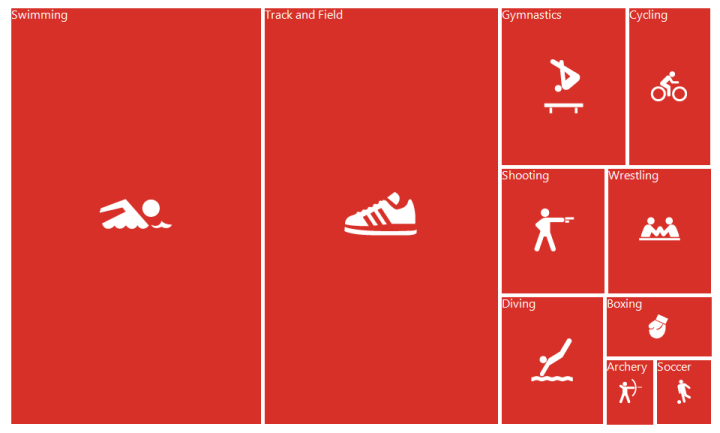
See also
How to customize the WinForms TreeMap label font style and label text alignment?