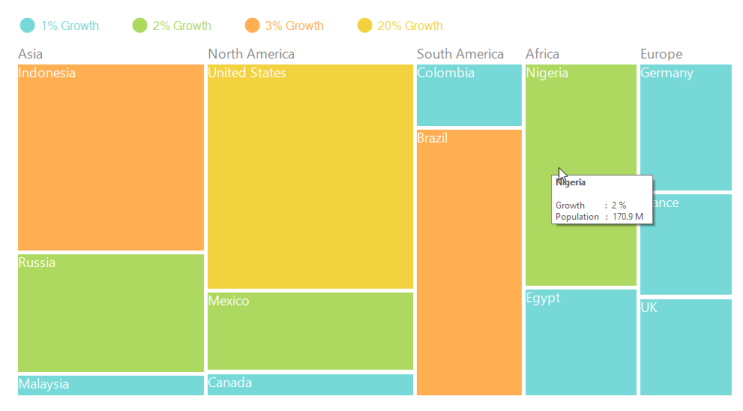
ToolTip Support in Windows Forms TreeMap
8 Jul 20261 minute to read
Tooltip shows additional information on the tree map control. Visibility of tooltip can be controlled using the IsToolTipVisible property. The format of the tooltip header and item can be customized using the HeaderToolTipInfo and ItemToolTipInfo properties.
Code sample
ToolTipInfo itemInfoHead = new ToolTipInfo();
itemInfoHead.ToolTipHeaderPattern = "<b>{Label}</b>";
itemInfoHead.ToolTipContentPattern = "Growth \t  :  {Growth} % ";
TreeMap1.HeaderToolTipInfo = itemInfoHead;

ToolTipInfo itemInfo = new ToolTipInfo();
itemInfo.ToolTipHeaderPattern = "<b>{Country}</b>";
itemInfo.ToolTipContentPattern = "Growth \t      :  {Growth} %  \nPopulation   :  {StrPopulation}  ";
TreeMap1.ItemToolTipInfo = itemInfo;
Dim itemInfoHead As New ToolTipInfo()
itemInfoHead.ToolTipHeaderPattern = "<b>{Label}</b>"
itemInfoHead.ToolTipContentPattern = "Growth \t : {Growth} % "
TreeMap1.HeaderToolTipInfo = itemInfoHead
Dim itemInfo As New ToolTipInfo()
itemInfo.ToolTipHeaderPattern = "<b>{Country}</b>"
itemInfo.ToolTipContentPattern = "Growth \t : {Growth} % \nPopulation : {StrPopulation} "
TreeMap1.ItemToolTipInfo = itemInfo