Pull To Refresh in .NET MAUI ListView (SfListView)
13 Jul 20269 minutes to read
The SfPullToRefresh control allows users to refresh the loaded view by performing a pull-to-refresh action. When SfListView is placed inside the SfPullToRefresh, it refreshes the items on the pull-to-refresh action.
Refer to initializing pull-to-refresh to enable pull-to-refresh on each platform.
SfListView inside the SfPullToRefresh
The SfListView supports refreshing the data in view when performing the pull-to-refresh action at runtime by loading it directly into the SfPullToRefresh.PullableContent of the SfPullToRefresh.
- Install the Syncfusion.Maui.PullToRefresh NuGet package alongside the SfListView NuGet package. Refer to the SfPullToRefresh getting-started guide for the full list of required packages and platform-specific handler registration.
- Import the SfPullToRefresh control and SfListView control namespace as follows.
- Define the SfListView as PullableContent of the SfPullToRefresh.
- Handle the PullToRefresh events for refreshing the data.
- Customize the required properties of SfListView and SfPullToRefresh based on your requirements.
xmlns:ListView="clr-namespace:Syncfusion.Maui.ListView;assembly=Syncfusion.Maui.ListView"
xmlns:pulltoRefresh="clr-namespace:Syncfusion.Maui.PullToRefresh;assembly=Syncfusion.Maui.PullToRefresh"
using Syncfusion.Maui.ListView;
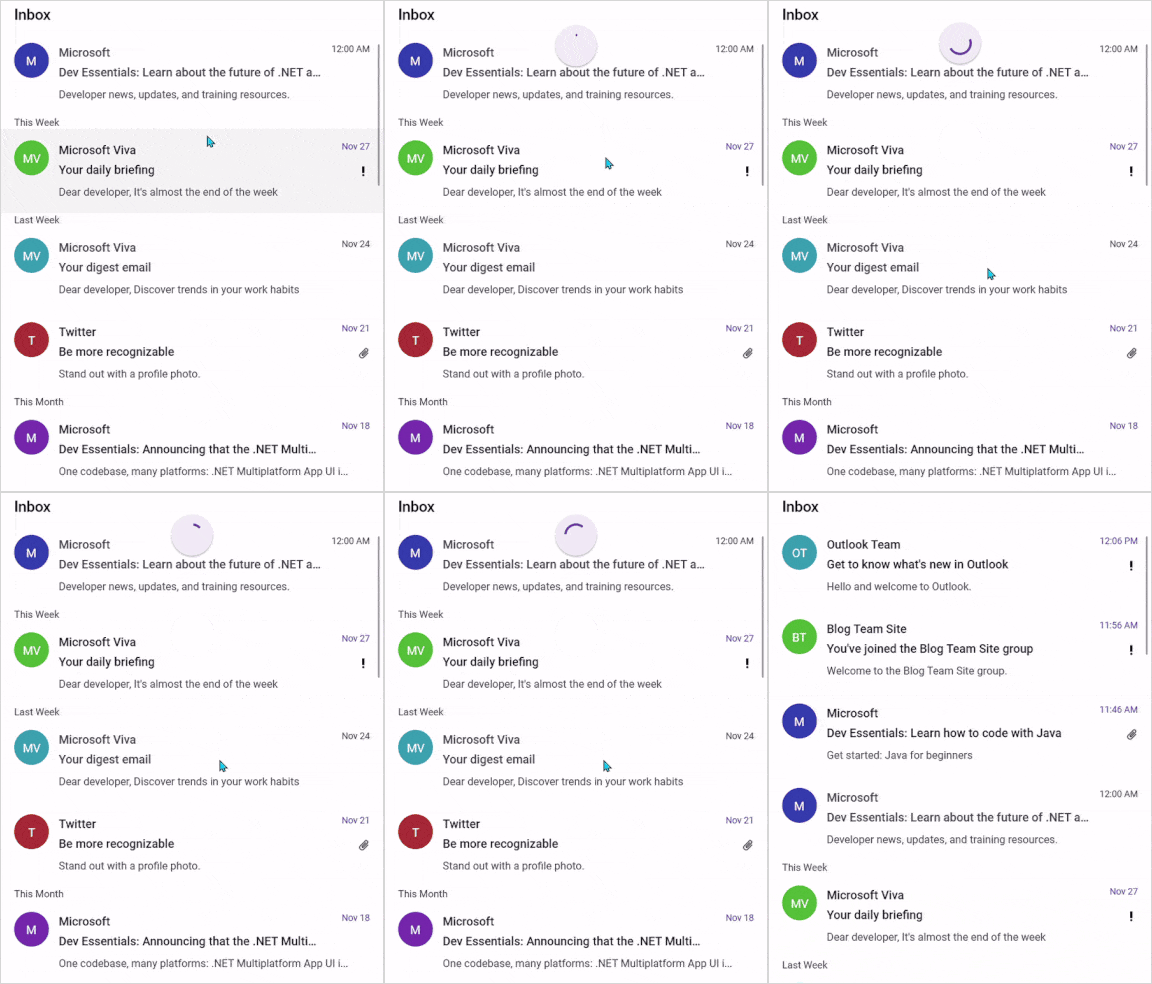
using Syncfusion.Maui.PullToRefresh;The final output when hosting SfListView as pullable content is shown below.
<ContentPage xmlns="http://schemas.microsoft.com/dotnet/2021/maui"
            xmlns:x="http://schemas.microsoft.com/winfx/2009/xaml"
            x:Class="RefreshableListView.MainPage"
            xmlns:ListView="clr-namespace:Syncfusion.Maui.ListView;assembly=Syncfusion.Maui.ListView"
            xmlns:pulltoRefresh="clr-namespace:Syncfusion.Maui.PullToRefresh;assembly=Syncfusion.Maui.PullToRefresh"
            xmlns:local="clr-namespace:RefreshableListView">

    <ContentPage.Behaviors>
        <local:ListViewPullToRefreshBehavior />
    </ContentPage.Behaviors>

    <ContentPage.Content>
        <Grid>
            <Grid.RowDefinitions>
                <RowDefinition Height="Auto" />
                <RowDefinition Height="*" />
            </Grid.RowDefinitions>

            <pulltoRefresh:SfPullToRefresh x:Name="pullToRefresh"
                                        RefreshViewHeight="50"
                                        RefreshViewThreshold="30"
                                        PullingThreshold="150"
                                        RefreshViewWidth="50"
                                        TransitionMode="SlideOnTop"
                                        IsRefreshing="False">
                <pulltoRefresh:SfPullToRefresh.PullableContent>
                    <Grid x:Name="mainGrid">
                        <ListView:SfListView Grid.Row="1"
                                            x:Name="listView"
                                            ItemsSource="{Binding InboxInfos}"
                                            ItemSize="102"
                                            SelectionMode="Single"
                                            ScrollBarVisibility="Always">
                            . . .
                            . . . .

                        </ListView:SfListView>
                    </Grid>
                </pulltoRefresh:SfPullToRefresh.PullableContent>
            </pulltoRefresh:SfPullToRefresh>
        </Grid>
    </ContentPage.Content>
</ContentPage>
using Syncfusion.Maui.ListView;
using Syncfusion.Maui.PullToRefresh;
namespace RefreshableListView
{
public class ListViewPullToRefreshBehavior : Behavior<ContentPage>
{
private SfPullToRefresh? pullToRefresh;
private SfListView? listView;
private ListViewInboxInfoViewModel? ViewModel;
protected override void OnAttachedTo(ContentPage bindable)
{
ViewModel = new ListViewInboxInfoViewModel();
bindable.BindingContext = ViewModel;
pullToRefresh = bindable.FindByName<SfPullToRefresh>("pullToRefresh");
listView = bindable.FindByName<SfListView>("listView");
if (pullToRefresh != null)
{
pullToRefresh.Refreshing += PullToRefresh_Refreshing;
}
base.OnAttachedTo(bindable);
}
protected override void OnDetachingFrom(ContentPage bindable)
{
if (pullToRefresh != null)
{
pullToRefresh.Refreshing -= PullToRefresh_Refreshing;
pullToRefresh = null;
}
listView = null;
ViewModel = null;
base.OnDetachingFrom(bindable);
}
private async void PullToRefresh_Refreshing(object? sender, EventArgs e)
{
if (pullToRefresh == null || ViewModel == null)
{
return;
}
pullToRefresh.IsRefreshing = true;
await Task.Delay(2500);
ViewModel.AddItemsRefresh(3);
pullToRefresh.IsRefreshing = false;
}
}
}NOTE
If you run the above sample with the TransitionMode as Push, the output will look like the following.

Limitation
The Horizontal SfListView does not support the pull-to-refresh action provided by the SfPullToRefresh.