Empty view in .NET MAUI ListView (SfListView)
13 Jul 202617 minutes to read
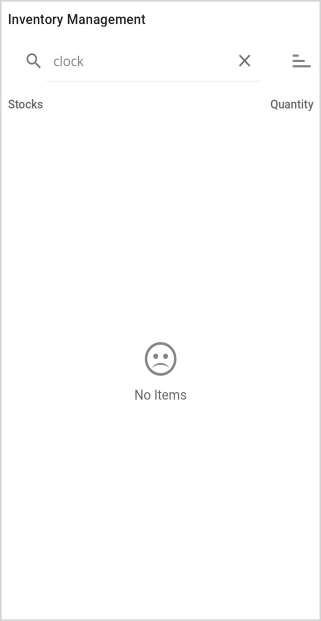
The SfListView allows you to display and customize empty view content when there is no data available, using the following properties:
-
EmptyView is of type
objectand can be set to astring, aView, or a custom type. It is displayed whenSfListViewhas no items. The default value isnull. -
EmptyViewTemplate is of type
DataTemplate. It is applied to the value ofEmptyViewto produce the final visual content, so the binding context of the template is theEmptyViewvalue itself. The default value isnull.
Display a string when ListView has no items
The empty view is displayed whenever the ItemsSource is null, or whenever the collection assigned to the ItemsSource property is null or empty. In this section, the EmptyView property is set to a string.
<ContentPage xmlns:syncfusion="clr-namespace:Syncfusion.Maui.ListView;assembly=Syncfusion.Maui.ListView">
  <syncfusion:SfListView x:Name="listView"
                         ItemsSource="{Binding Items}"
                         ItemSize="56"
                         EmptyView="No Items">
  </syncfusion:SfListView>
</ContentPage>listView.EmptyView = "No Items";Display views when ListView has no items
The EmptyView property can be set to a view, which is displayed when the ItemsSource property is null, or when the collection specified by the ItemsSource property is null or empty.
<ContentPage xmlns:syncfusion="clr-namespace:Syncfusion.Maui.ListView;assembly=Syncfusion.Maui.ListView">
<syncfusion:SfListView x:Name="listView"
ItemsSource="{Binding Items}"
ItemSize="56">
<syncfusion:SfListView.EmptyView>
<VerticalStackLayout VerticalOptions="Center">
<Label Text="" FontSize="40" HorizontalTextAlignment="Center"
FontFamily="{OnPlatform iOS=ListViewFontIcons.ttf#ListViewFontIcons, MacCatalyst=ListViewFontIcons.ttf#ListViewFontIcons, Android=ListViewFontIcons.ttf#ListViewFontIcons, UWP=ListViewFontIcons.ttf#ListViewFontIcons}" />
<Label Text="No Items" FontSize="16" FontFamily="Roboto-Regular" HorizontalTextAlignment="Center" />
</VerticalStackLayout>
</syncfusion:SfListView.EmptyView>
</syncfusion:SfListView>
</ContentPage>VerticalStackLayout stackLayout = new VerticalStackLayout() { VerticalOptions = LayoutOptions.Center };
var label1 = new Label()
{
Text = "\ue725",
FontSize = 40,
HorizontalTextAlignment = TextAlignment.Center,
FontFamily = "ListViewFontIcons.ttf#ListViewFontIcons"
};
var label2 = new Label()
{
Text = "No Items",
FontSize = 16,
FontFamily = "Roboto-Regular",
HorizontalTextAlignment = TextAlignment.Center,
};
stackLayout.Children.Add(label1);
stackLayout.Children.Add(label2);
listView.EmptyView = stackLayout;NOTE
View displayed by the
EmptyViewcan be a single view or a view that contains multiple child views.
Download the entire source code from GitHub here.
Display a custom type as the empty view
The EmptyView property can be set to a custom type, which is used to display when the ItemsSource is null, or when the collection specified by the ItemsSource property is null or empty. The appearance of the EmptyView can be customized by using the EmptyViewTemplate.
<ContentPage xmlns:syncfusion="clr-namespace:Syncfusion.Maui.ListView;assembly=Syncfusion.Maui.ListView"
             xmlns:local="clr-namespace:EmptyViewTemplate">
  <Grid>
    <Grid.RowDefinitions>
      <RowDefinition Height="30"/>
      <RowDefinition Height="*" />
    </Grid.RowDefinitions>
    <SearchBar x:Name="filterText"
               FontSize="16"
               Placeholder="Filter Inventory" TextChanged="SearchBar_TextChanged"/>
    <syncfusion:SfListView Grid.Row="1" x:Name="listView"
                           ItemsSource="{Binding Items}"
                           ItemSize="56">
      <syncfusion:SfListView.EmptyView>
        <local:FilterItem Filter="{Binding Source={x:Reference filterText},Path=Text}"/>
      </syncfusion:SfListView.EmptyView>
      <syncfusion:SfListView.EmptyViewTemplate>
        <DataTemplate>
          <Label Text="{Binding Filter,StringFormat='{0} is not found'}" HorizontalTextAlignment="Center"
                 VerticalOptions="Center"
                 FontSize="18" FontFamily="Roboto-Regular"/>
        </DataTemplate>
      </syncfusion:SfListView.EmptyViewTemplate>
    </syncfusion:SfListView>
  </Grid>
</ContentPage>listView.EmptyView = new FilterItem() { Filter = filterText.Text};
listView.EmptyViewTemplate = new DataTemplate(() =>
{
Label label = new Label()
{
FontSize = 18,
FontFamily = "Roboto-Regular",
VerticalOptions = LayoutOptions.Center,
HorizontalTextAlignment = TextAlignment.Center
};
label.SetBinding(Label.TextProperty, new Binding("Filter", stringFormat : "{0} is not found"));
return label;
});The FilterItem type defines a Filter property. It inherits from BindableObject so that the Filter property can be backed by a BindableProperty and notify the template when the value changes, which keeps the EmptyViewTemplate in sync with the SearchBar.Text value at run time:
public class FilterItem : BindableObject
{
  public static readonly BindableProperty FilterProperty = BindableProperty.Create(nameof(Filter), typeof(string), typeof(FilterItem), null);

  public string Filter
  {
      get { return (string)GetValue(FilterProperty); }
      set { SetValue(FilterProperty, value); }
  }
}
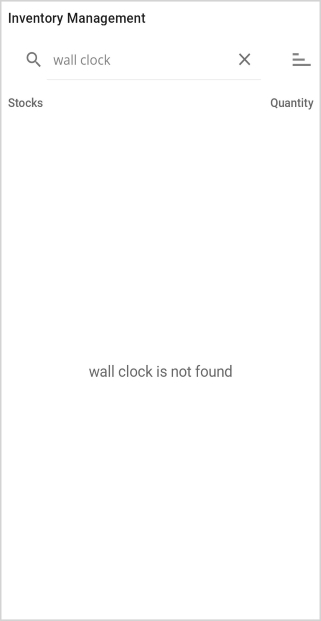
FilterItem object is set to the EmptyView property, and the Filter property is bound to the SearchBar.Text property. When the SearchBar.TextChanged event is raised, the value of the SearchBar.Text property is stored in the Filter property.

Download the entire source code from GitHub here.
Change an empty view at runtime
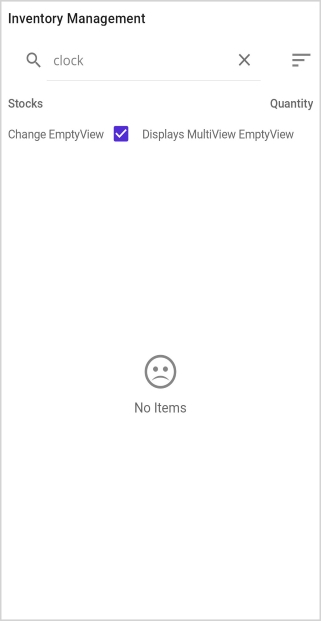
The EmptyView can be changed to a specific view at run time. Views can also be defined as ContentView objects in the ResourceDictionary.
<ContentPage xmlns:syncfusion="clr-namespace:Syncfusion.Maui.ListView;assembly=Syncfusion.Maui.ListView"
xmlns:local="clr-namespace:EmptyViewTemplate">
<ContentPage.Resources>
<ResourceDictionary>
<ContentView x:Key="SingleView">
<ContentView.Content>
<Label Text="No Items" FontSize="18" FontFamily="Roboto-Regular"
HorizontalTextAlignment="Center" VerticalOptions="Center"/>
</ContentView.Content>
</ContentView>
<ContentView x:Key="MultiView">
<ContentView.Content>
<VerticalStackLayout VerticalOptions="Center">
<Label Text="" FontSize="40"
FontFamily="{OnPlatform iOS=ListViewFontIcons.ttf#ListViewFontIcons, MacCatalyst=ListViewFontIcons.ttf#ListViewFontIcons, Android=ListViewFontIcons.ttf#ListViewFontIcons, UWP=ListViewFontIcons.ttf#ListViewFontIcons}"
HorizontalTextAlignment="Center" />
<Label TextColor="#666666" Text="No Items" FontSize="16" FontFamily="Roboto-Regular" HorizontalTextAlignment="Center" />
</VerticalStackLayout>
</ContentView.Content>
</ContentView>
</ResourceDictionary>
</ContentPage.Resources>
<ContentPage.Content>
<Grid>
<Grid.RowDefinitions>
<RowDefinition Height="30"/>
<RowDefinition Height="30"/>
<RowDefinition Height="*" />
</Grid.RowDefinitions>
<SearchBar x:Name="filterText"
FontSize="16"
Placeholder="Filter Inventory" TextChanged="SearchBar_TextChanged"/>
<CheckBox Grid.Row="1" x:Name="checkBox" IsChecked="False"
CheckedChanged="CheckBox_CheckedChanged"/>
<syncfusion:SfListView Grid.Row="2" x:Name="listView"
ItemsSource="{Binding Items}"
ItemSize="56"
EmptyView="{StaticResource SingleView}">
</syncfusion:SfListView>
</Grid>
</ContentPage.Content>
</ContentPage>listView.EmptyView = Resources["SingleView"];
checkBox.CheckedChanged += CheckBox_CheckedChanged;EmptyView is changed based on the value of the CheckBox.IsChecked property at run time.
private void CheckBox_CheckedChanged(object sender, CheckedChangedEventArgs e)
{
  if(e.Value)
    listView.EmptyView = this.Resources["MultiView"];
  else
    listView.EmptyView = this.Resources["SingleView"];
}
Download the entire source code from GitHub here.
Change an empty view template at runtime
The EmptyView appearance can be changed at run time based on the value of EmptyView by using the EmptyViewTemplate property.
<ContentPage xmlns:syncfusion="clr-namespace:Syncfusion.Maui.ListView;assembly=Syncfusion.Maui.ListView"
xmlns:local="clr-namespace:EmptyViewTemplate">
<ContentPage.Resources>
<ResourceDictionary>
<DataTemplate x:Key="BasicTemplate">
<Label Text="{Binding .,StringFormat='{0} is not found'}"
HorizontalTextAlignment="Center" VerticalOptions="Center"
FontSize="18" FontFamily="Roboto-Regular"/>
</DataTemplate>
<DataTemplate x:Key="AdvancedTemplate">
<VerticalStackLayout VerticalOptions="Center">
<Label Text=""
FontSize="40"
FontFamily="{OnPlatform iOS=ListViewFontIcons, MacCatalyst=ListViewFontIcons, Android=ListViewFontIcons.ttf#, UWP=ListViewFontIcons.ttf#ListViewFontIcons}"
HorizontalTextAlignment="Center"/>
<Label Text="{Binding .,StringFormat='{0} is not found'}"
FontSize="16"
FontFamily="Roboto-Regular"
HorizontalTextAlignment="Center"/>
</VerticalStackLayout>
</DataTemplate>
<local:EmptyViewDataTemplateSelector x:Key="DataTemplateSelector"
BasicTemplate="{StaticResource BasicTemplate}"
AdvancedTemplate="{StaticResource AdvancedTemplate}"/>
</ResourceDictionary>
</ContentPage.Resources>
<Grid>
<Grid.RowDefinitions>
<RowDefinition Height="30"/>
<RowDefinition Height="*" />
</Grid.RowDefinitions>
<SearchBar x:Name="filterText"
FontSize="16"
Placeholder="Filter Inventory" TextChanged="SearchBar_TextChanged"/>
<syncfusion:SfListView Grid.Row="1" x:Name="listView"
ItemsSource="{Binding Items}"
ItemSize="56"
EmptyView="{Binding Source={x:Reference filterText},Path=Text}"
EmptyViewTemplate="{StaticResource DataTemplateSelector}">
</syncfusion:SfListView>
</Grid>
</ContentPage>listView.EmptyView = filterText.Text;
listView.EmptyViewTemplate = new EmptyViewDataTemplateSelector() { BasicTemplate = this.Resources["BasicTemplate"] as DataTemplate, AdvancedTemplate = this.Resources["AdvancedTemplate"] as DataTemplate };The EmptyView property is set to the SearchBar.Text property, and the EmptyViewTemplate property is set to an EmptyViewDataTemplateSelector object.
public class EmptyViewDataTemplateSelector : Microsoft.Maui.Controls.DataTemplateSelector
{
  public DataTemplate BasicTemplate { get; set; }
  public DataTemplate AdvancedTemplate { get; set; }

  public EmptyViewDataTemplateSelector()
  {

  }

  protected override DataTemplate OnSelectTemplate(object item, BindableObject container)
  {
    if (((string)item).Length > 10)
        return AdvancedTemplate;
    else
        return BasicTemplate;
  }
}
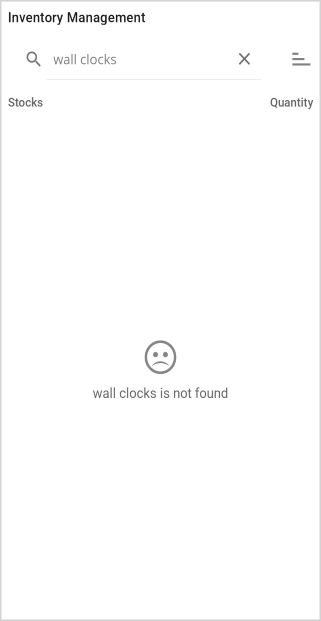
The template for EmptyView is set to AdvancedTemplate when the SearchBar.Text length is greater than 10; otherwise, it is set to BasicTemplate.
Download the entire source code from GitHub here.