About Syncfusion® Windows Forms MultiColumnTreeView Control
18 Nov 20181 minute to read
WinForms MultiColumn TreeView is an advanced treeview control with multiple columns. This control displays content as a tree with additional columns that show related data for each node, and its robust features deliver a visually appealing tree structure. The Style Architecture for the control lets users define styles for nodes at different levels of the tree and column styles for individual columns.
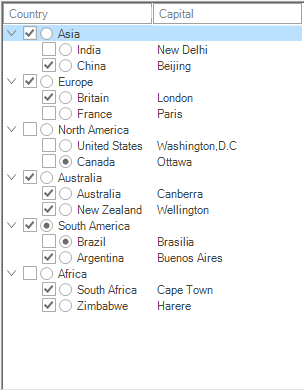
Components of MultiColumnTreeView
- TreeColumnAdv - Represents a column in the MultiColumnTreeView control.
- TreeNodeAdv - Represents a node that can be added to the control and supports sub-items.
- TreeNodeAdvSubItem - Represents a sub-item displayed in additional columns of a node.
- Custom Control - Represents a control that can be embedded in a node of the first column.
Key Features
Style Architecture - Supports a flexible style architecture to let users define the styles for nodes at different levels of the Tree. It helps the users to specify the styles for a specific node.
Columns - Supports adding multiple columns and sub-items.
CheckBox and OptionButton support - Interactive check boxes that can be checked or unchecked, indicating the check state of the child node’s check boxes. Nodes can also hold option buttons.
Load on demand - Delays loading of nodes in the tree until the user expands a parent node.
Image settings - Tree nodes can hold left images, right images, and images for different node states such as expand and collapse.
Appearance - Provides the background and foreground properties for customizing the appearance of the control.
Customization - Customizes the text, font, and nodes.
ToolTip - Allows showing or hiding tooltips for the nodes in the first column wherever necessary.
Custom Control - Supports adding custom controls to a tree node in the first column only.
Multiline Support - TreeNodeAdv provides an option to enable multiline text for each node by using the Multiline property on TreeNodeAdvStyleInfo. This must be set for each individual node and is available through the NodeCollection Editor.
Enhanced performance - MultiColumnTreeView can be populated with a large number of nodes. Performance when expanding or collapsing nodes can be improved by setting the SuspendExpandRecalculate property. See Performance for details.