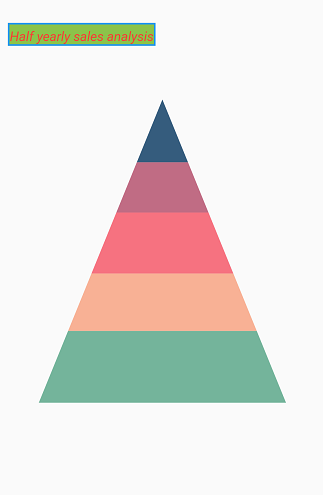
Chart title in Flutter Pyramid Chart
18 Nov 20184 minutes to read
You can define and customize the chart title using the title property of SfPyramidChart. The text property of ChartTitle is used to set the title text.
The following properties can be used to customize its appearance.
-
backgroundColor- used to change the background color. -
borderColor- used to change the border color. -
borderWidth- used to change the border width. -
textStyle- used to change the text color, size, font family, fontStyle, and font weight. -
color- used to change the color of the text. -
fontFamily- used to change the font family for chart title. -
fontStyle- used to change the font style for the chart title. -
fontSize- used to change the font size for the chart title.
Title alignment
You can align the title text horizontally to the near, center, or far positions of the chart using the alignment property of the title.
@override
    Widget build(BuildContext context) {
      return Scaffold(
        body: Center(
          child: Container(
            child: SfPyramidChart(
              title: ChartTitle(
                text: 'Half yearly sales analysis',
                backgroundColor: Colors.lightGreen,
                borderColor: Colors.blue,
                borderWidth: 2,
                // Aligns the chart title to the left
                alignment: ChartAlignment.near,
                textStyle: TextStyle(
                  color: Colors.red,
                  fontFamily: 'Roboto',
                  fontStyle: FontStyle.italic,
                  fontSize: 14,
                )
              ),
              series: PyramidSeries<ChartData, String>(
                  dataSource: [
                    ChartData('Jan', 35),
                    ChartData('Feb', 28),
                    ChartData('Mar', 34),
                    ChartData('Apr', 32),
                    ChartData('May', 40)
                  ],
                  xValueMapper: (ChartData data, _) => data.x,
                  yValueMapper: (ChartData data, _) => data.y
                )
            )
          )
        )
      );
    }