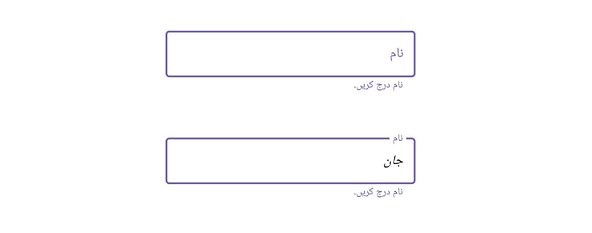
Right-to-Left in .NET MAUI Text Input Layout
18 Nov 20182 minutes to read
.NET MAUI Text Input Layout supports to changing the flow of text to the right-to-left direction by setting the FlowDirection to RightToLeft.
Prerequisites
Before using the SfTextInputLayout, ensure the following NuGet package is installed in your .NET MAUI project:
Syncfusion.Maui.Core
For a step-by-step setup, refer to the Getting Started documentation.
FlowDirection Values
| Value | Description |
|---|---|
LeftToRight |
LTR layout. The hint, helper text, and input view flow from left to right. This is the default. |
RightToLeft |
RTL layout. The hint, helper text, and input view flow from right to left. Leading and trailing views are also mirrored. |
MatchParent |
Inherits the FlowDirection from the visual parent. The default for most controls. |
When the layout direction changes, the hint label, helper text, error text, character counter, password toggle, and leading/trailing views are mirrored automatically.
Apply RTL to a single control
Set the FlowDirection property directly on the Text Input Layout instance.
<inputLayout:SfTextInputLayout x:Name="inputLayout"
                               FlowDirection="RightToLeft"
                               ContainerType="Outlined"
                               Hint="نام"
                               HelperText="نام درج کریں">
    <Entry />
</inputLayout:SfTextInputLayout>
SfTextInputLayout inputLayout = new SfTextInputLayout
{
FlowDirection = FlowDirection.RightToLeft,
ContainerType = ContainerType.Outlined,
Hint = "نام",
HelperText = "نام درج کریں",
Content = new Entry()
};
Content = new VerticalStackLayout
{
Children =
{
inputLayout
}
};