Events and Commands in .NET MAUI DateTime Slider
18 Nov 201816 minutes to read
This section explains how to add the events and commands for DateTime Slider.
Events
Handle callbacks
- ValueChangeStart - Called when the user selecting a new value for the slider by tap/mouse down in the thumb.
- ValueChanging - Called when the user is selecting a new value for the slider by dragging the thumb.
- ValueChanged - Called when the user completed selecting a new value.
- ValueChangeEnd - Called when the user stopped interacting with slider by tap/mouse up the thumb.
<sliders:SfDateTimeSlider  Minimum="2010-01-01"
                           Maximum="2018-01-01"
                           Value="2014-01-01"
                           ValueChangeStart="OnValueChangeStart"
                           ValueChanging="OnValueChanging"
                           ValueChanged="OnValueChanged"
                           ValueChangeEnd="OnValueChangeEnd" />
{
SfDateTimeSlider slider = new SfDateTimeSlider()
{
Minimum = new DateTime(2010, 01, 01),
Maximum = new DateTime(2018, 01, 01),
Value = new DateTime(2014, 01, 01),
};
slider.ValueChangeStart += OnValueChangeStart;
slider.ValueChanging += OnValueChanging;
slider.ValueChanged += OnValueChanged;
slider.ValueChangeEnd += OnValueChangeEnd;
}
private void OnValueChangeStart(object sender, EventArgs e)
{
}
private void OnValueChanging(object sender, DateTimeSliderValueChangingEventArgs e)
{
}
private void OnValueChanged(object sender, DateTimeSliderValueChangedEventArgs e)
{
}
private void OnValueChangeEnd(object sender, EventArgs e)
{
}Customize label text
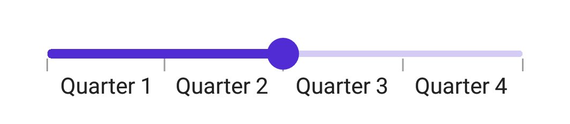
Format or change the label text using the LabelCreated event. The SliderLabelCreatedEventArgs contains the following parameters:
- Text – Customize the text color using the
Textparameter. - Style – Formats the text color, font size, font family, offset using the
Styleparameter.
<sliders:SfDateTimeSlider Minimum="2010-01-01"
                          Maximum="2011-01-01"
                          Value="2010-07-01"
                          Interval="3"
                          DateFormat="MMM"
                          ShowTicks="True"
                          LabelsPlacement="BetweenTicks"
                          IntervalType="Months"
                          LabelCreated="OnLabelCreated"
                          ShowLabels="True" />
{
SfDateTimeSlider slider = new SfDateTimeSlider()
{
Minimum = new DateTime(2010, 01, 01),
Maximum = new DateTime(2011, 01, 01),
Value = new DateTime(2010, 07, 01),
Interval = 3,
DateFormat = "MMM",
IntervalType = SliderDateIntervalType.Months,
LabelsPlacement = SliderLabelsPlacement.BetweenTicks,
ShowTicks = true,
ShowLabels = true,
};
slider.LabelCreated += OnLabelCreated;
}
private void OnLabelCreated(object sender, SliderLabelCreatedEventArgs e)
{
if (e.Text == "Jan")
{
e.Text = "Quarter 1";
}
else if (e.Text == "Apr")
{
e.Text = "Quarter 2";
}
else if (e.Text == "Jul")
{
e.Text = "Quarter 3";
}
else
{
e.Text = "Quarter 4";
}
}
Tooltip text format
By default, it is formatted based on the SliderTooltip.DateFormat property.
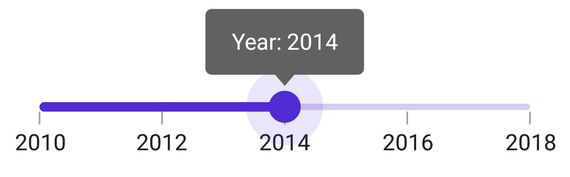
Format or change the whole tooltip label text using the TooltipLabelCreated event. The SliderTooltipLabelCreatedEventArgs contains the following parameters:
- Text – Change the tooltip text using the
Textproperty. - Color – Change the color of the tooltip text using the
TextColorproperty. - Font Size – Change the font size of the tooltip text using the
FontSizeproperty. - Font Family – Change the font family of the tooltip text using the
FontFamilyproperty. - Font Attributes – Change the font attributes of the tooltip text using the
FontAttributesproperty.
<sliders:SfDateTimeSlider Minimum="2010-01-01"
                          Maximum="2018-01-01"
                          Value="2014-01-01"
                          Interval="2"
                          ShowTicks="True"
                          ShowLabels="True">

    <sliders:SfDateTimeSlider.Tooltip>
        <sliders:SliderTooltip TooltipLabelCreated="OnTooltipLabelCreated" />
    </sliders:SfDateTimeSlider.Tooltip>

</sliders:SfDateTimeSlider>
{
SfDateTimeSlider slider = new SfDateTimeSlider()
{
Minimum = new DateTime(2010, 01, 01),
Maximum = new DateTime(2018, 01, 01),
Value = new DateTime(2014, 01, 01),
Interval = 3,
ShowTicks = true,
ShowLabels = true,
Tooltip = new SliderTooltip(),
};
slider.Tooltip.TooltipLabelCreated += OnTooltipLabelCreated;
}
private void OnTooltipLabelCreated(object sender, SliderTooltipLabelCreatedEventArgs e)
{
e.Text = "Year: " + e.Text;
}
Commands and its parameter
Drag started command
The DragStartedCommand will be executed when the user started moving the thumb.
<ContentPage.BindingContext>
    <local:ViewModel x:Name="viewModel" />
</ContentPage.BindingContext>

<ContentPage.Content>
    <sliders:SfDateTimeSlider Minimum="2010-01-01"
                              Maximum="2018-01-01"
                              Value="2014-01-01"
                              DragStartedCommand="{Binding DragStartedCommand}" />
</ContentPage.Content>
SfDateTimeSlider slider = new SfDateTimeSlider()
{
Minimum = new DateTime(2010, 01, 01),
Maximum = new DateTime(2020, 01, 01),
Value = new DateTime(2014, 01, 01),
DragStartedCommand = viewModel.DragStartedCommand,
};
public class ViewModel
{
public ICommand DragStartedCommand { get; }
public ViewModel()
{
DragStartedCommand = new Command(OnDragStarted);
}
private void OnDragStarted(object obj)
{
}
}Drag started command parameter
The DragStartedCommandParameter will be executed when the user started moving the thumb.
<ContentPage.BindingContext>
    <local:ViewModel x:Name="viewModel" />
</ContentPage.BindingContext>

<ContentPage.Content>
    <sliders:SfDateTimeSlider Minimum="2010-01-01"
                              Maximum="2018-01-01"
                              Value="2014-01-01"
                              DragStartedCommand="{Binding DragStartedCommand}"
                              DragStartedCommandParameter="1" />
</ContentPage.Content>
SfDateTimeSlider slider = new SfDateTimeSlider()
{
Minimum = new DateTime(2010, 01, 01),
Maximum = new DateTime(2020, 01, 01),
Value = new DateTime(2014, 01, 01),
DragStartedCommand = viewModel.DragStartedCommand,
DragStartedCommandParameter = "1"
};
public class ViewModel
{
public ICommand DragStartedCommand { get; }
public ViewModel()
{
DragStartedCommand = new Command(OnDragStarted);
}
private void OnDragStarted(object obj)
{
}
}Drag completed command
The DragCompletedCommand will be executed when the user completed moving the thumb.
<ContentPage.BindingContext>
    <local:ViewModel x:Name="viewModel" />
</ContentPage.BindingContext>

<ContentPage.Content>
    <sliders:SfDateTimeSlider Minimum="2010-01-01"
                              Maximum="2018-01-01"
                              Value="2014-01-01"
                              DragCompletedCommand="{Binding DragCompletedCommand}" />
</ContentPage.Content>
SfDateTimeSlider slider = new SfDateTimeSlider()
{
Minimum = new DateTime(2010, 01, 01),
Maximum = new DateTime(2020, 01, 01),
Value = new DateTime(2014, 01, 01),
DragCompletedCommand = viewModel.DragCompletedCommand
};
public class ViewModel
{
public ICommand DragCompletedCommand { get; }
public ViewModel()
{
DragCompletedCommand = new Command(OnDragCompleted);
}
private void OnDragCompleted(object obj)
{
}
}Drag completed command parameter
The DragCompletedCommandParameter will be executed when the user completed moving the thumb.
<ContentPage.BindingContext>
    <local:ViewModel x:Name="viewModel" />
</ContentPage.BindingContext>

<ContentPage.Content>
    <sliders:SfDateTimeSlider Minimum="2010-01-01"
                              Maximum="2018-01-01"
                              Value="2014-01-01"
                              DragCompletedCommand="{Binding DragCompletedCommand}"
                              DragCompletedCommandParameter="1" />
</ContentPage.Content>
SfDateTimeSlider slider = new SfDateTimeSlider()
{
Minimum = new DateTime(2010, 01, 01),
Maximum = new DateTime(2020, 01, 01),
Value = new DateTime(2014, 01, 01),
DragCompletedCommand = viewModel.DragCompletedCommand,
DragCompletedCommandParameter = "1"
};
public class ViewModel
{
public ICommand DragCompletedCommand { get; }
public ViewModel()
{
DragCompletedCommand = new Command(OnDragCompleted);
}
private void OnDragCompleted(object obj)
{
}
}