Time Break in .NET MAUI Chat
18 Nov 20189 minutes to read
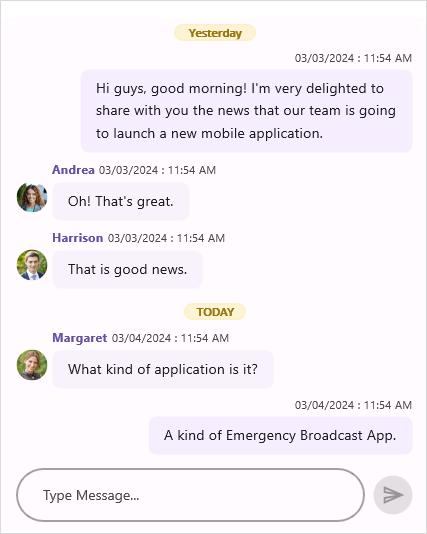
Use the Chat control to display a time break between messages based on their creation date and time. Set the ShowTimeBreak property to true to display a time break between messages.
<sfChat:SfChat x:Name="sfChat"
                ShowTimeBreak="True"
                Messages="{Binding Messages}"
CurrentUser="{Binding CurrentUser}" />this.sfChat.ShowTimeBreak = true;

Sticky time break view
To stick the time break view, enable the StickyTimeBreak property. When StickyTimeBreak is set to true, the current time break stays pinned at the top until the next one scrolls into view. Additionally, the time break will adjust its position as another time break appears while scrolling.
<sfChat:SfChat x:Name="sfChat"
                ShowTimeBreak="True"
                StickyTimeBreak="True" />
this.sfChat.ShowTimeBreak = true;
this.sfChat.StickyTimeBreak = true;
To use StickyTimeBreak, ensure that ShowTimeBreak=”True” is also set. Otherwise, time break views will not be displayed.
Template for time break view
The Chat control allows to load a custom template for time break view using the TimeBreakTemplate property.
The
timeBreakTemplateSelectorresource must be declared in the page’s resource scope (or a parent ResourceDictionary) before it can be referenced using {StaticResource timeBreakTemplateSelector}.
<?xml version="1.0" encoding="utf-8" ?>
<ContentPage xmlns="http://schemas.microsoft.com/dotnet/2021/maui"
             xmlns:x="http://schemas.microsoft.com/winfx/2009/xaml"
             xmlns:sfChat="clr-namespace:Syncfusion.Maui.Chat;assembly=Syncfusion.Maui.Chat"
             xmlns:local="clr-namespace:TimeBreak"
             x:Class="TimeBreak.MainPage">

    <ContentPage.Resources>
        <local:TimeBreakTemplateSelector x:Key="timeBreakTemplateSelector"/>
    </ContentPage.Resources>

    <ContentPage.BindingContext>
        <local:GettingStartedViewModel/>
    </ContentPage.BindingContext>

    <ContentPage.Content>
        <sfChat:SfChat x:Name="sfChat"
                       ShowTimeBreak="True"
                       Messages="{Binding Messages}"
                       CurrentUser="{Binding CurrentUser}"
                       TimeBreakTemplate="{StaticResource timeBreakTemplateSelector}"/>
    </ContentPage.Content>
</ContentPage>
namespace TimeBreak
{
public partial class MainPage : ContentPage
{
SfChat sfChat;
GettingStartedViewModel viewModel;
public MainPage()
{
InitializeComponent();
sfChat = new SfChat();
viewModel = new GettingStartedViewModel();
this.sfChat.Messages = viewModel.Messages;
this.sfChat.CurrentUser = viewModel.CurrentUser;
this.sfChat.ShowTimeBreak= true;
this.sfChat.TimeBreakTemplate = new TimeBreakTemplateSelector();
this.Content = sfChat;
}
}
}using System.Globalization;
using Syncfusion.Maui.DataSource.Extensions;
public class TimeBreakTemplateSelector : DataTemplateSelector
{
/// <summary>
/// Returns the template based on the message's date time.
/// </summary>
/// <param name="item">The <see cref="Syncfusion.Data.GroupResult"/> of the grouped row.</param>
/// <param name="container">The ChatListView as <see cref="BindableObject"/>.</param>
/// <returns>The <see cref="Border"/> control which contains templates for the grouped row.</returns>
protected override DataTemplate OnSelectTemplate(object item, BindableObject container)
{
string dateString = (item as GroupResult).Key.ToString();
DateTime groupedDate = DateTime.ParseExact(dateString, "d/M/yyyy", CultureInfo.InvariantCulture);
string formatDate = string.Format("{0:dd MMMM yyyy}", groupedDate);
Grid grid = new Grid();
grid.Padding = new Thickness(3, 4, 2, 0);
grid.RowDefinitions = new RowDefinitionCollection()
{
new RowDefinition(){Height = 20},
};
grid.ColumnDefinitions = new ColumnDefinitionCollection()
{
new ColumnDefinition(){ Width = GridLength.Star},
new ColumnDefinition(){ Width = GridLength.Auto},
new ColumnDefinition(){ Width = GridLength.Star},
};
Border border = new Border();
border.VerticalOptions = LayoutOptions.Center;
border.HorizontalOptions = LayoutOptions.Center;
border.Stroke = Color.FromHex("#FDE490");
Label label = new Label();
label.FontSize = 11;
label.VerticalOptions = LayoutOptions.Center;
label.HorizontalOptions = LayoutOptions.Center;
label.HorizontalTextAlignment = TextAlignment.Center;
label.TextColor = Color.FromHex("#98770E");
label.FontAttributes = FontAttributes.Bold;
label.BackgroundColor = Color.FromHex("#FDF4D6");
border.Content = label;
grid.Children.Add(new StackLayout() { HeightRequest = 1, Background = Colors.LightGray, VerticalOptions = LayoutOptions.Center, Margin= 5 });
var boxview = new StackLayout() { HeightRequest = 1, Background = Colors.LightGray, VerticalOptions = LayoutOptions.Center, Margin = 5 };
grid.Children.Add(boxview);
Grid.SetColumn(boxview, 2);
if (groupedDate.Date == DateTime.Now.Date)
{
label.WidthRequest = 60;
label.Text = "TODAY";
grid.Children.Add(border);
Grid.SetColumn(border, 1);
return new DataTemplate(() =>
{
return grid;
});
}
else if (groupedDate.Date == new DateTime(DateTime.Now.Year,DateTime.Now.Month, DateTime.Now.Day - 1))
{
label.WidthRequest = 80;
label.Text = "Yesterday";
grid.Children.Add(border);
Grid.SetColumn(border, 1);
return new DataTemplate(() =>
{
return grid;
});
}
else
{
label.WidthRequest = 120;
label.Text = formatDate;
grid.Children.Add(border);
Grid.SetColumn(border, 1);
return new DataTemplate(() =>
{
return grid;
});
}
}
}