Swiping in .NET MAUI Chat
18 Nov 201821 minutes to read
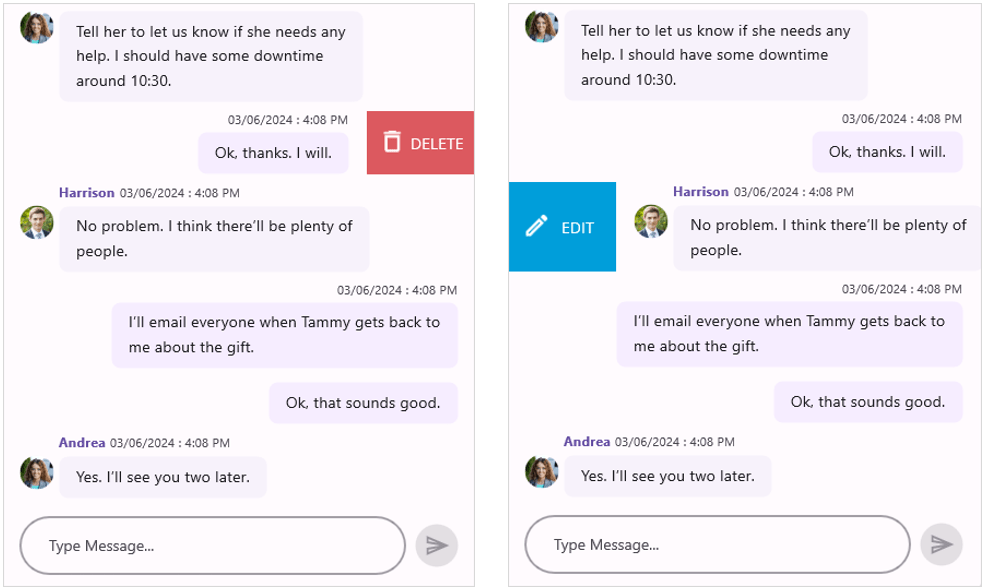
In SfChat, you can enable swiping by setting the AllowSwiping property to true. When you swipe a message left or right, a customizable swipe view is revealed on that side. You can also limit how far you can swipe on a message by setting the MaxSwipeOffset property.
Swipe templates
The swipe views can be customized by using the StartSwipeTemplate when swiping towards the right and EndSwipeTemplate when swiping towards the left. The content inside the swipe template is arranged based on the offset values when swiping a message.
The samples below reference
edit.pnganddelete.png. Add these images to theResources/Imagesfolder of your .NET MAUI project and register each as aMauiImagein the project file (.csproj).
<?xml version="1.0" encoding="utf-8" ?>
<ContentPage xmlns="http://schemas.microsoft.com/dotnet/2021/maui"
             xmlns:x="http://schemas.microsoft.com/winfx/2009/xaml"
             xmlns:sfchat="clr-namespace:Syncfusion.Maui.Chat;assembly=Syncfusion.Maui.Chat"
             xmlns:local="clr-namespace:GettingStarted"
             x:Class="GettingStarted.MainPage">

    <ContentPage.BindingContext>
        <local:ViewModel/>
    </ContentPage.BindingContext>

    <ContentPage.Content>
        <sfchat:SfChat x:Name="sfChat"
                       Messages="{Binding Messages}"
                       CurrentUser="{Binding CurrentUser}"
                       AllowSwiping="True">
            <sfchat:SfChat.StartSwipeTemplate>
                <DataTemplate>
                    <Grid BackgroundColor="#009EDA" Padding="9">
                        <Grid.ColumnDefinitions>
                            <ColumnDefinition Width="50"/>
                            <ColumnDefinition Width="50"/>
                        </Grid.ColumnDefinitions>

                        <Image Grid.Column="0"
                               BackgroundColor="Transparent"
                               HorizontalOptions="Center"
                               Source="edit.png"/>

                        <Label Grid.Column="1"
                               BackgroundColor="Transparent"
                               LineBreakMode="NoWrap"
                               Text="EDIT"
                               TextColor="White"
                               HorizontalTextAlignment="Start"
                               VerticalTextAlignment="Center"/>
                    </Grid>
                </DataTemplate>
            </sfchat:SfChat.StartSwipeTemplate>

            <sfchat:SfChat.EndSwipeTemplate>
                <DataTemplate>
                    <Grid BackgroundColor="#DC595F" Padding="4">
                        <Grid.ColumnDefinitions>
                            <ColumnDefinition Width="40"/>
                            <ColumnDefinition Width="60"/>
                        </Grid.ColumnDefinitions>

                        <Image Grid.Column="0"
                           BackgroundColor="Transparent"
                           HorizontalOptions="Center"
                           Source="delete.png"/>

                        <Label Grid.Column="1"
                           BackgroundColor="Transparent"
                           LineBreakMode="NoWrap"
                           Text="DELETE"
                           TextColor="White"
                           HorizontalTextAlignment="Start"
                           VerticalTextAlignment="Center"/>
                    </Grid>
                </DataTemplate>
            </sfchat:SfChat.EndSwipeTemplate>
        </sfchat:SfChat>
    </ContentPage.Content>
</ContentPage>
using Syncfusion.Maui.Chat;
namespace GettingStarted
{
public partial class MainPage : ContentPage
{
SfChat sfChat;
ViewModel viewModel;
public MainPage()
{
InitializeComponent();
sfChat = new SfChat();
viewModel = new ViewModel();
sfChat.Messages = viewModel.Messages;
sfChat.CurrentUser = viewModel.CurrentUser;
sfChat.AllowSwiping = true;
sfChat.StartSwipeTemplate = new DataTemplate(() =>
{
var grid = new Grid()
{
ColumnDefinitions =
{
new ColumnDefinition(){Width=50 },
new ColumnDefinition(){Width=50 }
},
Padding = 9,
BackgroundColor = Color.FromArgb("#009EDA"),
} ;
var image = new Image()
{
HorizontalOptions = LayoutOptions.Center,
Source = "edit.png",
};
var label = new Label()
{
VerticalTextAlignment = TextAlignment.Center,
HorizontalTextAlignment = TextAlignment.Start,
TextColor = Colors.White,
Text = "EDIT",
LineBreakMode = LineBreakMode.NoWrap,
};
grid.Children.Add(image);
Grid.SetColumn(image, 0);
grid.Children.Add(label);
Grid.SetColumn(label, 1);
return grid;
});
sfChat.EndSwipeTemplate = new DataTemplate(() =>
{
var grid = new Grid()
{
ColumnDefinitions =
{
new ColumnDefinition(){Width=40 },
new ColumnDefinition(){Width=60 }
},
Padding = 4,
BackgroundColor = Color.FromArgb("#DC595F"),
};
var image = new Image()
{
HorizontalOptions = LayoutOptions.Center,
Source = "delete.png",
};
var label = new Label()
{
VerticalTextAlignment = TextAlignment.Center,
HorizontalTextAlignment = TextAlignment.Start,
TextColor = Colors.White,
Text = "DELETE",
LineBreakMode = LineBreakMode.NoWrap,
};
grid.Children.Add(image);
Grid.SetColumn(image, 0);
grid.Children.Add(label);
Grid.SetColumn(label, 1);
return grid;
});
this.Content = sfChat;
}
}
}
Swipe events
SwipeStarted event
The SwipeStarted event is raised when the swipe offset changes from its initial value. This event is triggered with MessageSwipeStartedEventArgs.
The SwipeStarted event provides the following properties in its arguments:
- Message: Defines the underlying data associated with the swiped message.
- SwipeDirection: Defines the swipe direction of the message being swiped.
-
Cancel: Defines that the swipe action can be canceled by setting the
Cancelproperty totrue. When set totrue, the swipe is aborted and the swipe view is not revealed for the message.
<sfchat:SfChat x:Name="sfChat"
                Messages="{Binding Messages}"
                CurrentUser="{Binding CurrentUser}"
                AllowSwiping="True"
                SwipeStarted="sfChat_SwipeStarted"/>
sfChat.SwipeStarted += sfChat_SwipeStarted;

private void sfChat_SwipeStarted(object sender, MessageSwipeStartedEventArgs e)
{
    var index = sfChat.Messages.IndexOf(e.Message);
    if (index == 1)
    {
        e.Cancel = true;
    }
}
Swiping event
The Swiping event is raised while swiping a message is in progress. This event is triggered with MessageSwipingEventArgs.
The Swiping event provides the following properties in its arguments:
- Message: Defines the underlying data associated with the swiped message.
- SwipeDirection: Defines the swipe direction of the message being swiped.
- SwipeOffSet: Defines the current swipe offset of the message that is being swiped.
- Handled: Defines that if it is true, the current swipe offset value remains the same for the swiped message until the SwipeEnded event is raised.
<sfchat:SfChat x:Name="sfChat"
                Messages="{Binding Messages}"
                CurrentUser="{Binding CurrentUser}"
                AllowSwiping="True"
                MaxSwipeOffset="130"
                Swiping="sfChat_Swiping"/>
sfChat.Swiping += sfChat_Swiping;

private void sfChat_Swiping(object sender, MessageSwipingEventArgs e)
{
    var index = sfChat.Messages.IndexOf(e.Message);
    if (index == 1 && e.SwipeOffset > 70)
    {
        e.Handled = true;
    }
}
SwipeEnded event
The SwipeEnded event is raised when the swipe offset reaches MaxSwipeOffset, indicating that the swipe action is completed. This event is triggered with MessageSwipeEndedEventArgs.
The SwipeEnded event provides the following properties in its arguments:
- Message: Defines the underlying data associated with the swiped message.
- SwipeDirection: Defines the swipe direction of the message being swiped.
- SwipeOffSet: Defines the current swipe offset of the message that is being swiped.
In the XAML below,
MaxSwipeOffset="130"caps the swipe distance and is also the threshold at which thisSwipeEndedevent is raised. The value is the sameMaxSwipeOffsetintroduced at the top of this document.
<sfchat:SfChat x:Name="sfChat"
                Messages="{Binding Messages}"
                CurrentUser="{Binding CurrentUser}"
                MaxSwipeOffset="130"
                AllowSwiping="True"
                SwipeEnded="sfChat_SwipeEnded"/>
sfChat.SwipeEnded += sfChat_SwipeEnded;

private void sfChat_SwipeEnded(object sender, MessageSwipeEndedEventArgs e)
{
    if (e.SwipeOffset > 100)
    {
        sfChat.ResetSwipeOffset();
    }
}
Reset swipe view programmatically
The SfChat allows you to cancel the swipe programmatically by calling the ResetSwipeOffset method in the SwipeEnded event.
<sfchat:SfChat x:Name="sfChat"
            Messages="{Binding Messages}"
            CurrentUser="{Binding CurrentUser}"
            AllowSwiping="True"
            SwipeEnded="sfChat_SwipeEnded" />
sfChat.SwipeEnded += sfChat_SwipeEnded;

private void sfChat_SwipeEnded(object sender, MessageSwipeEndedEventArgs e)
{
    if (e.SwipeOffset > 100)
    {
        sfChat.ResetSwipeOffset();
    }
}