Overview of .NET MAUI Chat
18 Nov 20185 minutes to read
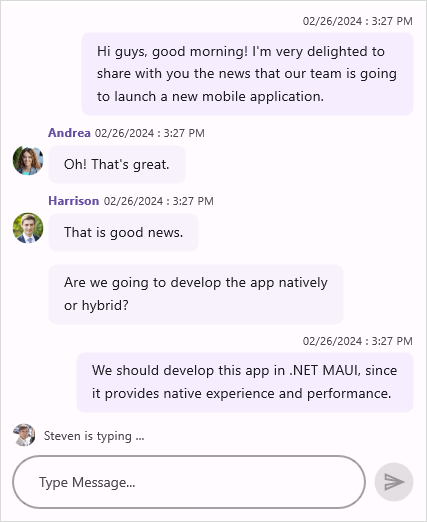
The Syncfusion® .NET MAUI Chat control offers a contemporary conversational chatbot experience, allowing for flexible customization of the layout to display conversations between two or more users.
Business use cases
- Messaging applications that require real-time conversations and rich chat interfaces.
- Customer support systems that provide chat-based assistance and automated responses.
- AI chatbot integrations that enable interactive user engagement with intelligent replies.
- Collaboration tools that involve team communication and message history management.
Key features
- Rich message types including text, images, cards, calendar, and hyperlinks.
- Message grouping with time breaks for better readability.
- Typing indicators to show real-time user activity.
- Quick suggestions for faster replies and reduced typing effort.
- Load more messages to handle long chat histories smoothly.
Globalization
The following table summarizes the globalization support available in this control.
 Full Support
 Partial Support
 Not Applicable
| Control | Localization | RTL | Time zone | Screen reader | Keyboard navigation |
|---|---|---|---|---|---|
| Chat | |
|
|
|
|
Related Controls
- The AI AssistView enhances conversations with AI‑driven suggestions and guided responses.
- Autocomplete speeds up message composition with predictive text input.
- ComboBox provides flexible selection options within chat workflows.
See Also
- Getting Started shows how to begin using the Chat control step by step.
- Styles in .NET MAUI Chat shows how to customize message styles, editor appearance, and layout.
- Suggestions show how to provide quick reply options.
- UI Kit provides interactive demos and ready-made UI examples.
Resources
Feature Tour
Get a quick overview of key features and capabilities to kick start your journey.
Explore Features
Tutorial Videos
Watch step‑by‑step video guides to quickly understand concepts and implementation.
Watch now
Knowledge Base
Find practical solutions, troubleshooting tips and how‑to guides for common scenarios.
Search KB's
Use Case Sample
Explore a real-world application that demonstrates the practical use of the Chat.
View Sample