Footer in .NET MAUI Calendar (SfCalendar)
21 Jul 20265 minutes to read
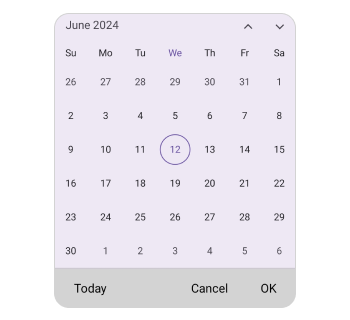
You can customize all the properties of the Footer view using FooterView. By using this property, you can customize the Background, Height, DividerColor, TextStyle, ShowActionButtons and ShowTodayButton of the Calendar.
Customize the footer height
You can customize the footer height Calendar by using the Height property.
<ContentPage
    . . .
    xmlns:calendar="clr-namespace:Syncfusion.Maui.Calendar;assembly=Syncfusion.Maui.Calendar">

    <calendar:SfCalendar x:Name="calendar"
                      View="Month">
        <calendar:SfCalendar.FooterView>
            <calendar:CalendarFooterView Height="70" ShowActionButtons="True" ShowTodayButton="True" />
        </calendar:SfCalendar.FooterView>
    </calendar:SfCalendar>

</ContentPage>
using Syncfusion.Maui.Calendar;
. . .
this.calendar.FooterView.Height = 70;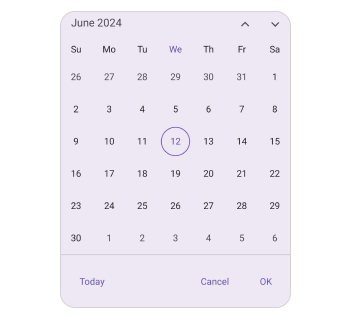
Action buttons
You can display action buttons at the footer of the calendar by using the ShowActionButtons property of the SfCalendar. It allows you to confirm or cancel the selected date, dates, and range of dates in calendar views of the SfCalendar.
<ContentPage
    . . .
    xmlns:calendar="clr-namespace:Syncfusion.Maui.Calendar;assembly=Syncfusion.Maui.Calendar">

    <calendar:SfCalendar x:Name="calendar"
                      View="Month">
        <calendar:SfCalendar.FooterView>
            <calendar:CalendarFooterView ShowActionButtons="true" />
        </calendar:SfCalendar.FooterView>
    </calendar:SfCalendar>

</ContentPage>
using Syncfusion.Maui.Calendar;
. . .
this.calendar.FooterView.ShowActionButtons = true;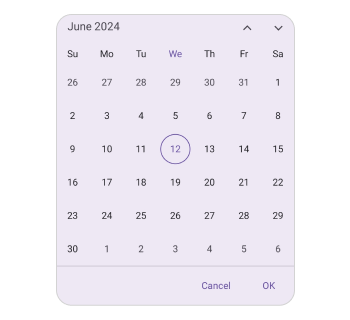
Today button
The today button can be displayed at the footer of the calendar using the ShowTodayButton property of the SfCalendar, allowing you to quickly navigate from the current view to today’s date.
<ContentPage
    . . .
    xmlns:calendar="clr-namespace:Syncfusion.Maui.Calendar;assembly=Syncfusion.Maui.Calendar">

    <calendar:SfCalendar x:Name="calendar"
                      View="Month">
        <calendar:SfCalendar.FooterView>
            <calendar:CalendarFooterView ShowTodayButton="True" />
        </calendar:SfCalendar.FooterView>
    </calendar:SfCalendar>

</ContentPage>
using Syncfusion.Maui.Calendar;
. . .
this.calendar.FooterView.ShowTodayButton = true;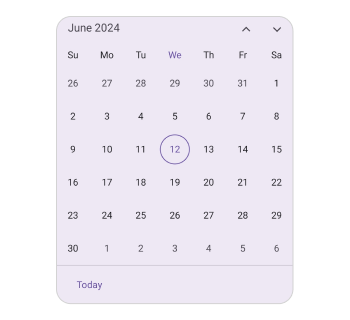
Set the Divider color
You can customize the footer divider color by setting the DividerColor property of the CalendarFooterView.
<ContentPage
    . . .
    xmlns:calendar="clr-namespace:Syncfusion.Maui.Calendar;assembly=Syncfusion.Maui.Calendar">

    <calendar:SfCalendar x:Name="calendar"
                      View="Month">
        <calendar:SfCalendar.FooterView>
            <calendar:CalendarFooterView DividerColor="Red" ShowActionButtons="True" ShowTodayButton="True" />
        </calendar:SfCalendar.FooterView>
    </calendar:SfCalendar>

</ContentPage>
using Syncfusion.Maui.Calendar;
. . .
this.calendar.FooterView.Height = 70;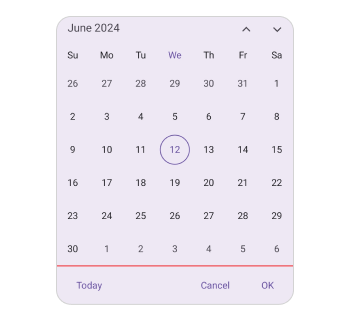
Customization of the footer
You can customize the footer text style and background color of the Calendar footer view using the TextStyle and Background properties of the CalendarFooterView.
<ContentPage
    . . .
    xmlns:calendar="clr-namespace:Syncfusion.Maui.Calendar;assembly=Syncfusion.Maui.Calendar">

    <calendar:SfCalendar x:Name="calendar" >
        <calendar:SfCalendar.FooterView >
            <calendar:CalendarFooterView Background="#D3D3D3" ShowActionButtons="True" ShowTodayButton="True" >
                <calendar:CalendarFooterView.TextStyle >
                    <calendar:CalendarTextStyle FontSize="15" TextColor="Black" />
                </calendar:CalendarFooterView.TextStyle>
            </calendar:CalendarFooterView>
        </calendar:SfCalendar.FooterView>
    </calendar:SfCalendar>

</ContentPage>
using Syncfusion.Maui.Calendar;
. . .
SfCalendar calendar = new SfCalendar();
calendar.FooterView = new CalendarFooterView()
{
Background = Color.FromArgb("#D3D3D3"),
TextStyle = new CalendarTextStyle()
{
TextColor = Colors.Black,
FontSize = 15,
}
};
this.Content = calendar;