About Syncfusion .NET MAUI Autocomplete Control
18 Nov 20184 minutes to read
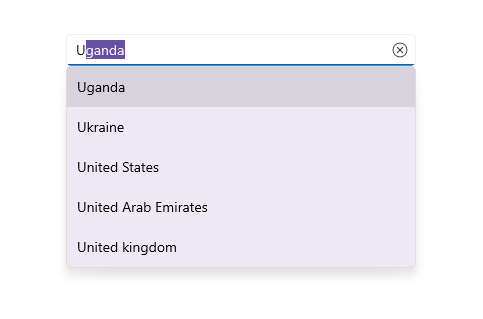
The Syncfusion® .NET MAUI Autocomplete control is highly optimized to load and populate suggestions quickly from large amounts of data depending on the user’s input characters. It allows users to select an item from the suggestion list. It displays the selected item in the input view with the text and clear button.
Business use cases
- Search boxes with instant suggestions for faster discovery.
- Form inputs with predefined selectable values to reduce errors.
- Product and category search in e‑commerce apps for better navigation.
- Mobile apps requiring fast lookup from large datasets.
Key features
- Flexible data binding binds the control to different types of data sources.
- Filtering support filters the suggestion list based on input and fills with the closest match.
- Drop‑down customization allows tailoring the appearance and behavior of the suggestion list.
- Multi‑selection enables choosing multiple values from the available options.
Globalization
The following table summarizes the globalization support available in this control.
 Full Support
 Partial Support
 Not Applicable
| Control | Localization | RTL | Time zone | Screen reader | Keyboard navigation |
|---|---|---|---|---|---|
| Autocomplete | |
|
|
|
|
Related controls
- ComboBox for flexible selection with optional user input.
- ListView for displaying filtered results in list format.
- Numeric Entry for structured numeric input with validation and formatting.
See Also
- Getting Started shows how to begin using Autocomplete step by step.
- Searching & Filtering explains how to configure search logic and filtering behavior.
- UI Customization shows how to style and customize the AutoComplete control.
- UI Kit provides interactive demos and ready-made UI examples.
Resources
Feature Tour
Get a quick overview of key features and capabilities to kick start your journey.
Explore Features
Tutorial Videos
Watch step‑by‑step video guides to quickly understand concepts and implementation.
Watch now
Knowledge Base
Find practical solutions, troubleshooting tips and how‑to guides for common scenarios.
Search KB's