LoadMore in .NET MAUI Autocomplete (SfAutocomplete)
21 Jul 202617 minutes to read
Prerequisites
Before using the SfAutocomplete, ensure the following NuGet package is installed in your .NET MAUI project:
Syncfusion.Maui.Inputs
For step-by-step setup, refer to the Getting Started documentation.
Overview
You can restrict the number of suggestions shown in the drop-down of the SfAutocomplete and let users load the remaining items by tapping a LoadMore button. This page covers the MaximumSuggestion property, the LoadMoreText and LoadMoreTemplate customizations, and the LoadMoreButtonTapped event.
Properties
| Property | Type | Default | Description |
|---|---|---|---|
MaximumSuggestion |
int |
0 (no limit) |
Gets or sets the maximum number of suggestions to display before showing the LoadMore button. |
LoadMoreText |
string |
LOAD MORE |
Gets or sets the text displayed on the LoadMore button. |
LoadMoreTemplate |
DataTemplate |
null |
Gets or sets a custom template used to render the LoadMore button. |
LoadMoreButtonTapped |
EventHandler |
- | Raised when the user taps the LoadMore button. |
MaximumSuggestion
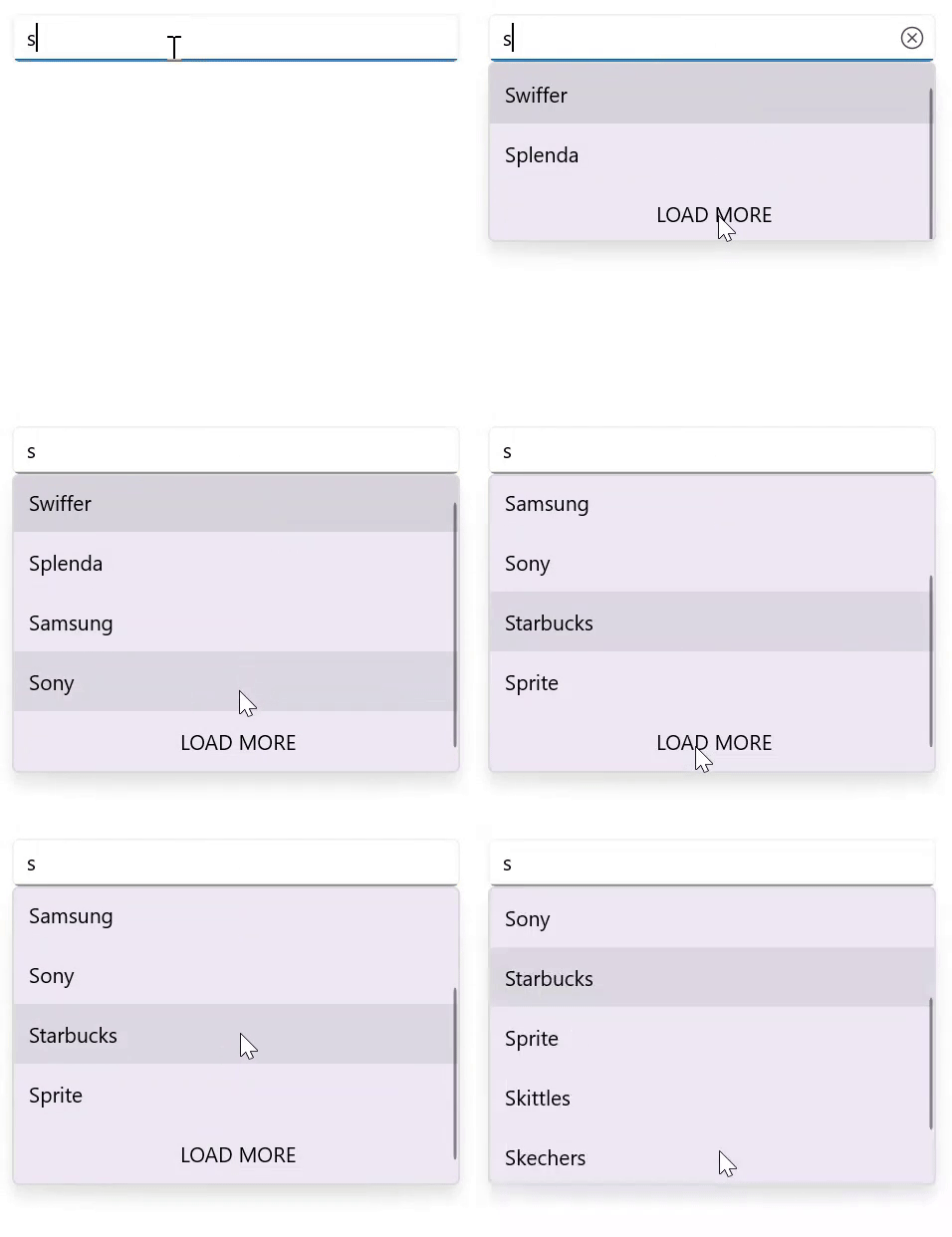
You can restrict the maximum number of suggestions displayed by setting the MaximumSuggestion property. When more items are available, a LoadMore button is shown at the bottom of the drop-down.
<editors:SfAutocomplete x:Name="autocomplete"
                        ItemsSource="{Binding SocialMedias}"
                        MaximumSuggestion="2"
                        DisplayMemberPath="Name"
                        TextMemberPath="Name" />
SfAutocomplete autocomplete = new SfAutocomplete
{
ItemsSource = new SocialMediaViewModel().SocialMedias,
MaximumSuggestion = 2,
DisplayMemberPath = "Name",
TextMemberPath = "Name"
};// ViewModel
public class SocialMediaViewModel
{
public ObservableCollection<SocialMedia> SocialMedias { get; set; }
public SocialMediaViewModel()
{
this.SocialMedias = new ObservableCollection<SocialMedia>
{
new SocialMedia { Name = "Facebook", ID = 0 },
new SocialMedia { Name = "Google Plus", ID = 1 },
new SocialMedia { Name = "Instagram", ID = 2 },
new SocialMedia { Name = "LinkedIn", ID = 3 },
new SocialMedia { Name = "Skype", ID = 4 },
new SocialMedia { Name = "Telegram", ID = 5 },
new SocialMedia { Name = "Twitter", ID = 6 },
new SocialMedia { Name = "WhatsApp", ID = 7 },
new SocialMedia { Name = "YouTube", ID = 8 }
};
}
}
public class SocialMedia
{
public string Name { get; set; }
public int ID { get; set; }
}The following image illustrates the LoadMore button shown after the maximum number of suggestions is reached:
LoadMore text customization
The LoadMore feature exposes the LoadMoreText property. You can set the desired text for the LoadMore button with this property.
<editors:SfAutocomplete x:Name="autocomplete"
                        ItemsSource="{Binding SocialMedias}"
                        MaximumSuggestion="2"
                        LoadMoreText="Load more items"
                        DisplayMemberPath="Name"
                        TextMemberPath="Name" />
SfAutocomplete autocomplete = new SfAutocomplete
{
ItemsSource = new SocialMediaViewModel().SocialMedias,
MaximumSuggestion = 2,
LoadMoreText = "Load more items",
DisplayMemberPath = "Name",
TextMemberPath = "Name"
};// ViewModel
public class SocialMediaViewModel
{
public ObservableCollection<SocialMedia> SocialMedias { get; set; }
public SocialMediaViewModel()
{
this.SocialMedias = new ObservableCollection<SocialMedia>
{
new SocialMedia { Name = "Facebook", ID = 0 },
new SocialMedia { Name = "Google Plus", ID = 1 },
new SocialMedia { Name = "Instagram", ID = 2 },
new SocialMedia { Name = "LinkedIn", ID = 3 },
new SocialMedia { Name = "Skype", ID = 4 },
new SocialMedia { Name = "Telegram", ID = 5 },
new SocialMedia { Name = "Twitter", ID = 6 },
new SocialMedia { Name = "WhatsApp", ID = 7 },
new SocialMedia { Name = "YouTube", ID = 8 }
};
}
}
public class SocialMedia
{
public string Name { get; set; }
public int ID { get; set; }
}The following image illustrates a customized LoadMore text:

LoadMore view customization
SfAutocomplete allows you to customize the user interface (UI) of the LoadMore view. To customize the LoadMore button, provide a custom UI by setting the LoadMoreTemplate property.
<editors:SfAutocomplete x:Name="autocomplete"
                        ItemsSource="{Binding SocialMedias}"
                        MaximumSuggestion="2"
                        DisplayMemberPath="Name"
                        TextMemberPath="Name">
    <editors:SfAutocomplete.LoadMoreTemplate>
        <DataTemplate>
            <Grid BackgroundColor="LightGreen">
                <Label Text="Load more items..."
                       VerticalOptions="Center"
                       FontAttributes="Bold"
                       HorizontalOptions="Center"
                       TextColor="Red" />
            </Grid>
        </DataTemplate>
    </editors:SfAutocomplete.LoadMoreTemplate>
</editors:SfAutocomplete>
SfAutocomplete autocomplete = new SfAutocomplete
{
DisplayMemberPath = "Name",
TextMemberPath = "Name",
MaximumSuggestion = 2,
ItemsSource = new SocialMediaViewModel().SocialMedias
};
autocomplete.LoadMoreTemplate = new DataTemplate(() =>
{
var grid = new Grid { BackgroundColor = Colors.LightGreen };
var label = new Label
{
Text = "Load more items...",
TextColor = Colors.Red,
HorizontalOptions = LayoutOptions.Center,
VerticalOptions = LayoutOptions.Center,
FontAttributes = FontAttributes.Bold
};
grid.Children.Add(label);
return grid;
});// ViewModel
public class SocialMediaViewModel
{
public ObservableCollection<SocialMedia> SocialMedias { get; set; }
public SocialMediaViewModel()
{
this.SocialMedias = new ObservableCollection<SocialMedia>
{
new SocialMedia { Name = "Facebook", ID = 0 },
new SocialMedia { Name = "Google Plus", ID = 1 },
new SocialMedia { Name = "Instagram", ID = 2 },
new SocialMedia { Name = "LinkedIn", ID = 3 },
new SocialMedia { Name = "Skype", ID = 4 },
new SocialMedia { Name = "Telegram", ID = 5 },
new SocialMedia { Name = "Twitter", ID = 6 },
new SocialMedia { Name = "WhatsApp", ID = 7 },
new SocialMedia { Name = "YouTube", ID = 8 }
};
}
}
public class SocialMedia
{
public string Name { get; set; }
public int ID { get; set; }
}The following image illustrates a customized LoadMore template:

LoadMore button tapped event
The LoadMore feature exposes the LoadMoreButtonTapped event. The event is raised only when the user taps the LoadMore button. Subscribe to it to load the remaining items or perform custom logic.
<editors:SfAutocomplete x:Name="autocomplete"
                        ItemsSource="{Binding SocialMedias}"
                        MaximumSuggestion="2"
                        LoadMoreButtonTapped="autocomplete_LoadMoreButtonTapped"
                        DisplayMemberPath="Name"
                        TextMemberPath="Name" />
SfAutocomplete autocomplete = new SfAutocomplete
{
DisplayMemberPath = "Name",
TextMemberPath = "Name",
MaximumSuggestion = 2,
ItemsSource = new SocialMediaViewModel().SocialMedias
};
autocomplete.LoadMoreButtonTapped += Autocomplete_LoadMoreButtonTapped;
private void Autocomplete_LoadMoreButtonTapped(object? sender, EventArgs e)
{
// Triggered when the LoadMore button is tapped.
// For example, load more items into the socialMedias collection.
}// ViewModel
public class SocialMediaViewModel
{
public ObservableCollection<SocialMedia> SocialMedias { get; set; }
public SocialMediaViewModel()
{
this.SocialMedias = new ObservableCollection<SocialMedia>
{
new SocialMedia { Name = "Facebook", ID = 0 },
new SocialMedia { Name = "Google Plus", ID = 1 },
new SocialMedia { Name = "Instagram", ID = 2 },
new SocialMedia { Name = "LinkedIn", ID = 3 },
new SocialMedia { Name = "Skype", ID = 4 },
new SocialMedia { Name = "Telegram", ID = 5 },
new SocialMedia { Name = "Twitter", ID = 6 },
new SocialMedia { Name = "WhatsApp", ID = 7 },
new SocialMedia { Name = "YouTube", ID = 8 }
};
}
}
public class SocialMedia
{
public string Name { get; set; }
public int ID { get; set; }
}