Basic Features in .NET MAUI Autocomplete
18 Nov 20189 minutes to read
Prerequisites
Before using the SfAutocomplete, ensure the following NuGet package is installed in your .NET MAUI project:
Syncfusion.Maui.Inputs
For a step-by-step setup, refer to the Getting Started documentation.
Selection
The .NET MAUI Autocomplete allows the user to select an item from the drop-down list by clicking or tapping the item, pressing the Enter key, or losing focus from the text box. By default, the SelectionMode is Single.
Selection properties
| Property | Type | Description |
|---|---|---|
SelectedItem |
object |
Gets or sets the currently selected item. |
SelectedValue |
object |
Gets or sets the value of the selected item based on ValueMemberPath. |
SelectionMode |
SelectionMode |
Specifies whether single or multiple selection is enabled. Default is Single. |
The following code example shows how to configure the basic selection behavior in the SfAutocomplete:
<editors:SfAutocomplete x:Name="autocomplete"
                        DisplayMemberPath = "Name"
                        TextMemberPath = "Name"
                        ItemsSource="{Binding SocialMedias}" />
using Syncfusion.Maui.Inputs;
SfAutocomplete autocomplete = new SfAutocomplete()
{
DisplayMemberPath = "Name",
TextMemberPath = "Name",
ItemsSource = new SocialMediaViewModel().SocialMedias,
};// ViewModel
public class SocialMediaViewModel
{
public ObservableCollection<SocialMedia> SocialMedias { get; set; }
public SocialMediaViewModel()
{
this.SocialMedias = new ObservableCollection<SocialMedia>
{
new SocialMedia { Name = "Facebook", ID = 0 },
new SocialMedia { Name = "Google Plus", ID = 1 },
new SocialMedia { Name = "Instagram", ID = 2 },
new SocialMedia { Name = "LinkedIn", ID = 3 },
new SocialMedia { Name = "Skype", ID = 4 },
new SocialMedia { Name = "Telegram", ID = 5 },
new SocialMedia { Name = "Twitter", ID = 6 },
new SocialMedia { Name = "WhatsApp", ID = 7 },
new SocialMedia { Name = "YouTube", ID = 8 }
};
}
}
public class SocialMedia
{
public string Name { get; set; }
public int ID { get; set; }
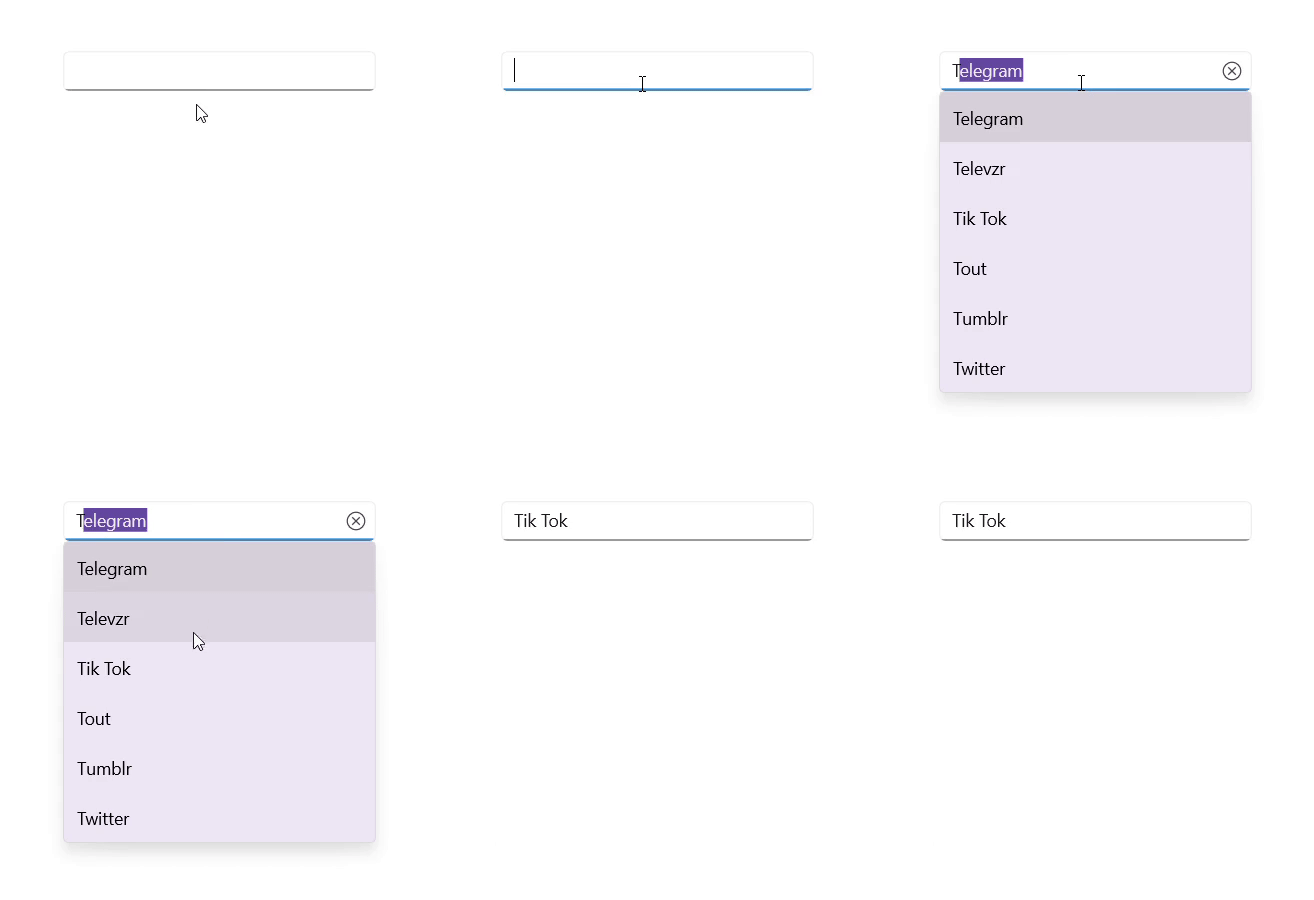
}The following image illustrates the output:
For more information about selection, refer to the Selection documentation.
Text
The Text property is used to get the text entered by the user in the SfAutocomplete. The default value of the Text property is string.Empty. The Text property is updated live as the user types and is also updated when an item is selected from the drop-down list.
Automation ID
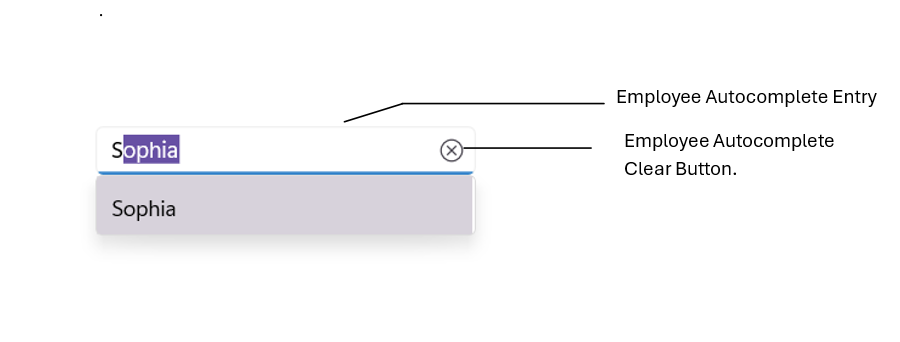
The SfAutocomplete control provides AutomationId support for the input field and the clear button, enabling UI automation frameworks to reliably target these elements. Each element’s AutomationId is derived from the control’s AutomationId to ensure uniqueness.
For example, if the SfAutocomplete’s AutomationId is set to “Employee Autocomplete,” the editable entry can be targeted as “Employee Autocomplete Entry” and the clear button as “Employee Autocomplete Clear Button.” This focused support improves accessibility and automated UI testing by providing stable, predictable identifiers for the primary interactive elements
<editors:SfAutocomplete x:Name="autocomplete"
                        AutomationId="Employee Autocomplete" />
using Syncfusion.Maui.Inputs;
SfAutocomplete autocomplete = new SfAutocomplete()
{
AutomationId = "Employee Autocomplete",
};The following screenshot illustrates the AutomationIds of the inner elements:
Keyboard
The Autocomplete
control provides support for changing the keyboard type through the Keyboard property. By default, the Keyboard property is set to Keyboard.Default.
<editors:SfAutocomplete x:Name="employeeName"
                        Placeholder="Enter an employee name"
                        Keyboard="Text"
                        DisplayMemberPath="Name"
                        TextMemberPath="Name"
                        ItemsSource="{Binding Employees}" />
var viewModel = new EmployeeViewModel();
SfAutocomplete autocomplete = new SfAutocomplete
{
DisplayMemberPath = "Name",
TextMemberPath = "Name",
Placeholder = "Enter an employee name",
Keyboard = Keyboard.Text,
ItemsSource = viewModel.Employees
};
Content = autocomplete;using System.Collections.ObjectModel;
public class Employee
{
public string Name { get; set; }
public string ProfilePicture { get; set; }
public string Designation { get; set; }
public string ID { get; set; }
}
public class EmployeeViewModel
{
public ObservableCollection<Employee> Employees { get; set; }
public EmployeeViewModel()
{
Employees = new ObservableCollection<Employee>
{
new Employee
{
Name = "Anne Dodsworth",
ProfilePicture = "people_circle1.png",
Designation = "Developer",
ID = "E001"
},
new Employee
{
Name = "Andrew Fuller",
ProfilePicture = "people_circle8.png",
Designation = "Team Lead",
ID = "E002"
}
};
}
}