About Syncfusion® .NET MAUI Tab View Control
18 Nov 20185 minutes to read
The advanced Syncfusion® .NET MAUI Tab View provides a simple and intuitive interface for tab navigation in both mobile and desktop applications. This allows users to explore and switch between different tabs efficiently.
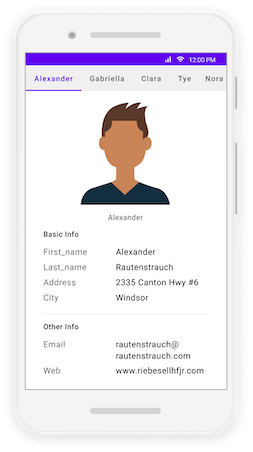
Business use cases
- Mobile and desktop applications that require tab-based navigation to switch between multiple screens or sections.
- Dashboard applications that organize different data views such as reports, charts, or summaries into tabs.
- Content-driven applications that display categorized information within a single layout.
- Business applications that require efficient use of screen space by grouping related content into tabs.
Key features
- Multiple tab allows displaying different content sections within a single container.
- Nested tab allows organizing tabs within other tabs for complex UI structures.
- Flexible header placement allows positioning tab headers in different locations.
- Scrollable and fixed header allows handling large numbers of tabs efficiently.
- Text and image header allows displaying icons and labels within tab headers for better usability.
Globalization
The following table summarizes the globalization support available in this control.
 Full Support
 Not Applicable
| Control | Localization | RTL | Time zone | Screen reader | Keyboard navigation |
|---|---|---|---|---|---|
| Tab View | |
|
|
|
|
Related controls
- Navigation Drawer for organizing navigation using sliding panels.
- TreeView for hierarchical navigation structures with expandable nodes.
- Rotator for cycling through content or images in a sliding view.
See Also
- Getting Started shows a step-by-step guide to begin using the Tab View control.
- Headers explains how to configure header placement and styles.
- Tab Bar Customization helps customize tab bar appearance and behavior.
- Tab Item Customization details how to style and configure individual tab items.
- UI Kit provides interactive demos and ready-made UI examples.
Resources
Feature Tour
Get a quick overview of key features and capabilities to kick start your journey.
Explore Features
Tutorial Videos
Watch step-by-step video guides to quickly understand concepts and implementation.
Watch now
Knowledge Base
Find practical solutions, troubleshooting tips and how-to guides for common scenarios.
Search KB's
Use Case Sample
Explore a real-world application that demonstrates the practical use of the Tab View.
View Sample