Nested Tab in .NET MAUI Tab View (SfTabView)
22 Jul 202619 minutes to read
Prerequisites
Before using the SfTabView, ensure the following NuGet package is installed in your .NET MAUI project:
Syncfusion.Maui.TabView
For step-by-step setup, refer to the Getting Started documentation.
Overview
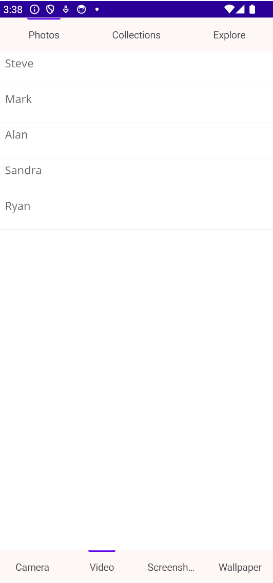
A nested tab is a tab item whose Content is itself another SfTabView. Use this pattern when you need to group related sub-categories under a parent tab—for example, a “Photos” tab that contains a nested tab view with “Camera”, “Video”, “Screenshots”, and “Wallpaper” sub-tabs.
You can configure nested tab items in the Tab View using the Items property of SfTabView. This property holds a collection of SfTabItem instances of type TabItemCollection.
Note The minimum Syncfusion MAUI package version that supports nested tabs is 21.2.XX or later. Verify the version in your project before applying the samples below.
Walkthrough video
To get started quickly with nested tabs in the .NET MAUI Tab View, watch this video walkthrough:
<Grid>
    <tabView:SfTabView x:Name="tabView"
                        TabBarBackground="#FDF8F6"
                        TabWidthMode="SizeToContent"
                        TabBarPlacement="Top"
                        BackgroundColor="Transparent"
                        IndicatorBackground="#6200EE"
                        IndicatorPlacement="Top">
        <tabView:SfTabView.Items>
            <tabView:SfTabItem Header="Photos">
                <tabView:SfTabItem.Content>
                    <Grid BackgroundColor="Blue">
                        <tabView:SfTabView x:Name="nestedTabView"
                                            TabBarBackground="#FDF8F6"
                                            TabWidthMode="Default"
                                            TabBarPlacement="Bottom"
                                            BackgroundColor="Transparent"
                                            IndicatorBackground="#6200EE"
                                            IndicatorPlacement="Top">
                            <tabView:SfTabView.Items>
                                <tabView:SfTabItem Header="Camera">
                                    <tabView:SfTabItem.Content>
                                        <Grid BackgroundColor="Blue">
                                            <!-- Camera content goes here. -->
                                        </Grid>
                                    </tabView:SfTabItem.Content>
                                </tabView:SfTabItem>
                                <tabView:SfTabItem Header="Video">
                                    <tabView:SfTabItem.Content>
                                        <Grid BackgroundColor="Blue">
                                            <!-- Video content goes here. -->
                                        </Grid>
                                    </tabView:SfTabItem.Content>
                                </tabView:SfTabItem>
                                <tabView:SfTabItem Header="Screenshots">
                                    <tabView:SfTabItem.Content>
                                        <Grid BackgroundColor="Blue">
                                            <!-- Screenshots content goes here. -->
                                        </Grid>
                                    </tabView:SfTabItem.Content>
                                </tabView:SfTabItem>
                                <tabView:SfTabItem Header="Wallpaper">
                                    <tabView:SfTabItem.Content>
                                        <Grid BackgroundColor="Blue">
                                            <!-- Wallpaper content goes here. -->
                                        </Grid>
                                    </tabView:SfTabItem.Content>
                                </tabView:SfTabItem>
                            </tabView:SfTabView.Items>
                        </tabView:SfTabView>
                    </Grid>
                </tabView:SfTabItem.Content>
            </tabView:SfTabItem>
            <tabView:SfTabItem Header="Collections">
                <tabView:SfTabItem.Content>
                    <Grid BackgroundColor="Red"/>
                </tabView:SfTabItem.Content>
            </tabView:SfTabItem>
            <tabView:SfTabItem Header="Explore">
                <tabView:SfTabItem.Content>
                    <Grid BackgroundColor="Green"/>
                </tabView:SfTabItem.Content>
            </tabView:SfTabItem>
        </tabView:SfTabView.Items>
    </tabView:SfTabView>
</Grid>
SfTabView tabView = new SfTabView
{
Items = new TabItemCollection
{
new SfTabItem()
{
Header = "Photos",
Content = new SfTabView
{
Items = new TabItemCollection
{
new SfTabItem()
{
Header = "Camera",
Content = new ListView()
{
// Add Camera content here.
}
},
new SfTabItem()
{
Header = "Video",
Content = new ListView()
{
// Add Video content here.
}
},
new SfTabItem()
{
Header = "Screenshots",
Content = new ListView()
{
// Add Screenshots content here.
}
},
new SfTabItem()
{
Header = "Wallpaper",
Content = new ListView()
{
// Add Wallpaper content here.
}
}
},
TabBarPlacement = TabBarPlacement.Bottom,
IndicatorPlacement = TabIndicatorPlacement.Top,
TabBarBackground = new SolidColorBrush(Color.FromArgb("#FDF8F6")),
IndicatorBackground = new SolidColorBrush(Color.FromArgb("#6200EE"))
}
},
new SfTabItem()
{
Header = "Collections",
Content = new ListView()
{
// Add Collections content here.
}
},
new SfTabItem()
{
Header = "Explore",
Content = new ListView()
{
// Add Explore content here.
}
}
},
TabWidthMode = TabWidthMode.SizeToContent,
TabBarPlacement = TabBarPlacement.Top,
IndicatorPlacement = TabIndicatorPlacement.Top,
TabBarBackground = new SolidColorBrush(Color.FromArgb("#FDF8F6")),
IndicatorBackground = new SolidColorBrush(Color.FromArgb("#6200EE"))
};
NOTE
View the sample on GitHub.
Enable Virtualization
The EnableVirtualization property is a bool that defaults to false. Set it to true to improve the initial loading performance of the SfTabView by only creating the tab content when the corresponding tab is selected. This is especially useful when the Tab View contains many heavy or nested tab items.
<tabView:SfTabView x:Name="tabView" EnableVirtualization="true">
    <tabView:SfTabItem Header="Item1" />
    <tabView:SfTabItem Header="Item2" />
    <tabView:SfTabItem Header="Item3" />
</tabView:SfTabView>
SfTabView tabView = new SfTabView
{
EnableVirtualization = true,
Items =
{
new SfTabItem { Header = "Item1" },
new SfTabItem { Header = "Item2" },
new SfTabItem { Header = "Item3" }
}
};