Right To Left Flow Direction in .NET MAUI Segmented control (SfSegmentedControl)
7 Jan 20251 minute to read
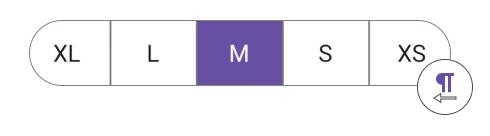
The SfSegmentedControl supports changing the flow direction of items rendering in the right-to-left order by setting the FlowDirection to RightToLeft.
<ContentPage
...
xmlns:buttons="clr-namespace:Syncfusion.Maui.Buttons;assembly=Syncfusion.Maui.Buttons">
    <buttons:SfSegmentedControl x:Name="segmentedControl"
                                FlowDirection="RightToLeft">
    </buttons:SfSegmentedControl>
</ContentPage>
SfSegmentedControl segmentedControl = new SfSegmentedControl();
segmentedControl.FlowDirection = FlowDirection.RightToLeft;
this.Content = segmentedControl;