Needle Pointer in .NET MAUI Radial Gauge
18 Nov 201816 minutes to read
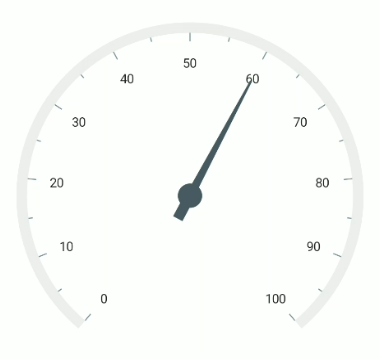
The Needle Pointer contains three parts, namely needle, knob, and tail, and can be placed on a gauge to mark values.
Prerequisite: Ensure that the required NuGet package is installed, the necessary namespaces are imported, and the SfRadialGauge control is properly configured in your application. For detailed setup and configuration instructions, refer to the Getting Started guide.
<gauge:SfRadialGauge>
    <gauge:SfRadialGauge.Axes>
        <gauge:RadialAxis>
            <gauge:RadialAxis.Pointers>
                <gauge:NeedlePointer Value = "60" />
            </gauge:RadialAxis.Pointers>
        </gauge:RadialAxis>
    </gauge:SfRadialGauge.Axes>
</gauge:SfRadialGauge>
SfRadialGauge sfRadialGauge = new SfRadialGauge();
RadialAxis radialAxis = new RadialAxis();
sfRadialGauge.Axes.Add(radialAxis);
NeedlePointer needlePointer = new NeedlePointer();
needlePointer.Value = 60;
radialAxis.Pointers.Add(needlePointer);
this.Content = sfRadialGauge;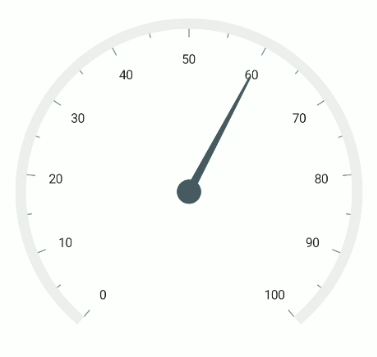
Needle customization
The needle can be customized using the following properties:
-
NeedleLength- Specifies the length of the needle. The length can be set either in pixels or factor. -
NeedleLengthUnit- Specifies whether the length is set in pixels or factor. -
NeedleStartWidth- Specifies the start width of the needle. -
NeedleEndWidth- Specifies the end width of the needle. -
NeedleFill- Specifies the color of the needle.
Needle length customization
The needle length can be controlled using the NeedleLength and NeedleLengthUnit properties. The length can be set either in pixels or factor using NeedleLengthUnit.
If NeedleLengthUnit is set to SizeUnit.Pixel, the pixel value is set to the NeedleLength to calculate the needle length.
If NeedleLengthUnit is set to SizeUnit.Factor, the factor value is set to the NeedleLength. The factor value ranges from 0 to 1. For example, if the needle length is set to 0.5, half of the axis radius is set as the needle length. The default value of NeedleLengthUnit is SizeUnit.Factor.
<gauge:SfRadialGauge>
    <gauge:SfRadialGauge.Axes>
        <gauge:RadialAxis>
            <gauge:RadialAxis.Pointers>
                <gauge:NeedlePointer Value = "60"
                                     NeedleLengthUnit = "Pixel"
                                     NeedleLength = "130" />
            </gauge:RadialAxis.Pointers>
        </gauge:RadialAxis>
    </gauge:SfRadialGauge.Axes>
</gauge:SfRadialGauge>
SfRadialGauge sfRadialGauge = new SfRadialGauge();
RadialAxis radialAxis = new RadialAxis();
sfRadialGauge.Axes.Add(radialAxis);
NeedlePointer needlePointer = new NeedlePointer();
needlePointer.Value = 60;
needlePointer.NeedleLengthUnit = SizeUnit.Pixel;
needlePointer.NeedleLength = 130;
radialAxis.Pointers.Add(needlePointer);
this.Content = sfRadialGauge;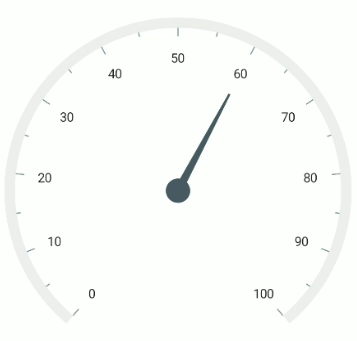
Needle width customization
The width of the needle pointer can be customized using the NeedleStartWidth and NeedleEndWidth properties.
<gauge:SfRadialGauge>
    <gauge:SfRadialGauge.Axes>
        <gauge:RadialAxis>
            <gauge:RadialAxis.Pointers>
                <gauge:NeedlePointer Value = "60"
                                     NeedleLengthUnit = "Factor"
                                     NeedleLength = "0.7"
                                     NeedleStartWidth = "10"
                                     NeedleEndWidth = "10"
                                     NeedleFill = "Red"/>
            </gauge:RadialAxis.Pointers>
        </gauge:RadialAxis>
    </gauge:SfRadialGauge.Axes>
</gauge:SfRadialGauge>
SfRadialGauge sfRadialGauge = new SfRadialGauge();
RadialAxis radialAxis = new RadialAxis();
sfRadialGauge.Axes.Add(radialAxis);
NeedlePointer needlePointer = new NeedlePointer();
needlePointer.Value = 60;
needlePointer.NeedleLengthUnit = SizeUnit.Factor;
needlePointer.NeedleLength = 0.7;
needlePointer.NeedleFill = new SolidColorBrush(Colors.Red);
needlePointer.NeedleStartWidth = 10;
needlePointer.NeedleEndWidth = 10;
radialAxis.Pointers.Add(needlePointer);
this.Content = sfRadialGauge;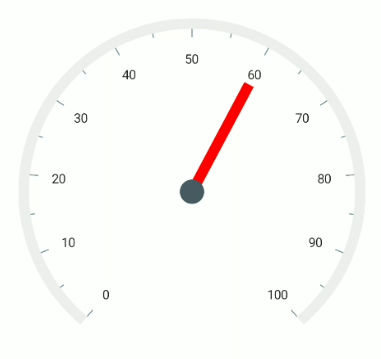
Knob customization
The knob can be customized using the following properties:
-
KnobRadius- Specifies the radius of the knob either in pixels or factor. -
KnobFill- Specifies the color of the knob. -
KnobStrokeThickness- Specifies the width of the knob stroke outline either in pixels or factor. -
KnobStroke- Specifies the border color of the knob. -
KnobSizeUnit- Specifies whether the knob radius and stroke width values are in pixels or factor.
Knob radius customization
The radius of the knob can be customized using the KnobRadius and KnobSizeUnit. If KnobSizeUnit is set to SizeUnit.Pixel, the pixel value can be set to the KnobRadius.
<gauge:SfRadialGauge>
    <gauge:SfRadialGauge.Axes>
        <gauge:RadialAxis>
            <gauge:RadialAxis.Pointers>
                <gauge:NeedlePointer Value = "65"
                                     KnobSizeUnit = "Pixel"
                                     KnobRadius = "15"
                                     KnobFill = "Red" />
            </gauge:RadialAxis.Pointers>
        </gauge:RadialAxis>
    </gauge:SfRadialGauge.Axes>
</gauge:SfRadialGauge>
SfRadialGauge sfRadialGauge = new SfRadialGauge();
RadialAxis radialAxis = new RadialAxis();
sfRadialGauge.Axes.Add(radialAxis);
NeedlePointer needlePointer = new NeedlePointer();
needlePointer.Value = 65;
needlePointer.KnobRadius = 15;
needlePointer.KnobSizeUnit = SizeUnit.Pixel;
needlePointer.KnobFill = new SolidColorBrush(Colors.Red);
radialAxis.Pointers.Add(needlePointer);
this.Content = sfRadialGauge;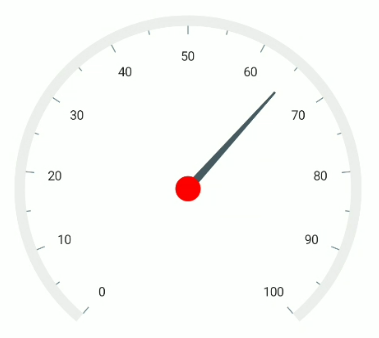
If KnobSizeUnit is set to SizeUnit.Factor, the factor value is set to the knob radius. The factor value ranges from 0 to 1. For example, if the knob radius is set to 0.1, 10% of the axis radius is set as the knob radius. By default, the value of KnobSizeUnit is SizeUnit.Factor.
Knob stroke customization
Like the knob radius, the KnobStrokeThickness can be specified either in pixel or factor. The KnobSizeUnit property is common for both the KnobRadius and KnobStrokeThickness properties.
<gauge:SfRadialGauge>
    <gauge:SfRadialGauge.Axes>
        <gauge:RadialAxis>
            <gauge:RadialAxis.Pointers>
                <gauge:NeedlePointer Value = "65"
                                     NeedleEndWidth = "10"
                                     NeedleFill = "Black"
                                     KnobRadius = "0.06"
                                     KnobStrokeThickness = "0.02"
                                     KnobStroke = "Black"
                                     KnobFill = "White" />
            </gauge:RadialAxis.Pointers>
        </gauge:RadialAxis>
    </gauge:SfRadialGauge.Axes>
</gauge:SfRadialGauge>
SfRadialGauge sfRadialGauge = new SfRadialGauge();
RadialAxis radialAxis = new RadialAxis();
sfRadialGauge.Axes.Add(radialAxis);
NeedlePointer needlePointer = new NeedlePointer();
needlePointer.Value = 65;
needlePointer.NeedleEndWidth = 10;
needlePointer.NeedleFill = new SolidColorBrush(Colors.Black);
needlePointer.KnobRadius = 0.06;
needlePointer.KnobStrokeThickness = 0.02;
needlePointer.KnobFill = new SolidColorBrush(Colors.White);
needlePointer.KnobStroke = new SolidColorBrush(Colors.Black);
radialAxis.Pointers.Add(needlePointer);
this.Content = sfRadialGauge;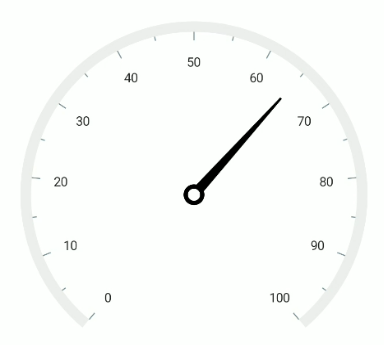
Tail customization
The tail of the needle can be customized using the following properties:
-
TailLength- Specifies the length of the tail either in pixels or factor. -
TailLengthUnit- Specifies whether the tail length value is defined in pixels or factor. -
TailWidth- Specifies the width of the tail. -
TailFill- Specifies the color of the tail.
Tail length customization
The tail length can be controlled using the TailLength and TailLengthUnit properties. The length can be set either in pixels or factor using TailLengthUnit. The default value of TailLengthUnit is SizeUnit.Factor.
Tail length in pixel
If TailLengthUnit is set to SizeUnit.Pixel, the tail is rendered based on the pixel value given in TailLength.
<gauge:SfRadialGauge>
    <gauge:SfRadialGauge.Axes>
        <gauge:RadialAxis>
            <gauge:RadialAxis.Pointers>
                <gauge:NeedlePointer Value = "60"
                                     TailLengthUnit = "Pixel"
                                     TailLength = "40" />
            </gauge:RadialAxis.Pointers>
        </gauge:RadialAxis>
    </gauge:SfRadialGauge.Axes>
</gauge:SfRadialGauge>
SfRadialGauge sfRadialGauge = new SfRadialGauge();
RadialAxis radialAxis = new RadialAxis();
sfRadialGauge.Axes.Add(radialAxis);
NeedlePointer needlePointer = new NeedlePointer();
needlePointer.Value = 60;
needlePointer.TailLengthUnit = SizeUnit.Pixel;
needlePointer.TailLength = 40;
radialAxis.Pointers.Add(needlePointer);
this.Content = sfRadialGauge;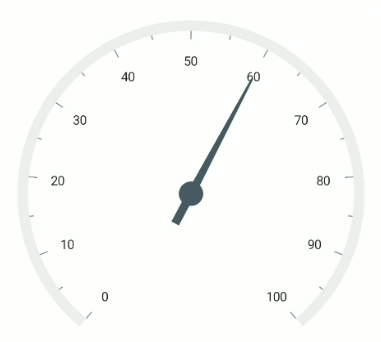
Tail length in factor
If TailLengthUnit is set to SizeUnit.Factor, the provided factor value in the tail length is multiplied by the axis radius. The factor value ranges from 0 to 1. For example, if the tail length is set to 0.5, half of the axis radius is set as the tail length.
<gauge:SfRadialGauge>
    <gauge:SfRadialGauge.Axes>
        <gauge:RadialAxis>
            <gauge:RadialAxis.Pointers>
                <gauge:NeedlePointer Value = "60"
                                     TailLengthUnit = "Factor"
                                     TailLength = "0.2" />
            </gauge:RadialAxis.Pointers>
        </gauge:RadialAxis>
    </gauge:SfRadialGauge.Axes>
</gauge:SfRadialGauge>
SfRadialGauge sfRadialGauge = new SfRadialGauge();
RadialAxis radialAxis = new RadialAxis();
sfRadialGauge.Axes.Add(radialAxis);
NeedlePointer needlePointer = new NeedlePointer();
needlePointer.Value = 60;
needlePointer.TailLengthUnit = SizeUnit.Factor;
needlePointer.TailLength = 0.2;
radialAxis.Pointers.Add(needlePointer);
this.Content = sfRadialGauge;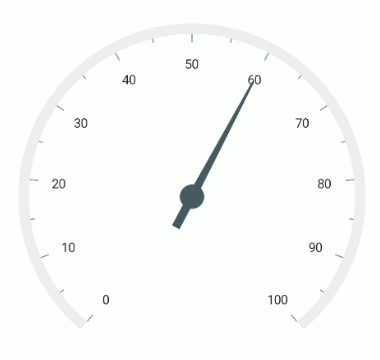
Tail width customization
The width of the tail can be customized using the TailWidth property of the needle pointer.
<gauge:SfRadialGauge>
    <gauge:SfRadialGauge.Axes>
        <gauge:RadialAxis>
            <gauge:RadialAxis.Pointers>
                <gauge:NeedlePointer Value = "60"
                                     TailLength = "0.15"
                                     TailWidth = "10" />
            </gauge:RadialAxis.Pointers>
        </gauge:RadialAxis>
    </gauge:SfRadialGauge.Axes>
</gauge:SfRadialGauge>
SfRadialGauge sfRadialGauge = new SfRadialGauge();
RadialAxis radialAxis = new RadialAxis();
sfRadialGauge.Axes.Add(radialAxis);
NeedlePointer needlePointer = new NeedlePointer();
needlePointer.Value = 60;
needlePointer.TailLength = 0.15;
needlePointer.TailWidth = 10;
radialAxis.Pointers.Add(needlePointer);
this.Content = sfRadialGauge;