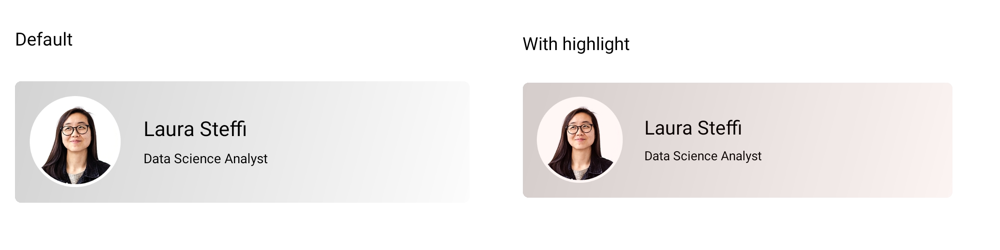
Highlight Effect in .NET MAUI Effects View
18 Nov 20186 minutes to read
The SfEffects.Highlight effect applies a smooth color transition to the background of the Effects View when the user touches the view. Use it to give users visual feedback for taps, long presses, and other interactions.
The example below applies a red background to the Effects View while the user is touching it.
<Border HorizontalOptions="Center"
        VerticalOptions="Center">
    <Border.StrokeShape>
        <RoundRectangle CornerRadius="18" />
    </Border.StrokeShape>
    <Border.Background>
        <LinearGradientBrush EndPoint="1,0">
            <GradientStop Color="#FFCDCDD2"
                          Offset="0.0" />
            <GradientStop Color="#FFEEEEF5"
                          Offset="1.0" />
        </LinearGradientBrush>
    </Border.Background>
    <syncEffectsView:SfEffectsView TouchDownEffects="Highlight"
                                   HighlightBackground="Red">
        <Grid>
            <Grid.ColumnDefinitions>
                <ColumnDefinition Width="90" />
                <ColumnDefinition Width="*"/>
            </Grid.ColumnDefinitions>
            <Image Source="laura.png"
                   Margin="7"
                   VerticalOptions="Center"
                   WidthRequest="72"
                   HeightRequest="72" />
                <StackLayout Grid.Column="1"
                             VerticalOptions="Center">
                    <Label Text="Laura Steffi"
                           Margin="10,0,10,0"
                           FontSize="18" />
                    <Label Text="Data Science Analyst"
                           Margin="10,0,10,0"
                           FontSize="12"/>
                </StackLayout>
        </Grid>
    </syncEffectsView:SfEffectsView>
</Border>
var grid = new Grid
{
ColumnDefinitions =
{
new ColumnDefinition { Width = 90 },
new ColumnDefinition { Width = GridLength.Star }
}
};
var image = new Image
{
Source = "laura.png",
Margin = new Thickness(7),
VerticalOptions = LayoutOptions.Center,
WidthRequest = 72,
HeightRequest = 72
};
var nameLabel = new Label
{
Text = "Laura Steffi",
Margin = new Thickness(10, 0),
FontSize = 18
};
var roleLabel = new Label
{
Text = "Data Science Analyst",
Margin = new Thickness(10, 0),
FontSize = 12
};
var stackLayout = new StackLayout
{
VerticalOptions = LayoutOptions.Center,
Children = { nameLabel, roleLabel }
};
grid.Add(image);
grid.Add(stackLayout, 1, 0);
var effectsView = new SfEffectsView
{
TouchDownEffects = SfEffects.Highlight,
HighlightBackground = new SolidColorBrush(Colors.Red),
Content = grid
};
var border = new Border
{
HorizontalOptions = LayoutOptions.Center,
VerticalOptions = LayoutOptions.Center,
StrokeShape = new RoundRectangle
{
CornerRadius = 18
},
Background = new LinearGradientBrush
{
EndPoint = new Point(1, 0),
GradientStops = new GradientStopCollection
{
new GradientStop(Color.FromArgb("#FFCDCDD2"), 0.0f),
new GradientStop(Color.FromArgb("#FFCDCDD2"), 1.0f)
}
},
Content = effectsView
};
this.Content = border;