Style customization in NET MAUI AI AssistView
18 Nov 201824 minutes to read
You can style the elements of the SfAIAssistView control by creating resource dictionaries and assigning values to the built-in keys for each individual element.
AI AssistView background
To set a solid color as the background for the SfAIAssistView control, assign a color to the SfAIAssistView.Background property. For the solid color to be visible, also set the background to transparent, as shown in the code sample below.
<ContentPage.Resources>
    <syncTheme:SyncfusionThemeDictionary>
        <syncTheme:SyncfusionThemeDictionary.MergedDictionaries>
            <ResourceDictionary>
                <x:String x:Key="SfAIAssistViewTheme">CustomTheme</x:String>
                <Color x:Key="SfAIAssistViewBackground">transparent</Color>
            </ResourceDictionary>
        </syncTheme:SyncfusionThemeDictionary.MergedDictionaries>
    </syncTheme:SyncfusionThemeDictionary>
</ContentPage.Resources>

<syncfusion:SfAIAssistView x:Name="sfAIAssistView"
                           Background="#94b6ec" />
public partial class MainPage : ContentPage
{
    public MainPage()
    {
        InitializeComponent();
        SfAIAssistView sfAIAssistView = new SfAIAssistView();
        sfAIAssistView.Background = Color.FromArgb("#94b6ec");
        this.Content = sfAIAssistView;
    }
}
Set background image
To set an image as the background for the SfAIAssistView, set the SfAIAssistView.Background to Colors.Transparent and place the image below the SfAIAssistView control.
<ContentPage.Resources>
    <syncTheme:SyncfusionThemeDictionary>
        <syncTheme:SyncfusionThemeDictionary.MergedDictionaries>
            <ResourceDictionary>
                <x:String x:Key="SfAIAssistViewTheme">CustomTheme</x:String>
                <Color x:Key="SfAIAssistViewBackground">transparent</Color>
            </ResourceDictionary>
        </syncTheme:SyncfusionThemeDictionary.MergedDictionaries>
    </syncTheme:SyncfusionThemeDictionary>
</ContentPage.Resources>

<Grid>
    <Image Source="backgroundimage.jpg" Aspect="AspectFill" />
    <syncfusion:SfAIAssistView x:Name="sfAIAssistView"
                               Background="Transparent" />
</Grid>
public partial class MainPage : ContentPage
{
public MainPage()
{
InitializeComponent();
Grid grid = new Grid();
SfAIAssistView sfAIAssistView = new SfAIAssistView();
Image image = new Image();
image.Source = "backgroundimage.jpg";
image.Aspect = Aspect.AspectFill;
grid.Children.Add(image);
sfAIAssistView.Background = Colors.Transparent;
grid.Children.Add(sfAIAssistView);
this.Content = grid;
}
}Set gradient background
To apply a gradient view as a background to the AI AssistView, set the SfAIAssistView.Background property to the desired gradient colors.
<ContentPage.Resources>
    <syncTheme:SyncfusionThemeDictionary>
        <syncTheme:SyncfusionThemeDictionary.MergedDictionaries>
            <ResourceDictionary>
                <x:String x:Key="SfAIAssistViewTheme">CustomTheme</x:String>
                <Color x:Key="SfAIAssistViewBackground">transparent</Color>
            </ResourceDictionary>
        </syncTheme:SyncfusionThemeDictionary.MergedDictionaries>
    </syncTheme:SyncfusionThemeDictionary>
</ContentPage.Resources>

<syncfusion:SfAIAssistView x:Name="sfAIAssistView">
    <syncfusion:SfAIAssistView.Background>
        <LinearGradientBrush>
            <GradientStop Color="SkyBlue" Offset="0.0" />
            <GradientStop Color="LightCyan" Offset="0.25" />
            <GradientStop Color="SteelBlue" Offset="0.5" />
            <GradientStop Color="LightSkyBlue" Offset="0.75" />
            <GradientStop Color="LightGray" Offset="1.0" />
        </LinearGradientBrush>
    </syncfusion:SfAIAssistView.Background>
</syncfusion:SfAIAssistView>
public partial class MainPage : ContentPage
{
public MainPage()
{
InitializeComponent();
SfAIAssistView sfAIAssistView = new SfAIAssistView();
LinearGradientBrush linearGradientBrush = new LinearGradientBrush();
linearGradientBrush.GradientStops.Add(new GradientStop(Colors.SkyBlue, 0.0f));
linearGradientBrush.GradientStops.Add(new GradientStop(Colors.LightCyan, 0.25f));
linearGradientBrush.GradientStops.Add(new GradientStop(Colors.SteelBlue, 0.5f));
linearGradientBrush.GradientStops.Add(new GradientStop(Colors.LightSkyBlue, 0.75f));
linearGradientBrush.GradientStops.Add(new GradientStop(Colors.LightGray, 1.0f));
sfAIAssistView.Background = linearGradientBrush;
this.Content = sfAIAssistView;
}
}Request item styling
To apply styles to the elements of a request item, set values to the built-in keys of the request item in the resource dictionary.
| Key | Description |
|---|---|
| SfAIAssistViewRequestItemTextColor | Text color of the request item. |
| SfAIAssistViewRequestItemAuthorTextColor | Text color of the author’s name in the request item. |
| SfAIAssistViewRequestItemBackground | Background color of the request item. |
| SfAIAssistViewRequestItemFontFamily | Font family of the request item. |
| SfAIAssistViewRequestItemFontAttributes | Font attributes of the request item. |
| SfAIAssistViewRequestItemFontSize | Font size of the request item. |
| SfAIAssistViewRequestItemAuthorFontFamily | Font family of the author’s name in the request item. |
| SfAIAssistViewRequestItemAuthorFontAttributes | Font attributes of the author’s name in the request item. |
| SfAIAssistViewRequestItemAuthorFontSize | Font size of the author’s name in the request item. |
<ContentPage.Resources>
    <syncTheme:SyncfusionThemeDictionary>
        <syncTheme:SyncfusionThemeDictionary.MergedDictionaries>
            <ResourceDictionary>
                <x:String x:Key="SfAIAssistViewTheme">CustomTheme</x:String>
                <Color x:Key="SfAIAssistViewRequestItemTextColor">Gray</Color>
                <Color x:Key="SfAIAssistViewRequestItemAuthorTextColor">Gray</Color>
                <Color x:Key="SfAIAssistViewRequestItemBackground">#eee479</Color>
                <x:String x:Key="SfAIAssistViewRequestItemFontFamily">Roboto-Medium</x:String>
                <FontAttributes x:Key="SfAIAssistViewRequestItemFontAttributes">Italic</FontAttributes>
                <x:Double x:Key="SfAIAssistViewRequestItemFontSize">16</x:Double>
                <x:String x:Key="SfAIAssistViewRequestItemAuthorFontFamily">Roboto-Medium</x:String>
                <FontAttributes x:Key="SfAIAssistViewRequestItemAuthorFontAttributes">Italic</FontAttributes>
                <x:Double x:Key="SfAIAssistViewRequestItemAuthorFontSize">16</x:Double>
            </ResourceDictionary>
        </syncTheme:SyncfusionThemeDictionary.MergedDictionaries>
    </syncTheme:SyncfusionThemeDictionary>
</ContentPage.Resources>
public partial class MainPage : ContentPage
{
public MainPage()
{
InitializeComponent();
ResourceDictionary dictionary = new ResourceDictionary();
dictionary.Add("SfAIAssistViewTheme", "CustomTheme");
dictionary.Add("SfAIAssistViewRequestItemTextColor", Colors.Gray);
dictionary.Add("SfAIAssistViewRequestItemAuthorTextColor", Colors.Gray);
dictionary.Add("SfAIAssistViewRequestItemBackground", Color.FromArgb("#eee479"));
dictionary.Add("SfAIAssistViewRequestItemFontFamily", "Roboto-Medium");
dictionary.Add("SfAIAssistViewRequestItemFontAttributes", FontAttributes.Italic);
dictionary.Add("SfAIAssistViewRequestItemFontSize", 16);
dictionary.Add("SfAIAssistViewRequestItemAuthorFontFamily", "Roboto-Medium");
dictionary.Add("SfAIAssistViewRequestItemAuthorFontAttributes", FontAttributes.Italic);
dictionary.Add("SfAIAssistViewRequestItemAuthorFontSize", 16);
this.Resources.Add(dictionary);
}
}Response item styling
To apply styles to the elements of a response item, set values to the built-in keys of the response item in the resource dictionary.
| Key | Description |
|---|---|
| SfAIAssistViewResponseItemTextColor | Text color of the response item. |
| SfAIAssistViewResponseItemAuthorTextColor | Text color of the author’s name in the response item. |
| SfAIAssistViewResponseItemBackground | Background color of the response item. |
| SfAIAssistViewResponseItemFontFamily | Font family of the response item. |
| SfAIAssistViewResponseItemFontAttributes | Font attributes of the response item. |
| SfAIAssistViewResponseItemFontSize | Font size of the response. |
| SfAIAssistViewResponseItemAuthorFontFamily | Font family of the author’s name in the response item. |
| SfAIAssistViewResponseItemAuthorFontAttributes | Font attributes of the author’s name in the response item. |
| SfAIAssistViewResponseItemAuthorFontSize | Font size of the author’s name in the response item. |
<ContentPage.Resources>
    <syncTheme:SyncfusionThemeDictionary>
        <syncTheme:SyncfusionThemeDictionary.MergedDictionaries>
            <ResourceDictionary>
                <x:String x:Key="SfAIAssistViewTheme">CustomTheme</x:String>
                <Color x:Key="SfAIAssistViewResponseItemTextColor">Gray</Color>
                <Color x:Key="SfAIAssistViewResponseItemAuthorTextColor">Gray</Color>
                <Color x:Key="SfAIAssistViewResponseItemBackground">#eee479</Color>
                <x:String x:Key="SfAIAssistViewResponseItemFontFamily">Roboto-Medium</x:String>
                <FontAttributes x:Key="SfAIAssistViewResponseItemFontAttributes">Italic</FontAttributes>
                <x:Double x:Key="SfAIAssistViewResponseItemFontSize">16</x:Double>
                <x:String x:Key="SfAIAssistViewResponseItemAuthorFontFamily">Roboto-Medium</x:String>
                <FontAttributes x:Key="SfAIAssistViewResponseItemAuthorFontAttributes">Italic</FontAttributes>
                <x:Double x:Key="SfAIAssistViewResponseItemAuthorFontSize">16</x:Double>
            </ResourceDictionary>
        </syncTheme:SyncfusionThemeDictionary.MergedDictionaries>
    </syncTheme:SyncfusionThemeDictionary>
</ContentPage.Resources>
public partial class MainPage : ContentPage
{
public MainPage()
{
InitializeComponent();
ResourceDictionary dictionary = new ResourceDictionary();
dictionary.Add("SfAIAssistViewTheme", "CustomTheme");
dictionary.Add("SfAIAssistViewResponseItemTextColor", Colors.Gray);
dictionary.Add("SfAIAssistViewResponseItemAuthorTextColor", Colors.Gray);
dictionary.Add("SfAIAssistViewResponseItemBackground", Color.FromArgb("#eee479"));
dictionary.Add("SfAIAssistViewResponseItemFontFamily", "Roboto-Medium");
dictionary.Add("SfAIAssistViewResponseItemFontAttributes", FontAttributes.Italic);
dictionary.Add("SfAIAssistViewResponseItemFontSize", 16);
dictionary.Add("SfAIAssistViewResponseItemAuthorFontFamily", "Roboto-Medium");
dictionary.Add("SfAIAssistViewResponseItemAuthorFontAttributes", FontAttributes.Italic);
dictionary.Add("SfAIAssistViewResponseItemAuthorFontSize", 16);
this.Resources.Add(dictionary);
}
}Hyperlink item styling
To apply styles to the elements of a hyperlink item, set values to the built-in keys of the hyperlink item in the resource dictionary.
| Key | Description |
|---|---|
| SfAIAssistViewRequestHyperlinkColor | Text color of the URL in a hyperlink item. |
| SfAIAssistViewResponseHyperlinkColor | Text color of the URL in an outgoing hyperlink item. |
| SfAIAssistViewHyperlinkDescriptionTextColor | Text color of the URL's meta description in a hyperlink item. |
| SfAIAssistViewHyperlinkDescriptionBackground | Background color of the URL description area in a hyperlink item. |
| SfAIAssistViewHyperlinkMetaTitleTextColor | Text color of the URL's meta title in a hyperlink item. |
<ContentPage.Resources>
    <syncTheme:SyncfusionThemeDictionary>
        <syncTheme:SyncfusionThemeDictionary.MergedDictionaries>
            <ResourceDictionary>
                <x:String x:Key="SfAIAssistViewTheme">CustomTheme</x:String>
                <Color x:Key="SfAIAssistViewRequestHyperlinkColor">#94b6ec</Color>
                <Color x:Key="SfAIAssistViewHyperlinkMetaTitleTextColor">#f29d0a</Color>
                <Color x:Key="SfAIAssistViewHyperlinkDescriptionTextColor">Black</Color>
                <Color x:Key="SfAIAssistViewHyperlinkDescriptionBackground">#dde9cc</Color>
            </ResourceDictionary>
        </syncTheme:SyncfusionThemeDictionary.MergedDictionaries>
    </syncTheme:SyncfusionThemeDictionary>
</ContentPage.Resources>
public partial class MainPage : ContentPage
{
public MainPage()
{
InitializeComponent();
ResourceDictionary dictionary = new ResourceDictionary();
dictionary.Add("SfAIAssistViewTheme", "CustomTheme");
dictionary.Add("SfAIAssistViewRequestHyperlinkColor", Color.FromArgb("#94b6ec"));
dictionary.Add("SfAIAssistViewHyperlinkMetaTitleTextColor", Color.FromArgb("#f29d0a"));
dictionary.Add("SfAIAssistViewHyperlinkDescriptionTextColor", Colors.Black);
dictionary.Add("SfAIAssistViewHyperlinkDescriptionBackground", Color.FromArgb("#dde9cc"));
this.Resources.Add(dictionary);
}
}Card item styling
To apply styles to the elements of a card item, set values to the built-in keys of the card item in the resource dictionary.
| Key | Description |
|---|---|
| SfAIAssistViewCardBackground | Background color of the card item. |
| SfAIAssistViewCardStroke | Border color of the card item. |
| SfAIAssistViewCardTitleTextColor | Title text color of the card item. |
| SfAIAssistViewCardTitleFontFamily | Font family of the card title. |
| SfAIAssistViewCardTitleFontSize | Font size of the card title. |
| SfAIAssistViewCardTitleFontAttributes | Font attributes of the card title. |
| SfAIAssistViewCardSubtitleTextColor | Text color of the card subtitle. |
| SfAIAssistViewCardSubtitleFontFamily | Font family of the card subtitle. |
| SfAIAssistViewCardSubtitleFontSize | Font size of the card subtitle. |
| SfAIAssistViewCardSubtitleFontAttributes | Font attributes of the card subtitle. |
| SfAIAssistViewCardDescriptionTextColor | Text color of the card description. |
| SfAIAssistViewCardDescriptionFontFamily | Font family of the card description. |
| SfAIAssistViewCardDescriptionFontSize | Font size of the card description. |
| SfAIAssistViewCardDescriptionFontAttributes | Font attributes of the card description. |
| SfAIAssistViewCardButtonBackground | Background color of the card button. |
| SfAIAssistViewCardButtonStroke | Border color of the card button. |
| SfAIAssistViewCardButtonTextColor | Text color of the card button. |
| SfAIAssistViewCardButtonFontFamily | Font family of the card button. |
| SfAIAssistViewCardButtonFontSize | Font size of the card button. |
| SfAIAssistViewCardButtonFontAttributes | Font attributes of the card button. |
<ContentPage.Resources>
    <syncTheme:SyncfusionThemeDictionary>
        <syncTheme:SyncfusionThemeDictionary.MergedDictionaries>
            <ResourceDictionary>
                <x:String x:Key="SfAIAssistViewTheme">CustomTheme</x:String>
                <Color x:Key="SfAIAssistViewCardBackground">#94b6ec</Color>
                <Color x:Key="SfAIAssistViewCardStroke">#f29d0a</Color>
                <Color x:Key="SfAIAssistViewCardTitleTextColor">Black</Color>
                <x:String x:Key="SfAIAssistViewCardTitleFontFamily">Roboto-Medium</x:String>
                <x:Double x:Key="SfAIAssistViewCardTitleFontSize">16</x:Double>
                <FontAttributes x:Key="SfAIAssistViewCardTitleFontAttributes">Bold</FontAttributes>
                <Color x:Key="SfAIAssistViewCardSubtitleTextColor">#dde9cc</Color>
                <x:String x:Key="SfAIAssistViewCardSubtitleFontFamily">Roboto-Medium</x:String>
                <x:Double x:Key="SfAIAssistViewCardSubtitleFontSize">12</x:Double>
                <FontAttributes x:Key="SfAIAssistViewCardSubtitleFontAttributes">Italic</FontAttributes>
                <Color x:Key="SfAIAssistViewCardDescriptionTextColor">#dde9cc</Color>
                <x:String x:Key="SfAIAssistViewCardDescriptionFontFamily">Roboto-Medium</x:String>
                <x:Double x:Key="SfAIAssistViewCardDescriptionFontSize">12</x:Double>
                <FontAttributes x:Key="SfAIAssistViewCardDescriptionFontAttributes">Italic</FontAttributes>
                <Color x:Key="SfAIAssistViewCardButtonBackground">#94b6ec</Color>
                <Color x:Key="SfAIAssistViewCardButtonStroke">#f29d0a</Color>
                <Color x:Key="SfAIAssistViewCardButtonTextColor">Gray</Color>
                <x:String x:Key="SfAIAssistViewCardButtonFontFamily">Roboto-Medium</x:String>
                <x:Double x:Key="SfAIAssistViewCardButtonFontSize">16</x:Double>
                <FontAttributes x:Key="SfAIAssistViewCardButtonFontAttributes">Bold</FontAttributes>
            </ResourceDictionary>
        </syncTheme:SyncfusionThemeDictionary.MergedDictionaries>
    </syncTheme:SyncfusionThemeDictionary>
</ContentPage.Resources>
public partial class MainPage : ContentPage
{
public MainPage()
{
InitializeComponent();
ResourceDictionary dictionary = new ResourceDictionary();
dictionary.Add("SfAIAssistViewTheme", "CustomTheme");
dictionary.Add("SfAIAssistViewCardBackground", Color.FromArgb("#94b6ec"));
dictionary.Add("SfAIAssistViewCardStroke", Color.FromArgb("#f29d0a"));
dictionary.Add("SfAIAssistViewCardTitleTextColor", Colors.Black);
dictionary.Add("SfAIAssistViewCardTitleFontFamily", "Roboto-Medium");
dictionary.Add("SfAIAssistViewCardTitleFontSize", 16.0);
dictionary.Add("SfAIAssistViewCardTitleFontAttributes", FontAttributes.Bold);
dictionary.Add("SfAIAssistViewCardSubtitleTextColor", Color.FromArgb("#dde9cc"));
dictionary.Add("SfAIAssistViewCardSubtitleFontFamily", "Roboto-Medium");
dictionary.Add("SfAIAssistViewCardSubtitleFontSize", 12.0);
dictionary.Add("SfAIAssistViewCardSubtitleFontAttributes", FontAttributes.Italic);
dictionary.Add("SfAIAssistViewCardDescriptionTextColor", Color.FromArgb("#dde9cc"));
dictionary.Add("SfAIAssistViewCardDescriptionFontFamily", "Roboto-Medium");
dictionary.Add("SfAIAssistViewCardDescriptionFontSize", 12.0);
dictionary.Add("SfAIAssistViewCardDescriptionFontAttributes", FontAttributes.Italic);
dictionary.Add("SfAIAssistViewCardButtonBackground", Color.FromArgb("#94b6ec"));
dictionary.Add("SfAIAssistViewCardButtonStroke", Color.FromArgb("#f29d0a"));
dictionary.Add("SfAIAssistViewCardButtonTextColor", Colors.Gray);
dictionary.Add("SfAIAssistViewCardButtonFontFamily", "Roboto-Medium");
dictionary.Add("SfAIAssistViewCardButtonFontSize", 16.0);
dictionary.Add("SfAIAssistViewCardButtonFontAttributes", FontAttributes.Bold);
this.Resources.Add(dictionary);
}
}Item input view styling
To apply styles to the elements of the input view, set values to the built-in keys of the input view in the resource dictionary.
| Key | Description |
|---|---|
| SfAIAssistViewInputViewBackground | Item input view background color. |
<ContentPage.Resources>
    <syncTheme:SyncfusionThemeDictionary>
        <syncTheme:SyncfusionThemeDictionary.MergedDictionaries>
            <ResourceDictionary>
                <x:String x:Key="SfAIAssistViewTheme">CustomTheme</x:String>
                <Color x:Key="SfAIAssistViewInputViewBackground">#94b6ec</Color>
            </ResourceDictionary>
        </syncTheme:SyncfusionThemeDictionary.MergedDictionaries>
    </syncTheme:SyncfusionThemeDictionary>
</ContentPage.Resources>
public partial class MainPage : ContentPage
{
public MainPage()
{
InitializeComponent();
ResourceDictionary dictionary = new ResourceDictionary();
dictionary.Add("SfAIAssistViewTheme", "CustomTheme");
dictionary.Add("SfAIAssistViewInputViewBackground", Color.FromArgb("#94b6ec"));
this.Resources.Add(dictionary);
}
}Editor styling
To apply styles to the elements of the editor view, set values to the built-in keys of the editor view in the resource dictionary.
| Key | Description |
|---|---|
| SfAIAssistViewEditorTextColor | Color of the text in the editor. |
| SfAIAssistViewEditorPlaceholderTextColor | Color of the placeholder text in the editor. |
| SfAIAssistViewEditorStroke | Color of the border in the editor. |
| SfAIAssistViewEditorBackground | Background color of the editor. |
| SfAIAssistViewEditorFontFamily | Font family of the text in the editor. |
| SfAIAssistViewEditorFontAttributes | Font attributes of the text in the editor. |
| SfAIAssistViewEditorFontSize | Font size of the text in the editor. |
<ContentPage.Resources>
    <syncTheme:SyncfusionThemeDictionary>
        <syncTheme:SyncfusionThemeDictionary.MergedDictionaries>
            <ResourceDictionary>
                <x:String x:Key="SfAIAssistViewTheme">CustomTheme</x:String>
                <Color x:Key="SfAIAssistViewEditorPlaceholderTextColor">Blue</Color>
                <Color x:Key="SfAIAssistViewEditorTextColor">Black</Color>
                <Color x:Key="SfAIAssistViewEditorBackground">LightGreen</Color>
                <Color x:Key="SfAIAssistViewEditorStroke">Black</Color>
                <x:String x:Key="SfAIAssistViewEditorFontFamily">Roboto-Medium</x:String>
                <FontAttributes x:Key="SfAIAssistViewEditorFontAttributes">Bold</FontAttributes>
                <x:Double x:Key="SfAIAssistViewEditorFontSize">16</x:Double>
            </ResourceDictionary>
        </syncTheme:SyncfusionThemeDictionary.MergedDictionaries>
    </syncTheme:SyncfusionThemeDictionary>
</ContentPage.Resources>
public partial class MainPage : ContentPage
{
public MainPage()
{
InitializeComponent();
ResourceDictionary dictionary = new ResourceDictionary();
dictionary.Add("SfAIAssistViewTheme", "CustomTheme");
dictionary.Add("SfAIAssistViewEditorPlaceholderTextColor", Colors.Blue);
dictionary.Add("SfAIAssistViewEditorBackground", Colors.LightGreen);
dictionary.Add("SfAIAssistViewEditorTextColor", Colors.Black);
dictionary.Add("SfAIAssistViewEditorStroke", Colors.Black);
dictionary.Add("SfAIAssistViewEditorFontFamily", "Roboto-Medium");
dictionary.Add("SfAIAssistViewEditorFontAttributes", FontAttributes.Bold);
dictionary.Add("SfAIAssistViewEditorFontSize", 16);
this.Resources.Add(dictionary);
}
}Suggestions styling
To apply styles to the elements of the suggestion view, set values to the built-in keys of the suggestion view in the resource dictionary.
| Key | Description |
|---|---|
| SfAIAssistViewSuggestionItemTextColor | Text color of an item in the list of suggestions. |
| SfAIAssistViewSuggestionItemBackground | Background color of an item in the list of suggestions. |
| SfAIAssistViewSuggestionBackground | Background color of the suggestions list view. |
| SfAIAssistViewSuggestionItemFontFamily | Font family of an item in the list of suggestions. |
| SfAIAssistViewSuggestionItemFontAttributes | Font attributes of an item in the list of suggestions. |
| SfAIAssistViewSuggestionItemFontSize | Font size of an item in the list of suggestions. |
<ContentPage.Resources>
    <syncTheme:SyncfusionThemeDictionary>
        <syncTheme:SyncfusionThemeDictionary.MergedDictionaries>
            <ResourceDictionary>
                <x:String x:Key="SfAIAssistViewTheme">CustomTheme</x:String>
                <Color x:Key="SfAIAssistViewSuggestionItemTextColor">Blue</Color>
                <Color x:Key="SfAIAssistViewSuggestionItemBackground">#d9d9d9</Color>
                <Color x:Key="SfAIAssistViewSuggestionBackground">Violet</Color>
                <x:String x:Key="SfAIAssistViewSuggestionItemFontFamily">Roboto-Medium</x:String>
                <FontAttributes x:Key="SfAIAssistViewSuggestionItemFontAttributes">Bold</FontAttributes>
                <x:Double x:Key="SfAIAssistViewSuggestionItemFontSize">16</x:Double>
            </ResourceDictionary>
        </syncTheme:SyncfusionThemeDictionary.MergedDictionaries>
    </syncTheme:SyncfusionThemeDictionary>
</ContentPage.Resources>
public partial class MainPage : ContentPage
{
public MainPage()
{
InitializeComponent();
ResourceDictionary dictionary = new ResourceDictionary();
dictionary.Add("SfAIAssistViewTheme", "CustomTheme");
dictionary.Add("SfAIAssistViewSuggestionItemTextColor", Colors.Blue);
dictionary.Add("SfAIAssistViewSuggestionBackground", Colors.Violet);
dictionary.Add("SfAIAssistViewSuggestionItemBackground", Color.FromArgb("#d9d9d9"));
dictionary.Add("SfAIAssistViewSuggestionItemFontFamily", "Roboto-Medium");
dictionary.Add("SfAIAssistViewSuggestionItemFontAttributes", FontAttributes.Bold);
dictionary.Add("SfAIAssistViewSuggestionItemFontSize", 16);
this.Resources.Add(dictionary);
}
}Action view styling
To apply styles to the elements of the action view, set values to the built-in keys of the action view in the resource dictionary.
| Key | Description |
|---|---|
| SfAIAssistViewNormalActionViewColor | Background color of the action view. |
| SfAIAssistViewHoverActionViewColor | Background color of the action view in the hover state. |
| SfAIAssistViewPressedActionViewColor | Background color of the action view in the pressed state. |
| SfAIAssistViewNormalActionViewIconColor | Icon color of the copy, retry, like, and dislike icons. |
| SfAIAssistViewSelectedLikeIconColor | Color of the like icon. |
| SfAIAssistViewSelectedDisLikeIconColor | Color of the dislike icon. |
<ContentPage.Resources>
    <syncTheme:SyncfusionThemeDictionary>
        <syncTheme:SyncfusionThemeDictionary.MergedDictionaries>
            <ResourceDictionary>
                <x:String x:Key="SfAIAssistViewTheme">CustomTheme</x:String>
                <Color x:Key="SfAIAssistViewNormalActionViewColor">Blue</Color>
                <Color x:Key="SfAIAssistViewHoverActionViewColor">LightGray</Color>
                <Color x:Key="SfAIAssistViewPressedActionViewColor">DarkGray</Color>
                <Color x:Key="SfAIAssistViewNormalActionViewIconColor">Black</Color>
                <Color x:Key="SfAIAssistViewSelectedLikeIconColor">Green</Color>
                <Color x:Key="SfAIAssistViewSelectedDisLikeIconColor">Red</Color>
            </ResourceDictionary>
        </syncTheme:SyncfusionThemeDictionary.MergedDictionaries>
    </syncTheme:SyncfusionThemeDictionary>
</ContentPage.Resources>
public partial class MainPage : ContentPage
{
public MainPage()
{
InitializeComponent();
ResourceDictionary dictionary = new ResourceDictionary();
dictionary.Add("SfAIAssistViewTheme", "CustomTheme");
dictionary.Add("SfAIAssistViewNormalActionViewColor", Colors.Blue);
dictionary.Add("SfAIAssistViewHoverActionViewColor", Colors.LightGray);
dictionary.Add("SfAIAssistViewPressedActionViewColor", Colors.DarkGray);
dictionary.Add("SfAIAssistViewNormalActionViewIconColor", Colors.Black);
dictionary.Add("SfAIAssistViewSelectedLikeIconColor", Colors.Green);
dictionary.Add("SfAIAssistViewSelectedDisLikeIconColor", Colors.Red);
this.Resources.Add(dictionary);
}
}Send button styling
To style the send item button based on its state, set values to the built-in keys of the send button in the resource dictionary.
| Key | Description |
|---|---|
| SfAIAssistViewDisabledSendButtonIconColor | Color of the send button when it is in the disabled state. |
| SfAIAssistViewDisabledSendButtonColor | Background color of the send button in the disabled state. |
<ContentPage.Resources>
    <syncTheme:SyncfusionThemeDictionary>
        <syncTheme:SyncfusionThemeDictionary.MergedDictionaries>
            <ResourceDictionary>
                <x:String x:Key="SfAIAssistViewTheme">CustomTheme</x:String>
                <Color x:Key="SfAIAssistViewDisabledSendButtonIconColor">Purple</Color>
                <Color x:Key="SfAIAssistViewDisabledSendButtonColor">LightGreen</Color>
            </ResourceDictionary>
        </syncTheme:SyncfusionThemeDictionary.MergedDictionaries>
    </syncTheme:SyncfusionThemeDictionary>
</ContentPage.Resources>
public partial class MainPage : ContentPage
{
public MainPage()
{
InitializeComponent();
ResourceDictionary dictionary = new ResourceDictionary();
dictionary.Add("SfAIAssistViewTheme", "CustomTheme");
dictionary.Add("SfAIAssistViewDisabledSendButtonIconColor", Colors.Purple);
dictionary.Add("SfAIAssistViewDisabledSendButtonColor", Colors.LightGreen);
this.Resources.Add(dictionary);
}
}Stop responding view styling
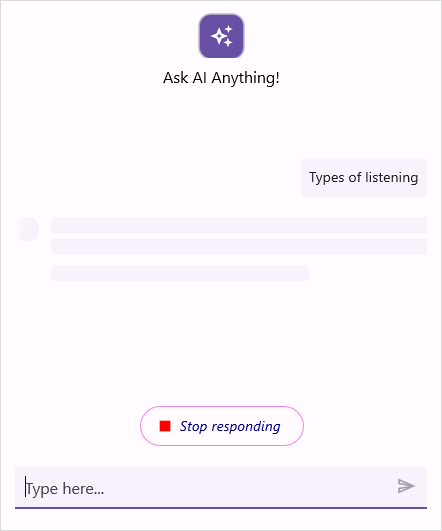
To style the stop responding view based on its appearance, set values to the built-in keys in the resource dictionary.
| Key | Description |
|---|---|
| SfAIAssistViewStopRespondingBackground | Background color of the stop responding view. |
| SfAIAssistViewStopRespondingIconColor | Icon color of the stop responding view. |
| SfAIAssistViewStopRespondingTextColor | Text color of the stop responding view. |
| SfAIAssistViewStopRespondingFontFamily | Font family used for the stop responding text. |
| SfAIAssistViewStopRespondingFontSize | Font size of the stop responding text. |
| SfAIAssistViewStopRespondingFontAttributes | Font attributes used for the stop responding text. |
| SfAIAssistViewStopRespondingStroke | Stroke color of the stop responding view. |
| SfAIAssistViewStopRespondingStrokeThickness | Stroke thickness of the stop responding view. |
<ContentPage.Resources>
    <syncTheme:SyncfusionThemeDictionary>
        <syncTheme:SyncfusionThemeDictionary.MergedDictionaries>
            <ResourceDictionary>
                <x:String x:Key="SfAIAssistViewTheme">CustomTheme</x:String>
                <Color x:Key="SfAIAssistViewStopRespondingBackground">LightYellow</Color>
                <Color x:Key="SfAIAssistViewStopRespondingIconColor">Red</Color>
                <Color x:Key="SfAIAssistViewStopRespondingTextColor">DarkBlue</Color>
                <x:String x:Key="SfAIAssistViewStopRespondingFontFamily">Segoe UI</x:String>
                <x:Double x:Key="SfAIAssistViewStopRespondingFontSize">14</x:Double>
                <FontAttributes x:Key="SfAIAssistViewStopRespondingFontAttributes">Italic</FontAttributes>
                <Color x:Key="SfAIAssistViewStopRespondingStroke">Violet</Color>
                <x:Double x:Key="SfAIAssistViewStopRespondingStrokeThickness">2</x:Double>
            </ResourceDictionary>
        </syncTheme:SyncfusionThemeDictionary.MergedDictionaries>
    </syncTheme:SyncfusionThemeDictionary>
</ContentPage.Resources>
public partial class MainPage : ContentPage
{
public MainPage()
{
InitializeComponent();
ResourceDictionary dictionary = new ResourceDictionary();
dictionary.Add("SfAIAssistViewTheme", "CustomTheme");
dictionary.Add("SfAIAssistViewStopRespondingBackground", Colors.LightYellow);
dictionary.Add("SfAIAssistViewStopRespondingIconColor", Colors.Red);
dictionary.Add("SfAIAssistViewStopRespondingTextColor", Colors.DarkBlue);
dictionary.Add("SfAIAssistViewStopRespondingFontFamily", "Segoe UI");
dictionary.Add("SfAIAssistViewStopRespondingFontSize", 14.0);
dictionary.Add("SfAIAssistViewStopRespondingFontAttributes", FontAttributes.Italic);
dictionary.Add("SfAIAssistViewStopRespondingStroke", Colors.Violet);
dictionary.Add("SfAIAssistViewStopRespondingStrokeThickness", 2.0);
this.Resources.Add(dictionary);
}
}
Text selection styling
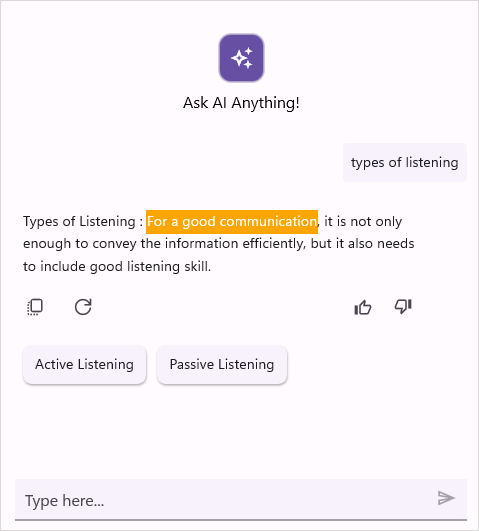
To modify the highlight color of selected text, you need to update the value associated with the built-in key SfAIAssistViewSelectionTextHighLightColor in the resource dictionary.
| Key | Description |
|---|---|
| SfAIAssistViewSelectionTextHighLightColor | Color to highlight the selected text. |
<ContentPage.Resources>
    <core:SyncfusionThemeDictionary>
        <core:SyncfusionThemeDictionary.MergedDictionaries>
            <ResourceDictionary>
                <x:String x:Key="SfAIAssistViewTheme">CustomTheme</x:String>
                <Color x:Key="SfAIAssistViewSelectionTextHighLightColor">Orange</Color>
            </ResourceDictionary>
        </core:SyncfusionThemeDictionary.MergedDictionaries>
    </core:SyncfusionThemeDictionary>
</ContentPage.Resources>
public partial class MainPage : ContentPage
{
public MainPage()
{
InitializeComponent();
ResourceDictionary dictionary = new ResourceDictionary();
dictionary.Add("SfAIAssistViewTheme", "CustomTheme");
dictionary.Add("SfAIAssistViewSelectionTextHighlightColor", Colors.Orange);
this.Resources.Add(dictionary);
}
}
Common suggestions styling
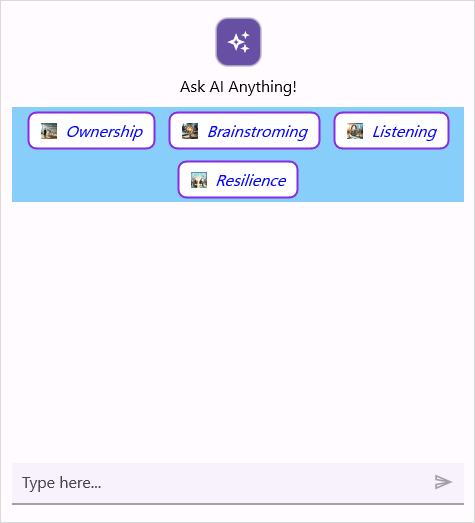
To style the common suggestion view based on its appearance, set values to the built-in keys in the resource dictionary.
| Key | Description |
|---|---|
| SfAIAssistViewHeaderSuggestionBackground | Background color of the common suggestions view. |
| SfAIAssistViewHeaderSuggestionItemStroke | Stroke color for the common suggestion item. |
| SfAIAssistViewHeaderSuggestionItemStrokeThickness | Stroke thickness for the common suggestion item. |
| SfAIAssistViewHeaderSuggestionItemBackground | Background color of an item in the common suggestions. |
| SfAIAssistViewHeaderSuggestionItemTextColor | Text color of an item in the common suggestions. |
| SfAIAssistViewHeaderSuggestionItemFontSize | Font size of an item in the common suggestions. |
| SfAIAssistViewHeaderSuggestionItemFontFamily | Font family of an item in the common suggestions. |
| SfAIAssistViewHeaderSuggestionItemFontAttribute | Font attributes of an item in the common suggestions. |
<ContentPage.Resources>
    <syncTheme:SyncfusionThemeDictionary>
        <syncTheme:SyncfusionThemeDictionary.MergedDictionaries>
            <ResourceDictionary>
                <x:String x:Key="SfAIAssistViewTheme">CustomTheme</x:String>
                <Color x:Key="SfAIAssistViewHeaderSuggestionBackground">LightSkyBlue</Color>
                <Color x:Key="SfAIAssistViewHeaderSuggestionItemStroke">BlueViolet</Color>
                <x:Double x:Key="SfAIAssistViewHeaderSuggestionItemStrokeThickness">2</x:Double>
                <Color x:Key="SfAIAssistViewHeaderSuggestionItemBackground">White</Color>
                <Color x:Key="SfAIAssistViewHeaderSuggestionItemTextColor">Blue</Color>
                <x:Double x:Key="SfAIAssistViewHeaderSuggestionItemFontSize">16</x:Double>
                <FontAttributes x:Key="SfAIAssistViewHeaderSuggestionItemFontAttribute">Italic</FontAttributes>
                <x:String x:Key="SfAIAssistViewHeaderSuggestionItemFontFamily">Roboto-Medium</x:String>
            </ResourceDictionary>
        </syncTheme:SyncfusionThemeDictionary.MergedDictionaries>
    </syncTheme:SyncfusionThemeDictionary>
</ContentPage.Resources>
public partial class MainPage : ContentPage
{
public MainPage()
{
InitializeComponent();
ResourceDictionary dictionary = new ResourceDictionary();
dictionary.Add("SfAIAssistViewTheme", "CustomTheme");
dictionary.Add("SfAIAssistViewHeaderSuggestionBackground", Colors.LightSkyBlue);
dictionary.Add("SfAIAssistViewHeaderSuggestionItemStroke", Colors.BlueViolet);
dictionary.Add("SfAIAssistViewHeaderSuggestionItemStrokeThickness", 2.0);
dictionary.Add("SfAIAssistViewHeaderSuggestionItemBackground", Colors.White);
dictionary.Add("SfAIAssistViewHeaderSuggestionItemTextColor", Colors.Blue);
dictionary.Add("SfAIAssistViewHeaderSuggestionItemFontSize", 16.0);
dictionary.Add("SfAIAssistViewHeaderSuggestionItemFontAttribute", FontAttributes.Italic);
dictionary.Add("SfAIAssistViewHeaderSuggestionItemFontFamily", "Roboto-Medium");
this.Resources.Add(dictionary);
}
}
Scroll to bottom button styling
To style the scroll to bottom button view based on its appearance, set values to the built-in keys in the resource dictionary.
| Key | Description |
|---|---|
| SfAIAssistViewScrollToBottomButtonBackground | Background color of the scroll to bottom button view. |
| SfAIAssistViewScrollToBottomButtonIconColor | Color of the scroll to bottom button. |
<ContentPage.Resources>
    <core:SyncfusionThemeDictionary>
        <core:SyncfusionThemeDictionary.MergedDictionaries>
            <ResourceDictionary>
                <x:String x:Key="SfAIAssistViewTheme">CustomTheme</x:String>
                <Color x:Key="SfAIAssistViewScrollToBottomButtonBackground">Orange</Color>
                <Color x:Key="SfAIAssistViewScrollToBottomButtonIconColor">White</Color>
            </ResourceDictionary>
        </core:SyncfusionThemeDictionary.MergedDictionaries>
    </core:SyncfusionThemeDictionary>
</ContentPage.Resources>
public partial class MainPage : ContentPage
{
public MainPage()
{
InitializeComponent();
ResourceDictionary dictionary = new ResourceDictionary();
dictionary.Add("SfAIAssistViewTheme", "CustomTheme");
dictionary.Add("SfAIAssistViewScrollToBottomButtonBackground", Colors.Orange);
dictionary.Add("SfAIAssistViewScrollToBottomButtonIconColor", Colors.White);
this.Resources.Add(dictionary);
}
}Action button styling
To style the action button view based on its appearance, set values to the built-in keys in the resource dictionary.
| Key | Description |
|---|---|
| SfAIAssistViewActionButtonBackground | Background color of the action button. |
| SfAIAssistViewActionButtonIconColor | Color of the action button. |
| SfAIAssistViewActionButtonViewTextColor | Text color of an item in the action button. |
| SfAIAssistViewActionButtonsPopupBackground | Background color of the action buttons view. |
<ContentPage.Resources>
    <core:SyncfusionThemeDictionary>
        <core:SyncfusionThemeDictionary.MergedDictionaries>
            <ResourceDictionary>
                <x:String x:Key="SfAIAssistViewTheme">CustomTheme</x:String>
                <Color x:Key="SfAIAssistViewActionButtonBackground">Orange</Color>
                <Color x:Key="SfAIAssistViewActionButtonIconColor">White</Color>
                <Color x:Key="SfAIAssistViewActionButtonViewTextColor">Black</Color>
                <Color x:Key="SfAIAssistViewActionButtonsPopupBackground">LightGray</Color>
            </ResourceDictionary>
        </core:SyncfusionThemeDictionary.MergedDictionaries>
    </core:SyncfusionThemeDictionary>
</ContentPage.Resources>
public partial class MainPage : ContentPage
{
public MainPage()
{
InitializeComponent();
ResourceDictionary dictionary = new ResourceDictionary();
dictionary.Add("SfAIAssistViewTheme", "CustomTheme");
dictionary.Add("SfAIAssistViewActionButtonBackground", Colors.Orange);
dictionary.Add("SfAIAssistViewActionButtonIconColor", Colors.White);
dictionary.Add("SfAIAssistViewActionButtonViewTextColor", Colors.Black);
dictionary.Add("SfAIAssistViewActionButtonsPopupBackground", Colors.LightGray);
this.Resources.Add(dictionary);
}
}Response suggestion header text styling
To style the response suggestion header text view based on its appearance, set values to the built-in keys in the resource dictionary.
| Key | Description |
|---|---|
| SfAIAssistViewSuggestionHeaderTextColor | Text color of the response suggestion header text. |
| SfAIAssistViewSuggestionHeaderFontSize | Font size of the response suggestion header text. |
| SfAIAssistViewSuggestionHeaderFontFamily | Font family of the response suggestion header text. |
| SfAIAssistViewSuggestionHeaderFontAttributes | Font attributes of the response suggestion header text. |
<ContentPage.Resources>
    <syncTheme:SyncfusionThemeDictionary>
        <syncTheme:SyncfusionThemeDictionary.MergedDictionaries>
            <ResourceDictionary>
                <x:String x:Key="SfAIAssistViewTheme">CustomTheme</x:String>
                <Color x:Key="SfAIAssistViewSuggestionHeaderTextColor">DarkBlue</Color>
                <x:Double x:Key="SfAIAssistViewSuggestionHeaderFontSize">14</x:Double>
                <x:String x:Key="SfAIAssistViewSuggestionHeaderFontFamily">Roboto-Medium</x:String>
                <FontAttributes x:Key="SfAIAssistViewSuggestionHeaderFontAttributes">Bold</FontAttributes>
            </ResourceDictionary>
        </syncTheme:SyncfusionThemeDictionary.MergedDictionaries>
    </syncTheme:SyncfusionThemeDictionary>
</ContentPage.Resources>
public partial class MainPage : ContentPage
{
public MainPage()
{
InitializeComponent();
ResourceDictionary dictionary = new ResourceDictionary();
dictionary.Add("SfAIAssistViewTheme", "CustomTheme");
dictionary.Add("SfAIAssistViewSuggestionHeaderTextColor", Colors.DarkBlue);
dictionary.Add("SfAIAssistViewSuggestionHeaderFontSize", 14);
dictionary.Add("SfAIAssistViewSuggestionHeaderFontFamily", "Roboto-Medium");
dictionary.Add("SfAIAssistViewSuggestionHeaderFontAttributes", FontAttributes.Bold);
this.Resources.Add(dictionary);
}
}AutoComplete suggestion item styling
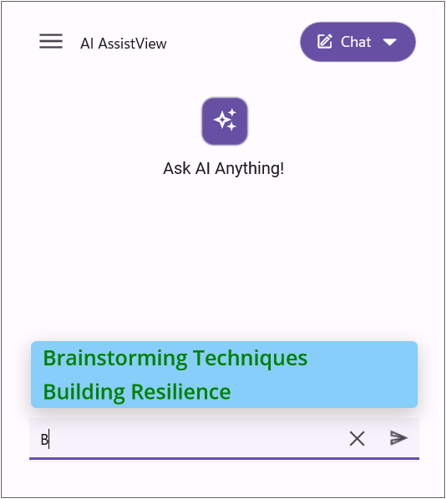
To style the autocomplete suggestion overlay view based on its appearance, set values to the built-in keys in the resource dictionary.
| Key | Description |
|---|---|
| SfAIAssistViewAutoCompleteSuggestionBackground | Background color of the autocomplete suggestion overlay. |
| SfAIAssistViewAutoCompleteSuggestionItemBackground | Background color of an item in the autocomplete suggestion overlay. |
| SfAIAssistViewAutoCompleteSuggestionItemTextColor | Text color of an item in the autocomplete suggestion overlay. |
| SfAIAssistViewAutoCompleteSuggestionItemFontFamily | Font family of an item in the autocomplete suggestion overlay. |
| SfAIAssistViewAutoCompleteSuggestionItemFontSize | Font size of an item in the autocomplete suggestion overlay. |
| SfAIAssistViewAutoCompleteSuggestionItemFontAttributes | Font attributes of an item in the autocomplete suggestion overlay. |
<ContentPage.Resources>
    <syncTheme:SyncfusionThemeDictionary>
        <syncTheme:SyncfusionThemeDictionary.MergedDictionaries>
            <ResourceDictionary>
                <x:String x:Key="SfAIAssistViewTheme">CustomTheme</x:String>
                <Color x:Key="SfAIAssistViewAutoCompleteSuggestionBackground">Orange</Color>
                <Color x:Key="SfAIAssistViewAutoCompleteSuggestionItemBackground">LightSkyBlue</Color>
                <Color x:Key="SfAIAssistViewAutoCompleteSuggestionItemTextColor">Green</Color>
                <x:String x:Key="SfAIAssistViewAutoCompleteSuggestionItemFontFamily">OpenSansSemibold</x:String>
                <x:Double x:Key="SfAIAssistViewAutoCompleteSuggestionItemFontSize">20</x:Double>
                <FontAttributes x:Key="SfAIAssistViewAutoCompleteSuggestionItemFontAttributes">Bold</FontAttributes>
            </ResourceDictionary>
        </syncTheme:SyncfusionThemeDictionary.MergedDictionaries>
    </syncTheme:SyncfusionThemeDictionary>
</ContentPage.Resources>
public partial class MainPage : ContentPage
{
public MainPage()
{
InitializeComponent();
ResourceDictionary dictionary = new ResourceDictionary();
dictionary.Add("SfAIAssistViewTheme", "CustomTheme");
dictionary.Add("SfAIAssistViewAutoCompleteSuggestionBackground", Colors.Orange);
dictionary.Add("SfAIAssistViewAutoCompleteSuggestionItemBackground", Colors.LightSkyBlue);
dictionary.Add("SfAIAssistViewAutoCompleteSuggestionItemTextColor", Colors.Green);
dictionary.Add("SfAIAssistViewAutoCompleteSuggestionItemFontFamily", "OpenSansSemibold");
dictionary.Add("SfAIAssistViewAutoCompleteSuggestionItemFontSize", 20.0);
dictionary.Add("SfAIAssistViewAutoCompleteSuggestionItemFontAttributes", FontAttributes.Bold);
this.Resources.Add(dictionary);
}
}
Time break styling
To style the time break view based on its appearance, set values to the built-in keys in the resource dictionary.
| Key | Description |
|---|---|
| SfAIAssistViewTimeBreakLabelTextColor | Text color of the time break label. |
| SfAIAssistViewTimeBreakLabelFontSize | Font size of the time break label. |
| SfAIAssistViewTimeBreakLabelFontFamily | Font family of the time break label. |
| SfAIAssistViewTimeBreakLabelFontAttributes | Font attributes of the time break label. |
| SfAIAssistViewTimeBreakSeparatorHeightRequest | Height of the time break separator line. |
| SfAIAssistViewTimeBreakSeparatorBackground | Background color of the time break separator line. |
<ContentPage.Resources>
    <syncTheme:SyncfusionThemeDictionary>
        <syncTheme:SyncfusionThemeDictionary.MergedDictionaries>
            <ResourceDictionary>
                <x:String x:Key="SfAIAssistViewTheme">CustomTheme</x:String>
                <Color x:Key="SfAIAssistViewTimeBreakLabelTextColor">Blue</Color>
                <x:Double x:Key="SfAIAssistViewTimeBreakLabelFontSize">15</x:Double>
                <x:String x:Key="SfAIAssistViewTimeBreakLabelFontFamily">OpenSansSemibold</x:String>
                <FontAttributes x:Key="SfAIAssistViewTimeBreakLabelFontAttributes">Bold</FontAttributes>
                <x:Double x:Key="SfAIAssistViewTimeBreakSeparatorHeightRequest">4</x:Double>
                <Color x:Key="SfAIAssistViewTimeBreakSeparatorBackground">LightSkyBlue</Color>
            </ResourceDictionary>
        </syncTheme:SyncfusionThemeDictionary.MergedDictionaries>
    </syncTheme:SyncfusionThemeDictionary>
</ContentPage.Resources>
public partial class MainPage : ContentPage
{
public MainPage()
{
InitializeComponent();
ResourceDictionary dictionary = new ResourceDictionary();
dictionary.Add("SfAIAssistViewTheme", "CustomTheme");
dictionary.Add("SfAIAssistViewTimeBreakLabelTextColor", Colors.Blue);
dictionary.Add("SfAIAssistViewTimeBreakLabelFontSize", 15.0);
dictionary.Add("SfAIAssistViewTimeBreakLabelFontFamily", "OpenSansSemibold");
dictionary.Add("SfAIAssistViewTimeBreakLabelFontAttributes", FontAttributes.Bold);
dictionary.Add("SfAIAssistViewTimeBreakSeparatorHeightRequest", 4.0);
dictionary.Add("SfAIAssistViewTimeBreakSeparatorBackground", Colors.LightSkyBlue);
this.Resources.Add(dictionary);
}
}Editor expansion button styling
To style the editor expansion button view based on its appearance, set values to the built-in keys in the resource dictionary.
| Key | Description |
|---|---|
| SfAIAssistViewExpandViewBackground | Background color of the editor expansion button. |
| SfAIAssistViewExpandViewStroke | Stroke color of the editor expansion button. |
| SfAIAssistViewExpandIconColor | Icon color of the editor expansion button. |
<ContentPage.Resources>
    <syncTheme:SyncfusionThemeDictionary>
        <syncTheme:SyncfusionThemeDictionary.MergedDictionaries>
            <ResourceDictionary>
                <x:String x:Key="SfAIAssistViewTheme">CustomTheme</x:String>
                <Color x:Key="SfAIAssistViewExpandViewBackground">Blue</Color>
                <Color x:Key="SfAIAssistViewExpandViewStroke">Orange</Color>
                <Color x:Key="SfAIAssistViewExpandIconColor">Red</Color>
            </ResourceDictionary>
        </syncTheme:SyncfusionThemeDictionary.MergedDictionaries>
    </syncTheme:SyncfusionThemeDictionary>
</ContentPage.Resources>
public partial class MainPage : ContentPage
{
public MainPage()
{
InitializeComponent();
ResourceDictionary dictionary = new ResourceDictionary();
dictionary.Add("SfAIAssistViewTheme", "CustomTheme");
dictionary.Add("SfAIAssistViewExpandViewBackground", Colors.Blue);
dictionary.Add("SfAIAssistViewExpandViewStroke", Colors.Orange);
dictionary.Add("SfAIAssistViewExpandIconColor", Colors.Red);
this.Resources.Add(dictionary);
}
}Voice input styling
To style the voice input view based on its appearance, set values to the built-in keys in the resource dictionary.
| Key | Description |
|---|---|
| SfAIAssistViewMicViewNormalBackground | Background color of the microphone view in the normal state. |
| SfAIAssistViewMicViewHoverBackground | Background color of the microphone view in the hover state. |
| SfAIAssistViewMicViewPressedBackground | Background color of the microphone view in the pressed state. |
| SfAIAssistViewMicViewStroke | Stroke color of the microphone view. |
| SfAIAssistViewMicViewStrokeThickness | Stroke thickness of the microphone view. |
| SfAIAssistViewMicButtonDefaultIconColor | Default icon color of the microphone button. |
| SfAIAssistViewMicButtonPressedIconColor | Icon color of the microphone button in the pressed state. |
<ContentPage.Resources>
    <syncTheme:SyncfusionThemeDictionary>
        <syncTheme:SyncfusionThemeDictionary.MergedDictionaries>
            <ResourceDictionary>
                <x:String x:Key="SfAIAssistViewTheme">CustomTheme</x:String>
                <Color x:Key="SfAIAssistViewMicViewNormalBackground">Blue</Color>
                <Color x:Key="SfAIAssistViewMicViewHoverBackground">LightBlue</Color>
                <Color x:Key="SfAIAssistViewMicViewPressedBackground">Violet</Color>
                <Color x:Key="SfAIAssistViewMicViewStroke">Red</Color>
                <x:Double x:Key="SfAIAssistViewMicViewStrokeThickness">3</x:Double>
                <Color x:Key="SfAIAssistViewMicButtonDefaultIconColor">Orange</Color>
                <Color x:Key="SfAIAssistViewMicButtonPressedIconColor">Green</Color>
            </ResourceDictionary>
        </syncTheme:SyncfusionThemeDictionary.MergedDictionaries>
    </syncTheme:SyncfusionThemeDictionary>
</ContentPage.Resources>
public partial class MainPage : ContentPage
{
public MainPage()
{
InitializeComponent();
ResourceDictionary dictionary = new ResourceDictionary();
dictionary.Add("SfAIAssistViewTheme", "CustomTheme");
dictionary.Add("SfAIAssistViewMicViewNormalBackground", Colors.Blue);
dictionary.Add("SfAIAssistViewMicViewHoverBackground", Colors.LightBlue);
dictionary.Add("SfAIAssistViewMicViewPressedBackground", Colors.Violet);
dictionary.Add("SfAIAssistViewMicViewStroke", Colors.Red);
dictionary.Add("SfAIAssistViewMicViewStrokeThickness", 3.0);
dictionary.Add("SfAIAssistViewMicButtonDefaultIconColor", Colors.Orange);
dictionary.Add("SfAIAssistViewMicButtonPressedIconColor", Colors.Green);
this.Resources.Add(dictionary);
}
}