Show Password Character in .NET MAUI Masked Entry
21 Jul 20263 minutes to read
The .NET MAUI Masked Entry control can be used as a password text box by setting a character for the PasswordChar property. To improve the user experience, the most-recently typed character can remain visible briefly before being masked by using the PasswordDelayDuration property.
Prerequisites
Before using the SfMaskedEntry, ensure the following NuGet package is installed in your .NET MAUI project:
Syncfusion.Maui.Inputs
For a step-by-step setup, refer to the Getting Started documentation.
Password Char
The PasswordChar property of type char defines the character that is displayed in place of each typed character. The default value is '\0', which means the typed characters are shown normally. When set to any other value (for example, * or •), all typed characters are masked with that character, making the control behave like a password text box.
<editors:SfMaskedEntry x:Name="maskedEntry"
                       WidthRequest="200"
                       Mask="\w+"
                       MaskType="RegEx"
                       PasswordChar="*"/>
SfMaskedEntry maskedEntry = new SfMaskedEntry();
maskedEntry.WidthRequest = 200;
maskedEntry.Mask = "\w+";
maskedEntry.MaskType = MaskedEntryMaskType.RegEx;
maskedEntry.PasswordChar = '*';
Password Delay Duration
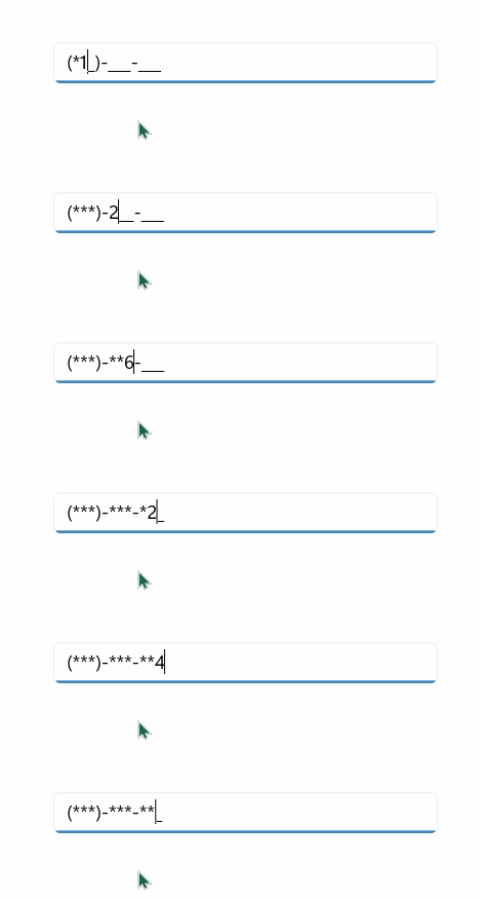
The PasswordDelayDuration property of type int controls how long (in milliseconds) the most-recently typed character remains visible before being replaced by the PasswordChar. This provides brief visual confirmation to the user while preserving password privacy. The default value is 0, which masks the character immediately. Set the value to a positive number to enable the delay.
When the control loses focus, the timer is canceled and the most-recently typed character is masked immediately. The delay is reset for each new character typed.
<editors:SfMaskedEntry x:Name="passwordEntry"
                       WidthRequest="200"
                       Mask="(000)-000-000"
                       MaskType="Simple"
                       PasswordChar="*"
                       PasswordDelayDuration="2000"/>
SfMaskedEntry passwordEntry = new SfMaskedEntry
{
WidthRequest = 200,
Mask = "(000)-000-000",
MaskType = MaskedEntryMaskType.Simple,
PasswordChar = '*',
PasswordDelayDuration = 2000
};In the example above, each character is shown for 2000 milliseconds (2 seconds) before being replaced by *.
The following GIF demonstrates the password delay behavior: each typed character is briefly visible before being masked.