Mask Types in .NET MAUI Masked Entry
18 Nov 20184 minutes to read
The MaskType property of type MaskedEntryMaskType defines the masking format applied to the user input. The default value is MaskedEntryMaskType.Simple.
The following table summarizes the differences between the available mask types:
| Mask type | When to use | Format syntax |
|---|---|---|
Simple |
Fixed-format input such as phone numbers, dates, or product keys. | Mask elements (for example, 0, 9, L, >). |
RegEx |
Custom validation patterns such as email addresses, IP addresses, or custom rules. | Standard .NET regular expressions. |
The available mask types are:
- Simple - fixed-format masks built from mask elements.
- RegEx - masks that use standard regular-expression patterns.
Prerequisites
Before using the SfMaskedEntry, ensure the following NuGet package is installed in your .NET MAUI project:
Syncfusion.Maui.Inputs
For a step-by-step setup, refer to the Getting Started documentation.
Simple
Masks that use a combination of letters, digits, and special characters fall into the simple group. Simple masks are mainly used for fixed-length inputs, such as phone numbers, dates, or product keys.
Simple mask elements
| Elements | Description |
|---|---|
| 0 | Digit, required. This element accepts any single digit between 0 and 9. |
| 9 | Digit or space, optional. This element does not allow sign characters. |
| # | Digit or space, optional. Plus (+) and minus (-) signs are allowed. |
| L |
Letter, required. Restricts input to the ASCII letters a-z and A-Z. This mask element is equivalent to [a-zA-Z] in regular expressions. |
| ? |
Letter, optional. Restricts input to the ASCII letters a-z and A-Z. This mask element is equivalent to [a-zA-Z]? in regular expressions. |
| C | Character, optional. Accepts any printable ASCII character. |
| A | Alphanumeric, required. Accepts any digit (0-9) or ASCII letter (a-z, A-Z). |
| < | Shift down. Converts all the characters that follow to lowercase. |
| > | Shift up. Converts all the characters that follow to uppercase. |
Simple mask example
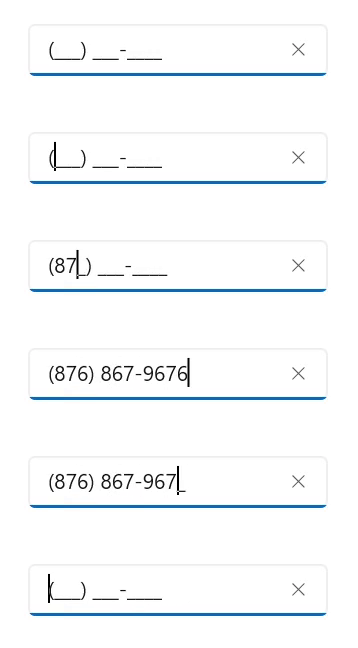
The following example formats input as a U.S. phone number using the Simple mask (000) 000-0000:
<editors:SfMaskedEntry WidthRequest="200"
                       ClearButtonVisibility="WhileEditing"
                       MaskType="Simple"
                       Mask="(000) 000-0000"/>
SfMaskedEntry maskedEntry = new SfMaskedEntry();
maskedEntry.WidthRequest = 200;
maskedEntry.ClearButtonVisibility = ClearButtonVisibility.WhileEditing;
maskedEntry.MaskType = MaskedEntryMaskType.Simple;
maskedEntry.Mask = "(000) 000-0000";The mask renders the input as (123) 456-7890 when the user types the digits 1234567890.
RegEx
RegEx masks use standard regular-expression patterns to validate input, for example [0-9A-Z] for alphanumeric values or [A-Za-z0-9._%-]+@[A-Za-z0-9]+\.[A-Za-z]{2,3} for an email address.
RegEx mask elements
The following table lists the most common regular-expression elements supported by the RegEx mask type:
| Elements | Description |
|---|---|
| [ABC] | Accepts any single character included in the specified set of characters. |
| [^ABC] | Accepts any single character not included in the specified set of characters. |
| [0-9A-Z] | Accepts any digit between 0-9 and character between A-Z. |
| \d | Accepts any digit. Same as [0-9]. |
| \D | Accepts any non digit. Same as [^0-9]. |
| \w | Accepts any word character. \w is the same as [a-zA-Z_0-9]. |
| \W | Accepts any non word character. \W is the same as [^a-zA-Z_0-9]. |
| \s | Accepts any white space characters. |
| \S | Accepts any non white space characters. |
| \S | Accepts any non white space characters. |
| (?=ABC) | Matches a group after the main expression without including it in the result. |
| (?!ABC) | Specifies a group that cannot match after the main expression. |
| {n} | Accepts the input for n number of times. |
| {n,} | Accepts the input for 'n' and more than 'n' number of times. |
| {n,m} | Accepts the input for n minimum number of times and m maximum number of times. |
| + | Accepts one or more matches for the preceding character. |
| * | Accepts zero or more matches for the preceding character. |
| ? | Optional input (Zero or one occurrence of the matching input) |
| | | Acts like a Boolean OR. Matches the expression before or after the |. |
| . | Accepts any character. It can be changed based on culture |
RegEx mask example
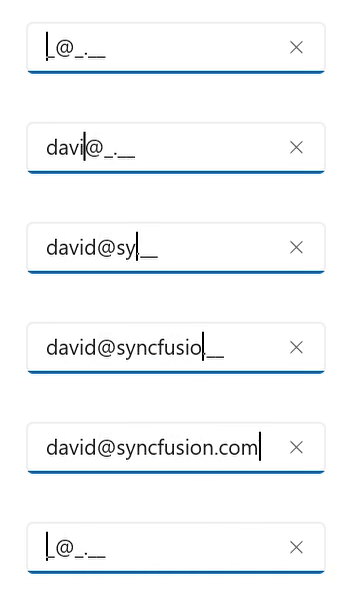
The following example validates an email address using the RegEx mask [A-Za-z0-9._%-]+@[A-Za-z0-9]+\.[A-Za-z]{2,3}:
<editors:SfMaskedEntry WidthRequest="200"
                       ClearButtonVisibility="WhileEditing"
                       MaskType="RegEx"
                       Mask="[A-Za-z0-9._%-]+@[A-Za-z0-9]+\.[A-Za-z]{2,3}"/>
SfMaskedEntry maskedEntry = new SfMaskedEntry();
maskedEntry.WidthRequest = 200;
maskedEntry.ClearButtonVisibility = ClearButtonVisibility.WhileEditing;
maskedEntry.MaskType = MaskedEntryMaskType.RegEx;
maskedEntry.Mask = "[A-Za-z0-9._%-]+@[A-Za-z0-9]+\\.[A-Za-z]{2,3}";The mask accepts strings such as [email protected] and rejects incomplete or malformed values.