Culture in .NET MAUI Masked Entry
18 Nov 20181 minute to read
Prerequisites
Before using the SfMaskedEntry, ensure the following NuGet package is installed in your .NET MAUI project:
Syncfusion.Maui.Inputs
For a step-by-step setup, refer to the Getting Started documentation.
Setting culture
The Masked Entry allows you to set any Culture support for currency symbols, date separators, time separators, group separators, and decimal separators by using the following special symbols.
| Characters | Description |
|---|---|
| . | Decimal separator determined by current culture. |
| , | Group separator determined by current culture. |
| / | Date separator determined by current culture. |
| : | Time separator determined by current culture. |
| $ | Currency symbol determined by current culture. |
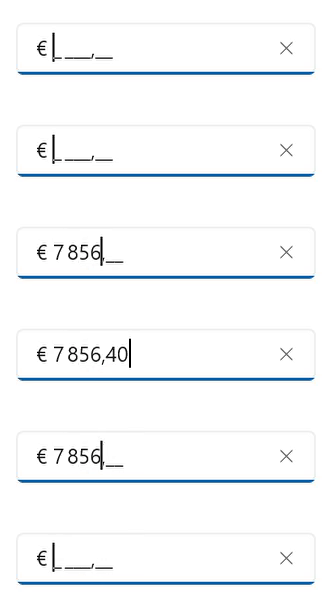
The following example shows how to set the France culture for the currency symbol, group separator, and decimal separator.
SfMaskedEntry maskedEntry = new SfMaskedEntry();
maskedEntry.WidthRequest = 200;
maskedEntry.MaskType = MaskedEntryMaskType.Simple;
maskedEntry.Mask = "$ 0,000.00";
maskedEntry.Culture = new CultureInfo("fr-FR");
Based on the France Culture, the ‘$’ will be localized to ‘€’; ‘.’ will be localized to ‘,’ and ‘,’ will be localized to ‘ ‘(single white space).