About Syncfusion® .NET MAUI Masked Entry Control
18 Nov 20185 minutes to read
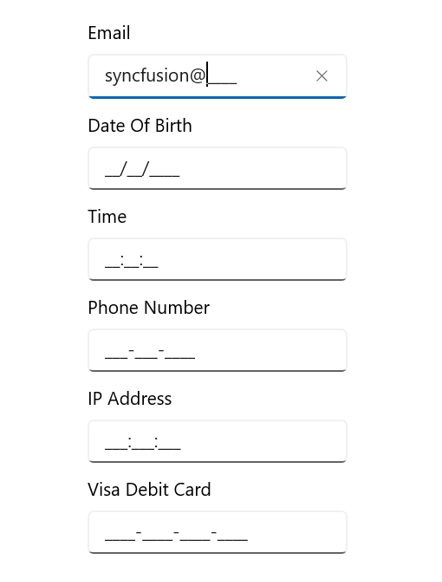
The Syncfusion® .NET MAUI Masked Entry is an advanced version of the input control that restricts input of certain characters, text, and numbers by using a mask pattern. This control creates a template for providing information such as telephone numbers, email IDs, IP addresses, product keys, and more.
Business use cases
- Form-based applications that require structured input such as phone numbers, email addresses, or identification numbers.
- Enterprise applications that enforce validated and formatted data entry for critical fields.
- Financial and business systems that require standardized input formats for codes, keys, or account numbers.
- Data entry applications that need input validation and formatting to improve data accuracy and consistency.
Key features
- Mask type support allows defining fixed or variable length input patterns using simple or regular expression masks.
- Prompt character customization allows setting default placeholder characters when input is not provided.
- Value handling support allows entering values and performing clipboard operations based on configured formats.
- Value mask format support allows controlling how values are stored and displayed, including prompt characters and literals.
- UI customization support allows modifying the appearance of the control to match application design.
Globalization
The following table summarizes the globalization support available in this control.
 Full Support
 Not Applicable
| Control | Localization | RTL | Time zone | Screen reader | Keyboard navigation |
|---|---|---|---|---|---|
| Masked Entry | |
|
|
|
|
Related controls
- ComboBox for selecting values from predefined lists with optional input.
- Numeric Entry for structured numeric input with validation and formatting.
- Text Input Layout for enhancing input fields with labels and validation UI.
See Also
- Getting Started shows a step‑by‑step guide to begin using the Masked Entry control.
- Mask Types explains how to configure mask patterns and input formats.
- Features highlights built‑in options for validation, placeholders, and easy formatting.
- UI Kit provides interactive demos and ready‑made UI examples.
Resources
Feature Tour
Get a quick overview of key features and capabilities to kick start your journey.
Explore Features
Tutorial Videos
Watch step‑by‑step video guides to quickly understand concepts and implementation.
Watch now
Knowledge Base
Find practical solutions, troubleshooting tips and how‑to guides for common scenarios.
Search KB's
Use Case Sample
Explore a real-world application that demonstrates the practical use of the Masked Entry.
View Sample