Overview of .NET MAUI TreeView
18 Nov 20185 minutes to read
The Syncfusion® .NET MAUI TreeView is a data-oriented control that displays the hierarchical data,such as organizational structures and nested connections, within your application. It provides a user-friendly way to interact with complex data structures and navigate through different levels of information by allowing users to expand and collapse nodes to reveal or hide underlying information.
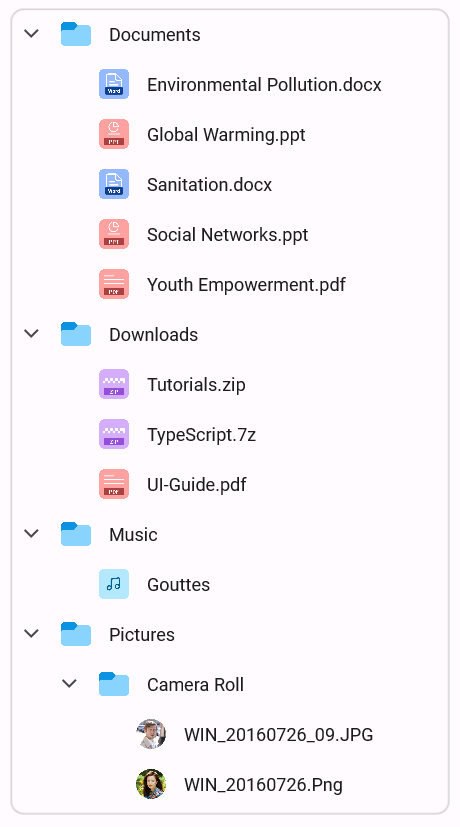
Business use cases
- Applications that require displaying hierarchical data such as folders, organizational structures, or category trees.
- File Explorer and Document Management systems that support navigation through nested directories and items.
- Data-driven applications that organize related information into expandable and collapsible groups.
- Business applications that require intuitive navigation through multi-level structured data.
Key features
- Optimized performance allows smooth rendering using efficient view reuse techniques.
- Data binding allows binding hierarchical data or manually creating unbound tree structures.
- Selection allows selecting nodes using multiple selection modes and keyboard navigation.
- Item templating allows customizing the appearance of each node for rich UI design.
- Expand and collapse allows revealing or hiding child nodes for better navigation.
- Drag and drop allows reordering or reorganizing nodes interactively.
- Filtering allows locating nodes quickly using built-in text matching or custom predicates.
- Sorting allows ordering nodes in ascending or descending order using one or more sort descriptors.
Globalization
The following table summarizes the globalization support available in this control.
 Full Support
 Partial Support
 Not Applicable
| Control | Localization | RTL | Time zone | Screen reader | Keyboard navigation |
|---|---|---|---|---|---|
| TreeView | |
|
|
|
|
Related controls
- TreeMap for visualizing hierarchical data using a graphical layout.
- ListView for displaying flat data collections.
- Accordion for organizing grouped data into expandable and collapsible sections.
See Also
- Getting Started shows a step‑by‑step guide to begin using the TreeView control.
- MVVM explains how to bind hierarchical data and configure structure.
- Customization helps customize node appearance and behavior.
- UI Kit provides interactive demos and ready‑made UI examples.
Resources
Feature Tour
Get a quick overview of key features and capabilities to kick start your journey.
Explore Features
Tutorial Videos
Watch step‑by‑step video guides to quickly understand concepts and implementation.
Watch now
Knowledge Base
Find practical solutions, troubleshooting tips and how‑to guides for common scenarios.
Search KB's