Pointers in Xamarin Linear Gauge (SfLinearGauge)
8 Jan 202524 minutes to read
SfLinearGauge provides support to mark the values using BarPointer and SymbolPointer.
Adding bar pointer to scale
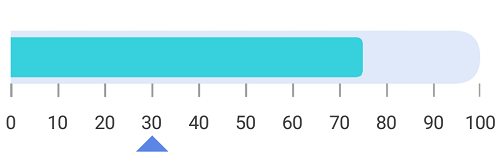
BarPointer is used to mark the scale values. It starts at the beginning of gauge and ends at the pointer value.
<gauge:SfLinearGauge>

             <gauge:SfLinearGauge.Scales>
                <gauge:LinearScale ScaleBarColor="#e0e9f9" LabelColor="#424242" ScaleBarSize = "20" LabelFontSize ="14" MinorTicksPerInterval ="0">
                    <gauge:LinearScale.MajorTickSettings>
                        <gauge:LinearTickSettings Thickness="1" Color ="#9E9E9E" Length = "10"/>
                    </gauge:LinearScale.MajorTickSettings>
                    <gauge:LinearScale.Pointers>
                        <gauge:BarPointer  Value="75" EnableAnimation = "false" Color = "#36d1dc" />
                    </gauge:LinearScale.Pointers>
                </gauge:LinearScale>
            </gauge:SfLinearGauge.Scales>

        </gauge:SfLinearGauge>
SfLinearGauge linearGauge = new SfLinearGauge();
LinearScale linearScale = new LinearScale();
linearScale.ScaleBarColor = Color.FromHex("#e0e9f9");
linearScale.LabelColor = Color.FromHex("#424242");
linearScale.ScaleBarSize = 20;
linearScale.LabelFontSize = 14;
linearScale.MinorTicksPerInterval = 0;
linearScale.MajorTickSettings.Color = Color.FromHex("#9E9E9E");
linearScale.MajorTickSettings.Thickness = 1;
linearScale.MajorTickSettings.Length = 10;
BarPointer barPointer = new BarPointer();
barPointer.Value = 75;
barPointer.EnableAnimation = false;
barPointer.Color = Color.FromHex("#36d1dc");
linearScale.Pointers.Add(barPointer);
linearGauge.Scales.Add(linearScale);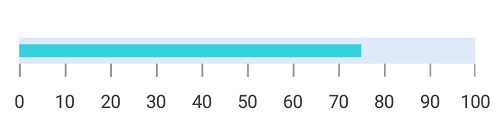
Bar pointer customization
The bar pointer’s UI is customized by using the Color and Thickness properties.
<gauge:SfLinearGauge>

           <gauge:SfLinearGauge.Scales>
                <gauge:LinearScale ScaleBarColor="#e0e9f9" LabelColor="#424242" ScaleBarSize = "40" LabelFontSize ="14" MinorTicksPerInterval ="0">
                    <gauge:LinearScale.MajorTickSettings>
                        <gauge:LinearTickSettings Thickness="1" Color ="#9E9E9E" Length = "10"/>
                    </gauge:LinearScale.MajorTickSettings>
                    <gauge:LinearScale.Pointers>
                        <gauge:BarPointer  Value="75" EnableAnimation = "false" Color = "#36d1dc" Thickness = "20"/>
                    </gauge:LinearScale.Pointers>
                </gauge:LinearScale>
            </gauge:SfLinearGauge.Scales>

        </gauge:SfLinearGauge>
SfLinearGauge linearGauge = new SfLinearGauge();
LinearScale linearScale = new LinearScale();
linearScale.ScaleBarColor = Color.FromHex("#e0e9f9");
linearScale.LabelColor = Color.FromHex("#424242");
linearScale.ScaleBarSize = 40;
linearScale.LabelFontSize = 14;
linearScale.MinorTicksPerInterval = 0;
linearScale.MajorTickSettings.Color = Color.FromHex("#9E9E9E");
linearScale.MajorTickSettings.Thickness = 1;
linearScale.MajorTickSettings.Length = 10;
BarPointer barPointer = new BarPointer();
barPointer.Value = 75;
barPointer.Thickness = 20;
barPointer.EnableAnimation = false;
barPointer.Color = Color.FromHex("#36d1dc");
linearScale.Pointers.Add(barPointer);
linearGauge.Scales.Add(linearScale);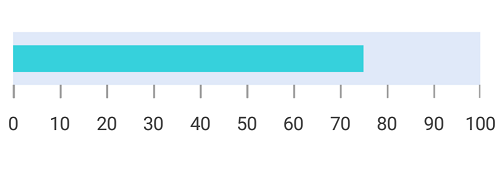
Setting corner radius type for bar pointer
Corners of the BarPointer can be customized by setting the value to the CornerRadiusType property. All corners of bar pointer can be customized using the Start, End, Both, and None options.
CornerRadius property used to reduce the radius of the corners.
<gauge:SfLinearGauge>
	         <gauge:SfLinearGauge.Scales>
                <gauge:LinearScale ScaleBarColor="#e0e9f9" LabelColor="#424242" ScaleBarSize = "40" LabelFontSize ="14" MinorTicksPerInterval ="0">
                    <gauge:LinearScale.MajorTickSettings>
                        <gauge:LinearTickSettings Thickness="1" Color ="#9E9E9E" Length = "10"/>
                    </gauge:LinearScale.MajorTickSettings>
                    <gauge:LinearScale.Pointers>
                        <gauge:BarPointer  Value="75" EnableAnimation = "false" Color = "#36d1dc" Thickness = "20" CornerRadiusType = "Start" CornerRadius = "10"/>
                    </gauge:LinearScale.Pointers>
                </gauge:LinearScale>
            </gauge:SfLinearGauge.Scales>
        </gauge:SfLinearGauge>
SfLinearGauge linearGauge = new SfLinearGauge();
LinearScale linearScale = new LinearScale();
linearScale.ScaleBarColor = Color.FromHex("#e0e9f9");
linearScale.LabelColor = Color.FromHex("#424242");
linearScale.ScaleBarSize = 40;
linearScale.LabelFontSize = 14;
linearScale.MinorTicksPerInterval = 0;
linearScale.MajorTickSettings.Color = Color.FromHex("#9E9E9E");
linearScale.MajorTickSettings.Thickness = 1;
linearScale.MajorTickSettings.Length = 10;
BarPointer barPointer = new BarPointer();
barPointer.Value = 75;
barPointer.Thickness = 20;
barPointer.CornerRadiusType = CornerRadiusType.Start;
barPointer.CornerRadius = 10;
barPointer.EnableAnimation = false;
barPointer.Color = Color.FromHex("#36d1dc");
linearScale.Pointers.Add(barPointer);
linearGauge.Scales.Add(linearScale);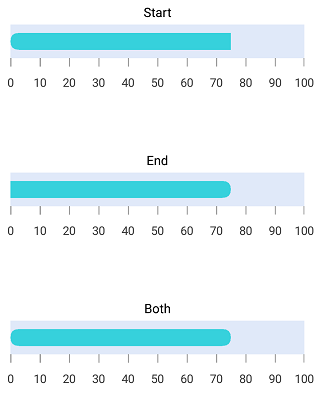
Setting gradient color for bar pointer
You can give smooth color transition to bar pointer to specifying the different colors based on bar pointer’s value by using GradientStops property.
<gauge:SfLinearGauge>

         <gauge:SfLinearGauge.Scales>
                <gauge:LinearScale ScaleBarColor="#F7EDED"  LabelColor="Black" ScaleBarSize="40" CornerRadius="20" CornerRadiusType="Both"
                               LabelFontSize="14" MinimumValue="0" MaximumValue="100" Interval="25" LabelOffset="-10" ShowTicks="False">
                    <gauge:LinearScale.Pointers>
                        <gauge:BarPointer Value="75" CornerRadiusType="Both" CornerRadius="15" Thickness="30" EnableAnimation="False">
                            <gauge:BarPointer.GradientStops>
                                <gauge:GaugeGradientStop Value="10" Color="#f8babf"/>
                                <gauge:GaugeGradientStop Value="40" Color="#ee89a7"/>
                                <gauge:GaugeGradientStop Value="50" Color="#e4548c"/>
                                <gauge:GaugeGradientStop Value="60" Color="#db2575"/>
                            </gauge:BarPointer.GradientStops>
                        </gauge:BarPointer>
                    </gauge:LinearScale.Pointers>
                </gauge:LinearScale>
            </gauge:SfLinearGauge.Scales>

      </gauge:SfLinearGauge>
SfLinearGauge linearGauge = new SfLinearGauge();
LinearScale linearScale = new LinearScale();
linearScale.ScaleBarColor = Color.FromRgb(247, 237, 237);
linearScale.LabelColor = Color.Black;
linearScale.ScaleBarSize = 40;
linearScale.CornerRadius = 20;
linearScale.CornerRadiusType = CornerRadiusType.Both;
linearScale.LabelFontSize = 14;
linearScale.MinimumValue = 0;
linearScale.MaximumValue = 100;
linearScale.Interval = 25;
linearScale.LabelOffset = -10;
linearScale.ShowTicks = false;
BarPointer barPointer = new BarPointer();
barPointer.Value = 75;
barPointer.CornerRadiusType = CornerRadiusType.Both;
barPointer.CornerRadius = 15;
barPointer.Thickness = 30;
barPointer.EnableAnimation = false;
GaugeGradientStop gaugeGradientStop = new GaugeGradientStop();
gaugeGradientStop.Value = 10;
gaugeGradientStop.Color = Color.FromRgb(248, 186, 191);
barPointer.GradientStops.Add(gaugeGradientStop);
GaugeGradientStop gaugeGradientStop1 = new GaugeGradientStop();
gaugeGradientStop1.Value = 40;
gaugeGradientStop1.Color = Color.FromRgb(238, 137, 167);
barPointer.GradientStops.Add(gaugeGradientStop1);
GaugeGradientStop gaugeGradientStop2 = new GaugeGradientStop();
gaugeGradientStop2.Value = 50;
gaugeGradientStop2.Color = Color.FromRgb(228, 84, 140);
barPointer.GradientStops.Add(gaugeGradientStop2);
GaugeGradientStop gaugeGradientStop3 = new GaugeGradientStop();
gaugeGradientStop3.Value = 60;
gaugeGradientStop3.Color = Color.FromRgb(219, 37, 117);
barPointer.GradientStops.Add(gaugeGradientStop3);
linearScale.Pointers.Add(barPointer);
linearGauge.Scales.Add(linearScale);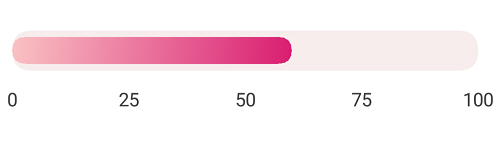
Adding symbol pointer to scale
In SymbolPointer, the value is pointed by a symbol on the scale.
<gauge:SfLinearGauge>

            <gauge:SfLinearGauge.Scales>
                <gauge:LinearScale ScaleBarColor="#e0e9f9" LabelColor="#424242" ScaleBarSize = "40" LabelFontSize ="14" MinorTicksPerInterval ="0">
                    <gauge:LinearScale.MajorTickSettings>
                        <gauge:LinearTickSettings Thickness="1" Color ="#9E9E9E" Length = "10"/>
                    </gauge:LinearScale.MajorTickSettings>
                    <gauge:LinearScale.Pointers>
                        <gauge:BarPointer  Value="75" CornerRadiusType="End" CornerRadius = "10" EnableAnimation = "false" Color = "#36d1dc" Thickness = "20"/>
                        <gauge:SymbolPointer Value ="30" EnableAnimation ="False" Color= "#5b86e5"/>
                    </gauge:LinearScale.Pointers>
                </gauge:LinearScale>
            </gauge:SfLinearGauge.Scales>

        </gauge:SfLinearGauge>
SfLinearGauge linearGauge = new SfLinearGauge();
LinearScale linearScale = new LinearScale();
linearScale.ScaleBarColor = Color.FromHex("#e0e9f9");
linearScale.LabelColor = Color.FromHex("#424242");
linearScale.ScaleBarSize = 40;
linearScale.LabelFontSize = 14;
linearScale.MinimumValue = 0;
linearScale.MaximumValue = 100;
linearScale.Interval = 10;
linearScale.MinorTicksPerInterval = 0;
linearScale.MajorTickSettings.Color = Color.FromHex("#9E9E9E");
linearScale.MajorTickSettings.Thickness = 1;
linearScale.MajorTickSettings.Length = 10;
BarPointer barPointer = new BarPointer();
barPointer.Value = 75;
barPointer.Thickness = 20;
barPointer.CornerRadiusType = CornerRadiusType.End;
barPointer.CornerRadius = 10;
barPointer.EnableAnimation = false;
barPointer.Color = Color.FromHex("#36d1dc");
linearScale.Pointers.Add(barPointer);
SymbolPointer symbolPointer = new SymbolPointer();
symbolPointer.Value = 30;
symbolPointer.EnableAnimation = false;
symbolPointer.Color = Color.FromHex("#5b86e5");
linearScale.Pointers.Add(symbolPointer);
linearGauge.Scales.Add(linearScale);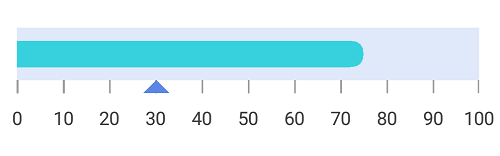
Symbol pointer customization
You can modify the symbol pointer’s size using the Thickness property. The color of the symbol pointer is changed using the Color property.
<gauge:SfLinearGauge>

              <gauge:SfLinearGauge.Scales>
                <gauge:LinearScale ScaleBarColor="#e0e0e0" LabelColor="#424242">
                    <gauge:LinearScale.MajorTickSettings>
                           <gauge:LinearTickSettings Thickness="1"  Color="Gray" Length="15"/>
                    </gauge:LinearScale.MajorTickSettings>
                   <gauge:LinearScale.MinorTickSettings>
                           <gauge:LinearTickSettings Thickness="1"  Color="Gray" Length="7"/>
                   </gauge:LinearScale.MinorTickSettings>
                    <gauge:LinearScale.Pointers>
                        <gauge:SymbolPointer Value="70" Color="DeepSkyBlue" Thickness="15"/>
                    </gauge:LinearScale.Pointers>
                </gauge:LinearScale>
            </gauge:SfLinearGauge.Scales>

        </gauge:SfLinearGauge>
SfLinearGauge linearGauge = new SfLinearGauge();
LinearScale linearScale = new LinearScale();
linearScale.ScaleBarColor = Color.FromHex("#e0e0e0");
linearScale.LabelColor = Color.FromHex("#424242");
linearScale.MajorTickSettings.Thickness = 1;
linearScale.MajorTickSettings.Length = 15;
linearScale.MajorTickSettings.Color = Color.Gray;
linearScale.MinorTickSettings.Color = Color.Gray;
linearScale.MinorTickSettings.Length = 7;
linearScale.MinorTickSettings.Thickness = 1;
SymbolPointer symbolPointer = new SymbolPointer();
symbolPointer.Value = 70;
symbolPointer.Color = Color.DeepSkyBlue;
symbolPointer.Thickness = 15;
linearScale.Pointers.Add(symbolPointer);
linearGauge.Scales.Add(linearScale);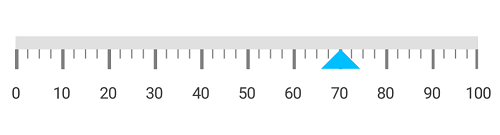
Positioning symbol pointer
You can position the SymbolPointer by using the following two ways:
Setting symbol pointer position
You can customize the position of the SymbolPointer by using the SymbolPointerPosition. The default symbol pointer position is Far.
<gauge:SfLinearGauge>

           <gauge:SfLinearGauge.Scales>
                <gauge:LinearScale ScaleBarColor="#e0e9f9" LabelColor="#424242" ScaleBarSize = "40" LabelFontSize ="14" MinorTicksPerInterval ="0">
                    <gauge:LinearScale.MajorTickSettings>
                        <gauge:LinearTickSettings Thickness="1" Color ="#9E9E9E" Length = "10"/>
                    </gauge:LinearScale.MajorTickSettings>
                    <gauge:LinearScale.Pointers>
                        <gauge:BarPointer  Value="75" CornerRadiusType="End" CornerRadius = "10" EnableAnimation = "false" Color = "#36d1dc" Thickness = "20"/>
                        <gauge:SymbolPointer Value ="30" EnableAnimation ="False" Color= "#5b86e5" SymbolPointerPosition = "Away"/>
                    </gauge:LinearScale.Pointers>
                </gauge:LinearScale>
            </gauge:SfLinearGauge.Scales>

        </gauge:SfLinearGauge>
SfLinearGauge linearGauge = new SfLinearGauge();
LinearScale linearScale = new LinearScale();
linearScale.ScaleBarColor = Color.FromHex("#e0e9f9");
linearScale.LabelColor = Color.FromHex("#424242");
linearScale.ScaleBarSize = 40;
linearScale.LabelFontSize = 14;
linearScale.MinorTicksPerInterval = 0;
linearScale.MajorTickSettings.Color = Color.FromHex("#9E9E9E");
linearScale.MajorTickSettings.Thickness = 1;
linearScale.MajorTickSettings.Length = 10;
BarPointer barPointer = new BarPointer();
barPointer.Value = 75;
barPointer.Thickness = 20;
barPointer.CornerRadiusType = CornerRadiusType.End;
barPointer.CornerRadius = 10;
barPointer.EnableAnimation = false;
barPointer.Color = Color.FromHex("#36d1dc");
linearScale.Pointers.Add(barPointer);
SymbolPointer symbolPointer = new SymbolPointer();
symbolPointer.Value = 30;
symbolPointer.EnableAnimation = false;
symbolPointer.SymbolPointerPosition = SymbolPointerPosition.Away;
symbolPointer.Color = Color.FromHex("#5b86e5");
linearScale.Pointers.Add(symbolPointer);
linearGauge.Scales.Add(linearScale);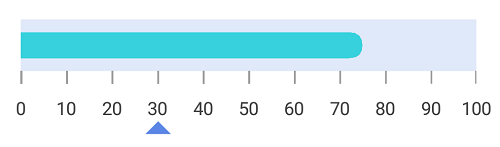
Setting offset for symbol pointer
You can move the SymbolPointer by using the Offset property.
<gauge:SfLinearGauge>
            <gauge:SfLinearGauge.Scales>
                <gauge:LinearScale ScaleBarColor="#e0e9f9" LabelColor="#424242" ScaleBarSize = "40" LabelFontSize ="14" MinorTicksPerInterval ="0">
                    <gauge:LinearScale.MajorTickSettings>
                      <gauge:LinearTickSettings Thickness="1" Color ="#9E9E9E" Length = "10"/>
                    </gauge:LinearScale.MajorTickSettings>
					<gauge:LinearScale.Pointers>
					<gauge:BarPointer  Value="75" CornerRadiusType="End" CornerRadius = "10" EnableAnimation = "false" Color = "#36d1dc" Thickness = "20"/>
					<gauge:SymbolPointer Value ="30" EnableAnimation ="False" Color= "#5b86e5" Offset ="40"/>
				</gauge:LinearScale.Pointers>
                </gauge:LinearScale>
            </gauge:SfLinearGauge.Scales>
        </gauge:SfLinearGauge>
SfLinearGauge linearGauge = new SfLinearGauge();
LinearScale linearScale = new LinearScale();
linearScale.ScaleBarColor = Color.FromHex("#e0e9f9");
linearScale.LabelColor = Color.FromHex("#424242");
linearScale.ScaleBarSize = 40;
linearScale.LabelFontSize = 14;
linearScale.MinorTicksPerInterval = 0;
linearScale.MajorTickSettings.Color = Color.FromHex("#9E9E9E");
linearScale.MajorTickSettings.Thickness = 1;
linearScale.MajorTickSettings.Length = 10;
BarPointer barPointer = new BarPointer();
barPointer.Value = 75;
barPointer.Thickness = 20;
barPointer.CornerRadiusType = CornerRadiusType.End;
barPointer.CornerRadius = 10;
barPointer.EnableAnimation = false;
barPointer.Color = Color.FromHex("#36d1dc");
linearScale.Pointers.Add(barPointer);
SymbolPointer symbolPointer = new SymbolPointer();
symbolPointer.Value = 30;
symbolPointer.EnableAnimation = false;
symbolPointer.Offset = 40;
symbolPointer.Color = Color.FromHex("#5b86e5");
linearScale.Pointers.Add(symbolPointer);
linearGauge.Scales.Add(linearScale);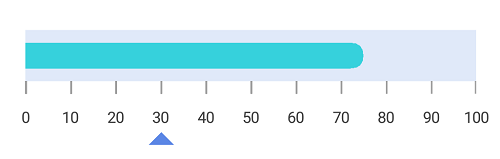
Change symbol pointer shapes
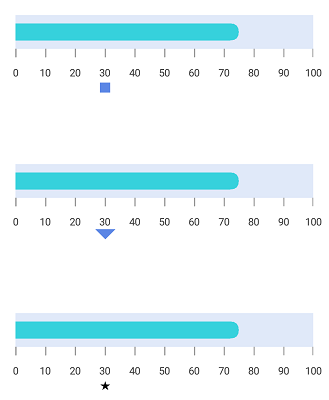
Different types of shapes are used in SymbolPointer to mark the pointer value in scale. You can change the shape of SymbolPointer by using the MarkerShape property in pointer.
<gauge:SfLinearGauge>

            <gauge:SfLinearGauge.Scales>
                <gauge:LinearScale ScaleBarColor="#e0e9f9" LabelColor="#424242" ScaleBarSize = "40" LabelFontSize ="14" MinorTicksPerInterval ="0">
                    <gauge:LinearScale.MajorTickSettings>
                        <gauge:LinearTickSettings Thickness="1" Color ="#9E9E9E" Length = "10"/>
                    </gauge:LinearScale.MajorTickSettings>
                    <gauge:LinearScale.Pointers>
                        <gauge:BarPointer  Value="75" CornerRadiusType="End" CornerRadius = "10" EnableAnimation = "false" Color = "#36d1dc" Thickness = "20"/>
                        <gauge:SymbolPointer Value ="30" EnableAnimation ="False" Color= "#5b86e5" SymbolPointerPosition="Away" MarkerShape = "Circle"/>
                    </gauge:LinearScale.Pointers>
                </gauge:LinearScale>
            </gauge:SfLinearGauge.Scales>

        </gauge:SfLinearGauge>
SfLinearGauge linearGauge = new SfLinearGauge();
LinearScale linearScale = new LinearScale();
linearScale.ScaleBarColor = Color.FromHex("#e0e9f9");
linearScale.LabelColor = Color.FromHex("#424242");
linearScale.ScaleBarSize = 40;
linearScale.LabelFontSize = 14;
linearScale.MinorTicksPerInterval = 0;
linearScale.MajorTickSettings.Color = Color.FromHex("#9E9E9E");
linearScale.MajorTickSettings.Thickness = 1;
linearScale.MajorTickSettings.Length = 10;
BarPointer barPointer = new BarPointer();
barPointer.Value = 75;
barPointer.Thickness = 20;
barPointer.CornerRadiusType = CornerRadiusType.End;
barPointer.CornerRadius = 10;
barPointer.EnableAnimation = false;
barPointer.Color = Color.FromHex("#36d1dc");
linearScale.Pointers.Add(barPointer);
SymbolPointer symbolPointer = new SymbolPointer();
symbolPointer.Value = 30;
symbolPointer.EnableAnimation = false;
symbolPointer.Thickness = 12;
symbolPointer.MarkerShape = MarkerShape.Circle;
symbolPointer.SymbolPointerPosition = SymbolPointerPosition.Away;
symbolPointer.Color = Color.FromHex("#5b86e5");
linearScale.Pointers.Add(symbolPointer);
linearGauge.Scales.Add(linearScale);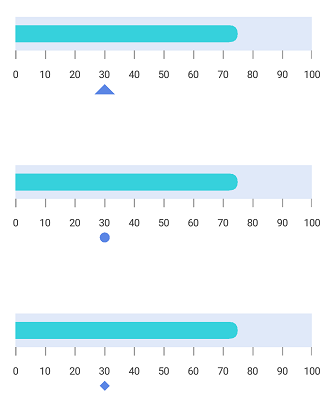
Setting image shape for symbol pointer
You can achieve the image shape by setting the MarkerShape property to Image and setting image path to ImageSource property in SymbolPointer.
<gauge:SfLinearGauge>
            <gauge:SfLinearGauge.Scales>
                <gauge:LinearScale ScaleBarColor="#e0e9f9" LabelColor="#424242" ScaleBarSize = "40" LabelFontSize ="14" MinorTicksPerInterval ="0">
                    <gauge:LinearScale.MajorTickSettings>
                      <gauge:LinearTickSettings Thickness="1" Color ="#9E9E9E" Length = "10"/>
                    </gauge:LinearScale.MajorTickSettings>
					<gauge:LinearScale.Pointers>
					<gauge:BarPointer  Value="75" CornerRadiusType="End" CornerRadius = "10" EnableAnimation = "false" Color = "#36d1dc" Thickness = "20"/>
					<gauge:SymbolPointer Value ="30" EnableAnimation ="False" Color= "#5b86e5" Offset ="40" MarkerShape ="Image" ImageSource="location.png"/>
				</gauge:LinearScale.Pointers>
                </gauge:LinearScale>
            </gauge:SfLinearGauge.Scales>
        </gauge:SfLinearGauge>
SfLinearGauge linearGauge = new SfLinearGauge();
LinearScale linearScale = new LinearScale();
linearScale.ScaleBarColor = Color.FromHex("#e0e9f9");
linearScale.LabelColor = Color.FromHex("#424242");
linearScale.ScaleBarSize = 40;
linearScale.LabelFontSize = 14;
linearScale.MinorTicksPerInterval = 0;
linearScale.MajorTickSettings.Color = Color.FromHex("#9E9E9E");
linearScale.MajorTickSettings.Thickness = 1;
linearScale.MajorTickSettings.Length = 10;
BarPointer barPointer = new BarPointer();
barPointer.Value = 75;
barPointer.Thickness = 20;
barPointer.CornerRadiusType = CornerRadiusType.End;
barPointer.CornerRadius = 10;
barPointer.EnableAnimation = false;
barPointer.Color = Color.FromHex("#36d1dc");
linearScale.Pointers.Add(barPointer);
SymbolPointer symbolPointer = new SymbolPointer();
symbolPointer.Value = 30;
symbolPointer.EnableAnimation = false;
symbolPointer.Thickness = 12;
symbolPointer.MarkerShape = MarkerShape.Image;
symbolPointer.ImageSource = "location.png";
symbolPointer.Offset = 40;
symbolPointer.Color = Color.FromHex("#5b86e5");
linearScale.Pointers.Add(symbolPointer);
linearGauge.Scales.Add(linearScale);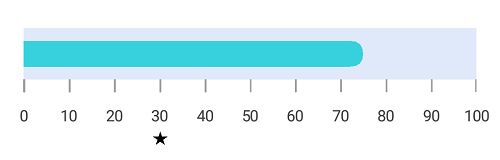
Adding multiple pointers
In addition to the default pointer, you can add n number of pointers to a linear scale by using the Pointers property.
<gauge:SfLinearGauge>

            <gauge:SfLinearGauge.Scales>
                <gauge:LinearScale ScaleBarColor="#e0e9f9" LabelColor="#424242" CornerRadiusType="End" CornerRadius="20" ScaleBarSize = "40" LabelFontSize ="14" MinorTicksPerInterval ="0">
                    <gauge:LinearScale.MajorTickSettings>
                        <gauge:LinearTickSettings Thickness="1" Color ="#9E9E9E" Length = "10"/>
                    </gauge:LinearScale.MajorTickSettings>
                    <gauge:LinearScale.Pointers>
                        <gauge:BarPointer  Value="75" CornerRadiusType="End" EnableAnimation = "false" Color = "#36d1dc" Thickness = "30"/>
                        <gauge:SymbolPointer Value ="30" EnableAnimation ="False" Color= "#5b86e5" SymbolPointerPosition="Away" MarkerShape="Triangle"/>
                    </gauge:LinearScale.Pointers>
                </gauge:LinearScale>
            </gauge:SfLinearGauge.Scales>

        </gauge:SfLinearGauge>
SfLinearGauge linearGauge = new SfLinearGauge();
LinearScale linearScale = new LinearScale();
linearScale.ScaleBarColor = Color.FromHex("#e0e9f9");
linearScale.LabelColor = Color.FromHex("#424242");
linearScale.ScaleBarSize = 40;
linearScale.CornerRadius = 20;
linearScale.CornerRadiusType = CornerRadiusType.End;
linearScale.LabelFontSize = 14;
linearScale.MinorTicksPerInterval = 0;
linearScale.MajorTickSettings.Color = Color.FromHex("#9E9E9E");
linearScale.MajorTickSettings.Thickness = 1;
linearScale.MajorTickSettings.Length = 10;
BarPointer barPointer = new BarPointer();
barPointer.Value = 75;
barPointer.CornerRadiusType = CornerRadiusType.End;
barPointer.Thickness = 30;
barPointer.EnableAnimation = false;
barPointer.Color = Color.FromHex("#36d1dc");
linearScale.Pointers.Add(barPointer);
SymbolPointer symbolPointer = new SymbolPointer();
symbolPointer.Value = 30;
symbolPointer.Thickness = 12;
symbolPointer.EnableAnimation = false;
symbolPointer.Color = Color.FromHex("#5b86e5");
symbolPointer.MarkerShape = MarkerShape.Triangle;
symbolPointer.SymbolPointerPosition = SymbolPointerPosition.Away;
linearScale.Pointers.Add(symbolPointer);
linearGauge.Scales.Add(linearScale);