Events in .NET MAUI TreeMap (SfTreeMap)
17 Jul 20267 minutes to read
NOTE
Prerequisite: Ensure that the required NuGet package is installed, the necessary namespaces are imported, and the TreeMap control is properly configured in your application. For detailed setup and configuration instructions, refer to the Getting Started guide.
SelectionChanged event
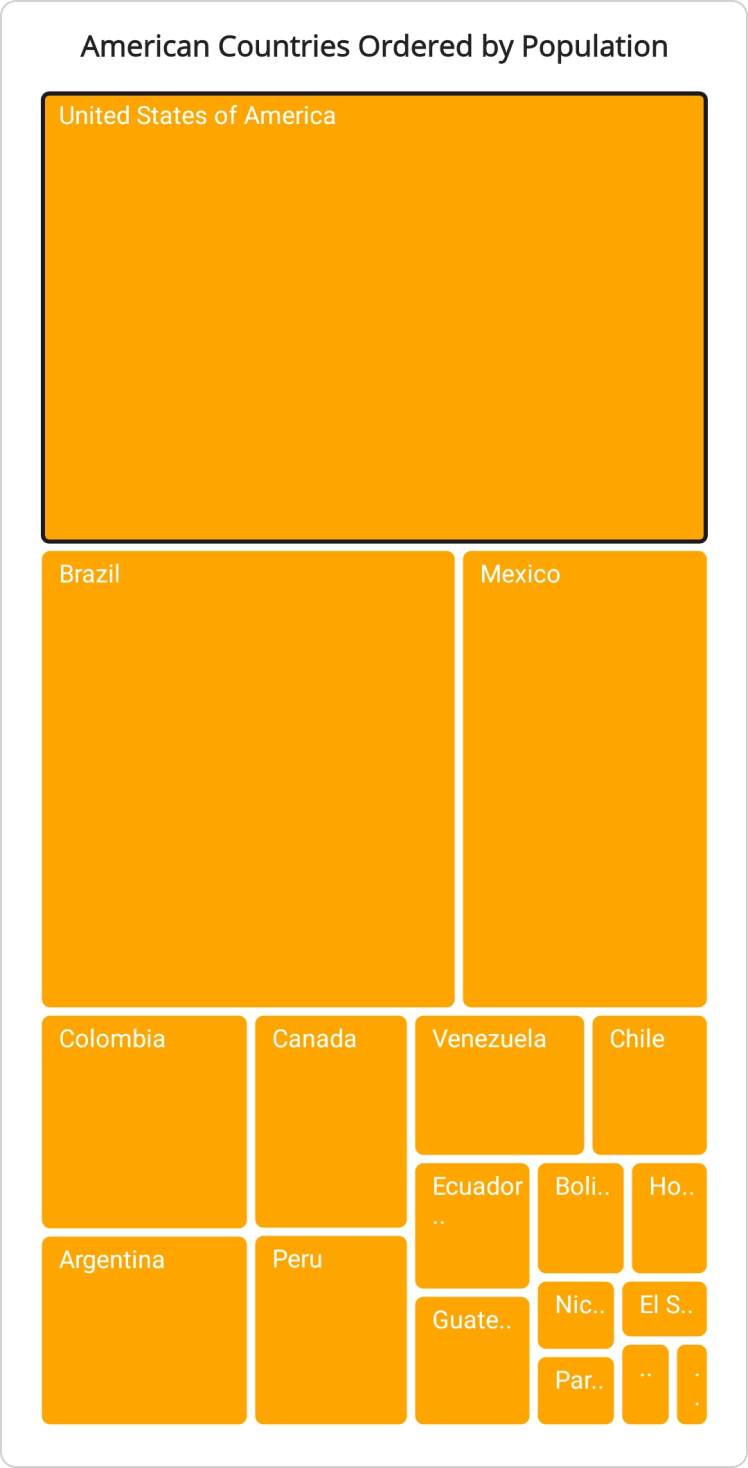
The SelectionChanged event occurs when a TreeMap item is selected or deselected.
The following details can be obtained from the TreeMapSelectionChangedEventArgs:
- OldItems: Gets the previously selected items.
- NewItems: Gets the newly selected items.
- Category: Gets the hierarchical path of the selected item within its groups.
- IsSelected: Gets whether the item was selected or deselected.
- GroupLevel: Gets the zero-based level of grouping for the selected item.
NOTE
The
SelectionChangedevent does not fire when SelectionMode is set to None. For more information about selection, refer to the Selection and highlights documentation.
<treemap:SfTreeMap x:Name="treeMap"
                   DataSource="{Binding PopulationDetails}"
                   SelectionChanged="OnTreeMapSelectionChanged"
                   PrimaryValuePath="Population">
    <treemap:SfTreeMap.BindingContext>
        <local:PopulationViewModel />
    </treemap:SfTreeMap.BindingContext>
    <treemap:SfTreeMap.LeafItemSettings>
        <treemap:TreeMapLeafItemSettings LabelPath="Country">
        </treemap:TreeMapLeafItemSettings>
    </treemap:SfTreeMap.LeafItemSettings>
    <treemap:SfTreeMap.LeafItemBrushSettings>
        <treemap:TreeMapUniformBrushSettings Brush="Orange"/>
    </treemap:SfTreeMap.LeafItemBrushSettings>
    <!-- code omitted for brevity -->
</treemap:SfTreeMap>this.treeMap.SelectionChanged += this.OnTreeMapSelectionChanged;
//code omitted for brevity
private void OnTreeMapSelectionChanged(object sender, TreeMapSelectionChangedEventArgs e)
{
var oldItems = e.OldItems;
var newItems = e.NewItems;
string groupName = e.Category;
int groupLevel = e.GroupLevel;
bool isSelected = e.IsSelected;
}/// <summary>
/// Represents the custom data properties.
/// </summary>
public class PopulationDetails
{
public string Country { get; set; }
public string Continent { get; set; }
public int Population { get; set; }
}/// <summary>
/// Represents demographic information for countries in the Americas for the year 2023.
/// </summary>
public class PopulationViewModel
{
public PopulationViewModel()
{
this.PopulationDetails = new ObservableCollection<PopulationDetails>()
{
new PopulationDetails() { Continent ="North America", Country = "United States of America", Population = 339996564 },
new PopulationDetails() { Continent ="South America", Country = "Brazil", Population = 216422446 },
new PopulationDetails() { Continent ="North America", Country = "Mexico", Population = 128455567 },
new PopulationDetails() { Continent ="South America", Country = "Colombia", Population = 52085168 },
new PopulationDetails() { Continent ="South America", Country = "Argentina", Population = 45773884 },
new PopulationDetails() { Continent ="North America", Country = "Canada", Population = 38781292 },
new PopulationDetails() { Continent ="South America", Country = "Peru", Population = 34352719 },
new PopulationDetails() { Continent ="South America", Country = "Venezuela", Population = 28838499 },
new PopulationDetails() { Continent ="South America", Country = "Chile", Population = 19629590 },
new PopulationDetails() { Continent ="South America", Country = "Ecuador", Population = 18190484 },
new PopulationDetails() { Continent ="North America", Country = "Guatemala", Population = 18092026 },
new PopulationDetails() { Continent ="South America", Country = "Bolivia", Population = 12388571 },
new PopulationDetails() { Continent ="North America", Country = "Honduras", Population = 10593798 },
new PopulationDetails() { Continent ="North America", Country = "Nicaragua", Population = 7046311 },
new PopulationDetails() { Continent ="South America", Country = "Paraguay", Population = 6861524 },
new PopulationDetails() { Continent ="North America", Country = "El Salvador", Population = 6364943 },
new PopulationDetails() { Continent ="North America", Country = "Costa Rica", Population = 5212173 },
new PopulationDetails() { Continent ="South America", Country = "Uruguay", Population = 3423109 },
};
}
public ObservableCollection<PopulationDetails> PopulationDetails
{
get;
set;
}
}
Troubleshooting
If the SelectionChanged event does not fire, verify the following:
- SelectionMode is not set to None; see Selection and highlights for details.
- The event handler is subscribed before the user interacts with the TreeMap.
- The
DataSourceis populated and the TreeMap is rendered on screen.