Brush Settings in .NET MAUI TreeMap
18 Nov 201824 minutes to read
Prerequisite: Ensure that the required NuGet package is installed, the necessary namespaces are imported, and the TreeMap control is properly configured in your application. For detailed setup and configuration instructions, refer to the Getting Started guide.
Leaf Item Brush Settings
The brush settings are used to customize the fill colors for leaf items based on ranges or values, offering four brush settings: UniformBrushSettings, RangeBrushSettings, DesaturationBrushSettings, and PaletteBrushSettings. Each setting provides unique options for defining and applying color schemes, enhancing the visualization of the TreeMap. By default, no LeafItemBrushSettings is set, and the leaf items are rendered with the default fill color.
Uniform brush settings
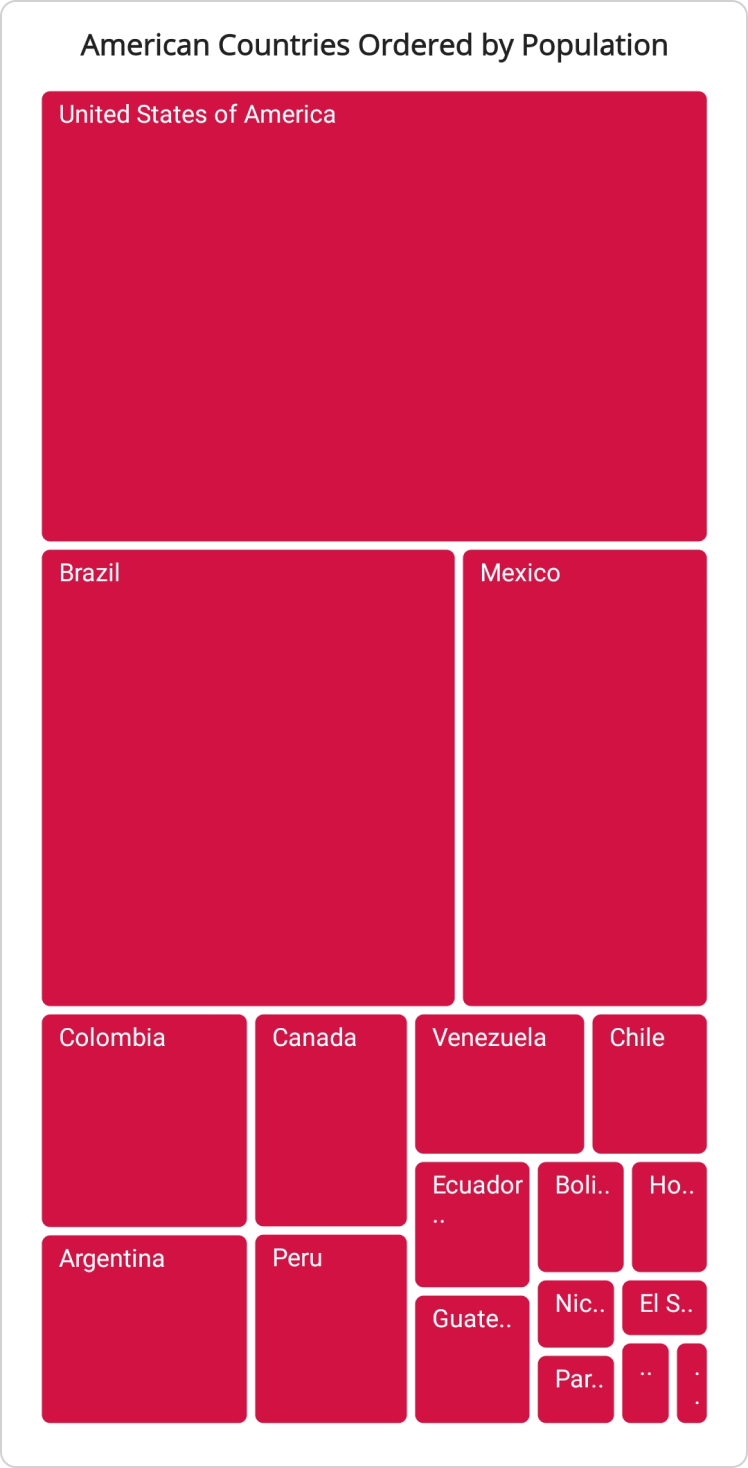
The uniform brush settings in SfTreeMap apply a single fill color to all leaf items. Use the Brush property of TreeMapUniformBrushSettings to set the background brush for TreeMap leaf items.
<treemap:SfTreeMap x:Name="treeMap"
                   DataSource="{Binding PopulationDetails}"
                   PrimaryValuePath="Population">
    <treemap:SfTreeMap.BindingContext>
        <local:PopulationViewModel />
    </treemap:SfTreeMap.BindingContext>
    <treemap:SfTreeMap.LeafItemSettings>
        <treemap:TreeMapLeafItemSettings LabelPath="Country">
        </treemap:TreeMapLeafItemSettings>
    </treemap:SfTreeMap.LeafItemSettings>
    <treemap:SfTreeMap.LeafItemBrushSettings>
        <treemap:TreeMapUniformBrushSettings Brush="#D21243"/>
    </treemap:SfTreeMap.LeafItemBrushSettings>
</treemap:SfTreeMap>
SfTreeMap treeMap = new SfTreeMap();
PopulationViewModel viewModel = new PopulationViewModel();
treeMap.DataSource = viewModel.PopulationDetails;
treeMap.PrimaryValuePath = "Population";
treeMap.LeafItemSettings = new TreeMapLeafItemSettings() { LabelPath = "Country" };
treeMap.LeafItemBrushSettings = new TreeMapUniformBrushSettings() { Brush = new SolidColorBrush(Color.FromArgb(0xFF, 0xD2, 0x12, 0x43)) };
//code omitted for brevity
this.Content = treeMap;/// <summary>
/// Represents the custom data properties.
/// </summary>
public class PopulationDetails
{
public string Country { get; set; }
public string Continent { get; set; }
public int Population { get; set; }
}/// <summary>
/// Represents demographic information for countries in the Americas for the year 2023.
/// </summary>
public class PopulationViewModel
{
public PopulationViewModel()
{
this.PopulationDetails = new ObservableCollection<PopulationDetails>()
{
new PopulationDetails() { Continent ="North America", Country = "United States of America", Population = 339996564 },
new PopulationDetails() { Continent ="South America", Country = "Brazil", Population = 216422446 },
new PopulationDetails() { Continent ="North America", Country = "Mexico", Population = 128455567 },
new PopulationDetails() { Continent ="South America", Country = "Colombia", Population = 52085168 },
new PopulationDetails() { Continent ="South America", Country = "Argentina", Population = 45773884 },
new PopulationDetails() { Continent ="North America", Country = "Canada", Population = 38781292 },
new PopulationDetails() { Continent ="South America", Country = "Peru", Population = 34352719 },
new PopulationDetails() { Continent ="South America", Country = "Venezuela", Population = 28838499 },
new PopulationDetails() { Continent ="South America", Country = "Chile", Population = 19629590 },
new PopulationDetails() { Continent ="South America", Country = "Ecuador", Population = 18190484 },
new PopulationDetails() { Continent ="North America", Country = "Guatemala", Population = 18092026 },
new PopulationDetails() { Continent ="South America", Country = "Bolivia", Population = 12388571 },
new PopulationDetails() { Continent ="North America", Country = "Honduras", Population = 10593798 },
new PopulationDetails() { Continent ="North America", Country = "Nicaragua", Population = 7046311 },
new PopulationDetails() { Continent ="South America", Country = "Paraguay", Population = 6861524 },
new PopulationDetails() { Continent ="North America", Country = "El Salvador", Population = 6364943 },
new PopulationDetails() { Continent ="North America", Country = "Costa Rica", Population = 5212173 },
new PopulationDetails() { Continent ="South America", Country = "Uruguay", Population = 3423109 },
};
}
public ObservableCollection<PopulationDetails> PopulationDetails
{
get;
set;
}
}
Range brush settings
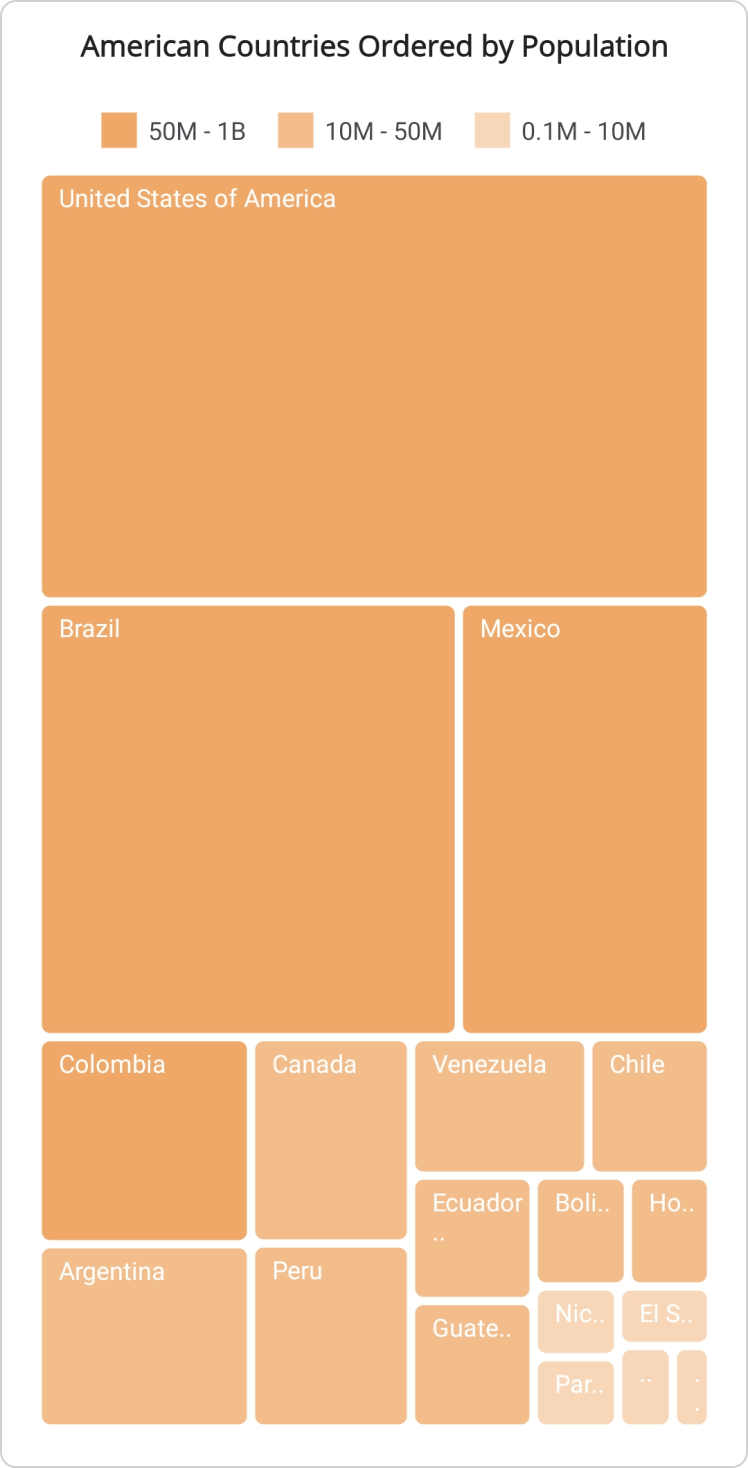
In SfTreeMap, the range brush settings assign a collection of range-based brushes. Use the RangeBrushes property of TreeMapRangeBrushSettings to specify a list of TreeMapRangeBrush instances. Each instance defines a specific range and its associated background brush.
The TreeMapRangeBrush includes the following properties:
- Brush: Specifies the background brush for the range in the SfTreeMap.
- From: Sets the starting value of the range for the background brush.
- To: Sets the ending value of the range for the background brush.
- LegendLabel: Defines the text for the legend item associated with the range in the SfTreeMap.
The TreeMapRangeBrushSettings is only applicable when the RangeColorValuePath property of the SfTreeMap is set. The
RangeColorValuePathproperty maps a field from the data source whose value is compared against theFromandTovalues of each range brush to determine the fill color of a leaf item. If a value does not fall within any defined range, the leaf item is rendered with the default fill color. To display legend items that share the same background color as the range brushes, set the ShowLegend property within LegendSettings. For more information, refer to the Legend documentation.
<treemap:SfTreeMap x:Name="treeMap"
                   DataSource="{Binding PopulationDetails}"
                   PrimaryValuePath="Population"
                   RangeColorValuePath="Population">
    <treemap:SfTreeMap.BindingContext>
        <local:PopulationViewModel />
    </treemap:SfTreeMap.BindingContext>
    <treemap:SfTreeMap.LeafItemSettings>
        <treemap:TreeMapLeafItemSettings LabelPath="Country">
        </treemap:TreeMapLeafItemSettings>
    </treemap:SfTreeMap.LeafItemSettings>
    <treemap:SfTreeMap.LeafItemBrushSettings>
        <treemap:TreeMapRangeBrushSettings>
            <treemap:TreeMapRangeBrushSettings.RangeBrushes>
                <treemap:TreeMapRangeBrush LegendLabel="50M - 1B"
                                           From="50000000"
                                           To="1000000000"
                                           Brush ="#F0A868" />
                <treemap:TreeMapRangeBrush LegendLabel="10M - 50M"
                                           From="10000000"
                                           To="50000000"
                                           Brush ="#F3BC8B" />
                <treemap:TreeMapRangeBrush LegendLabel="0.1M - 10M"
                                           From="100000"
                                           To="10000000"
                                           Brush= "#F8D7B9" />
            </treemap:TreeMapRangeBrushSettings.RangeBrushes>
        </treemap:TreeMapRangeBrushSettings>
    </treemap:SfTreeMap.LeafItemBrushSettings>
    <treemap:SfTreeMap.LegendSettings>
        <treemap:TreeMapLegendSettings ShowLegend="True">
        </treemap:TreeMapLegendSettings>
    </treemap:SfTreeMap.LegendSettings>
</treemap:SfTreeMap>
SfTreeMap treeMap = new SfTreeMap();
PopulationViewModel viewModel = new PopulationViewModel();
treeMap.DataSource = viewModel.PopulationDetails;
treeMap.PrimaryValuePath = "Population";
treeMap.RangeColorValuePath = "Population";
treeMap.LeafItemSettings = new TreeMapLeafItemSettings() { LabelPath = "Country" };
treeMap.LeafItemBrushSettings = new TreeMapRangeBrushSettings()
{
RangeBrushes = new List<TreeMapRangeBrush>()
{
new TreeMapRangeBrush() { LegendLabel="50M - 1B", From=50000000, To=1000000000, Brush = new SolidColorBrush(Color.FromArgb(0xFF, 0xF0, 0xA8, 0x68)) },
new TreeMapRangeBrush() { LegendLabel="10M - 50M", From=10000000, To=50000000, Brush = new SolidColorBrush(Color.FromArgb(0xFF, 0xF3, 0xBC, 0x8B)) },
new TreeMapRangeBrush() { LegendLabel="0.1M - 10M", From=100000, To=10000000, Brush = new SolidColorBrush(Color.FromArgb(0xFF, 0xF8, 0xD7, 0xB9)) },
}
};
//code omitted for brevity
this.Content = treeMap;/// <summary>
/// Represents the custom data properties.
/// </summary>
public class PopulationDetails
{
public string Country { get; set; }
public string Continent { get; set; }
public int Population { get; set; }
}/// <summary>
/// Represents demographic information for countries in the Americas for the year 2023.
/// </summary>
public class PopulationViewModel
{
public PopulationViewModel()
{
this.PopulationDetails = new ObservableCollection<PopulationDetails>()
{
new PopulationDetails() { Continent ="North America", Country = "United States of America", Population = 339996564 },
new PopulationDetails() { Continent ="South America", Country = "Brazil", Population = 216422446 },
new PopulationDetails() { Continent ="North America", Country = "Mexico", Population = 128455567 },
new PopulationDetails() { Continent ="South America", Country = "Colombia", Population = 52085168 },
new PopulationDetails() { Continent ="South America", Country = "Argentina", Population = 45773884 },
new PopulationDetails() { Continent ="North America", Country = "Canada", Population = 38781292 },
new PopulationDetails() { Continent ="South America", Country = "Peru", Population = 34352719 },
new PopulationDetails() { Continent ="South America", Country = "Venezuela", Population = 28838499 },
new PopulationDetails() { Continent ="South America", Country = "Chile", Population = 19629590 },
new PopulationDetails() { Continent ="South America", Country = "Ecuador", Population = 18190484 },
new PopulationDetails() { Continent ="North America", Country = "Guatemala", Population = 18092026 },
new PopulationDetails() { Continent ="South America", Country = "Bolivia", Population = 12388571 },
new PopulationDetails() { Continent ="North America", Country = "Honduras", Population = 10593798 },
new PopulationDetails() { Continent ="North America", Country = "Nicaragua", Population = 7046311 },
new PopulationDetails() { Continent ="South America", Country = "Paraguay", Population = 6861524 },
new PopulationDetails() { Continent ="North America", Country = "El Salvador", Population = 6364943 },
new PopulationDetails() { Continent ="North America", Country = "Costa Rica", Population = 5212173 },
new PopulationDetails() { Continent ="South America", Country = "Uruguay", Population = 3423109 },
};
}
public ObservableCollection<PopulationDetails> PopulationDetails
{
get;
set;
}
}
Desaturation brush settings
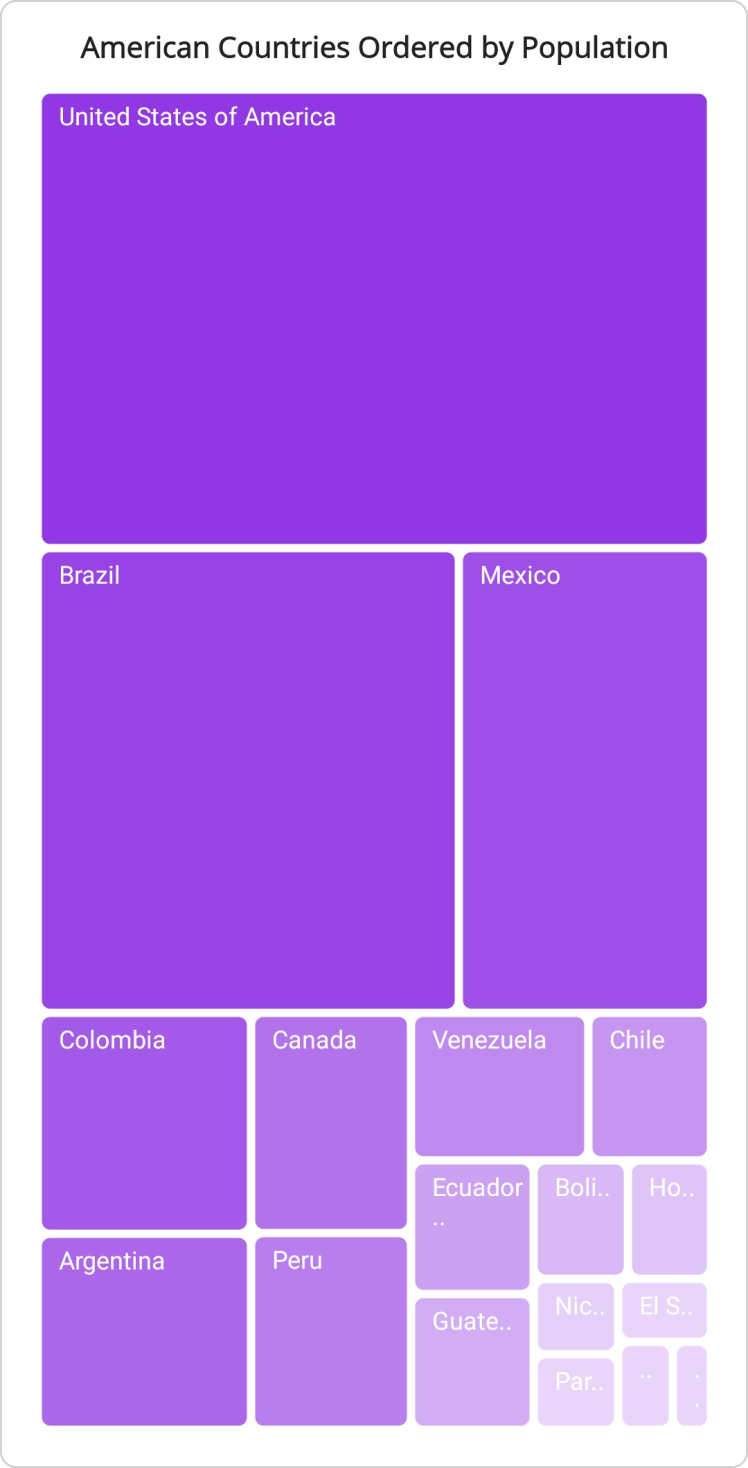
The desaturation brush settings in the SfTreeMap modify the color saturation of the background brush based on the value mapped through RangeColorValuePath. The From and To properties define the saturation scale, where 1 represents the full-saturation brush color and 0 represents a fully desaturated (gray) color.
The TreeMapDesaturationBrushSettings is only applicable when the RangeColorValuePath property of the SfTreeMap is set.
The TreeMapDesaturationBrushSettings includes the following properties:
- Brush: Sets the background brush for desaturation in the SfTreeMap.
-
From: Sets the starting saturation value (between
0and1) for the desaturation range. -
To: Sets the ending saturation value (between
0and1) for the desaturation range.
<treemap:SfTreeMap x:Name="treeMap"
                   DataSource="{Binding PopulationDetails}"
                   PrimaryValuePath="Population"
                   RangeColorValuePath="Population">
    <treemap:SfTreeMap.BindingContext>
        <local:PopulationViewModel />
    </treemap:SfTreeMap.BindingContext>
    <treemap:SfTreeMap.LeafItemSettings>
        <treemap:TreeMapLeafItemSettings LabelPath="Country">
        </treemap:TreeMapLeafItemSettings>
    </treemap:SfTreeMap.LeafItemSettings>
    <treemap:SfTreeMap.LeafItemBrushSettings>
        <treemap:TreeMapDesaturationBrushSettings Brush="BlueViolet" From="1" To="0.2"/>
    </treemap:SfTreeMap.LeafItemBrushSettings>
</treemap:SfTreeMap>
SfTreeMap treeMap = new SfTreeMap();
PopulationViewModel viewModel = new PopulationViewModel();
treeMap.DataSource = viewModel.PopulationDetails;
treeMap.PrimaryValuePath = "Population";
treeMap.RangeColorValuePath = "Population";
treeMap.LeafItemSettings = new TreeMapLeafItemSettings() { LabelPath = "Country" };
treeMap.LeafItemBrushSettings = new TreeMapDesaturationBrushSettings() { Brush = Brush.BlueViolet, From = 1, To = 0.2 };
//code omitted for brevity
this.Content = treeMap;/// <summary>
/// Represents the custom data properties.
/// </summary>
public class PopulationDetails
{
public string Country { get; set; }
public string Continent { get; set; }
public int Population { get; set; }
}/// <summary>
/// Represents demographic information for countries in the Americas for the year 2023.
/// </summary>
public class PopulationViewModel
{
public PopulationViewModel()
{
this.PopulationDetails = new ObservableCollection<PopulationDetails>()
{
new PopulationDetails() { Continent ="North America", Country = "United States of America", Population = 339996564 },
new PopulationDetails() { Continent ="South America", Country = "Brazil", Population = 216422446 },
new PopulationDetails() { Continent ="North America", Country = "Mexico", Population = 128455567 },
new PopulationDetails() { Continent ="South America", Country = "Colombia", Population = 52085168 },
new PopulationDetails() { Continent ="South America", Country = "Argentina", Population = 45773884 },
new PopulationDetails() { Continent ="North America", Country = "Canada", Population = 38781292 },
new PopulationDetails() { Continent ="South America", Country = "Peru", Population = 34352719 },
new PopulationDetails() { Continent ="South America", Country = "Venezuela", Population = 28838499 },
new PopulationDetails() { Continent ="South America", Country = "Chile", Population = 19629590 },
new PopulationDetails() { Continent ="South America", Country = "Ecuador", Population = 18190484 },
new PopulationDetails() { Continent ="North America", Country = "Guatemala", Population = 18092026 },
new PopulationDetails() { Continent ="South America", Country = "Bolivia", Population = 12388571 },
new PopulationDetails() { Continent ="North America", Country = "Honduras", Population = 10593798 },
new PopulationDetails() { Continent ="North America", Country = "Nicaragua", Population = 7046311 },
new PopulationDetails() { Continent ="South America", Country = "Paraguay", Population = 6861524 },
new PopulationDetails() { Continent ="North America", Country = "El Salvador", Population = 6364943 },
new PopulationDetails() { Continent ="North America", Country = "Costa Rica", Population = 5212173 },
new PopulationDetails() { Continent ="South America", Country = "Uruguay", Population = 3423109 },
};
}
public ObservableCollection<PopulationDetails> PopulationDetails
{
get;
set;
}
}
Palette brush settings
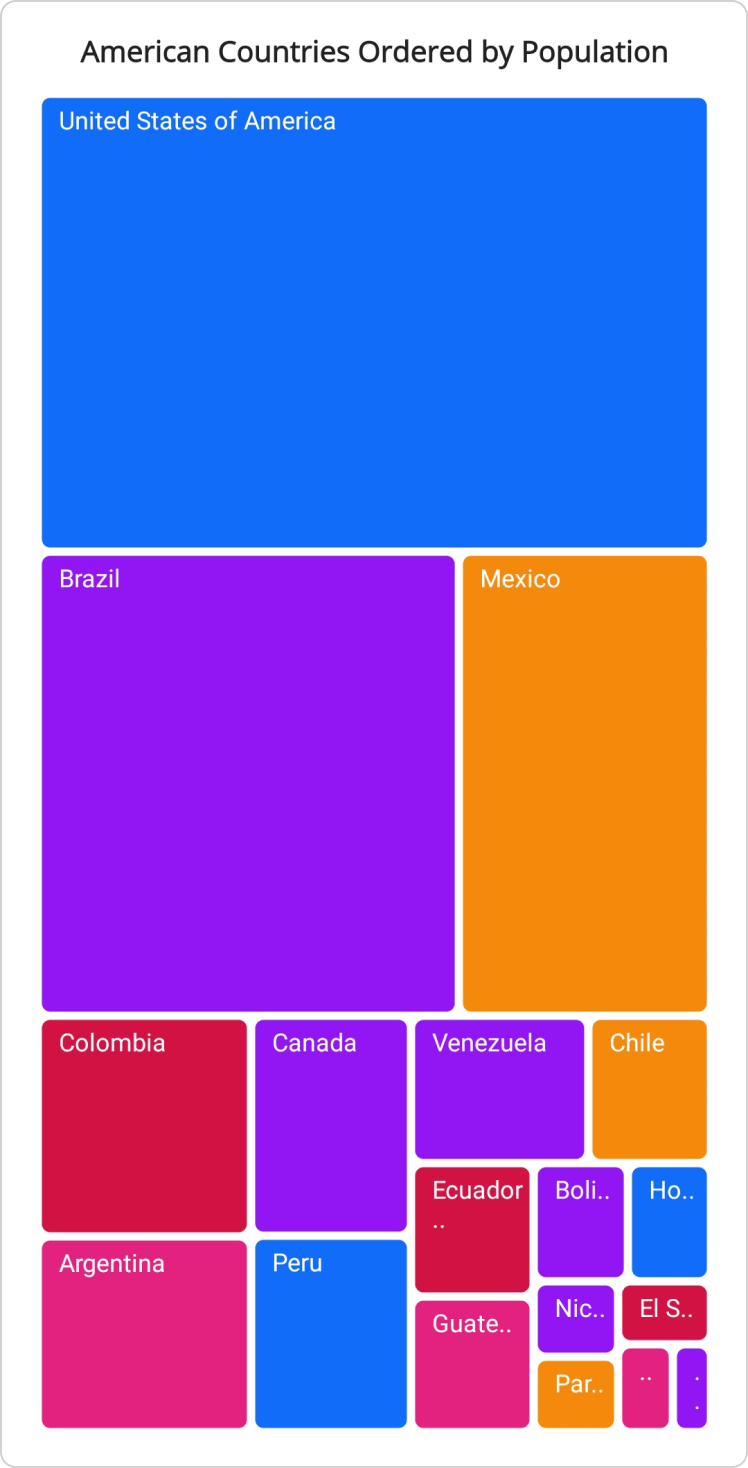
Use the Brushes property of TreeMapPaletteBrushSettings to apply a collection of brushes to leaf items. When the number of leaf items exceeds the number of brushes in the collection, the brushes are applied cyclically.
<treemap:SfTreeMap x:Name="treeMap"
                   DataSource="{Binding PopulationDetails}"
                   PrimaryValuePath="Population">
    <treemap:SfTreeMap.BindingContext>
        <local:PopulationViewModel />
    </treemap:SfTreeMap.BindingContext>
    <treemap:SfTreeMap.LeafItemSettings>
        <treemap:TreeMapLeafItemSettings LabelPath="Country">
        </treemap:TreeMapLeafItemSettings>
    </treemap:SfTreeMap.LeafItemSettings>
    <treemap:SfTreeMap.LeafItemBrushSettings>
        <treemap:TreeMapPaletteBrushSettings>
            <treemap:TreeMapPaletteBrushSettings.Brushes>
                <SolidColorBrush Color="#116DF9"/>
                <SolidColorBrush Color="#9215F3"/>
                <SolidColorBrush Color="#F4890B"/>
                <SolidColorBrush Color="#D21243"/>
                <SolidColorBrush Color="#E2227E"/>
            </treemap:TreeMapPaletteBrushSettings.Brushes>
        </treemap:TreeMapPaletteBrushSettings>
    </treemap:SfTreeMap.LeafItemBrushSettings>
</treemap:SfTreeMap>
SfTreeMap treeMap = new SfTreeMap();
PopulationViewModel viewModel = new PopulationViewModel();
treeMap.DataSource = viewModel.PopulationDetails;
treeMap.PrimaryValuePath = "Population";
treeMap.LeafItemSettings = new TreeMapLeafItemSettings() { LabelPath = "Country" };
treeMap.LeafItemBrushSettings = new TreeMapPaletteBrushSettings()
{
    Brushes = new List<Brush>()
    {
        new SolidColorBrush(Color.FromArgb(0xFF, 0x11, 0x6D, 0xF9)),
        new SolidColorBrush(Color.FromArgb(0xFF, 0x92, 0x15, 0xF3)),
        new SolidColorBrush(Color.FromArgb(0xFF, 0xF4, 0x89, 0x0B)),
        new SolidColorBrush(Color.FromArgb(0xFF, 0xD2, 0x12, 0x43)),
        new SolidColorBrush(Color.FromArgb(0xFF, 0xE2, 0x22, 0x7E)),
    }
};

//code omitted for brevity
this.Content = treeMap;
/// <summary>
/// Represents the custom data properties.
/// </summary>
public class PopulationDetails
{
public string Country { get; set; }
public string Continent { get; set; }
public int Population { get; set; }
}/// <summary>
/// Represents demographic information for countries in the Americas for the year 2023.
/// </summary>
public class PopulationViewModel
{
public PopulationViewModel()
{
this.PopulationDetails = new ObservableCollection<PopulationDetails>()
{
new PopulationDetails() { Continent ="North America", Country = "United States of America", Population = 339996564 },
new PopulationDetails() { Continent ="South America", Country = "Brazil", Population = 216422446 },
new PopulationDetails() { Continent ="North America", Country = "Mexico", Population = 128455567 },
new PopulationDetails() { Continent ="South America", Country = "Colombia", Population = 52085168 },
new PopulationDetails() { Continent ="South America", Country = "Argentina", Population = 45773884 },
new PopulationDetails() { Continent ="North America", Country = "Canada", Population = 38781292 },
new PopulationDetails() { Continent ="South America", Country = "Peru", Population = 34352719 },
new PopulationDetails() { Continent ="South America", Country = "Venezuela", Population = 28838499 },
new PopulationDetails() { Continent ="South America", Country = "Chile", Population = 19629590 },
new PopulationDetails() { Continent ="South America", Country = "Ecuador", Population = 18190484 },
new PopulationDetails() { Continent ="North America", Country = "Guatemala", Population = 18092026 },
new PopulationDetails() { Continent ="South America", Country = "Bolivia", Population = 12388571 },
new PopulationDetails() { Continent ="North America", Country = "Honduras", Population = 10593798 },
new PopulationDetails() { Continent ="North America", Country = "Nicaragua", Population = 7046311 },
new PopulationDetails() { Continent ="South America", Country = "Paraguay", Population = 6861524 },
new PopulationDetails() { Continent ="North America", Country = "El Salvador", Population = 6364943 },
new PopulationDetails() { Continent ="North America", Country = "Costa Rica", Population = 5212173 },
new PopulationDetails() { Continent ="South America", Country = "Uruguay", Population = 3423109 },
};
}
public ObservableCollection<PopulationDetails> PopulationDetails
{
get;
set;
}
}
Group Item Brush Settings
Use the GroupItemBrushSettings property of SfTreeMap to apply brush settings to group (level) items. Currently, only TreeMapPaletteBrushSettings is supported for group items. Use its Brushes property to specify the collection of brushes applied to group headers.
Group item brush settings are applicable only when Levels is configured. For more information about levels, refer to the Levels documentation.
<treemap:SfTreeMap x:Name="treeMap"
                   DataSource="{Binding PopulationDetails}"
                   PrimaryValuePath="Population">
    <treemap:SfTreeMap.BindingContext>
        <local:PopulationViewModel />
    </treemap:SfTreeMap.BindingContext>
    <treemap:SfTreeMap.LeafItemSettings>
        <treemap:TreeMapLeafItemSettings LabelPath="Country">
        </treemap:TreeMapLeafItemSettings>
    </treemap:SfTreeMap.LeafItemSettings>
    <!-- code omitted for brevity -->
    <treemap:SfTreeMap.Levels>
        <treemap:TreeMapLevel GroupPath="Continent"/>
    </treemap:SfTreeMap.Levels>
    <treemap:SfTreeMap.GroupItemBrushSettings>
        <treemap:TreeMapPaletteBrushSettings>
            <treemap:TreeMapPaletteBrushSettings.Brushes>
                <SolidColorBrush Color="#003790"/>
                <SolidColorBrush Color="#FF8F00"/>
            </treemap:TreeMapPaletteBrushSettings.Brushes>
        </treemap:TreeMapPaletteBrushSettings>
    </treemap:SfTreeMap.GroupItemBrushSettings>
</treemap:SfTreeMap>
SfTreeMap treeMap = new SfTreeMap();
PopulationViewModel viewModel = new PopulationViewModel();
treeMap.DataSource = viewModel.PopulationDetails;
treeMap.PrimaryValuePath = "Population";
treeMap.LeafItemSettings = new TreeMapLeafItemSettings() { LabelPath = "Country" };
treeMap.Levels = new List<TreeMapLevel>()
{
new TreeMapLevel() { GroupPath = "Continent" }
};
treeMap.GroupItemBrushSettings = new TreeMapPaletteBrushSettings()
{
Brushes = new List<Brush>()
{
new SolidColorBrush(Color.FromArgb(0xFF, 0x00, 0x37, 0x90)),
new SolidColorBrush(Color.FromArgb(0xFF, 0xFF, 0x8F, 0x00)),
}
};
//code omitted for brevity
this.Content = treeMap;/// <summary>
/// Represents the custom data properties.
/// </summary>
public class PopulationDetails
{
public string Country { get; set; }
public string Continent { get; set; }
public int Population { get; set; }
}public class PopulationViewModel
{
public PopulationViewModel()
{
this.PopulationDetails = new ObservableCollection<PopulationDetails>()
{
new PopulationDetails() { Continent ="North America", Country = "United States of America", Population = 339996564 },
new PopulationDetails() { Continent ="South America", Country = "Brazil", Population = 216422446 },
new PopulationDetails() { Continent ="North America", Country = "Mexico", Population = 128455567 },
new PopulationDetails() { Continent ="South America", Country = "Colombia", Population = 52085168 },
new PopulationDetails() { Continent ="South America", Country = "Argentina", Population = 45773884 },
new PopulationDetails() { Continent ="North America", Country = "Canada", Population = 38781292 },
new PopulationDetails() { Continent ="South America", Country = "Peru", Population = 34352719 },
new PopulationDetails() { Continent ="South America", Country = "Venezuela", Population = 28838499 },
new PopulationDetails() { Continent ="South America", Country = "Chile", Population = 19629590 },
new PopulationDetails() { Continent ="South America", Country = "Ecuador", Population = 18190484 },
new PopulationDetails() { Continent ="North America", Country = "Guatemala", Population = 18092026 },
new PopulationDetails() { Continent ="South America", Country = "Bolivia", Population = 12388571 },
new PopulationDetails() { Continent ="North America", Country = "Honduras", Population = 10593798 },
new PopulationDetails() { Continent ="North America", Country = "Nicaragua", Population = 7046311 },
new PopulationDetails() { Continent ="South America", Country = "Paraguay", Population = 6861524 },
new PopulationDetails() { Continent ="North America", Country = "El Salvador", Population = 6364943 },
new PopulationDetails() { Continent ="North America", Country = "Costa Rica", Population = 5212173 },
new PopulationDetails() { Continent ="South America", Country = "Uruguay", Population = 3423109 },
};
}
public ObservableCollection<PopulationDetails> PopulationDetails
{
get;
set;
}
}For troubleshooting tips related to brush settings, such as brushes not appearing or range brushes not being applied, verify the following:
- The
DataSourceis populated andPrimaryValuePathis set. - For range and desaturation brush settings,
RangeColorValuePathis set to the field whose values should be compared against the brush ranges. - For group item brush settings, Levels is configured. For more information, refer to the Levels documentation.