About Syncfusion® .NET MAUI Radial Menu Control
18 Nov 20185 minutes to read
The Syncfusion® .NET MAUI Radial Menu control displays a hierarchical menu in a circular layout, optimized for touch-enabled devices. It is typically used as a context menu and can expose more menu items in the same space than traditional menus.
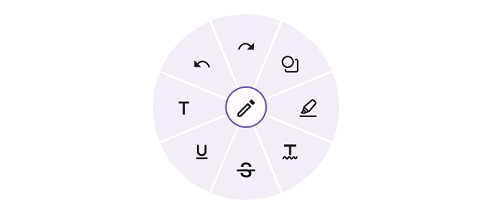
Business use cases
- Mobile applications that require compact and touch-friendly context menus for quick actions.
- Design and drawing tools that use radial menus for tool selection and commands.
- Productivity applications that provide shortcut actions in a circular layout for faster interaction.
- Applications with limited screen space that require efficient organization of multiple menu options.
Key features
- Drag allows floating the radial menu over layouts to avoid blocking underlying content.
- Rotation allows rotating menu items for better visual arrangement and interaction.
- Font icon allows using vector-based icons to avoid rendering issues with images.
- Custom view allows embedding images or custom UI elements within menu items.
- Segment customization allows modifying colors, sizes, shapes, and positioning of menu segments.
- Auto arrangement allows automatically arranging menu items for better usability and layout consistency.
Globalization
The following table summarizes globalization and accessibility support available in this control.
 Full Support
 Not Applicable
| Control | Localization | RTL | Time zone | Screen reader | Keyboard navigation |
|---|---|---|---|---|---|
| Radial Menu | |
|
|
|
|
Related controls
- Button for triggering actions and commands in applications.
- Navigation Drawer for organizing navigation options in a sliding panel.
- Tab View for organizing multiple actions or views.
See Also
- Getting Started shows a step‑by‑step guide to begin using the Radial Menu control.
- Customization explains how to customize layout and appearance of menu items.
- Center Button Customization details how to style and configure the central button.
- UI Kit provides interactive demos and ready‑made UI examples.
Resources
Feature Tour
Get a quick overview of key features and capabilities to kick start your journey.
Explore Features
Tutorial Videos
Watch step‑by‑step video guides to quickly understand concepts and implementation.
Watch now
Knowledge Base
Find practical solutions, troubleshooting tips and how‑to guides for common scenarios.
Search KB's