About Syncfusion .NET MAUI Kanban Board control
18 Nov 20184 minutes to read
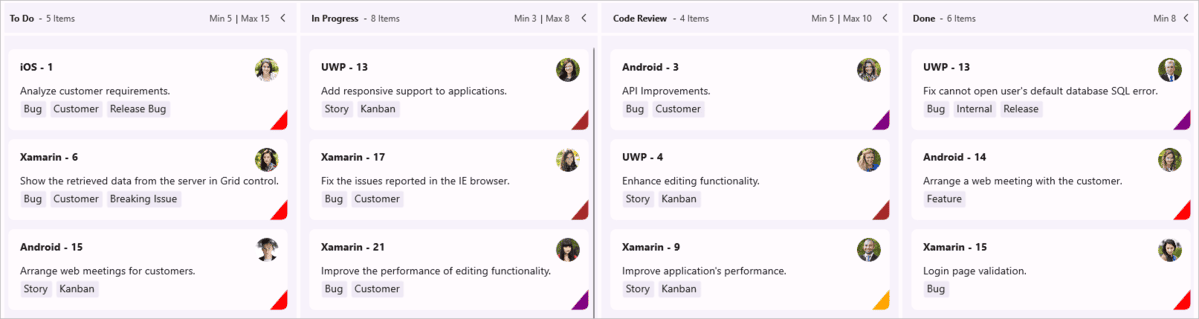
The Syncfusion® .NET MAUI Kanban control is a highly interactive and customizable tool designed to streamline task management. It provides an efficient way to visualize workflows at every stage of completion. It facilitates effective planning and provides a clear visualization of work progress.
Business use cases
- Project management - applications that require visual tracking of tasks across multiple workflow stages.
- Agile development - tools that support Kanban-based planning and task organization.
-
Business workflow - systems that manage process stages such as
Pending,In Progress, andCompleted. - Team collaboration - applications that require clear visibility of task status and progress.
Key features
- Workflow visualization support allows representing tasks across different stages for better visibility and tracking.
- Work-in-progress (WIP) control allows limiting the number of items in each stage to improve efficiency.
- Workflow transition management allows controlling how tasks move between different stages of the process.
- High-level customization support allows configuring layout, appearance, and behavior to match application needs.
Globalization
The following table summarizes the globalization support available in this control.
 Full Support
 Not Applicable
| Control | Localization | RTL | Time zone | Screen reader | Keyboard navigation |
|---|---|---|---|---|---|
| Kanban Board | |
|
|
|
|
Related controls
- DataGrid for managing structured task data in tabular format.
- ListView for displaying task lists in scrollable layouts.
- Scheduler for managing timelines and scheduling tasks.
See Also
- Getting Started shows a step‑by‑step guide to begin using the Kanban Board control.
- Columns explains how to configure workflow stages and columns.
- UI Kit provides interactive demos and ready‑made UI examples.
Resources
Feature Tour
Get a quick overview of the key features and capabilities to kick start your journey.
Explore Features
Tutorial Videos
Watch step‑by‑step video guides to quickly understand concepts and implementation.
Watch now
Knowledge Base
Find practical solutions, troubleshooting tips and how‑to guides for common scenarios.
Search KB's