Fill PDF Form Fields in Angular PDF Viewer
14 Aug 20269 minutes to read
This guide shows how to update, import, and validate PDF form fields in the Angular PDF Viewer so you can pre-fill forms or accept user input.
Outcome Programmatically set field values, allow UI-driven filling, import form data, and validate fields on submit.
Steps to fill forms
1. Fill form fields programmatically
Update form field values programmatically with updateFormFieldsValue.
Use the example below as a complete, runnable example for your Angular app. It retrieves form fields and updates a named field or the first available field.
import { Component, OnInit, ViewChild } from '@angular/core';
import {
  ToolbarService,
  MagnificationService,
  NavigationService,
  AnnotationService,
  TextSelectionService,
  TextSearchService,
  FormFieldsService,
  FormDesignerService,
  PdfViewerComponent,
  PdfViewerModule,
} from '@syncfusion/ej2-angular-pdfviewer';

@Component({
  selector: 'app-root',
  standalone: true,
  imports: [PdfViewerModule],
  template: `
    <div class="content-wrapper">
      <button (click)="fillForm()">Fill Form Fields</button>
      <ejs-pdfviewer
        #pdfViewer
        id="pdfViewer"
        [resourceUrl]="resourceUrl"
        [documentPath]="document"
        style="height: 640px; display: block;">
      </ejs-pdfviewer>
    </div>
  `,
  providers: [
    ToolbarService,
    MagnificationService,
    NavigationService,
    AnnotationService,
    TextSelectionService,
    TextSearchService,
    FormFieldsService,
    FormDesignerService,
  ],
})
export class AppComponent implements OnInit {
  @ViewChild('pdfViewer') pdfviewer!: PdfViewerComponent;
  public document: string = 'https://cdn.syncfusion.com/content/pdf/form-filling-document.pdf';
  public resourceUrl: string = 'https://cdn.syncfusion.com/ej2/31.1.23/dist/ej2-pdfviewer-lib';

  ngOnInit(): void {}

  fillForm(): void {
    const fields =
      this.pdfviewer?.retrieveFormFields?.() || (this.pdfviewer as any).formFieldCollection || [];
    const field = fields.find((f: any) => f?.name === 'First Name') || fields[0];

    if (field) {
      field.value = 'John Doe';
      field.tooltip = 'First';
      this.pdfviewer.updateFormFieldsValue(field);
    } else {
      console.warn('No form fields available to update.');
    }
  }
}
Expected result: Clicking the Fill Form Fields button sets the first or named field’s value to John Doe in the viewer.
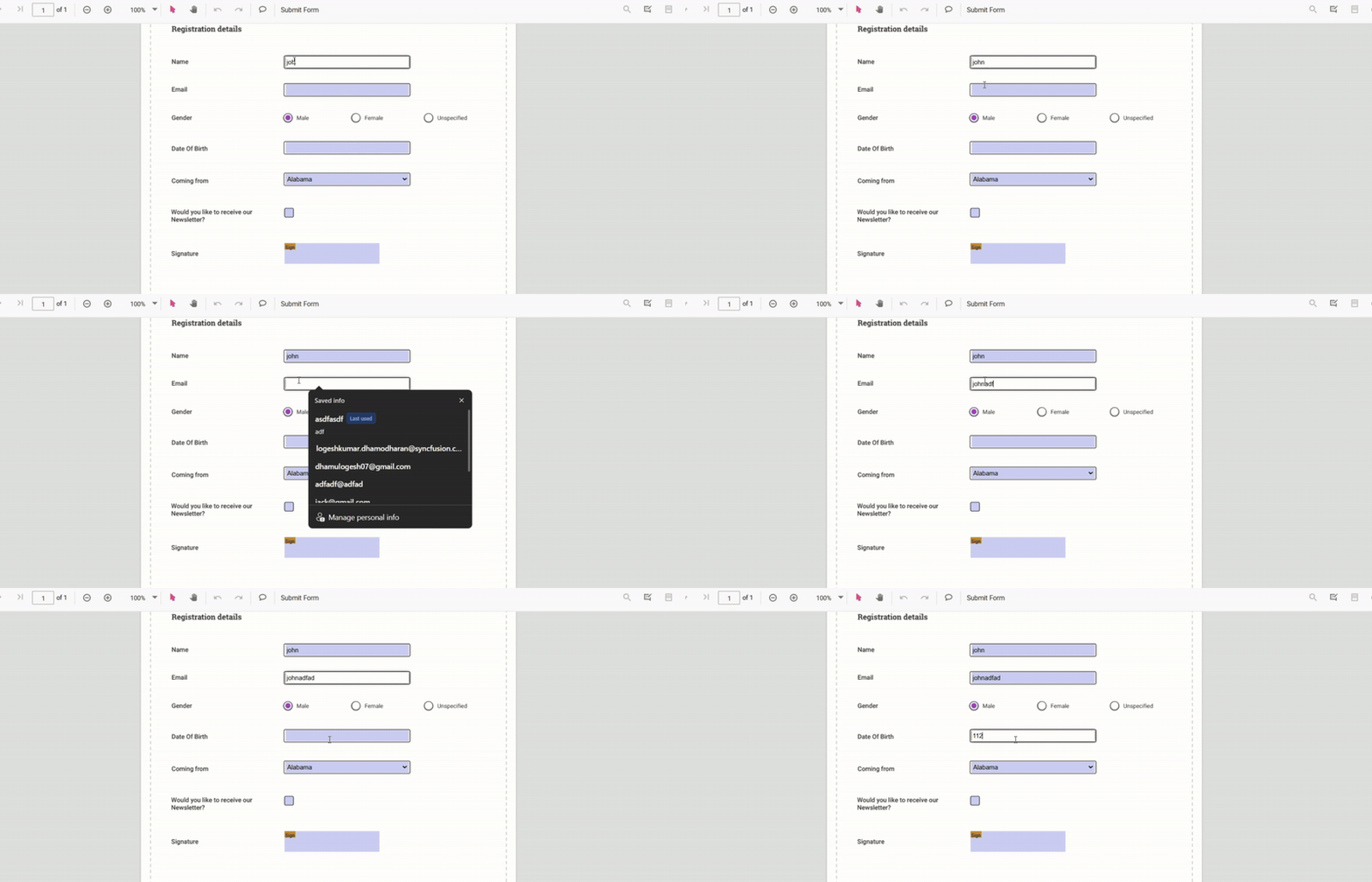
2. Fill form fields via UI
Users can click form controls and enter/select values. Supported field types include textboxes, checkboxes, radio buttons, dropdowns, list boxes, and signature fields. Edits are retained during the viewing session.
3. Fill form fields through imported data
Use importFormFields to map external data into PDF fields by name. The example below shows how to trigger import from a button handler.
import { Component, OnInit, ViewChild } from '@angular/core';
import {
  ToolbarService,
  MagnificationService,
  NavigationService,
  AnnotationService,
  TextSelectionService,
  TextSearchService,
  FormFieldsService,
  FormDesignerService,
  PdfViewerComponent,
  PdfViewerModule,
} from '@syncfusion/ej2-angular-pdfviewer';
import { FormFieldDataFormat } from '@syncfusion/ej2-pdfviewer';

@Component({
  selector: 'app-root',
  standalone: true,
  imports: [PdfViewerModule],
  template: `
    <div class="content-wrapper">
      <button (click)="importJson()">Import JSON</button>
      <ejs-pdfviewer
        #pdfViewer
        id="pdfViewer"
        [resourceUrl]="resourceUrl"
        [documentPath]="document"
        style="height: 640px; display: block;">
      </ejs-pdfviewer>
    </div>
  `,
  providers: [
    ToolbarService,
    MagnificationService,
    NavigationService,
    AnnotationService,
    TextSelectionService,
    TextSearchService,
    FormFieldsService,
    FormDesignerService,
  ],
})
export class AppComponent implements OnInit {
  @ViewChild('pdfViewer') pdfviewer!: PdfViewerComponent;
  public document = 'https://cdn.syncfusion.com/content/pdf/form-filling-document.pdf';
  public resourceUrl = 'https://cdn.syncfusion.com/ej2/31.1.23/dist/ej2-pdfviewer-lib';

  ngOnInit(): void {}

  importJson(): void {
    // NOTE:
    // The first parameter can be:
    //  - a file path/url (in server mode),
    //  - or a base64 encoded File/Blob stream from an <input type="file"> in real apps.
    // Replace 'File' with your actual file or path as per your integration.
    this.pdfviewer.importFormFields('File', FormFieldDataFormat.Json);
  }
}
For more details, see Import Form Data.
4. Validate form fields on submit
Enable enableFormFieldsValidation and handle validateFormFields to check required fields and cancel submission when necessary. Example below shows adding required fields and validating them.
import { Component, OnInit, ViewChild } from '@angular/core';
import {
  ToolbarService,
  MagnificationService,
  NavigationService,
  AnnotationService,
  TextSelectionService,
  TextSearchService,
  FormFieldsService,
  FormDesignerService,
  PdfViewerComponent,
  PdfViewerModule,
} from '@syncfusion/ej2-angular-pdfviewer';
import { TextFieldSettings } from '@syncfusion/ej2-pdfviewer';

@Component({
  selector: 'app-root',
  standalone: true,
  imports: [PdfViewerModule],
  template: `
    <div class="content-wrapper">
      <ejs-pdfviewer
        #pdfViewer
        id="pdfViewer"
        [resourceUrl]="resourceUrl"
        [documentPath]="document"
        [enableFormFieldsValidation]="true"
        (documentLoad)="onDocumentLoad()"
        (validateFormFields)="onValidateFormFields($event)"
        style="height: 640px; display: block;">
      </ejs-pdfviewer>
    </div>
  `,
  providers: [
    ToolbarService,
    MagnificationService,
    NavigationService,
    AnnotationService,
    TextSelectionService,
    TextSearchService,
    FormFieldsService,
    FormDesignerService,
  ],
})
export class AppComponent implements OnInit {
  @ViewChild('pdfViewer') pdfviewer!: PdfViewerComponent;
  public document = 'https://cdn.syncfusion.com/content/pdf/form-filling-document.pdf';
  public resourceUrl = 'https://cdn.syncfusion.com/ej2/31.1.23/dist/ej2-pdfviewer-lib';

  ngOnInit(): void {}

  // Runs after the document is loaded into the viewer
  onDocumentLoad(): void {
    // Add a required Email field
    this.pdfviewer.formDesignerModule.addFormField('Textbox', {
      name: 'Email',
      bounds: { X: 146, Y: 260, Width: 220, Height: 24 },
      isRequired: true,
      tooltip: 'Email is required',
    } as TextFieldSettings);

    // Add a required Phone field
    this.pdfviewer.formDesignerModule.addFormField('Textbox', {
      name: 'Phone',
      bounds: { X: 146, Y: 300, Width: 220, Height: 24 },
      isRequired: true,
      tooltip: 'Phone number is required',
    } as TextFieldSettings);
  }

  // Validates the added fields on form submit/validate trigger
  onValidateFormFields(args: any): void {
    const fields = this.pdfviewer.retrieveFormFields();

    fields.forEach((field: any) => {
      if ((field.name === 'Email' || field.name === 'Phone') && !field.value) {
        alert(field.name + ' field cannot be empty.');
        args.isFormSubmitCancelled = true;
      }
    });
  }
}
Troubleshooting
- If fields are not editable, confirm
FormFieldsmodule is injected into PDF Viewer. - If examples fail to load, verify your
resourceUrlmatches the installed PDF Viewer version. - For import issues, ensure JSON keys match the PDF field
namevalues.