PDF Form Field Constraints in Angular PDF Viewer
14 Aug 202619 minutes to read
The Syncfusion Angular PDF Viewer allows you to control how users interact with form fields and how those fields behave during validation and printing by applying form field flags. These flags define whether a form field can be modified, whether it is mandatory, and whether it appears in printed output.
This topic explains:
- Supported form field flags
- How each constraint affects field behavior
- How to apply flags using the UI
- How to update flags on existing fields
- How flags work with validation and printing
Supported PDF Form Field Flags
The following flags are supported in the PDF Viewer:
-
isReadOnly
Prevents users from modifying the form field in the UI while still allowing updates through APIs. -
isRequired
Marks the form field as mandatory and includes it in form field validation. -
isPrint
Controls whether the form field appears when the document is printed.
Key Actions
Make Fields Read-Only
Use the isReadOnly property to prevent users from modifying a form field through the UI. This is useful for displaying pre-filled or calculated values that should not be changed by the user.
import { Component, AfterViewInit, ViewChild } from '@angular/core';
import {
  ToolbarService,
  MagnificationService,
  NavigationService,
  AnnotationService,
  TextSelectionService,
  TextSearchService,
  FormFieldsService,
  FormDesignerService,
  PdfViewerModule,
} from '@syncfusion/ej2-angular-pdfviewer';

@Component({
  selector: 'app-root',
  standalone: true,
  imports: [PdfViewerModule],
  template: `
    <div class="content-wrapper">
      <ejs-pdfviewer
        #pdfViewer
        [resourceUrl]="resourceUrl"
        [documentPath]="document"
        style="height: 640px; display: block;">
      </ejs-pdfviewer>
    </div>
  `,
  providers: [
    ToolbarService,
    MagnificationService,
    NavigationService,
    AnnotationService,
    TextSelectionService,
    TextSearchService,
    FormFieldsService,
    FormDesignerService,
  ],
})
export class AppComponent implements AfterViewInit {
  @ViewChild('pdfViewer') public pdfviewer: any;
  public document: string =
    'https://cdn.syncfusion.com/content/pdf/form-filling-document.pdf';
  public resourceUrl: string =
    'https://cdn.syncfusion.com/ej2/31.1.23/dist/ej2-pdfviewer-lib';

  ngAfterViewInit(): void {
    //Use this setting to make Read-only as Default for new Textbox fields
    //this.pdfviewer.textFieldSettings = { isReadOnly: true };

    this.pdfviewer.documentLoad = () => {
      // Read-only Textbox
      this.pdfviewer.formDesignerModule.addFormField('Textbox', {
        name: 'EmployeeId',
        bounds: { X: 146, Y: 229, Width: 150, Height: 24 },
        isReadOnly: true,
        value: 'EMP-0001'
      } as any);

      // Read-only Signature field
      this.pdfviewer.formDesignerModule.addFormField('SignatureField', {
        name: 'ApplicantSign',
        bounds: { X: 57, Y: 923, Width: 200, Height: 43 },
        isReadOnly: true,
        tooltip: 'Sign to accept the terms'
      } as any);
    };
  }
}
Mark Fields as Required
Use the isRequired property to mark form fields as mandatory. To enforce this constraint, enable form field validation and validate fields before allowing actions such as printing or downloading.
- Enable validation using enableFormFieldsValidation
- Validate fields using validateFormFields()
If required fields are empty, validation can prevent further actions.
import { Component, AfterViewInit, ViewChild } from '@angular/core';
import {
  ToolbarService,
  MagnificationService,
  NavigationService,
  AnnotationService,
  TextSelectionService,
  TextSearchService,
  FormFieldsService,
  FormDesignerService,
  PdfViewerModule,
} from '@syncfusion/ej2-angular-pdfviewer';

@Component({
  selector: 'app-root',
  standalone: true,
  imports: [PdfViewerModule],
  template: `
    <div class="content-wrapper">
      <ejs-pdfviewer
        #pdfViewer
        [resourceUrl]="resourceUrl"
        [documentPath]="document"
        style="height: 640px; display: block;">
      </ejs-pdfviewer>
    </div>
  `,
  providers: [
    ToolbarService,
    MagnificationService,
    NavigationService,
    AnnotationService,
    TextSelectionService,
    TextSearchService,
    FormFieldsService,
    FormDesignerService,
  ],
})
export class AppComponent implements AfterViewInit {
  @ViewChild('pdfViewer') public pdfviewer: any;
  public document: string =
    'https://cdn.syncfusion.com/content/pdf/form-filling-document.pdf';
  public resourceUrl: string =
    'https://cdn.syncfusion.com/ej2/31.1.23/dist/ej2-pdfviewer-lib';

  ngAfterViewInit(): void {
    // 1) Default for new Textbox fields
    this.pdfviewer.textFieldSettings = { isRequired: true };

    // 2) Validation wiring
    this.pdfviewer.enableFormFieldsValidation = true;
    this.pdfviewer.validateFormFields = (args: any) => {
      // Triggers when required fields are empty on submit/validate
      if (args && args.formField && args.formField.length > 0) {
        alert('Please fill all required fields. Missing: ' + args.formField[0].name);
      }
    };

    // 3) Creation (add a Textbox form field once the document is loaded)
    this.pdfviewer.documentLoad = () => {
      this.pdfviewer.formDesignerModule.addFormField('Textbox', {
        name: 'Email',
        bounds: { X: 146, Y: 260, Width: 220, Height: 24 },
        isRequired: true,
        tooltip: 'Email is required'
      } as any);
    };
  }
}
Control Print Behavior
Use the isPrint property to control whether a form field appears in the printed output of the PDF document.
import { Component, AfterViewInit, ViewChild } from '@angular/core';
import {
  ToolbarService,
  MagnificationService,
  NavigationService,
  AnnotationService,
  TextSelectionService,
  TextSearchService,
  FormFieldsService,
  FormDesignerService,
  PdfViewerModule,
} from '@syncfusion/ej2-angular-pdfviewer';

@Component({
  selector: 'app-root',
  standalone: true,
  imports: [PdfViewerModule],
  template: `
    <div class="content-wrapper">
      <ejs-pdfviewer
        #pdfViewer
        [resourceUrl]="resourceUrl"
        [documentPath]="document"
        style="height: 640px; display: block;">
      </ejs-pdfviewer>
    </div>
  `,
  providers: [
    ToolbarService,
    MagnificationService,
    NavigationService,
    AnnotationService,
    TextSelectionService,
    TextSearchService,
    FormFieldsService,
    FormDesignerService,
  ],
})
export class AppComponent implements AfterViewInit {
  @ViewChild('pdfViewer') public pdfviewer: any;
  public document: string =
    'https://cdn.syncfusion.com/content/pdf/form-filling-document.pdf';
  public resourceUrl: string =
    'https://cdn.syncfusion.com/ej2/31.1.23/dist/ej2-pdfviewer-lib';

  ngAfterViewInit(): void {
    // 1) Default for new signature fields
    this.pdfviewer.signatureFieldSettings = { isPrint: false };

    // 2) Creation (do not print a signature field)
    this.pdfviewer.documentLoad = () => {
      this.pdfviewer.formDesignerModule.addFormField('SignatureField', {
        name: 'ApplicantSign',
        bounds: { X: 57, Y: 923, Width: 200, Height: 43 },
        isPrint: false
      } as any);

      // 3) Update existing field (toggle to print)
      const sign = this.pdfviewer.formFieldCollections.find((f: any) => f.name === 'ApplicantSign');
      if (sign) {
        this.pdfviewer.formDesignerModule.updateFormField(sign, { isPrint: true } as any);
      }
    };
  }
}
Printing can be triggered programmatically using
pdfviewer.print(). Form fields withisPrint: falseare excluded from the printed output.
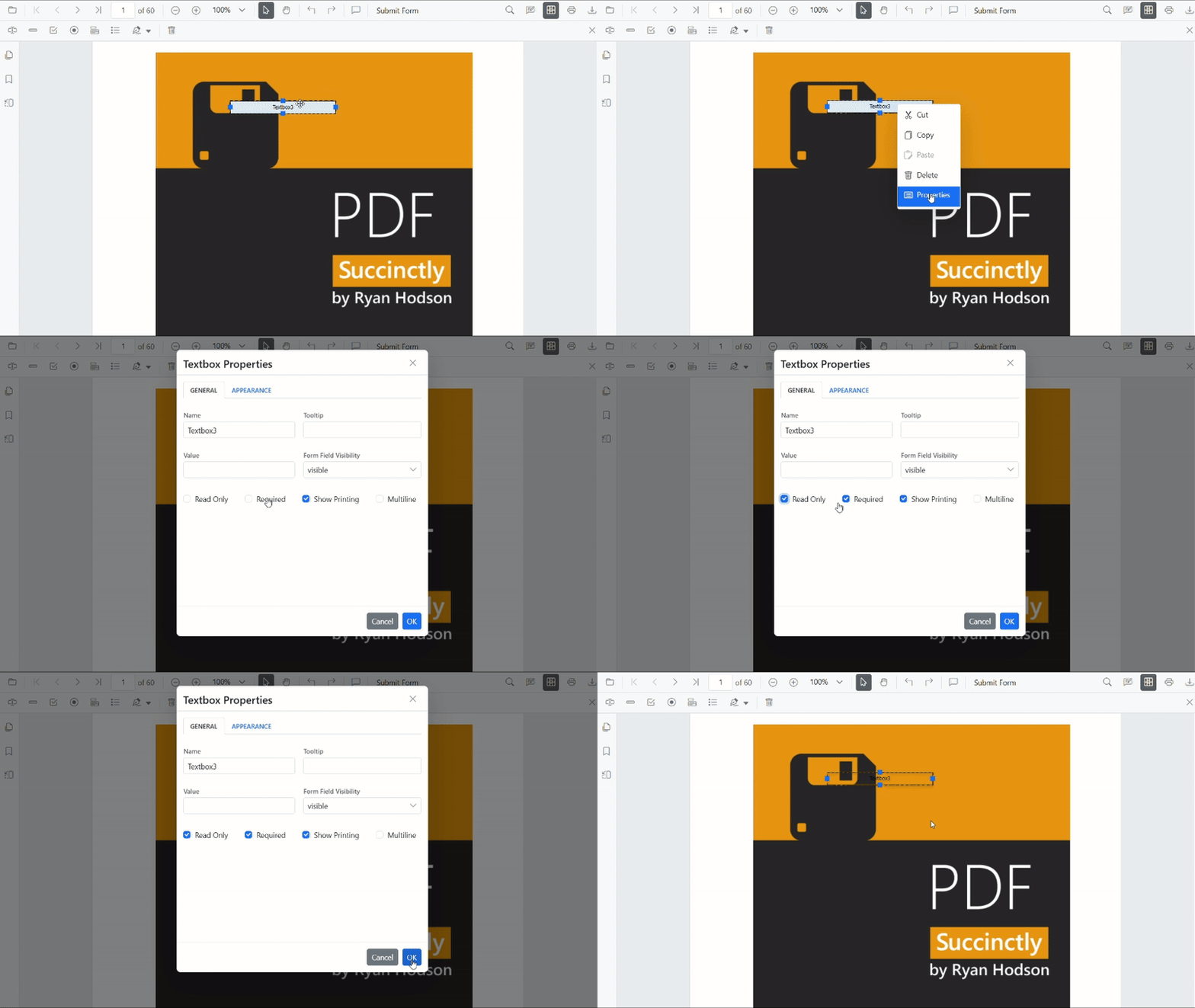
Apply PDF Form Field Flags Using the UI
Steps
- Enable Form Designer mode in the PDF Viewer.
- Select an existing form field on the PDF page.
- Right-click the field and choose Properties from the context menu.
- Configure the required constraint options.
- Click OK to apply the changes and close the properties popover.
Changes are reflected immediately in the viewer.
Apply PDF Form Field Flags Programmatically
You can apply or modify form field flags in the following ways.
Apply flags When Creating Fields
Pass the flags properties in the settings object when creating form fields using addFormField().
import { Component, AfterViewInit, ViewChild } from '@angular/core';
import {
  ToolbarService,
  MagnificationService,
  NavigationService,
  AnnotationService,
  TextSelectionService,
  TextSearchService,
  FormFieldsService,
  FormDesignerService,
  PdfViewerModule,
} from '@syncfusion/ej2-angular-pdfviewer';

@Component({
  selector: 'app-root',
  standalone: true,
  imports: [PdfViewerModule],
  template: `
    <div class="content-wrapper">
      <ejs-pdfviewer
        #pdfViewer
        [resourceUrl]="resourceUrl"
        [documentPath]="document"
        style="height: 640px; display: block;">
      </ejs-pdfviewer>
    </div>
  `,
  providers: [
    ToolbarService,
    MagnificationService,
    NavigationService,
    AnnotationService,
    TextSelectionService,
    TextSearchService,
    FormFieldsService,
    FormDesignerService,
  ],
})
export class AppComponent implements AfterViewInit {
  @ViewChild('pdfViewer') public pdfviewer: any;
  public document: string =
    'https://cdn.syncfusion.com/content/pdf/form-filling-document.pdf';
  public resourceUrl: string =
    'https://cdn.syncfusion.com/ej2/31.1.23/dist/ej2-pdfviewer-lib';

  ngAfterViewInit(): void {
    this.pdfviewer.documentLoad = () => {
      // Read-only Textbox that is printed but not required
      this.pdfviewer.formDesignerModule.addFormField('Textbox', {
        name: 'EmployeeId',
        bounds: { X: 146, Y: 229, Width: 150, Height: 24 },
        isReadOnly: true,
        isRequired: false,
        isPrint: true,
        value: 'EMP-0001'
      } as any);

      // Required Signature field that is not included in print
      this.pdfviewer.formDesignerModule.addFormField('SignatureField', {
        name: 'ApplicantSign',
        bounds: { X: 57, Y: 923, Width: 200, Height: 43 },
        isReadOnly: false,
        isRequired: true,
        isPrint: false,
        tooltip: 'Sign to accept the terms'
      } as any);
    };
  }
}
Update flags on Existing Fields Programmatically
Use the updateFormField() method to modify constraint values on existing form fields.
import { Component, AfterViewInit, ViewChild } from '@angular/core';
import {
  ToolbarService,
  MagnificationService,
  NavigationService,
  AnnotationService,
  TextSelectionService,
  TextSearchService,
  FormFieldsService,
  FormDesignerService,
  PdfViewerModule,
} from '@syncfusion/ej2-angular-pdfviewer';

@Component({
  selector: 'app-root',
  standalone: true,
  imports: [PdfViewerModule],
  template: `
    <div class="content-wrapper">
      <ejs-pdfviewer
        #pdfViewer
        [resourceUrl]="resourceUrl"
        [documentPath]="document"
        style="height: 640px; display: block;">
      </ejs-pdfviewer>
    </div>
  `,
  providers: [
    ToolbarService,
    MagnificationService,
    NavigationService,
    AnnotationService,
    TextSelectionService,
    TextSearchService,
    FormFieldsService,
    FormDesignerService,
  ],
})
export class AppComponent implements AfterViewInit {
  @ViewChild('pdfViewer') public pdfviewer: any;
  public document: string =
    'https://cdn.syncfusion.com/content/pdf/form-filling-document.pdf';
  public resourceUrl: string =
    'https://cdn.syncfusion.com/ej2/31.1.23/dist/ej2-pdfviewer-lib';

  ngAfterViewInit(): void {
    this.pdfviewer.documentLoad = () => {
      // Add a sample textbox
      this.pdfviewer.formDesignerModule.addFormField('Textbox', {
        name: 'Email',
        bounds: { X: 146, Y: 260, Width: 220, Height: 24 }
      } as any);

      // Retrieve it and update constraint flags
      const field = this.pdfviewer.formFieldCollections.find((f: any) => f.name === 'Email');
      if (field) {
        this.pdfviewer.formDesignerModule.updateFormField(field, {
          isReadOnly: false,
          isRequired: true,
          isPrint: true,
          tooltip: 'Enter a valid email'
        } as any);
      }
    };
  }
}
Set Default Flags for New PDF Form Fields
You can configure default flag values so that form fields added using the Form Designer toolbar automatically inherit them. This helps ensure consistent behavior for all newly created fields.
import { Component, AfterViewInit, ViewChild } from '@angular/core';
import {
  ToolbarService,
  MagnificationService,
  NavigationService,
  AnnotationService,
  TextSelectionService,
  TextSearchService,
  FormFieldsService,
  FormDesignerService,
  PdfViewerModule,
} from '@syncfusion/ej2-angular-pdfviewer';

@Component({
  selector: 'app-root',
  standalone: true,
  imports: [PdfViewerModule],
  template: `
    <div class="content-wrapper">
      <ejs-pdfviewer
        #pdfViewer
        [resourceUrl]="resourceUrl"
        [documentPath]="document"
        style="height: 640px; display: block;">
      </ejs-pdfviewer>
    </div>
  `,
  providers: [
    ToolbarService,
    MagnificationService,
    NavigationService,
    AnnotationService,
    TextSelectionService,
    TextSearchService,
    FormFieldsService,
    FormDesignerService,
  ],
})
export class AppComponent implements AfterViewInit {
  @ViewChild('pdfViewer') public pdfviewer: any;
  public document: string =
    'https://cdn.syncfusion.com/content/pdf/form-filling-document.pdf';
  public resourceUrl: string =
    'https://cdn.syncfusion.com/ej2/31.1.23/dist/ej2-pdfviewer-lib';

  ngAfterViewInit(): void {
    // Textbox fields will be editable, required, and included in print by default
    this.pdfviewer.textFieldSettings = {
      isReadOnly: false,
      isRequired: true,
      isPrint: true,
      tooltip: 'Required field'
    };

    // Signature fields will be optional and hidden when printing
    this.pdfviewer.signatureFieldSettings = {
      isReadOnly: false,
      isRequired: false,
      isPrint: false,
      tooltip: 'Sign if applicable'
    };
  }
}