Create Form Fields in Angular PDF Viewer
22 Oct 202624 minutes to read
Create or add new form fields visually with the Form Designer UI or programmatically using the Angular PDF Viewer API. This guide explains both methods and shows field-specific examples and a complete runnable example.
This guide covers the following:
- How to add fields with the Form Designer UI.
- How to add and edit fields programmatically (API).
- How to add common field types: Textbox, Password, CheckBox, RadioButton, ListBox, DropDown, Signature, Initial, DateTime picker.
Steps
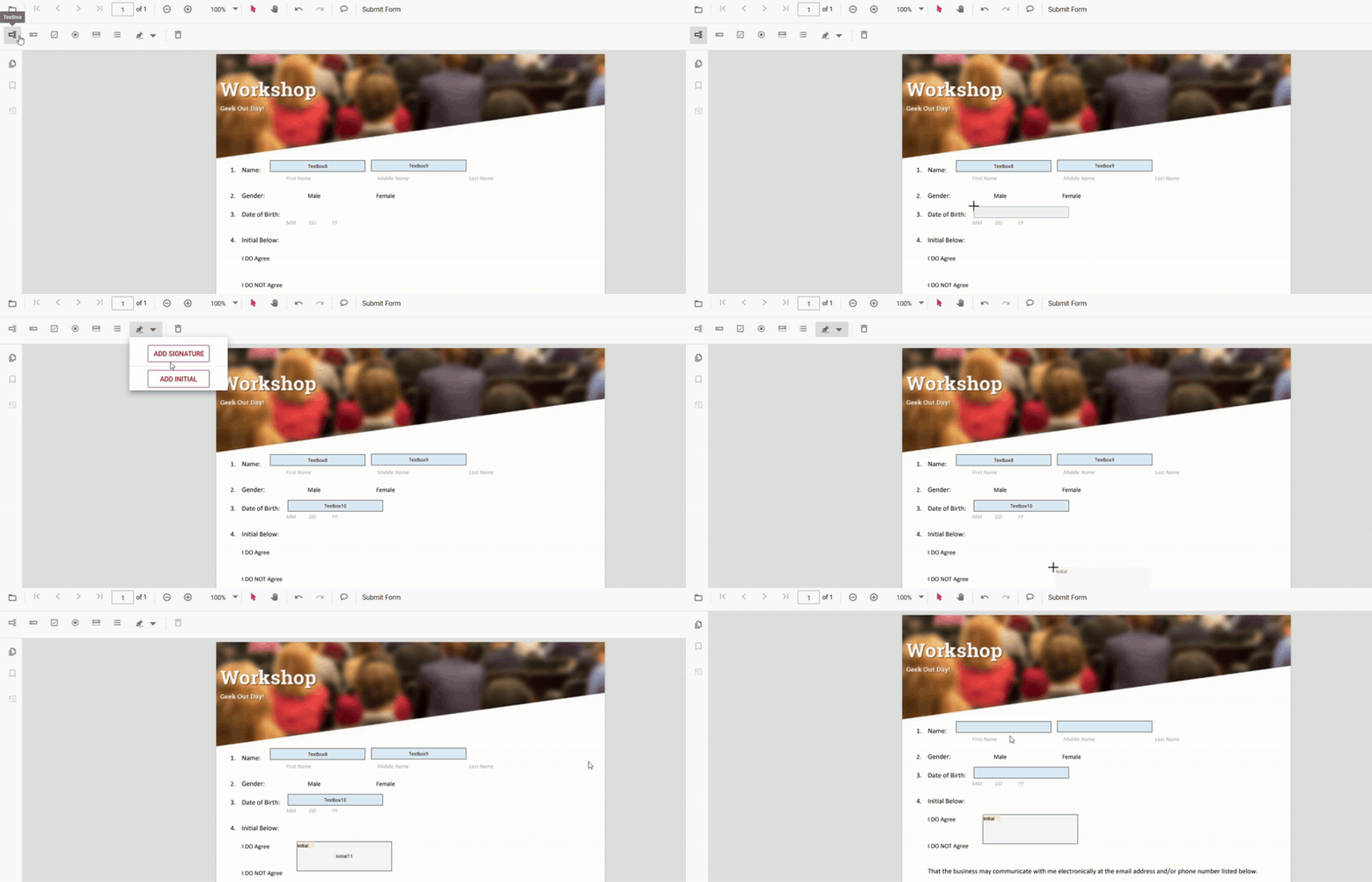
1. Create form fields using Form Designer UI
- Enable the Form Designer mode in the PDF Viewer. See Form Designer overview.
- Select a field type from the toolbar and click the PDF page to place it.
- Move/resize the field and configure properties in the Properties panel.
2. Create Form fields programmatically
Use addFormField method of the formDesigner module inside the viewer’s documentLoad handler or in response to user actions.
Use this approach to generate form fields dynamically based on data or application logic.
import { Component, ViewChild } from '@angular/core';
import {
  ToolbarService,
  MagnificationService,
  NavigationService,
  AnnotationService,
  TextSelectionService,
  TextSearchService,
  FormFieldsService,
  FormDesignerService,
  PdfViewerModule,
  PdfViewerComponent,
} from '@syncfusion/ej2-angular-pdfviewer';

@Component({
  selector: 'app-root',
  standalone: true,
  imports: [PdfViewerModule],
  template: `
    <div class="content-wrapper">
      <ejs-pdfviewer #pdfViewer id="pdfViewer" (documentLoad)="onDocumentLoad()"
        [resourceUrl]="resourceUrl"
        [documentPath]="document"
        style="height: 640px; display: block;">
      </ejs-pdfviewer>
    </div>
  `,
  providers: [
    ToolbarService,
    MagnificationService,
    NavigationService,
    AnnotationService,
    TextSelectionService,
    TextSearchService,
    FormFieldsService,
    FormDesignerService,
  ],
})
export class AppComponent {
  public document: string = 'https://cdn.syncfusion.com/content/pdf/form-filling-document.pdf';
  public resourceUrl: string = 'https://cdn.syncfusion.com/ej2/31.1.23/dist/ej2-pdfviewer-lib';

  @ViewChild('pdfViewer') public pdfviewer!: PdfViewerComponent;

  onDocumentLoad(): void {
    this.pdfviewer.formDesignerModule.addFormField('Textbox', {
      name: 'First Name',
      bounds: { X: 146, Y: 229, Width: 150, Height: 24 },
      pageNumber: 1,
      isRequired: true,
      tooltip: 'Enter your first name'
    } as any);
  }
}
Use programmatic creation when:
- Building dynamic forms
- Pre-filling forms from databases
- Automating form creation workflows
Field‑specific instructions
Below are concise UI steps and the programmatic examples for each common field type.
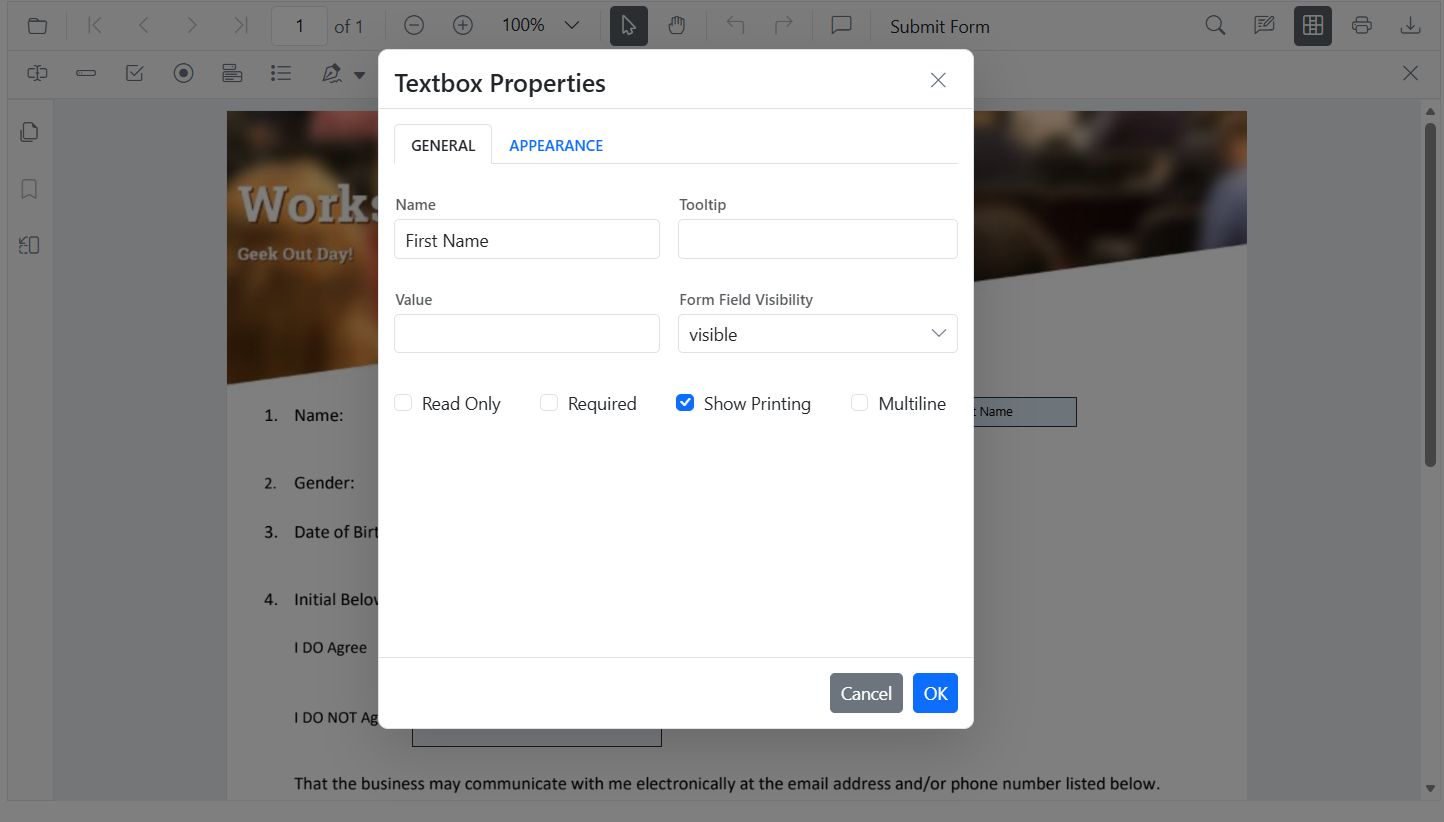
Textbox
Add via UI: Open Form Designer toolbar → select Textbox → click page → configure properties
Add Programmatically (API)
import { Component, ViewChild } from '@angular/core';
import {
  ToolbarService,
  MagnificationService,
  NavigationService,
  AnnotationService,
  TextSelectionService,
  TextSearchService,
  FormFieldsService,
  FormDesignerService,
  PdfViewerModule,
  PdfViewerComponent,
} from '@syncfusion/ej2-angular-pdfviewer';

@Component({
  selector: 'app-root',
  standalone: true,
  imports: [PdfViewerModule],
  template: `
    <div class="content-wrapper">
      <ejs-pdfviewer #pdfViewer id="pdfViewer" (documentLoad)="onDocumentLoad()"
        [resourceUrl]="resourceUrl"
        [documentPath]="document"
        style="height: 640px; display: block;">
      </ejs-pdfviewer>
    </div>
  `,
  providers: [
    ToolbarService,
    MagnificationService,
    NavigationService,
    AnnotationService,
    TextSelectionService,
    TextSearchService,
    FormFieldsService,
    FormDesignerService,
  ],
})
export class AppComponent {
  public document: string = 'https://cdn.syncfusion.com/content/pdf/form-filling-document.pdf';
  public resourceUrl: string = 'https://cdn.syncfusion.com/ej2/31.1.23/dist/ej2-pdfviewer-lib';

  @ViewChild('pdfViewer') public pdfviewer!: PdfViewerComponent;

  onDocumentLoad(): void {
    this.pdfviewer.formDesignerModule.addFormField('Textbox', {
      name: 'FirstName',
      pageNumber: 1,
      bounds: { X: 100, Y: 150, Width: 200, Height: 24 },
      isRequired: true,
      tooltip: 'Enter your first name',
      maxLength: 40
    } as any);
  }
}
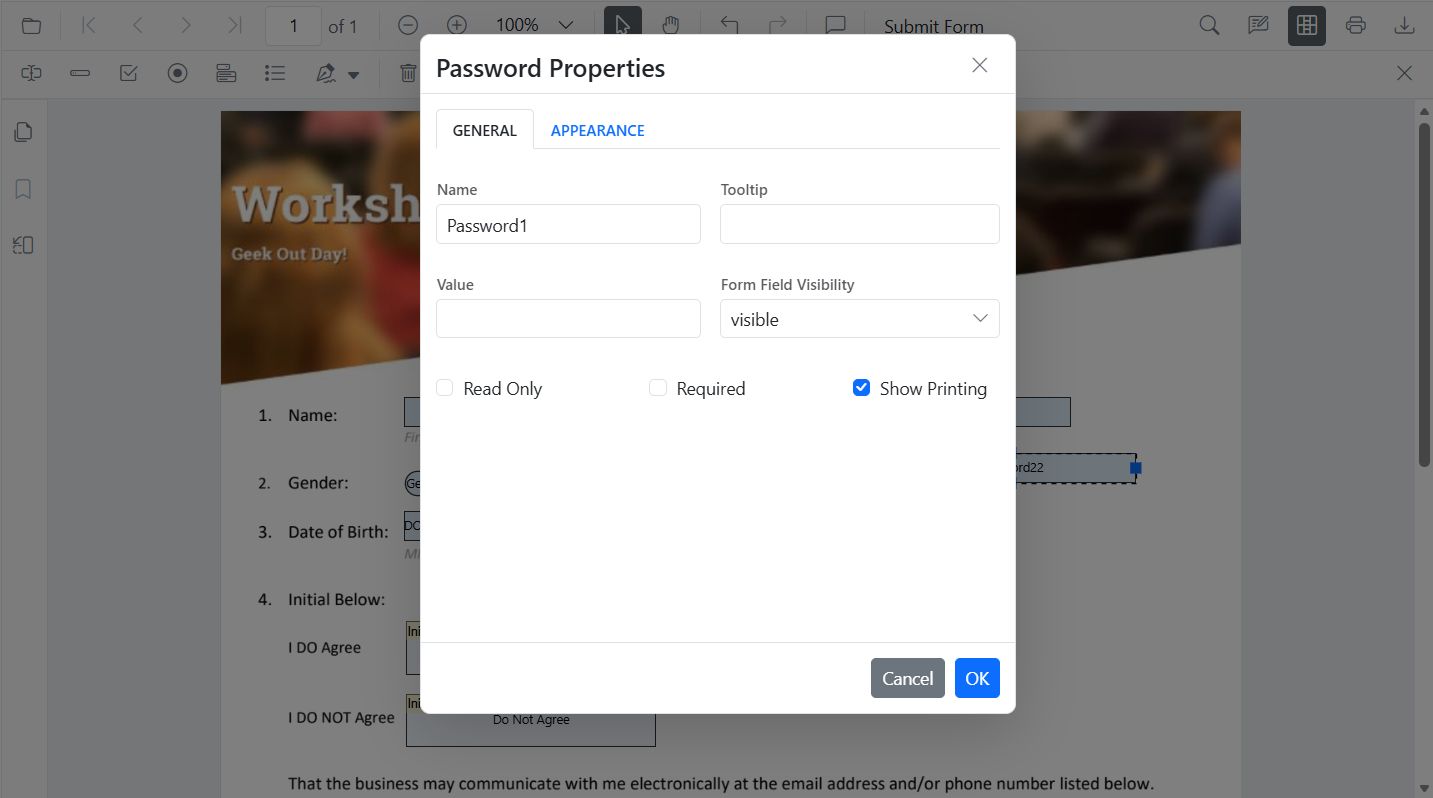
Password
Add via UI: Open form designer toolbar → Select Password → place → configure properties
Add Programmatically (API)
import { Component, ViewChild } from '@angular/core';
import {
  ToolbarService,
  MagnificationService,
  NavigationService,
  AnnotationService,
  TextSelectionService,
  TextSearchService,
  FormFieldsService,
  FormDesignerService,
  PdfViewerModule,
  PdfViewerComponent,
} from '@syncfusion/ej2-angular-pdfviewer';

@Component({
  selector: 'app-root',
  standalone: true,
  imports: [PdfViewerModule],
  template: `
    <div class="content-wrapper">
      <ejs-pdfviewer #pdfViewer id="pdfViewer" (documentLoad)="onDocumentLoad()"
        [resourceUrl]="resourceUrl"
        [documentPath]="document"
        style="height: 640px; display: block;">
      </ejs-pdfviewer>
    </div>
  `,
  providers: [
    ToolbarService,
    MagnificationService,
    NavigationService,
    AnnotationService,
    TextSelectionService,
    TextSearchService,
    FormFieldsService,
    FormDesignerService,
  ],
})
export class AppComponent {
  public document: string = 'https://cdn.syncfusion.com/content/pdf/form-filling-document.pdf';
  public resourceUrl: string = 'https://cdn.syncfusion.com/ej2/31.1.23/dist/ej2-pdfviewer-lib';

  @ViewChild('pdfViewer') public pdfviewer!: PdfViewerComponent;

  onDocumentLoad(): void {
    this.pdfviewer.formDesignerModule.addFormField('Password', {
      name: 'AccountPassword',
      pageNumber: 1,
      bounds: { X: 100, Y: 190, Width: 200, Height: 24 },
      isRequired: true,
      maxLength: 32,
      tooltip: 'Enter a secure password',
    } as any);
  }
}
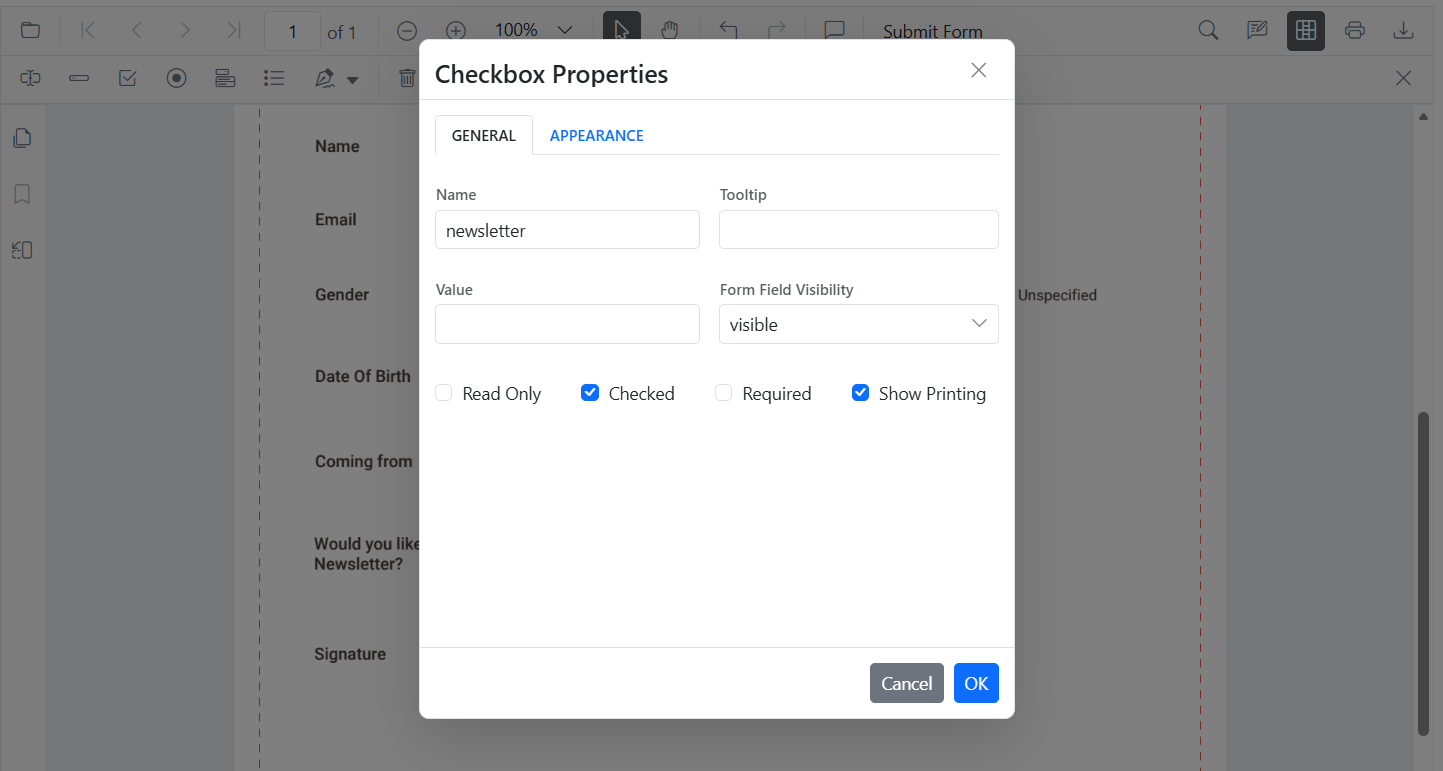
CheckBox
Add via UI: Open form designer toolbar → Select CheckBox → click to place → duplicate for options.
Add Programmatically (API)
import { Component, ViewChild } from '@angular/core';
import {
  ToolbarService,
  MagnificationService,
  NavigationService,
  AnnotationService,
  TextSelectionService,
  TextSearchService,
  FormFieldsService,
  FormDesignerService,
  PdfViewerModule,
  PdfViewerComponent,
} from '@syncfusion/ej2-angular-pdfviewer';

@Component({
  selector: 'app-root',
  standalone: true,
  imports: [PdfViewerModule],
  template: `
    <div class="content-wrapper">
      <ejs-pdfviewer #pdfViewer id="pdfViewer" (documentLoad)="onDocumentLoad()"
        [resourceUrl]="resourceUrl"
        [documentPath]="document"
        style="height: 640px; display: block;">
      </ejs-pdfviewer>
    </div>
  `,
  providers: [
    ToolbarService,
    MagnificationService,
    NavigationService,
    AnnotationService,
    TextSelectionService,
    TextSearchService,
    FormFieldsService,
    FormDesignerService,
  ],
})
export class AppComponent {
  public document: string = 'https://cdn.syncfusion.com/content/pdf/form-filling-document.pdf';
  public resourceUrl: string = 'https://cdn.syncfusion.com/ej2/31.1.23/dist/ej2-pdfviewer-lib';

  @ViewChild('pdfViewer') public pdfviewer!: PdfViewerComponent;

  onDocumentLoad(): void {
    this.pdfviewer.formDesignerModule.addFormField('CheckBox', {
      name: 'AgreeTerms',
      pageNumber: 1,
      bounds: { X: 100, Y: 230, Width: 18, Height: 18 },
      isChecked: false,
      tooltip: 'I agree to the terms',
    } as any);
  }
}
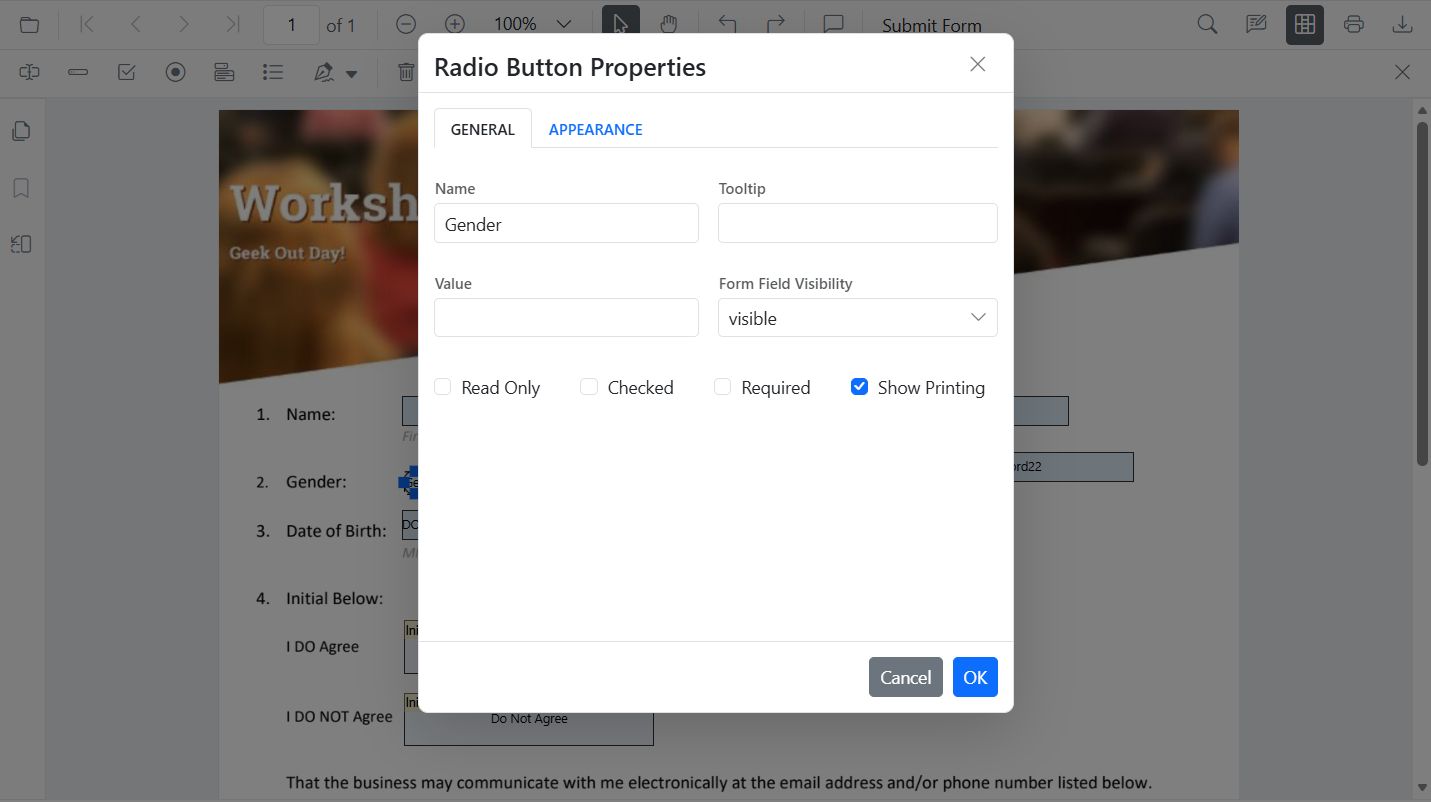
RadioButton
Add via UI: Open form designer toolbar → Select RadioButton → place buttons using the same name to group them.
Add Programmatically (API)
import { Component, ViewChild } from '@angular/core';
import {
  ToolbarService,
  MagnificationService,
  NavigationService,
  AnnotationService,
  TextSelectionService,
  TextSearchService,
  FormFieldsService,
  FormDesignerService,
  PdfViewerModule,
  PdfViewerComponent,
} from '@syncfusion/ej2-angular-pdfviewer';

@Component({
  selector: 'app-root',
  standalone: true,
  imports: [PdfViewerModule],
  template: `
    <div class="content-wrapper">
      <ejs-pdfviewer #pdfViewer id="pdfViewer" (documentLoad)="onDocumentLoad()"
        [resourceUrl]="resourceUrl"
        [documentPath]="document"
        style="height: 640px; display: block;">
      </ejs-pdfviewer>
    </div>
  `,
  providers: [
    ToolbarService,
    MagnificationService,
    NavigationService,
    AnnotationService,
    TextSelectionService,
    TextSearchService,
    FormFieldsService,
    FormDesignerService,
  ],
})
export class AppComponent {
  public document: string = 'https://cdn.syncfusion.com/content/pdf/form-filling-document.pdf';
  public resourceUrl: string = 'https://cdn.syncfusion.com/ej2/31.1.23/dist/ej2-pdfviewer-lib';

  @ViewChild('pdfViewer') public pdfviewer!: PdfViewerComponent;

  onDocumentLoad(): void {
    this.pdfviewer.formDesignerModule.addFormField('RadioButton', {
      name: 'Gender',
      value: 'Male',
      pageNumber: 1,
      bounds: { X: 100, Y: 270, Width: 16, Height: 16 }
    } as any);
    this.pdfviewer.formDesignerModule.addFormField('RadioButton', {
      name: 'Gender',
      value: 'Female',
      pageNumber: 1,
      bounds: { X: 160, Y: 270, Width: 16, Height: 16 }
    } as any);
  }
}
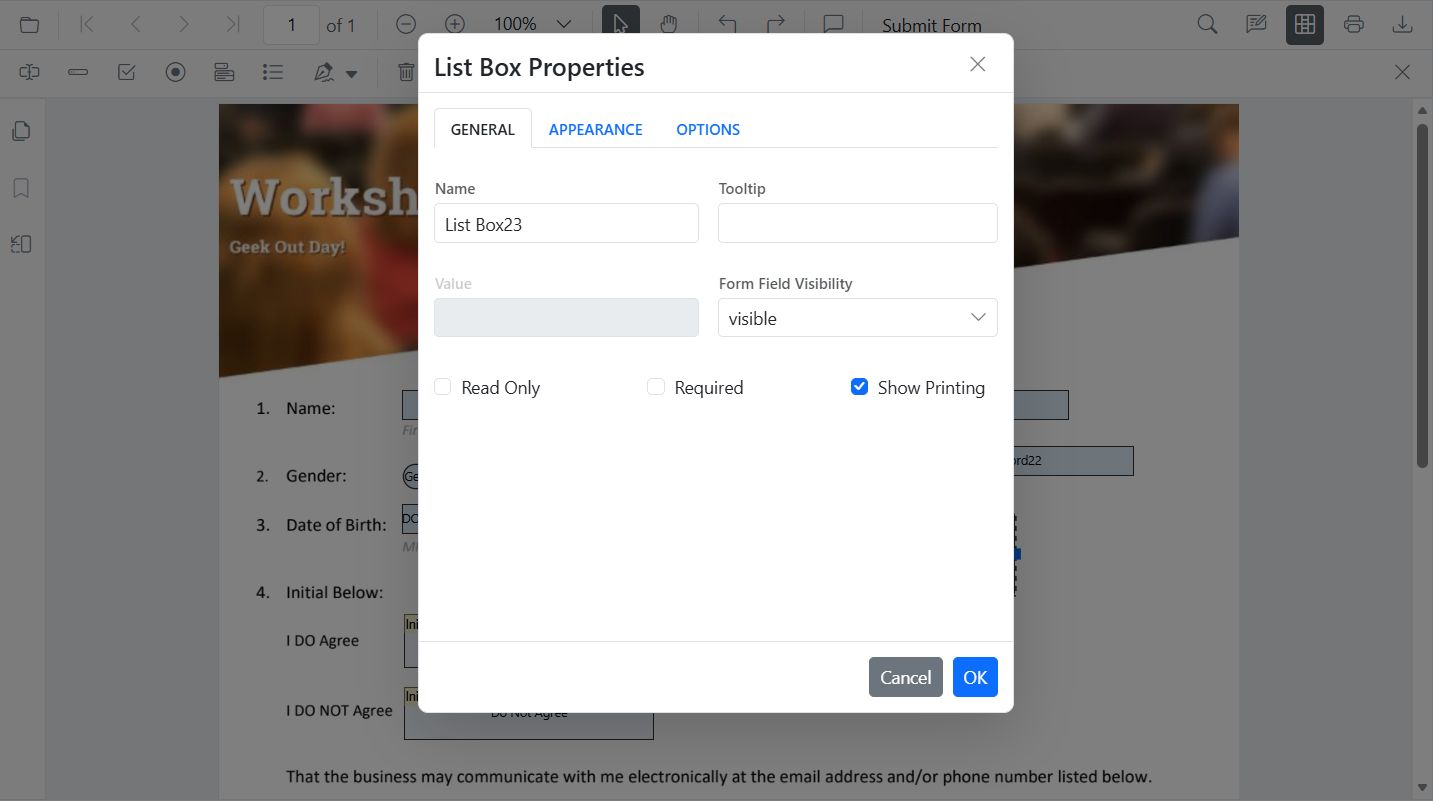
ListBox
Add via UI: Open form designer toolbar → Select ListBox → place → add items in Properties.
Add Programmatically (API)
import { Component, ViewChild } from '@angular/core';
import {
  ToolbarService,
  MagnificationService,
  NavigationService,
  AnnotationService,
  TextSelectionService,
  TextSearchService,
  FormFieldsService,
  FormDesignerService,
  PdfViewerModule,
  PdfViewerComponent,
} from '@syncfusion/ej2-angular-pdfviewer';

@Component({
  selector: 'app-root',
  standalone: true,
  imports: [PdfViewerModule],
  template: `
    <div class="content-wrapper">
      <ejs-pdfviewer #pdfViewer id="pdfViewer" (documentLoad)="onDocumentLoad()"
        [resourceUrl]="resourceUrl"
        [documentPath]="document"
        style="height: 640px; display: block;">
      </ejs-pdfviewer>
    </div>
  `,
  providers: [
    ToolbarService,
    MagnificationService,
    NavigationService,
    AnnotationService,
    TextSelectionService,
    TextSearchService,
    FormFieldsService,
    FormDesignerService,
  ],
})
export class AppComponent {
  public document: string = 'https://cdn.syncfusion.com/content/pdf/form-filling-document.pdf';
  public resourceUrl: string = 'https://cdn.syncfusion.com/ej2/31.1.23/dist/ej2-pdfviewer-lib';

  @ViewChild('pdfViewer') public pdfviewer!: PdfViewerComponent;

  onDocumentLoad(): void {
    const option = [
      { itemName: 'Item 1', itemValue: 'item1' },
      { itemName: 'Item 2', itemValue: 'item2' },
      { itemName: 'Item 3', itemValue: 'item3' }
    ];
    this.pdfviewer.formDesignerModule.addFormField('ListBox', {
      name: 'States',
      pageNumber: 1,
      bounds: { X: 100, Y: 310, Width: 220, Height: 70 },
      options: option,
    } as any);
  }
}
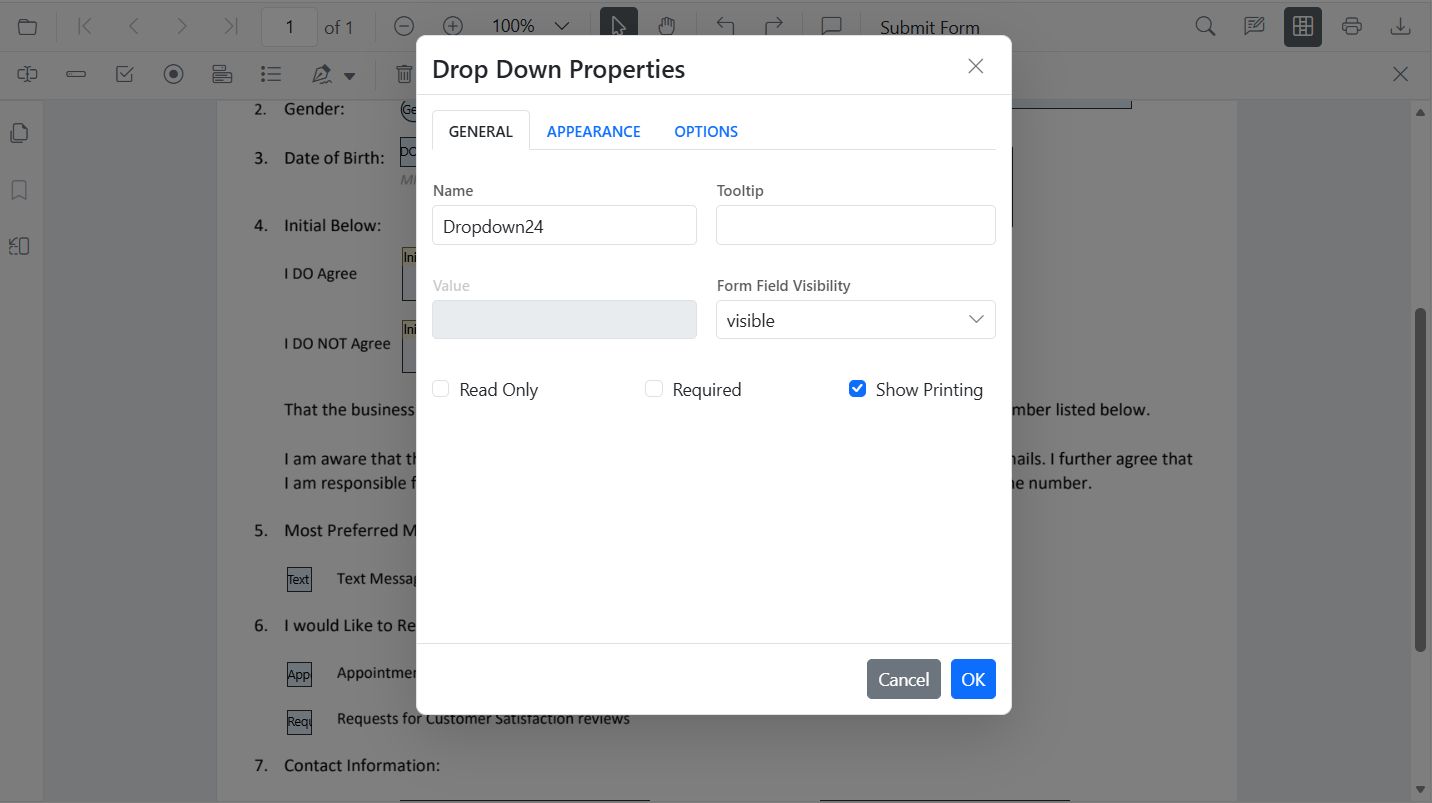
DropDown
Add via UI: Open form designer toolbar → Select DropDown → place → add items → set default value.
Add Programmatically (API)
import { Component, ViewChild } from '@angular/core';
import {
  ToolbarService,
  MagnificationService,
  NavigationService,
  AnnotationService,
  TextSelectionService,
  TextSearchService,
  FormFieldsService,
  FormDesignerService,
  PdfViewerModule,
  PdfViewerComponent,
} from '@syncfusion/ej2-angular-pdfviewer';

@Component({
  selector: 'app-root',
  standalone: true,
  imports: [PdfViewerModule],
  template: `
    <div class="content-wrapper">
      <ejs-pdfviewer #pdfViewer id="pdfViewer" (documentLoad)="onDocumentLoad()"
        [resourceUrl]="resourceUrl"
        [documentPath]="document"
        style="height: 640px; display: block;">
      </ejs-pdfviewer>
    </div>
  `,
  providers: [
    ToolbarService,
    MagnificationService,
    NavigationService,
    AnnotationService,
    TextSelectionService,
    TextSearchService,
    FormFieldsService,
    FormDesignerService,
  ],
})
export class AppComponent {
  public document: string = 'https://cdn.syncfusion.com/content/pdf/form-filling-document.pdf';
  public resourceUrl: string = 'https://cdn.syncfusion.com/ej2/31.1.23/dist/ej2-pdfviewer-lib';

  @ViewChild('pdfViewer') public pdfviewer!: PdfViewerComponent;

  onDocumentLoad(): void {
    const options = [
      { itemName: 'Item 1', itemValue: 'item1' },
      { itemName: 'Item 2', itemValue: 'item2' },
      { itemName: 'Item 3', itemValue: 'item3' },
    ];

    this.pdfviewer.formDesignerModule.addFormField('DropDown', {
      name: 'Country',
      options,
      bounds: { X: 560, Y: 320, Width: 150, Height: 24 },
    } as any);
  }
}
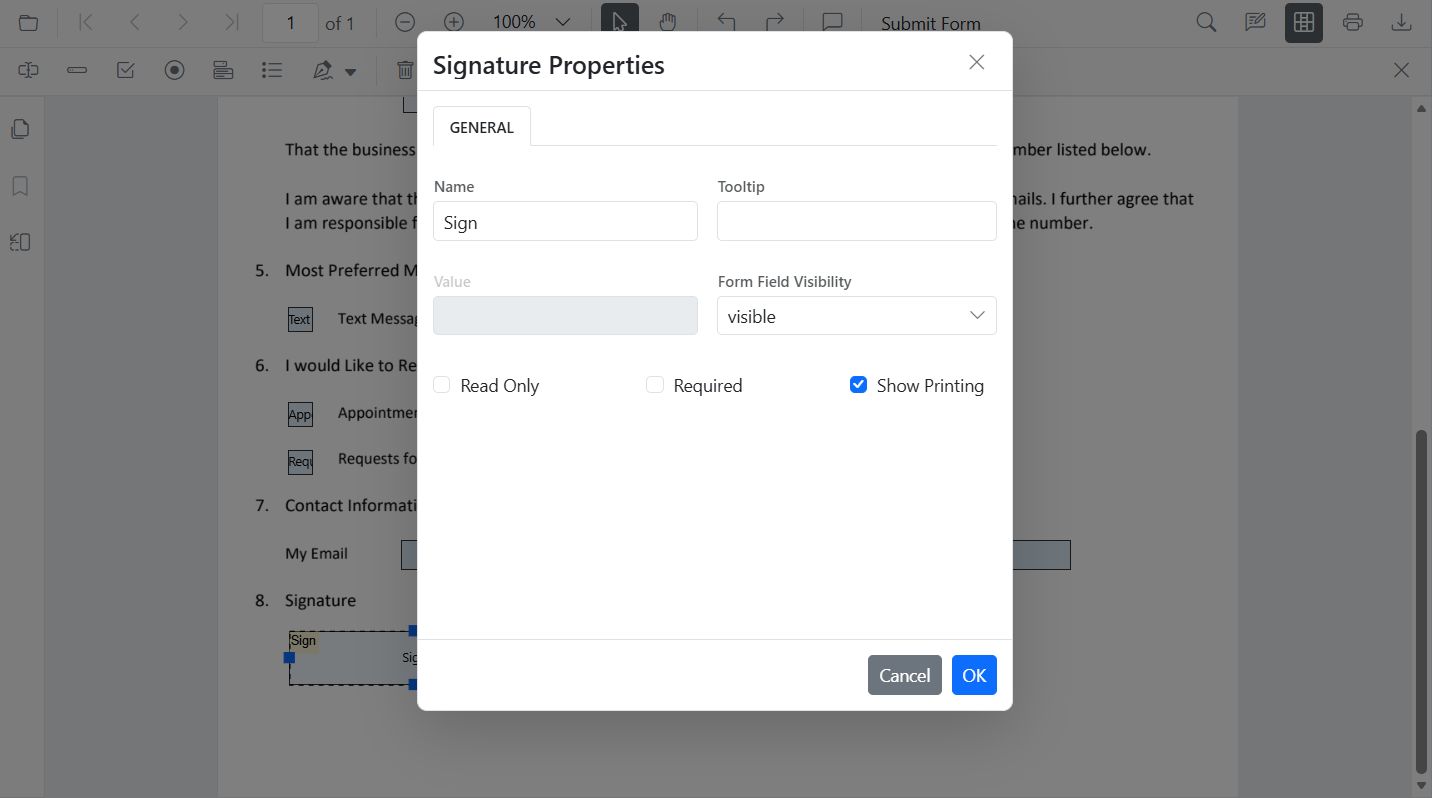
Signature Field
Add via UI: Open form designer toolbar → select Signature Field → place where signing is required → configure indicator text/thickness/tooltip/isRequired.
Add Programmatically (API)
import { Component, ViewChild } from '@angular/core';
import {
  ToolbarService,
  MagnificationService,
  NavigationService,
  AnnotationService,
  TextSelectionService,
  TextSearchService,
  FormFieldsService,
  FormDesignerService,
  PdfViewerModule,
  PdfViewerComponent,
} from '@syncfusion/ej2-angular-pdfviewer';

@Component({
  selector: 'app-root',
  standalone: true,
  imports: [PdfViewerModule],
  template: `
    <div class="content-wrapper">
      <ejs-pdfviewer #pdfViewer id="pdfViewer" (documentLoad)="onDocumentLoad()"
        [resourceUrl]="resourceUrl"
        [documentPath]="document"
        style="height: 640px; display: block;">
      </ejs-pdfviewer>
    </div>
  `,
  providers: [
    ToolbarService,
    MagnificationService,
    NavigationService,
    AnnotationService,
    TextSelectionService,
    TextSearchService,
    FormFieldsService,
    FormDesignerService,
  ],
})
export class AppComponent {
  public document: string = 'https://cdn.syncfusion.com/content/pdf/form-filling-document.pdf';
  public resourceUrl: string = 'https://cdn.syncfusion.com/ej2/31.1.23/dist/ej2-pdfviewer-lib';

  @ViewChild('pdfViewer') public pdfviewer!: PdfViewerComponent;

  onDocumentLoad(): void {
    this.pdfviewer.formDesignerModule.addFormField('SignatureField', {
      name: 'Sign',
      pageNumber: 1,
      bounds: { X: 57, Y: 923, Width: 200, Height: 43 },
      tooltip: 'Sign here',
      isRequired: true,
    } as any);
  }
}
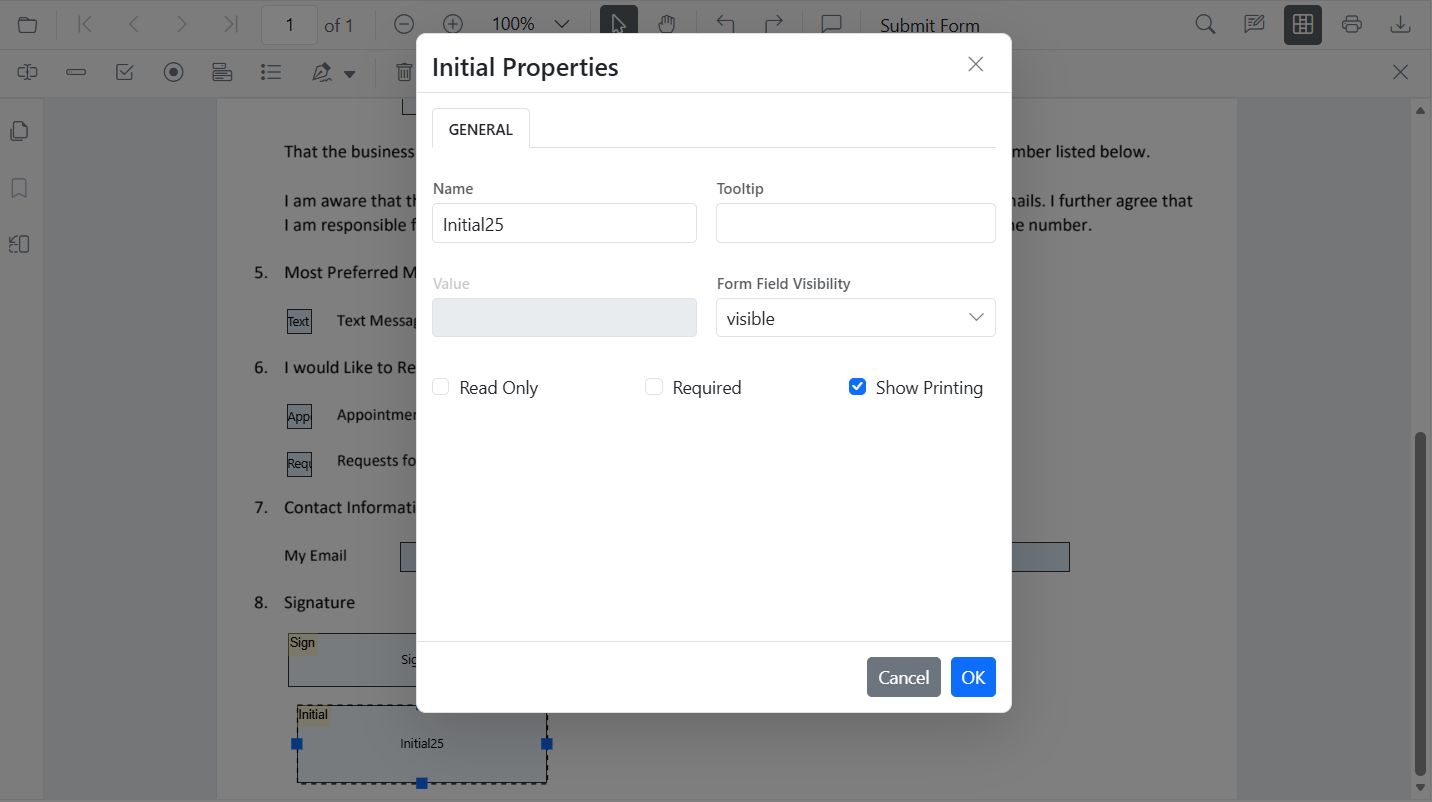
Initial Field
Add via UI: Open form designer toolbar → select Initial Field → place where initials are needed → configure text/isRequired.
Add Programmatically (API)
import { Component, ViewChild } from '@angular/core';
import {
  ToolbarService,
  MagnificationService,
  NavigationService,
  AnnotationService,
  TextSelectionService,
  TextSearchService,
  FormFieldsService,
  FormDesignerService,
  PdfViewerModule,
  PdfViewerComponent,
} from '@syncfusion/ej2-angular-pdfviewer';

@Component({
  selector: 'app-root',
  standalone: true,
  imports: [PdfViewerModule],
  template: `
    <div class="content-wrapper">
      <ejs-pdfviewer #pdfViewer id="pdfViewer" (documentLoad)="onDocumentLoad()"
        [resourceUrl]="resourceUrl"
        [documentPath]="document"
        style="height: 640px; display: block;">
      </ejs-pdfviewer>
    </div>
  `,
  providers: [
    ToolbarService,
    MagnificationService,
    NavigationService,
    AnnotationService,
    TextSelectionService,
    TextSearchService,
    FormFieldsService,
    FormDesignerService,
  ],
})
export class AppComponent {
  public document: string = 'https://cdn.syncfusion.com/content/pdf/form-filling-document.pdf';
  public resourceUrl: string = 'https://cdn.syncfusion.com/ej2/31.1.23/dist/ej2-pdfviewer-lib';

  @ViewChild('pdfViewer') public pdfviewer!: PdfViewerComponent;

  onDocumentLoad(): void {
    this.pdfviewer.formDesignerModule.addFormField('InitialField', {
      name: 'Sign',
      pageNumber: 1,
      bounds: { X: 57, Y: 923, Width: 200, Height: 43 },
      tooltip: 'Sign here',
      isRequired: true,
    } as any);
  }
}
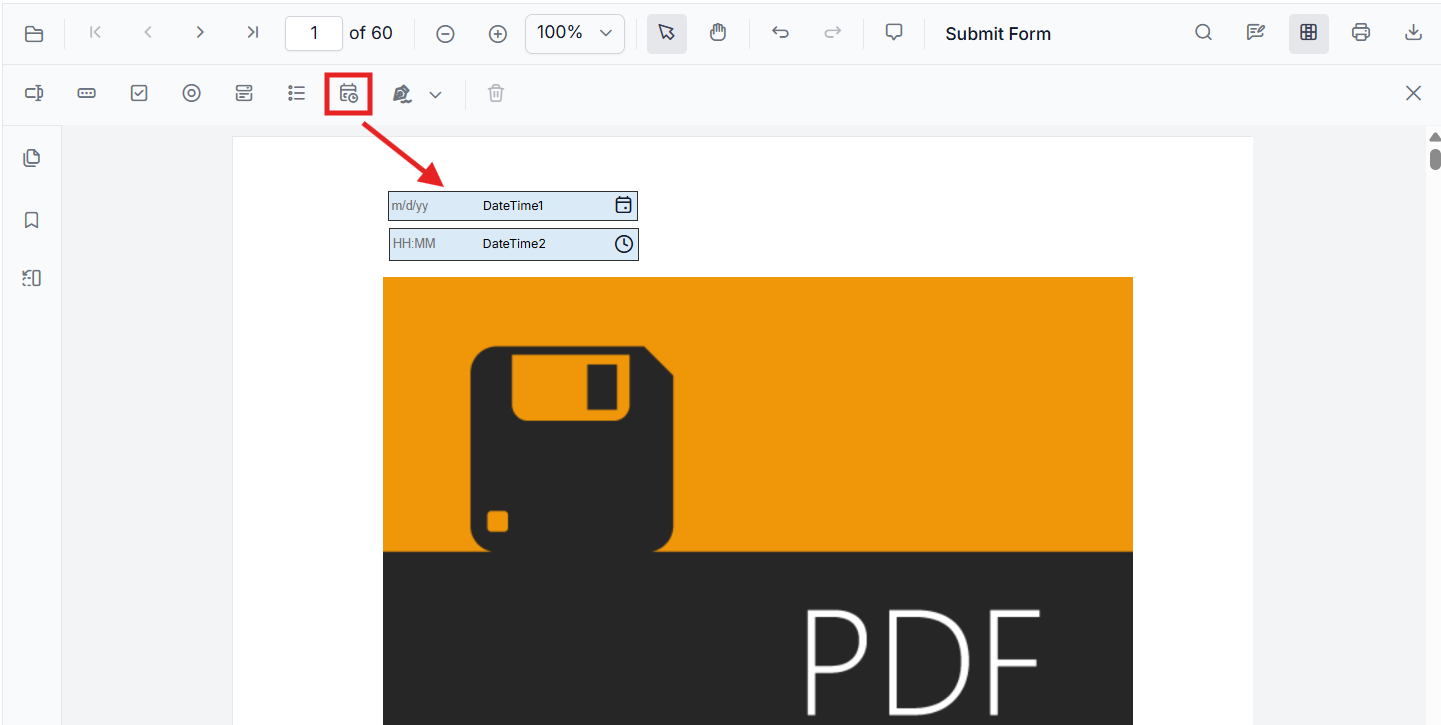
DateTime Picker
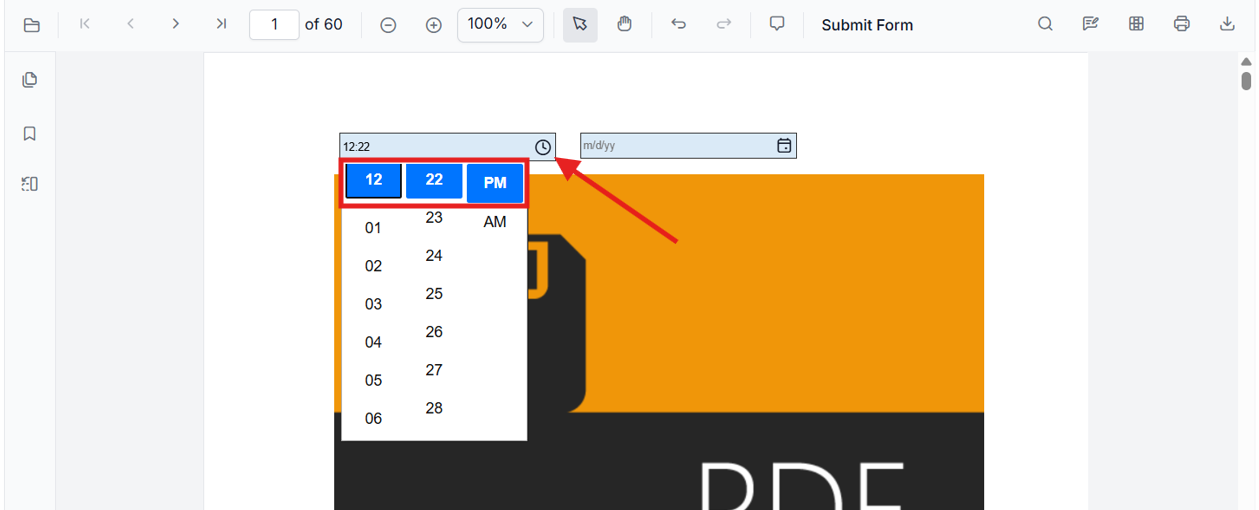
Add via UI: Open the Form Designer toolbar, select DateTime Picker, and click on a PDF page to place the field. The DateTime Picker tool adds date and time fields in Form Designer mode.
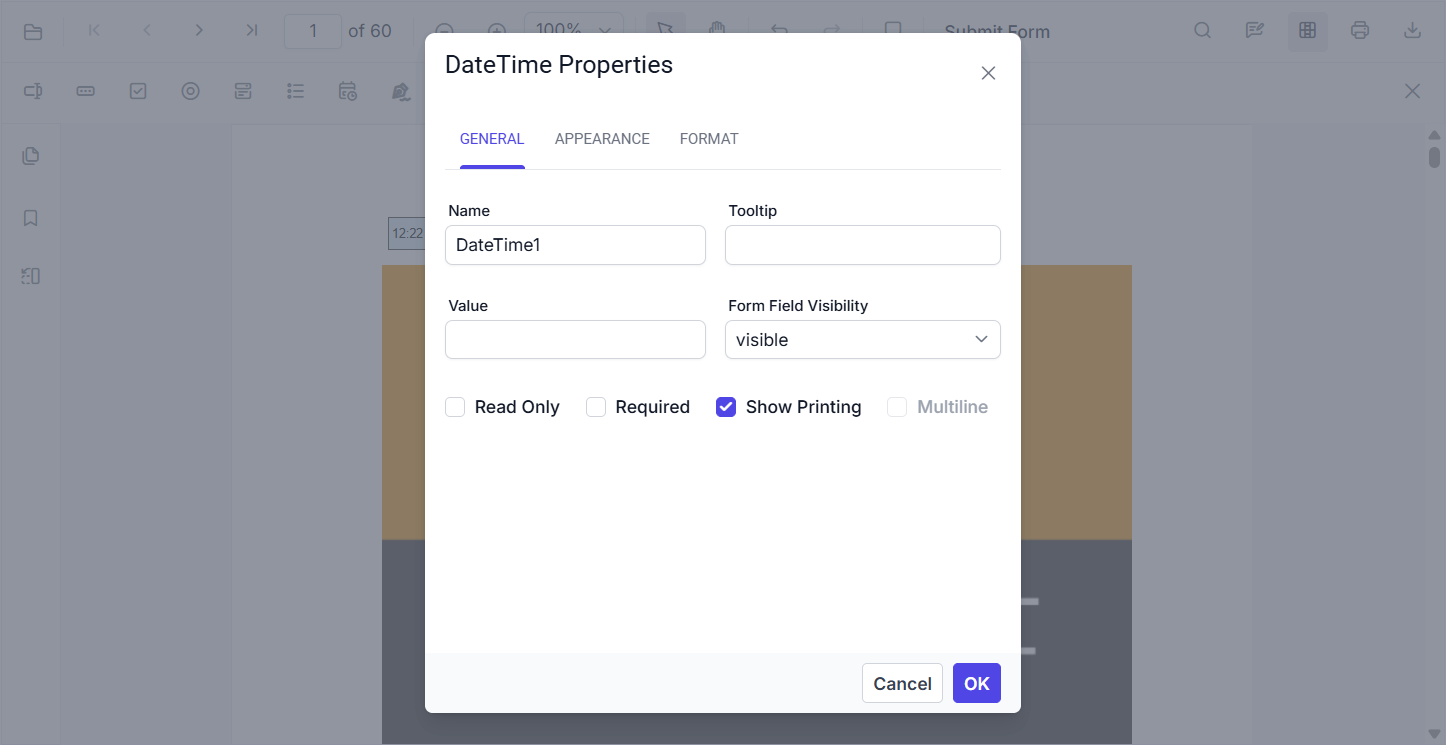
Select the field to configure its general properties, such as its name, value, visibility, and whether it is read-only or required.
Manual Entry and Picker
The field accepts values either by direct typing or through the integrated picker UI:
-
Date Field – Enter a date manually, or open the calendar dropdown to pick a date.
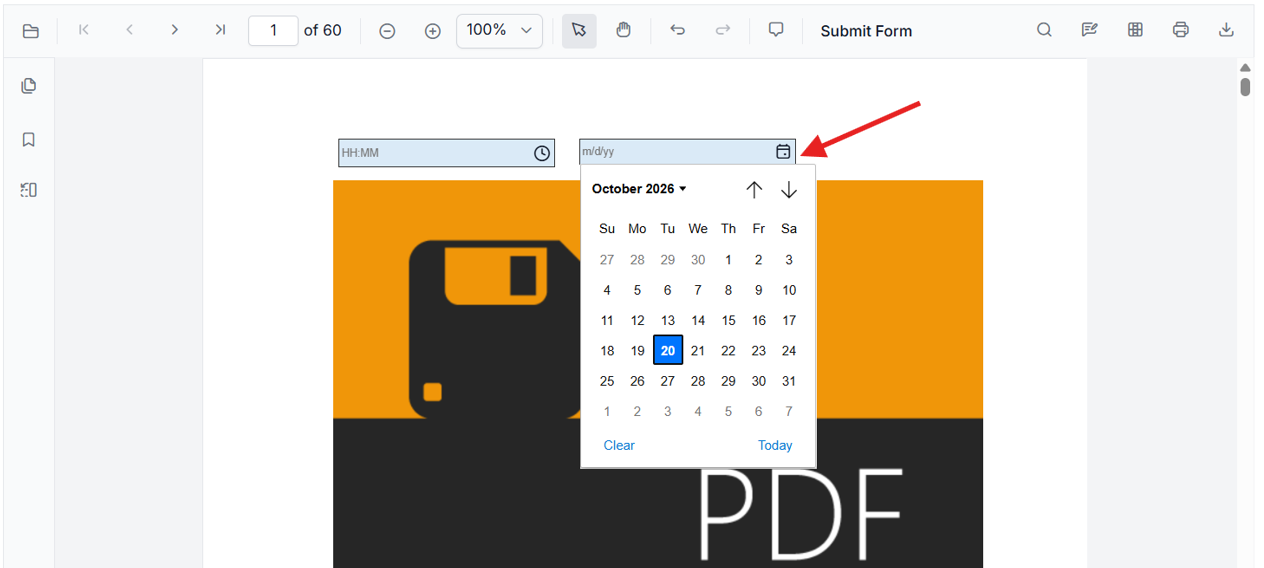
-
Time Field – Enter a time manually, or open the time dropdown to pick a time.
Strict Format Validation
Invalid values are rejected and a validation popup is displayed. The invalid value is not applied to the field.
For example, with the format m/d/yy:
| Input | Result |
|---|---|
10/19/2026 |
Accepted |
19/10/26 |
Rejected |
not-a-date |
Rejected |
Date / Time Toggle and Format Editing
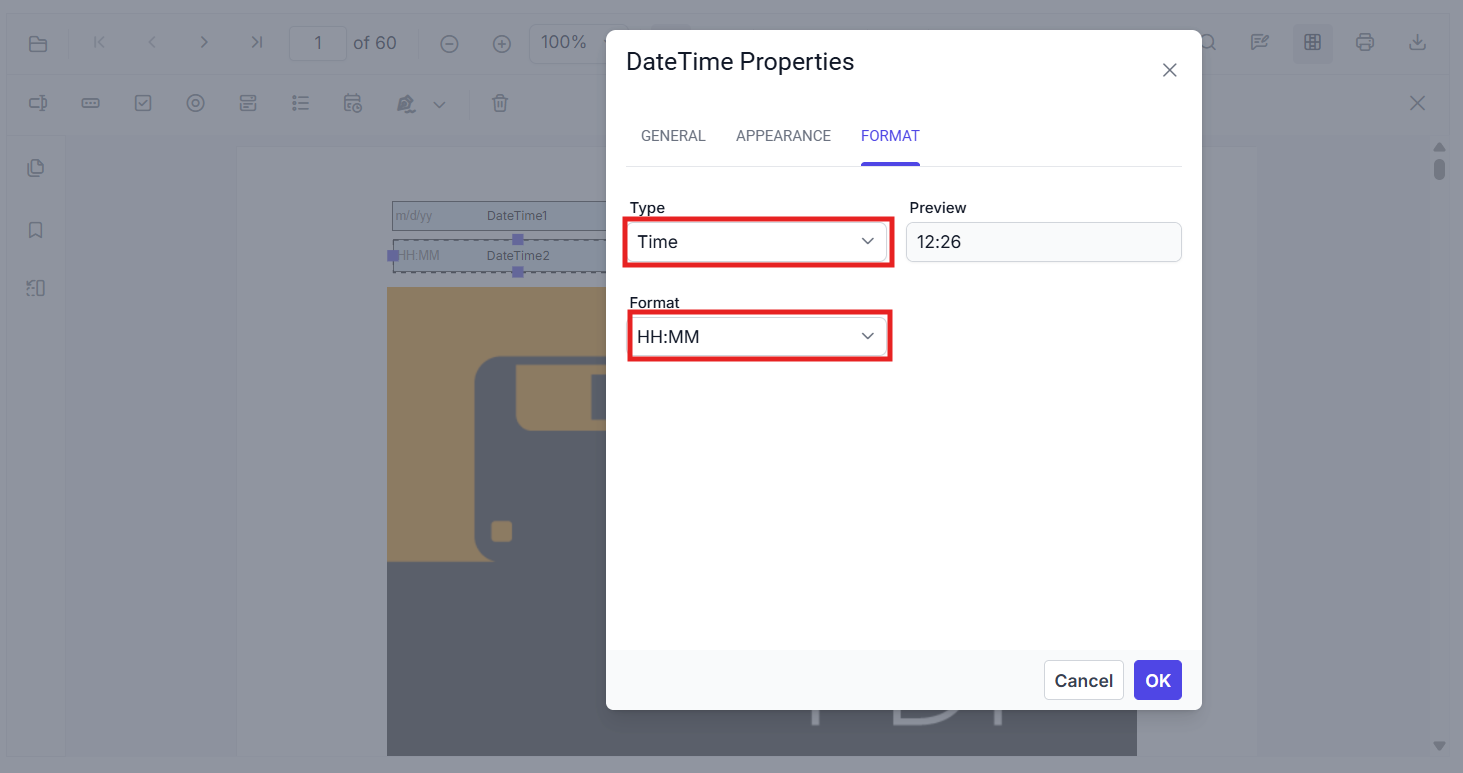
The Format tab in the Properties panel lets you:
- Switch between Date Picker and Time Picker modes.
- Edit the display format string.
- Preview formatting changes before saving.
Common Formats
| Format String | Example Output |
|---|---|
m/d/yy |
10/19/26 |
mm/dd/yyyy |
10/19/2026 |
HH:MM |
14:30 |
HH:MM:ss |
14:30:45 |
Form Designer Appearance
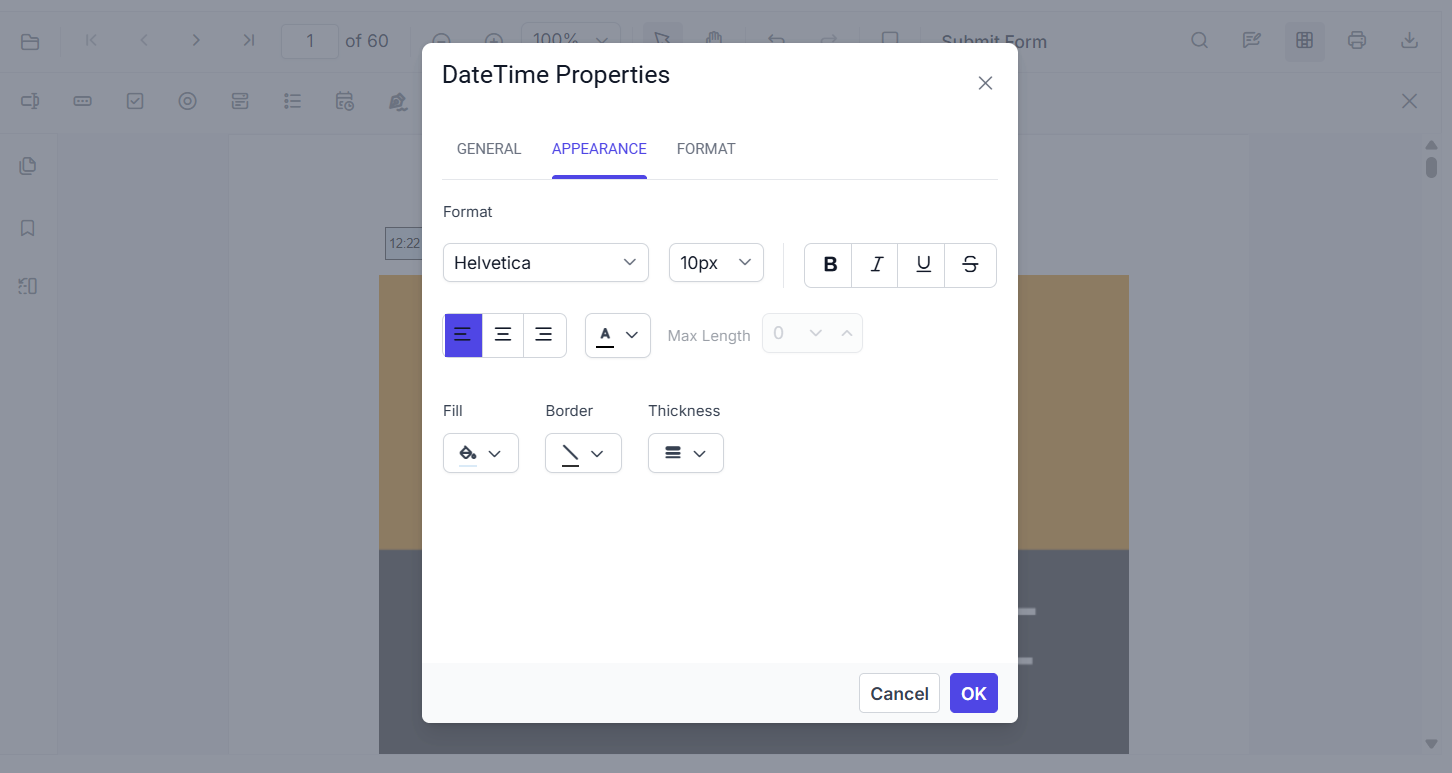
Placed DateTime pickers have a distinct visual appearance in Form Designer mode, including:
- Colored background
- Visible border
- Field-type indicator
Add Programmatically (API)
import { Component, ViewChild } from '@angular/core';
import {
  ToolbarService,
  MagnificationService,
  NavigationService,
  AnnotationService,
  TextSelectionService,
  TextSearchService,
  FormFieldsService,
  FormDesignerService,
  PdfViewerModule,
  PdfViewerComponent,
} from '@syncfusion/ej2-angular-pdfviewer';

@Component({
  selector: 'app-root',
  standalone: true,
  imports: [PdfViewerModule],
  template: `
    <div class="content-wrapper">
      <ejs-pdfviewer #pdfViewer id="pdfViewer" (documentLoad)="onDocumentLoad()"
        [resourceUrl]="resourceUrl"
        [documentPath]="document"
        style="height: 640px; display: block;">
      </ejs-pdfviewer>
    </div>
  `,
  providers: [
    ToolbarService,
    MagnificationService,
    NavigationService,
    AnnotationService,
    TextSelectionService,
    TextSearchService,
    FormFieldsService,
    FormDesignerService,
  ],
})
export class AppComponent {
  public document: string = 'https://cdn.syncfusion.com/content/pdf/form-filling-document.pdf';
  public resourceUrl: string = 'https://cdn.syncfusion.com/ej2/31.1.23/dist/ej2-pdfviewer-lib';

  @ViewChild('pdfViewer') public pdfviewer!: PdfViewerComponent;

  onDocumentLoad(): void {
    // Add Date field
    this.pdfviewer.formDesignerModule.addFormField('Textbox', {
      name: 'DateField1',
      bounds: { X: 146, Y: 200, Width: 200, Height: 24 },
      pageNumber: 1,
      isDateField: true,
      fontSize: 10,
      color: 'black',
      fontFamily: 'Helvetica',
      backgroundColor: '#daeaf7ff',
      borderColor: '#303030',
      alignment: 'Left',
      isReadOnly: false,
      visibility: 'visible',
      isRequired: false,
      isPrint: true,
      tooltip: '',
      thickness: 1,
      actions: {
        format: { script: 'AFDate_FormatEx("m/d/yy")' }
      }
    } as any);

    // Add Time field
    this.pdfviewer.formDesignerModule.addFormField('Textbox', {
      name: 'TimeField1',
      bounds: { X: 146, Y: 250, Width: 200, Height: 24 },
      pageNumber: 1,
      isDateField: true,
      fontSize: 10,
      color: 'black',
      fontFamily: 'Helvetica',
      backgroundColor: '#daeaf7ff',
      borderColor: '#303030',
      alignment: 'Left',
      isReadOnly: false,
      visibility: 'visible',
      isRequired: false,
      isPrint: true,
      tooltip: '',
      thickness: 1,
      actions: {
        format: { script: 'AFTime_FormatEx("HH:MM")' }
      }
    } as any);
  }
}
Add fields dynamically with setFormFieldMode
Use setFormFieldMode() to switch the designer into a specific field mode and let users add fields on the fly.
Edit Form Fields in Angular PDF Viewer
You can edit form fields using the UI or API.
Edit Using the UI
- Right click a field → Properties to update settings. (Image here)
- Drag to move; use handles to resize.
- Use the toolbar to toggle field mode or add new fields.
Edit Programmatically
import { Component, ViewChild } from '@angular/core';
import {
  ToolbarService,
  MagnificationService,
  NavigationService,
  AnnotationService,
  TextSelectionService,
  TextSearchService,
  FormFieldsService,
  FormDesignerService,
  PdfViewerModule,
  PdfViewerComponent,
} from '@syncfusion/ej2-angular-pdfviewer';

@Component({
  selector: 'app-root',
  standalone: true,
  imports: [PdfViewerModule],
  template: `
    <div class="content-wrapper">
      <button (click)="editTextbox()">EditTextBox</button>
      <button (click)="addPasswordField()">Add Form Field</button>

      <ejs-pdfviewer #pdfViewer id="pdfViewer"
        [resourceUrl]="resourceUrl"
        [documentPath]="document"
        style="height: 640px; display: block;">
      </ejs-pdfviewer>
    </div>
  `,
  providers: [
    ToolbarService,
    MagnificationService,
    NavigationService,
    AnnotationService,
    TextSelectionService,
    TextSearchService,
    FormFieldsService,
    FormDesignerService,
  ],
})
export class AppComponent {
  public document: string = 'https://cdn.syncfusion.com/content/pdf/form-filling-document.pdf';
  public resourceUrl: string = 'https://cdn.syncfusion.com/ej2/31.1.23/dist/ej2-pdfviewer-lib';

  @ViewChild('pdfViewer') public pdfviewer!: PdfViewerComponent;

  editTextbox(): void {
    const fields = this.pdfviewer.retrieveFormFields();
    const field = fields.find((f: any) => f.name === 'First Name') || fields[0];
    if (field) {
      this.pdfviewer.formDesignerModule.updateFormField(field, {
        value: 'John',
        fontFamily: 'Courier',
        fontSize: 12,
        fontStyle: 'None' as any,
        color: 'black',
        backgroundColor: 'white',
        borderColor: 'black',
        thickness: 2,
        alignment: 'Left',
        maxLength: 50
      } as any);
    }
  }

  addPasswordField(): void {
    this.pdfviewer.formDesignerModule.setFormFieldMode('Password');
  }
}Troubleshooting
- If fields do not appear, verify
resourceUrlmatches the EJ2 PDF Viewer library version and that the document loads correctly. - If using WASM or additional services, confirm those resources are reachable from the environment.