Customize Form Field Appearance in Angular PDF Viewer
14 Aug 20265 minutes to read
Styling customizes appearance only (font, color, alignment, border, background, indicator text).
Customize Appearance of Form Fields Using the UI
Use the Properties panel to adjust:
- Font family/size, text color, alignment
- Border color/thickness
- Background color
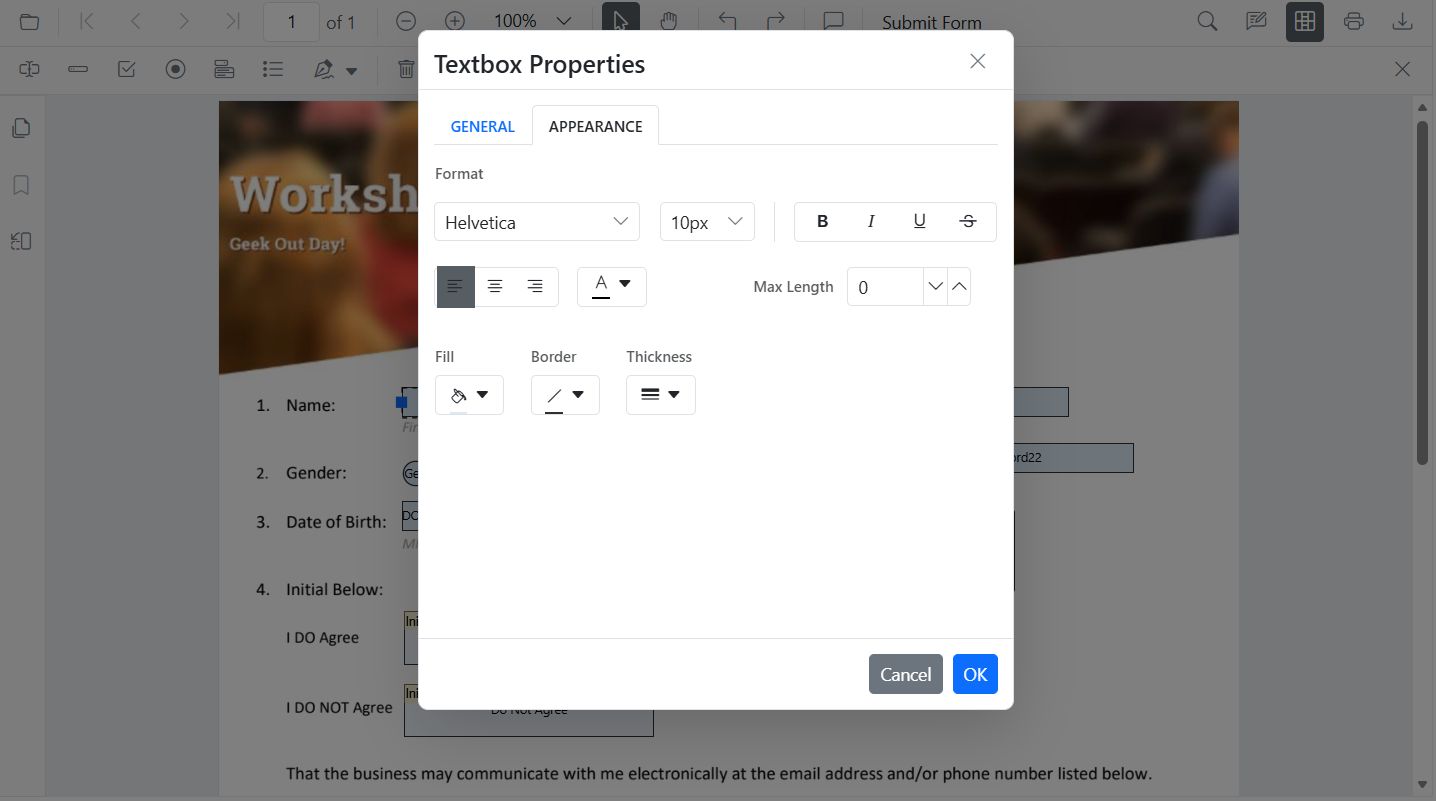
Customize the Appearance of Form Fields Programmatically
Use updateFormField() to apply styles:
import { Component, ViewChild } from '@angular/core';
import {
  ToolbarService,
  MagnificationService,
  NavigationService,
  AnnotationService,
  TextSelectionService,
  TextSearchService,
  FormFieldsService,
  FormDesignerService,
  PdfViewerModule,
  PdfViewerComponent,
} from '@syncfusion/ej2-angular-pdfviewer';

@Component({
  selector: 'app-root',
  standalone: true,
  imports: [PdfViewerModule],
  template: `
    <div class="content-wrapper">
      <button (click)="customizeTextboxStyle()">Update Textbox Style</button>

      <ejs-pdfviewer #pdfViewer id="pdfViewer"
        [resourceUrl]="resourceUrl"
        [documentPath]="document"
        style="height: 640px; display: block;">
      </ejs-pdfviewer>
    </div>
  `,
  providers: [
    ToolbarService,
    MagnificationService,
    NavigationService,
    AnnotationService,
    TextSelectionService,
    TextSearchService,
    FormFieldsService,
    FormDesignerService,
  ],
})
export class AppComponent {
  public document: string = 'https://cdn.syncfusion.com/content/pdf/form-filling-document.pdf';
  public resourceUrl: string = 'https://cdn.syncfusion.com/ej2/31.1.23/dist/ej2-pdfviewer-lib';

  @ViewChild('pdfViewer') public pdfviewer!: PdfViewerComponent;

  customizeTextboxStyle(): void {
    const fields = this.pdfviewer.retrieveFormFields();
    const tb = fields.find((f: any) => f.name === 'First Name') || fields[0];
    if (tb) {
      this.pdfviewer.formDesignerModule.updateFormField(tb, {
        value: 'John',
        fontFamily: 'Courier',
        fontSize: 12,
        fontStyle: 'None' as any,
        color: 'black',
        borderColor: 'black',
        backgroundColor: 'white',
        alignment: 'Left',
        thickness: 2
      } as any);
    }
  }
}
Set Default Styles for New Form Fields
Define defaults so fields added from the toolbar inherit styles.
import { Component } from '@angular/core';
import {
  ToolbarService,
  MagnificationService,
  NavigationService,
  AnnotationService,
  TextSelectionService,
  TextSearchService,
  FormFieldsService,
  FormDesignerService,
  PdfViewerModule,
  PdfViewerComponent,
} from '@syncfusion/ej2-angular-pdfviewer';

@Component({
  selector: 'app-root',
  standalone: true,
  imports: [PdfViewerModule],
  template: `
    <div class="content-wrapper">
      <ejs-pdfviewer
        [resourceUrl]="resourceUrl"
        [documentPath]="document"
        [textFieldSettings]="textFieldSettings"
        style="height: 640px; display: block;">
      </ejs-pdfviewer>
    </div>
  `,
  providers: [
    ToolbarService,
    MagnificationService,
    NavigationService,
    AnnotationService,
    TextSelectionService,
    TextSearchService,
    FormFieldsService,
    FormDesignerService,
  ],
})
export class AppComponent {
  public document: string = 'https://cdn.syncfusion.com/content/pdf/form-filling-document.pdf';
  public resourceUrl: string = 'https://cdn.syncfusion.com/ej2/31.1.23/dist/ej2-pdfviewer-lib';

  public textFieldSettings = {
    name: 'Textbox',
    isReadOnly: false,
    visibility: 'visible',
    isRequired: false,
    isPrint: true,
    tooltip: 'Textbox',
    thickness: 4,
    value: 'Textbox',
    fontFamily: 'Courier',
    fontSize: 10,
    fontStyle: 'None',
    color: 'black',
    borderColor: 'black',
    backgroundColor: 'White',
    alignment: 'Left',
    maxLength: 0,
    isMultiline: false,
  } as any;
}