Liquid Glass Support for .NET MAUI Navigation Drawer
29 Jul 20262 minutes to read
The Liquid Glass Effect introduces a modern, translucent design with adaptive color tinting and light refraction, creating a sleek, glass-like user experience that remains clear and accessible while maintaining readable contrast. This section explains how to enable and customize the effect in the Syncfusion® .NET MAUI Navigation Drawer (SfNavigationDrawer) control.
Prerequisites
Before using the SfNavigationDrawer, Install the Syncfusion.Maui.NavigationDrawer and Syncfusion.Maui.Core NuGet packages in your .NET MAUI project. The Syncfusion.Maui.Core package is required for the SfGlassEffectView container used to host the Liquid Glass Effect.
For step-by-step setup, refer to the Getting Started documentation.
NOTE
- The Liquid Glass Effect is supported only on .NET 10 targeting macOS 26 or higher and iOS 26 or higher.
- It is not supported on Android or Windows.
Enable the Liquid Glass effect
The following code example illustrates how to enable the liquid glass effect on the Navigation Drawer. Place the drawer over a visually rich background (image, gradient, or color block) so the translucent effect is visible.
<Grid>
    <!-- Background to make the glass effect visible while pressing the navigation drawer -->
    <Image Source="wallpaper.jpg" Aspect="AspectFill" />
    <navigationDrawer:SfNavigationDrawer EnableLiquidGlassEffect="True" />
</Grid>
Grid grid = new Grid
{
Children =
{
new Image
{
Source = "wallpaper.jpg",
Aspect = Aspect.AspectFill
},
new SfNavigationDrawer
{
EnableLiquidGlassEffect = true
}
}
};Behavior and tips
- The glass effect is applied to the Navigation Drawer at render time and during user interaction.
- Place the Navigation Drawer over visually rich content (images, gradients, or color blocks) to better showcase the transient glass effect.
- Visual output and performance may vary by device/platform; keep backgrounds moderately detailed to maintain clarity during interaction.
- For an enhanced UI, set
ContentBackground="Transparent"for theDrawerSettingsandBackground="Transparent"for theContentViewat the sample.
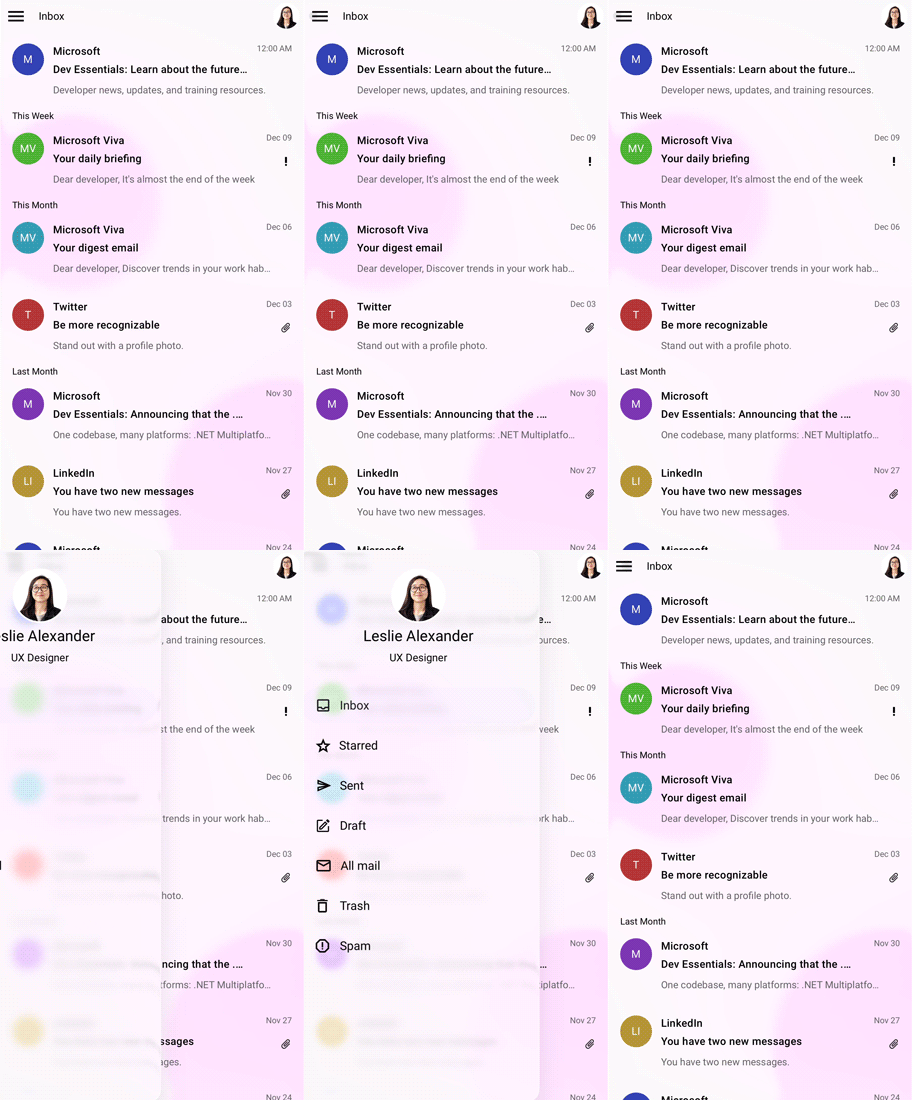
The following GIF demonstrates the liquid glass effect of Navigation Drawer.
NOTE
The liquid glass support is only applicable for slide-on mode.