About Syncfusion® .NET MAUI DataPager Control
18 Nov 20185 minutes to read
The Syncfusion® .NET MAUI DataPager control is a standalone pagination control used to efficiently navigate through large datasets by dividing them into manageable pages. It provides a seamless user experience with intuitive navigation options and can be seamlessly integrated with data display controls like the SfDataGrid.
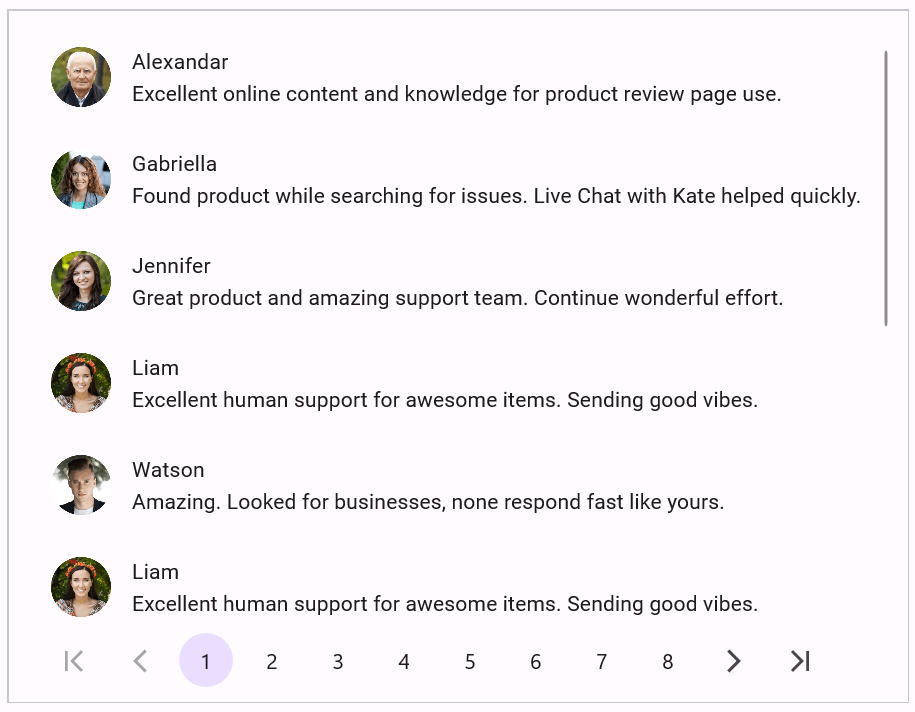
Business use cases
- E-commerce applications that require efficient navigation through large product catalogs.
- Data analytics dashboards that rely on paging for large datasets.
- Admin panels and management systems handling users, orders, and transactions.
- Reporting tools that display paginated records in a clear and compact format.
- Mobile applications with limited screen space that need efficient data presentation.
Key features
- Normal and On-Demand Paging: Load the entire data collection upfront or load pages dynamically on demand for better memory efficiency.
- Navigation options: Supports First, Last, Previous, Next, and numeric button navigation with programmatic page switching.
- Customizable display modes: Choose which navigation buttons to display (numeric only, navigation buttons, or both).
- Button customization: Customize button shape, size, font size, and display behavior.
- Flexible orientation: Arrange pager buttons horizontally or vertically.
- Auto-ellipsis support: Automatically displays ellipsis buttons for navigating large page ranges.
- Style customization: Customize colors, templates, and overall appearance.
-
Page change events: Handle
PageChangingandPageChangedfor custom operations.
Globalization
The following table summarizes the globalization support available in this control.
 Full Support
 Partial Support
 No Support
 Not Applicable
| Control | Localization | RTL | Time zone | Screen reader | Keyboard navigation |
|---|---|---|---|---|---|
| DataPager | |
|
|
|
|
Related controls
- Navigation Drawer for app-wide navigation and quick access to different sections.
- Tab View to switch between views or content sections in a structured way.
- TreeView to display and navigate hierarchical content.
See Also
- Getting Started shows how to begin using the DataPager control step by step.
- Appearance shows how to configure pager colors, styles, and templates.
- Customization shows how to configure button shape, size, display mode, and ellipsis behavior.
- Paging Modes explains normal paging, on-demand paging, and programmatic navigation.
- Events describes page change events and how to use them.
- UI Kit provides interactive demos and ready-made UI examples.
Resources
Feature Tour
Get a quick overview of key features and capabilities to kick start your journey.
Explore Features
Tutorial Videos
Watch step‑by‑step video guides to quickly understand concepts and implementation.
Watch now
Knowledge Base
Find practical solutions, troubleshooting tips and how‑to guides for common scenarios.
Search KB's