About Syncfusion® .NET MAUI Bottom Sheet Control
The Syncfusion® .NET MAUI Bottom Sheet (SfBottomSheet) control is used to present additional content or actions in a sliding panel from the bottom of the screen. It provides an interactive and space-efficient way to display contextual information without navigating away from the current view, making it suitable for modern mobile and desktop applications.
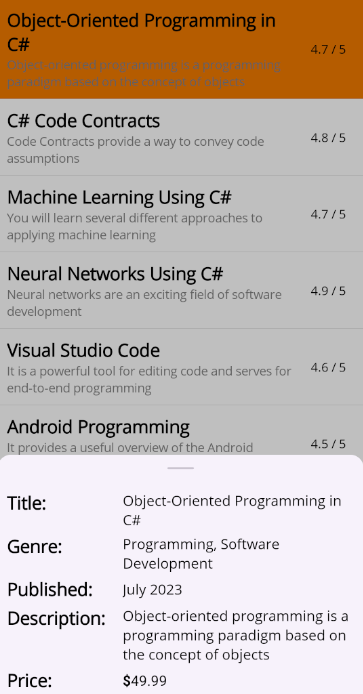
Business use cases
- Mobile applications that display contextual actions such as filters, options, or quick settings panels.
- E-commerce and content apps that present additional details or actions without leaving the current page.
- Dashboard applications that provide on-demand information panels for quick interaction.
- Business applications that require lightweight dialogs for user actions without full screen navigation.
Key features
- State management support allows configuring different panel states such as expanded, half-expanded, collapsed, and hidden.
- Allowed state control support allows restricting and managing which states are available for user interaction.
- Modal behavior support allows displaying the bottom sheet as a dialog that blocks interaction with the underlying UI when required.
- Smooth transition support allows providing seamless animations between different states for better user experience.
- Flexible layout support allows embedding custom UI content within the bottom sheet.
Globalization
The following table summarizes the globalization support available in this control.
 Full Support
 Not Applicable
| Control | Localization | RTL | Time zone | Screen reader | Keyboard navigation |
|---|---|---|---|---|---|
| BottomSheet | |
|
|
|
|
Related controls
- Popup for displaying overlay dialogs with customizable layouts.
- NavigationDrawer for presenting content in sliding side panels.
- TabView for organizing content into tabbed views with easy navigation.
See Also
- Getting Started shows a step‑by‑step guide to begin using the Bottom Sheet control.
- Setting Bottom Sheet Content describes how to define and manage the content inside the sheet.
- UI Kit provides interactive demos and ready-made UI examples.
Resources
Feature Tour
Get a quick overview of key features and capabilities to kick start your journey.
Explore Features
Showcase Samples
Explore real-world sample apps to see components in action and learn by example.
View Samples
Tutorial Videos
Watch step‑by‑step video guides to quickly understand concepts and implementation.
Watch now
Knowledge Base
Find practical solutions, troubleshooting tips and how‑to guides for common scenarios.
Search KB's