Undo and Redo Annotations in Blazor PDF Viewer
14 Aug 20262 minutes to read
The Blazor SfPdfViewer component supports undo and redo for annotations. Each annotation change is added to an internal history stack, and you can step backward and forward through that history using the keyboard, the built-in toolbar, or the component API. This feature is applies to all built-in annotations and form fields.
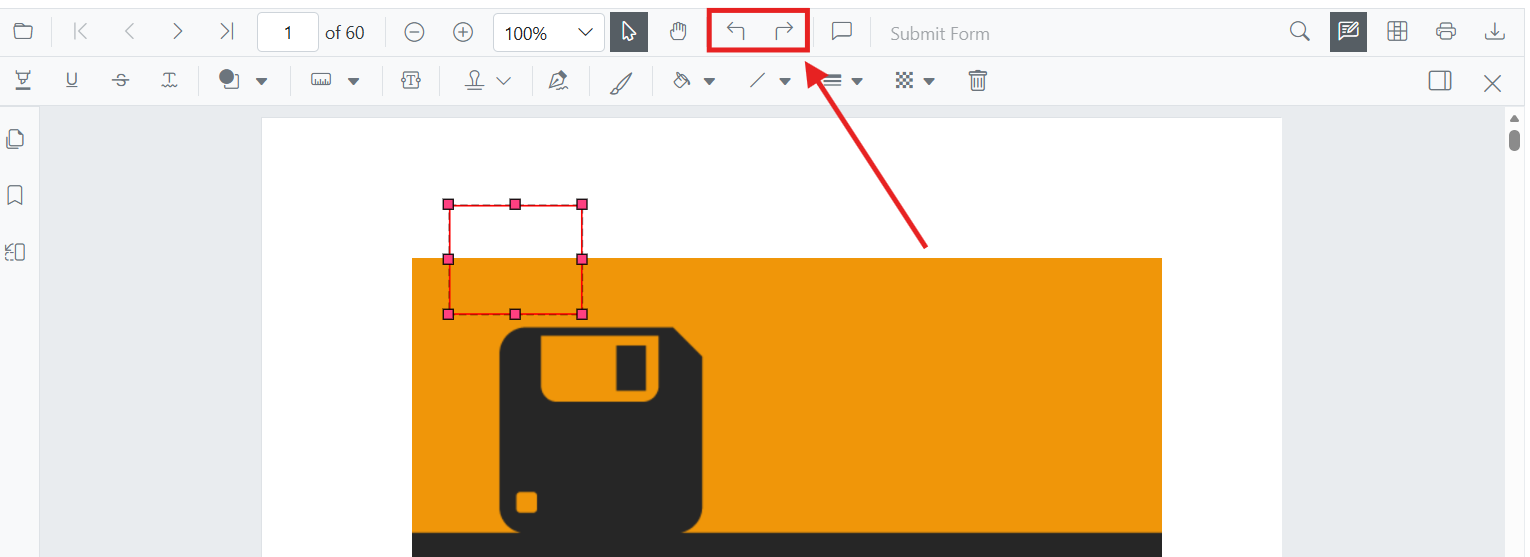
Undo and redo actions can be performed by using either of the following methods:
-
Using keyboard shortcuts (desktop): After performing an annotation action and ensuring the viewer has focus, press
Ctrl+Zto undo andCtrl+Yto redo on Windows and Linux. On macOS, useCommand+Zto undo andCommand+Shift+Zto redo. - Using the toolbar: Use the Undo and Redo tools in the toolbar.
- Programmatically: Call the UndoAsync and RedoAsync methods from your Blazor component code.
Keyboard Shortcut
The keyboard shortcuts are enabled by default and require no additional configuration. The viewer must have focus to receive the shortcut — click inside the page area before pressing the shortcut.
| Action | Windows / Linux | macOS |
|---|---|---|
| Undo | Ctrl+Z |
Command+Z |
| Redo | Ctrl+Y |
Command+Shift+Z |
Toolbar
The Undo and Redo tools appear in the annotation toolbar (see the screenshot at the top of this page). The buttons are enabled only when the corresponding history stack is non-empty. If the buttons appear disabled, perform an annotation action first.
Programmatic Undo and Redo
Refer to the following code snippet to call undo and redo actions programmatically.
@using Syncfusion.Blazor.Buttons
@using Syncfusion.Blazor.SfPdfViewer

<div style="margin-bottom: 8px;">
    <SfButton OnClick="UndoAnnotation">Undo</SfButton>
    <SfButton OnClick="RedoAnnotation">Redo</SfButton>
</div>

<SfPdfViewer2 @ref="viewer"
              DocumentPath="https://cdn.syncfusion.com/content/pdf/pdf-succinctly.pdf"
              Height="650px"
              Width="100%">
</SfPdfViewer2>

@code {
    private SfPdfViewer2 viewer;

    private async Task UndoAnnotation(MouseEventArgs args)
    {
        await viewer.UndoAsync();
    }

    private async Task RedoAnnotation(MouseEventArgs args)
    {
        await viewer.RedoAsync();
    }
}