Handwritten Signature in Angular PDF Viewer
14 Aug 202624 minutes to read
The PDF Viewer control supports adding handwritten signatures to a PDF document. Handwritten signatures reduce paperwork and enable digital verification.
Add signature annotation
Adding a handwritten signature in UI
The handwritten signature can be added to the PDF document using the annotation toolbar.
- Click the Edit Annotation button in the PDF Viewer toolbar. A toolbar appears below it.
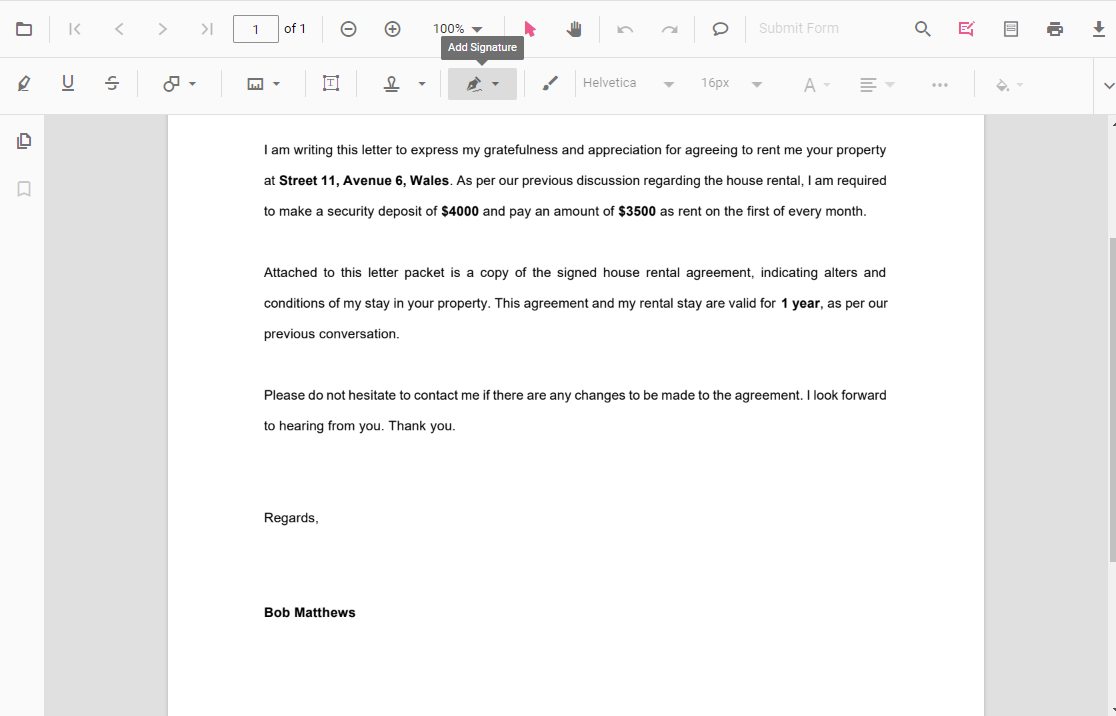
- Select the Handwritten signature button in the annotation toolbar. The signature panel appears.
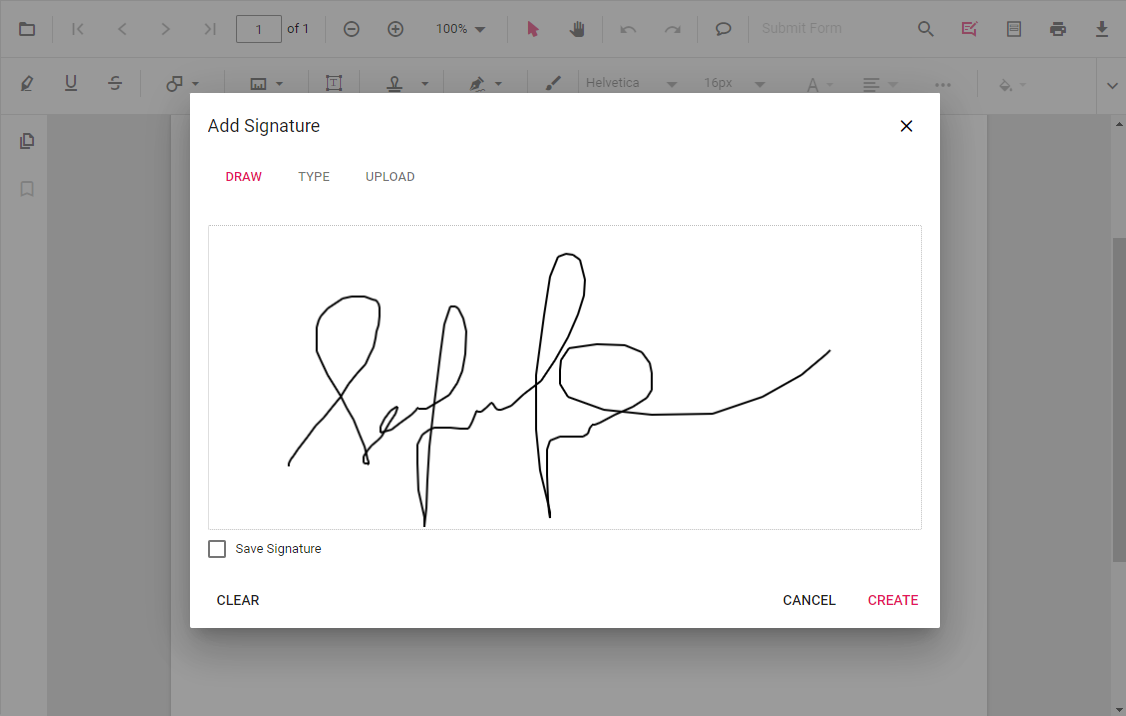
- Draw the signature in the panel.
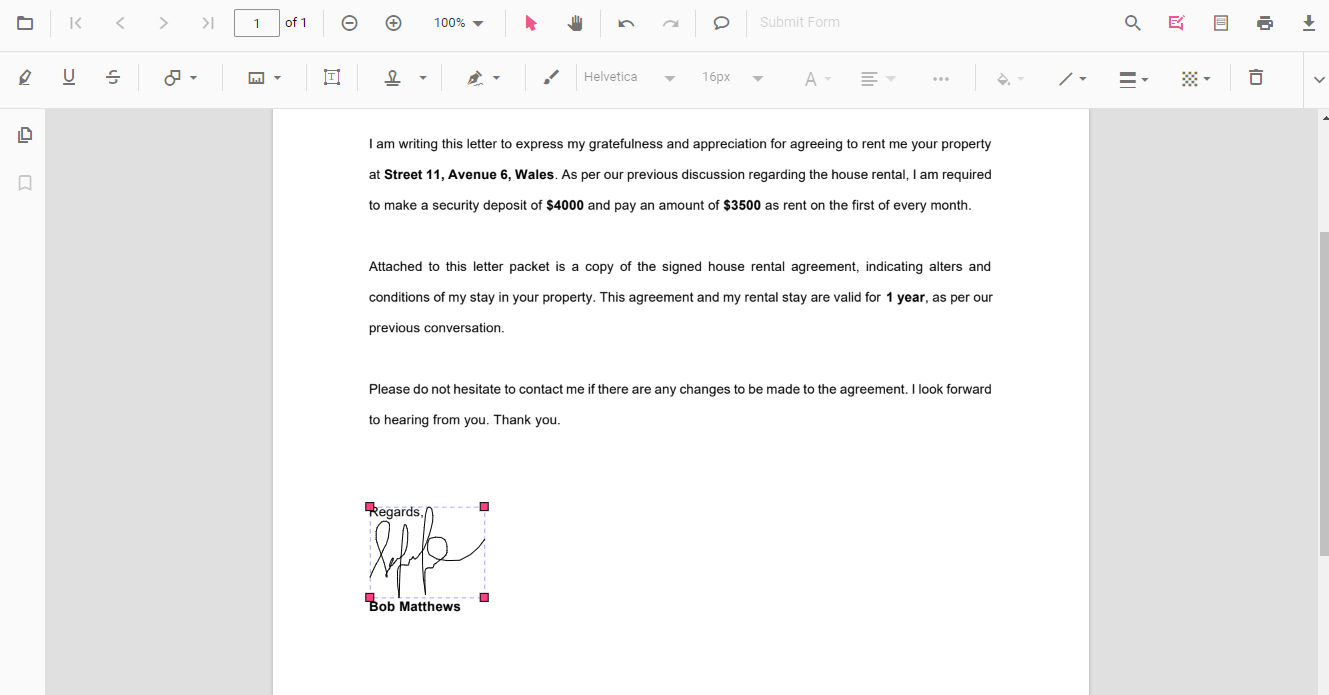
- Click Create, move the signature, and place it at the desired location.
Refer to the following code sample to switch to the handwritten signature mode programmatically.
import { Component } from '@angular/core';
import {
  PdfViewerModule,
  ToolbarService,
  AnnotationService,
  MagnificationService,
  NavigationService,
  LinkAnnotationService,
  BookmarkViewService,
  ThumbnailViewService,
  PrintService,
  TextSelectionService,
  TextSearchService,
  FormFieldsService,
  FormDesignerService,
  PageOrganizerService
} from '@syncfusion/ej2-angular-pdfviewer';

@Component({
  selector: 'app-root',
  standalone: true,
  imports: [PdfViewerModule],
  providers: [
    ToolbarService,
    AnnotationService,
    MagnificationService,
    NavigationService,
    LinkAnnotationService,
    BookmarkViewService,
    ThumbnailViewService,
    PrintService,
    TextSelectionService,
    TextSearchService,
    FormFieldsService,
    FormDesignerService,
    PageOrganizerService
  ],
  template: `
    <div>
      <button (click)="handWrittenSignature()">
        HandWritten Signature mode
      </button>

      <div class="control-section">
        <ejs-pdfviewer
          id="pdfViewer"
          [documentPath]="documentPath"
          [resourceUrl]="resourceUrl"
          style="height: 640px">
        </ejs-pdfviewer>
      </div>
    </div>
  `
})
export class AppComponent {

  public documentPath: string =
    'https://cdn.syncfusion.com/content/pdf/pdf-succinctly.pdf';

  public resourceUrl: string =
    'https://cdn.syncfusion.com/ej2/31.2.2/dist/ej2-pdfviewer-lib';

  /** Switch to Handwritten Signature annotation mode */
  handWrittenSignature(): void {
    const viewer = (document.getElementById('pdfViewer') as any)
      ?.ej2_instances?.[0];

    if (viewer) {
      viewer.annotation.setAnnotationMode('HandWrittenSignature');
    }
  }
}
import { Component } from '@angular/core';
import {
PdfViewerModule,
ToolbarService,
AnnotationService,
MagnificationService,
NavigationService,
LinkAnnotationService,
BookmarkViewService,
ThumbnailViewService,
PrintService,
TextSelectionService,
TextSearchService,
FormFieldsService,
FormDesignerService,
PageOrganizerService
} from '@syncfusion/ej2-angular-pdfviewer';
@Component({
selector: 'app-root',
standalone: true,
imports: [PdfViewerModule],
providers: [
ToolbarService,
AnnotationService,
MagnificationService,
NavigationService,
LinkAnnotationService,
BookmarkViewService,
ThumbnailViewService,
PrintService,
TextSelectionService,
TextSearchService,
FormFieldsService,
FormDesignerService,
PageOrganizerService
],
template: `
<div>
<button (click)="handWrittenSignature()">
HandWritten Signature mode
</button>
<div class="control-section">
<ejs-pdfviewer
id="pdfViewer"
[documentPath]="documentPath"
[serviceUrl]="serviceUrl"
style="height: 640px">
</ejs-pdfviewer>
</div>
</div>
`
})
export class AppComponent {
public documentPath: string =
'https://cdn.syncfusion.com/content/pdf/pdf-succinctly.pdf';
public serviceUrl: string =
'https://document.syncfusion.com/web-services/pdf-viewer/api/pdfviewer';
/** Switch to Handwritten Signature annotation mode */
handWrittenSignature(): void {
const viewer = (document.getElementById('pdfViewer') as any)
?.ej2_instances?.[0];
if (viewer) {
viewer.annotation.setAnnotationMode('HandWrittenSignature');
}
}
}Add a handwritten signature programmatically
With the PDF Viewer library, you can programmatically add a handwritten signature to the PDF Viewer control using the addAnnotation() method.
Here is an example of adding a handwritten signature programmatically using the addAnnotation() method:
import { Component, OnInit } from '@angular/core';
import { LinkAnnotationService, BookmarkViewService,
         MagnificationService, ThumbnailViewService, ToolbarService,
         NavigationService, TextSearchService, TextSelectionService,
         PrintService, FormDesignerService, FormFieldsService,
         AnnotationService, PageOrganizerService, HandWrittenSignatureSettings, DisplayMode } from '@syncfusion/ej2-angular-pdfviewer';

@Component({
  selector: 'app-root',
  // specifies the template string for the PDF Viewer component
  template: `<div class="content-wrapper">
  <button (click)="addAnnotation()">Add Handwritten signature Programmatically</button>
  <ejs-pdfviewer
    id="pdfViewer"
    [documentPath]='document'
    [resourceUrl]='resource'
    style="height:640px;display:block">
  </ejs-pdfviewer>
  </div>`,
  providers: [ LinkAnnotationService, BookmarkViewService, MagnificationService,
               ThumbnailViewService, ToolbarService, NavigationService,
               TextSearchService, TextSelectionService, PrintService,
               AnnotationService, FormDesignerService, FormFieldsService, PageOrganizerService]
})
export class AppComponent implements OnInit {
    public document = 'https://cdn.syncfusion.com/content/pdf/pdf-succinctly.pdf';
    public resource: string = "https://cdn.syncfusion.com/ej2/27.1.48/dist/ej2-pdfviewer-lib";
    ngOnInit(): void {
    }
    addAnnotation() {
        var pdfviewer = (<any>document.getElementById('pdfViewer')).ej2_instances[0];
        pdfviewer.annotation.addAnnotation("HandWrittenSignature", {
            offset: { x: 220, y: 180 },
            pageNumber: 1,
            width: 150,
            height: 60,
            signatureItem: ['Signature'],
            signatureDialogSettings: {
                displayMode: DisplayMode.Draw
            },
            canSave: true,
            path: '[{\"command\":\"M\",\"x\":244.83334350585938,\"y\":982.0000305175781}]'
        } as HandWrittenSignatureSettings );
        pdfviewer.annotation.addAnnotation("HandWrittenSignature", {
            offset: { x: 200, y: 310 },
            pageNumber: 1,
            width: 200,
            height: 65,
            signatureItem: ['Signature'],
            signatureDialogSettings: {
                displayMode: DisplayMode.Text, hideSaveSignature: false
            },
            canSave: false,
            path: 'Syncfusion',
            fontFamily: "Helvetica",
        } as HandWrittenSignatureSettings );
        pdfviewer.annotation.addAnnotation("Initial", {
            offset: { x: 200, y: 500 },
            pageNumber: 1,
            width: 200,
            height: 80,
            signatureItem: ['Initial'],
            initialDialogSettings: {
                displayMode: DisplayMode.Upload, hideSaveSignature: false
            },
            canSave: true,
            path: "data:image/jpeg;base64,/9j/4AAQSkZ..."
        } as HandWrittenSignatureSettings );
    }
}
import { Component, OnInit } from '@angular/core';
import { LinkAnnotationService, BookmarkViewService,
MagnificationService, ThumbnailViewService, ToolbarService,
NavigationService, TextSearchService, TextSelectionService,
PrintService, FormDesignerService, FormFieldsService,
AnnotationService, PageOrganizerService, HandWrittenSignatureSettings, DisplayMode } from '@syncfusion/ej2-angular-pdfviewer';
@Component({
selector: 'app-root',
// specifies the template string for the PDF Viewer component
template: `<div class="content-wrapper">
<button (click)="addAnnotation()">Add Handwritten signature Programmatically</button>
<ejs-pdfviewer
id="pdfViewer"
[documentPath]='document'
[serviceUrl]='service'
style="height:640px;display:block">
</ejs-pdfviewer>
</div>`,
providers: [ LinkAnnotationService, BookmarkViewService, MagnificationService,
ThumbnailViewService, ToolbarService, NavigationService,
TextSearchService, TextSelectionService, PrintService,
AnnotationService, FormDesignerService, FormFieldsService, PageOrganizerService]
})
export class AppComponent implements OnInit {
public document = 'https://cdn.syncfusion.com/content/pdf/pdf-succinctly.pdf';
public service: string = 'https://document.syncfusion.com/web-services/pdf-viewer/api/pdfviewer';
ngOnInit(): void {
}
addAnnotation() {
var pdfviewer = (<any>document.getElementById('pdfViewer')).ej2_instances[0];
pdfviewer.annotation.addAnnotation("Initial", {
offset: { x: 220, y: 180 },
pageNumber: 1,
width: 150,
height: 60,
signatureItem: ['Initial'],
initialDialogSettings: {
displayMode: DisplayMode.Draw
},
canSave: true,
path: '[{\"command\":\"M\",\"x\...}]'
} as HandWrittenSignatureSettings );
pdfviewer.annotation.addAnnotation("Initial", {
offset: { x: 200, y: 310 },
pageNumber: 1,
width: 200,
height: 65,
signatureItem: ['Initial'],
initialDialogSettings: {
displayMode: DisplayMode.Text, hideSaveSignature: false
},
canSave: false,
path: 'Syncfusion',
fontFamily: "Helvetica",
} as HandWrittenSignatureSettings );
pdfviewer.annotation.addAnnotation("HandWrittenSignature", {
offset: { x: 200, y: 500 },
pageNumber: 1,
width: 200,
height: 80,
signatureItem: ['Signature'],
signatureDialogSettings: {
displayMode: DisplayMode.Upload, hideSaveSignature: false
},
canSave: true,
path: "data:image/jpeg;base64,/9j/4AAQSkZJRgAB..."
} as HandWrittenSignatureSettings );
}
}Edit signature annotation
Edit signature annotation in UI
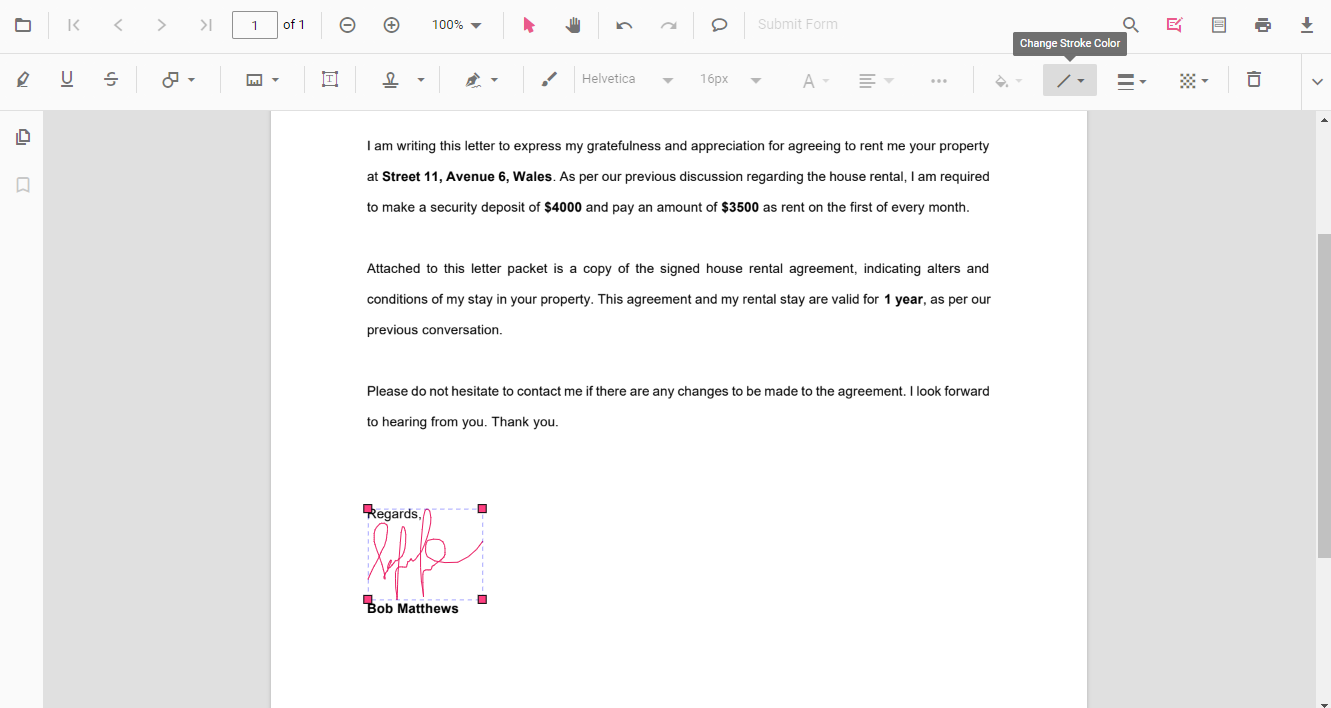
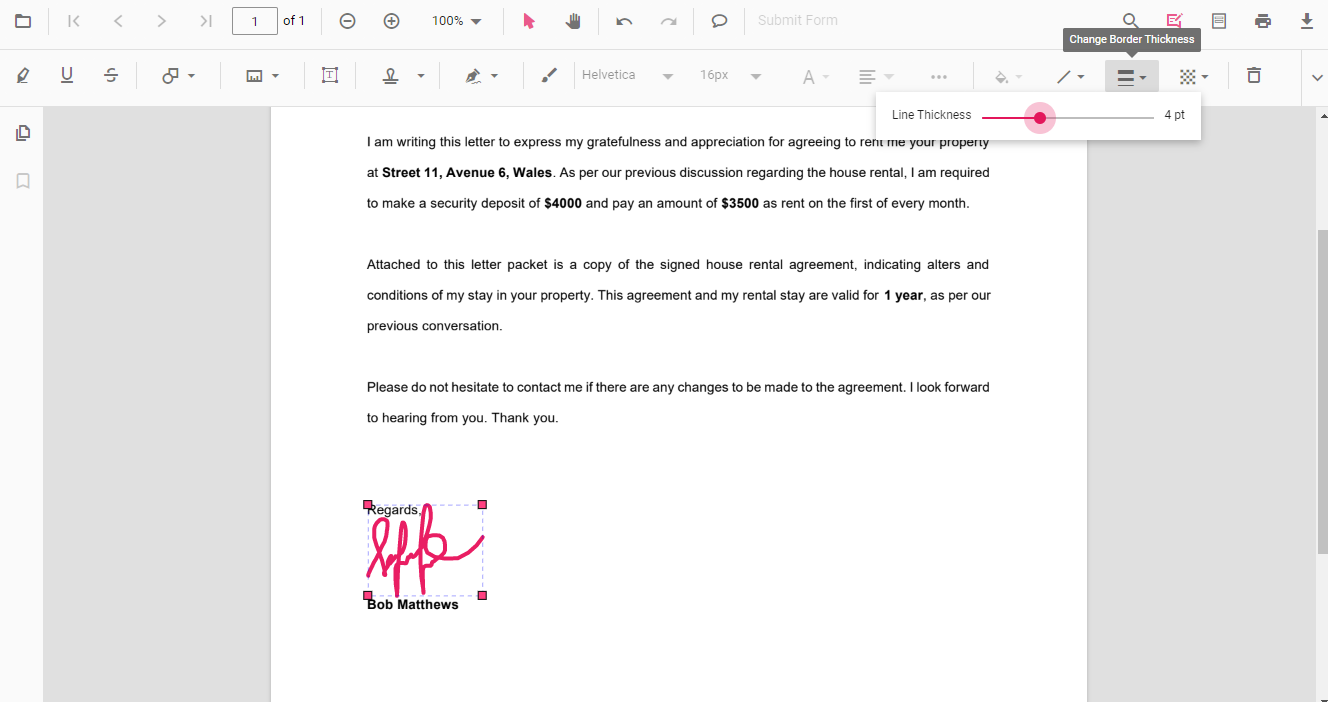
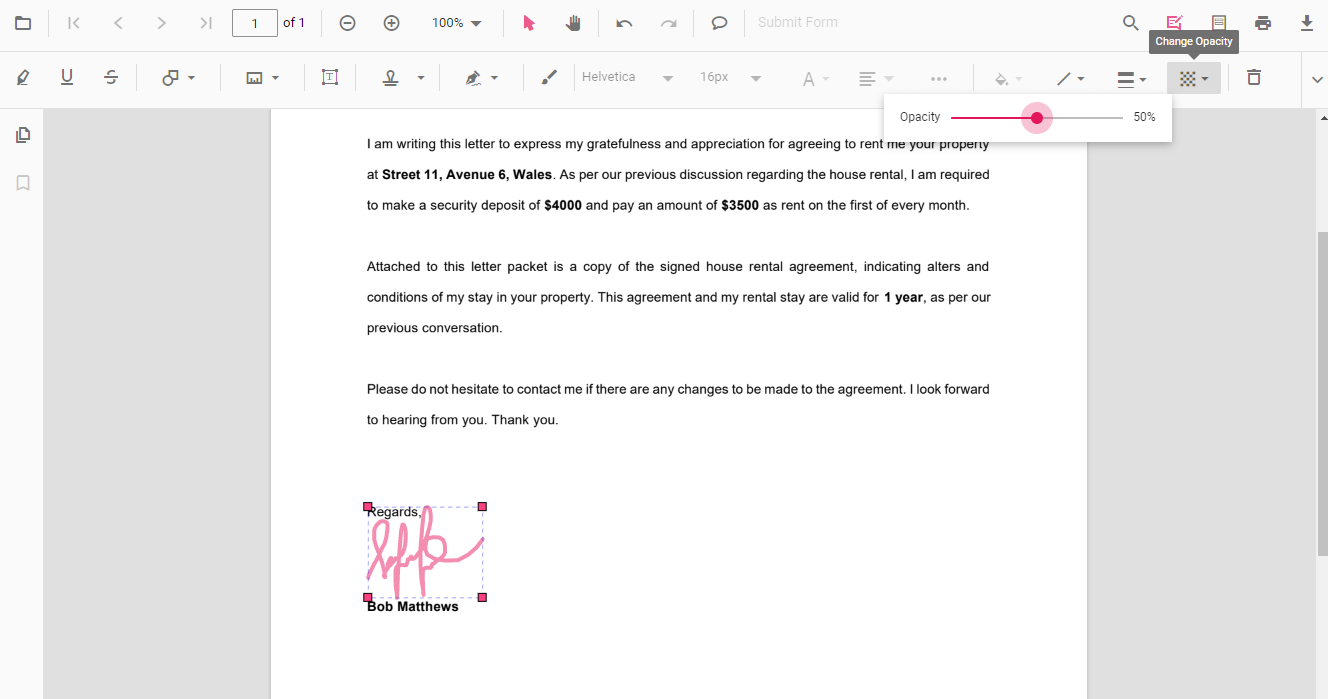
Stroke color, border thickness, and opacity can be edited using the Edit Stroke Color, Edit Thickness, and Edit Opacity tools in the annotation toolbar.
Edit stroke color
Edit the stroke color using the color palette in the Edit Stroke Color tool.
Edit thickness
Edit border thickness using the range slider in the Edit Thickness tool.
Edit opacity
Edit opacity using the range slider in the Edit Opacity tool.
Edit signature annotation programmatically
With the PDF Viewer library, you can programmatically edit a handwritten signature in the PDF Viewer control using the editSignature() method.
Here is an example of editing a handwritten signature programmatically using the editSignature() method:
import { Component } from '@angular/core';
import {
  PdfViewerModule,
  ToolbarService,
  MagnificationService,
  NavigationService,
  AnnotationService,
  LinkAnnotationService,
  ThumbnailViewService,
  BookmarkViewService,
  TextSelectionService,
  TextSearchService,
  FormFieldsService,
  FormDesignerService
} from '@syncfusion/ej2-angular-pdfviewer';

import { DisplayMode } from '@syncfusion/ej2-pdfviewer';

@Component({
  selector: 'app-root',
  standalone: true,
  imports: [PdfViewerModule],
  providers: [
    ToolbarService,
    MagnificationService,
    NavigationService,
    AnnotationService,
    LinkAnnotationService,
    ThumbnailViewService,
    BookmarkViewService,
    TextSelectionService,
    TextSearchService,
    FormFieldsService,
    FormDesignerService
  ],
  template: `
    <div>
      <div style="margin-bottom:12px; display:flex; gap:8px">
        <button (click)="addSignature()">Add Signature Annotation</button>
        <button (click)="editSignature()">Edit Signature Annotation</button>
      </div>

      <ejs-pdfviewer
        id="pdfViewer"
        [documentPath]="documentPath"
        [resourceUrl]="resourceUrl"
        style="height: 650px">
      </ejs-pdfviewer>
    </div>
  `
})
export class AppComponent {

  public documentPath: string =
    'https://cdn.syncfusion.com/content/pdf/form-designer.pdf';

  public resourceUrl: string =
    'https://cdn.syncfusion.com/ej2/31.2.2/dist/ej2-pdfviewer-lib';

  /** Get PDF Viewer instance */
  private getViewer(): any {
    return (document.getElementById('pdfViewer') as any)
      ?.ej2_instances?.[0];
  }

  /** Add Handwritten Signature (Text mode) */
  addSignature(): void {
    const viewer = this.getViewer();
    if (!viewer) { return; }

    viewer.annotation.addAnnotation('HandWrittenSignature', {
      offset: { x: 200, y: 310 },
      pageNumber: 1,
      width: 200,
      height: 65,
      signatureItem: ['Signature'],
      signatureDialogSettings: {
        displayMode: DisplayMode.Text,
        hideSaveSignature: false
      },
      canSave: false,
      path: 'Syncfusion',
      fontFamily: 'Helvetica'
    });
  }

  /** Edit existing Signature annotation */
  editSignature(): void {
    const viewer = this.getViewer();
    if (!viewer || !viewer.signatureCollection) { return; }

    for (const signature of viewer.signatureCollection) {
      if (signature.shapeAnnotationType === 'SignatureText') {
        signature.fontSize = 12;
        signature.thickness = 2;
        signature.strokeColor = '#0000FF';
        signature.opacity = 0.8;

        viewer.annotationModule.editSignature(signature);
      }
    }
  }
}
import { Component } from '@angular/core';
import {
PdfViewerModule,
ToolbarService,
MagnificationService,
NavigationService,
AnnotationService,
LinkAnnotationService,
ThumbnailViewService,
BookmarkViewService,
TextSelectionService,
TextSearchService,
FormFieldsService,
FormDesignerService
} from '@syncfusion/ej2-angular-pdfviewer';
import { DisplayMode } from '@syncfusion/ej2-pdfviewer';
@Component({
selector: 'app-root',
standalone: true,
imports: [PdfViewerModule],
providers: [
ToolbarService,
MagnificationService,
NavigationService,
AnnotationService,
LinkAnnotationService,
ThumbnailViewService,
BookmarkViewService,
TextSelectionService,
TextSearchService,
FormFieldsService,
FormDesignerService
],
template: `
<div>
<div style="margin-bottom:12px; display:flex; gap:8px">
<button (click)="addSignature()">Add Signature Annotation</button>
<button (click)="editSignature()">Edit Signature Annotation</button>
</div>
<ejs-pdfviewer
id="pdfViewer"
[documentPath]="documentPath"
[serviceUrl]="serviceUrl"
style="height: 650px">
</ejs-pdfviewer>
</div>
`
})
export class AppComponent {
public documentPath: string =
'https://cdn.syncfusion.com/content/pdf/form-designer.pdf';
public serviceUrl: string =
'https://document.syncfusion.com/web-services/pdf-viewer/api/pdfviewer';
/** Get PDF Viewer instance */
private getViewer(): any {
return (document.getElementById('pdfViewer') as any)
?.ej2_instances?.[0];
}
/** Add Handwritten Signature (Text mode) */
addSignature(): void {
const viewer = this.getViewer();
if (!viewer) { return; }
viewer.annotation.addAnnotation('HandWrittenSignature', {
offset: { x: 200, y: 310 },
pageNumber: 1,
width: 200,
height: 65,
signatureItem: ['Signature'],
signatureDialogSettings: {
displayMode: DisplayMode.Text,
hideSaveSignature: false
},
canSave: false,
path: 'Syncfusion',
fontFamily: 'Helvetica'
});
}
/** Edit existing Signature annotation */
editSignature(): void {
const viewer = this.getViewer();
if (!viewer || !viewer.signatureCollection) { return; }
for (const signature of viewer.signatureCollection) {
if (signature.shapeAnnotationType === 'SignatureText') {
signature.fontSize = 12;
signature.thickness = 2;
signature.strokeColor = '#0000FF';
signature.opacity = 0.8;
viewer.annotationModule.editSignature(signature);
}
}
}
}Enable or disable handwritten signature
The following example enables or disables the handwritten signature in the PDF Viewer. Setting the value to false disables the feature.
import { Component } from '@angular/core';
import {
  PdfViewerModule,
  ToolbarService,
  AnnotationService,
  MagnificationService,
  NavigationService,
  LinkAnnotationService,
  BookmarkViewService,
  ThumbnailViewService,
  PrintService,
  TextSelectionService,
  TextSearchService,
  FormFieldsService,
  FormDesignerService,
  PageOrganizerService
} from '@syncfusion/ej2-angular-pdfviewer';

@Component({
  selector: 'app-root',
  standalone: true,
  imports: [PdfViewerModule],
  providers: [
    ToolbarService,
    AnnotationService,
    MagnificationService,
    NavigationService,
    LinkAnnotationService,
    BookmarkViewService,
    ThumbnailViewService,
    PrintService,
    TextSelectionService,
    TextSearchService,
    FormFieldsService,
    FormDesignerService,
    PageOrganizerService
  ],
  template: `
    <div>
      <div class="control-section">
        <!-- Render the PDF Viewer -->
        <ejs-pdfviewer
          id="pdfViewer"
          [documentPath]="documentPath"
          [serviceUrl]="serviceUrl"
          [enableHandwrittenSignature]="true"
          style="height: 640px">
        </ejs-pdfviewer>
      </div>
    </div>
  `
})
export class AppComponent {

  public documentPath: string =
    'https://cdn.syncfusion.com/content/pdf/pdf-succinctly.pdf';

  public serviceUrl: string =
    'https://document.syncfusion.com/web-services/pdf-viewer/api/pdfviewer';
}
import { Component } from '@angular/core';
import {
PdfViewerModule,
ToolbarService,
AnnotationService,
MagnificationService,
NavigationService,
LinkAnnotationService,
BookmarkViewService,
ThumbnailViewService,
PrintService,
TextSelectionService,
TextSearchService,
FormFieldsService,
FormDesignerService,
PageOrganizerService
} from '@syncfusion/ej2-angular-pdfviewer';
@Component({
selector: 'app-root',
standalone: true,
imports: [PdfViewerModule],
providers: [
ToolbarService,
AnnotationService,
MagnificationService,
NavigationService,
LinkAnnotationService,
BookmarkViewService,
ThumbnailViewService,
PrintService,
TextSelectionService,
TextSearchService,
FormFieldsService,
FormDesignerService,
PageOrganizerService
],
template: `
<div>
<div class="control-section">
<!-- Render the PDF Viewer -->
<ejs-pdfviewer
id="pdfViewer"
[documentPath]="documentPath"
[resourceUrl]="resourceUrl"
[enableHandwrittenSignature]="true"
style="height: 640px">
</ejs-pdfviewer>
</div>
</div>
`
})
export class AppComponent {
public documentPath: string =
'https://cdn.syncfusion.com/content/pdf/pdf-succinctly.pdf';
public resourceUrl: string =
'https://cdn.syncfusion.com/ej2/31.2.2/dist/ej2-pdfviewer-lib';
}When
enableHandwrittenSignatureis set tofalse, the handwritten signature toolbar and related UI are disabled; existing handwritten signature annotations remain in the document unless removed. ThecanSaveoption in annotation examples controls whether a signature can be saved for reuse; whencanSaveisfalse, signatures are not persisted in the signature collection for later reuse.