PDFium Integration in PDF to Image Converter Library
17 Aug 20262 minutes to read
PdfToImageConverter uses PDFium to convert a PDF document to an image. PDFium is used in Google Chrome for rendering PDF files. It provides accurate and robust PDF rendering.
- PDFium is not supported in Windows XP operating system.
- From v34.1.x onwards, Pdfium is upgraded to the new version which was built with the branch chromium/7814.
How PDFium works with PdfToImageConverter
- On running your application, Syncfusion® PdfToImageConverter control generates a folder named
PDFiumin the application output path folder (for example: bin/release or bin/debug) at runtime. - Syncfusion® PdfToImageConverter control detects the architecture of the running machine automatically.
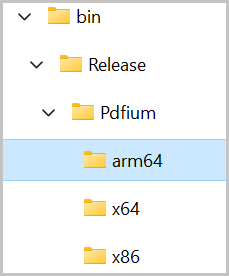
- For WPF, WinForms and MVC, the PDFium folder structure will be generated as shown below.
- Next, it creates another subfolder named “x64”, “x86” or “arm64” based on the machine architecture.
- Extracts the PDFium binary (PDFium.dll) into the subfolder (x64, x86 or arm64) and consumes it to render PDF files.
For Syncfusion.PdfToImageConverter.Net and Syncfusion.PdfToImageConverter.Net.Core NuGet packages, extraction of PDFium will not occur.
When you include PdfToImageConverter via a NuGet package, PDFium assemblies will automatically be generated in the application’s output path folder from the NuGet package during compilation.
How to run PDFium in a restricted access environment
If there is any access restriction applied to the application output folder, then the Syncfusion® PdfToImageConverter cannot extract and consume the PDFium engine.
In that situation, you need to add the following steps to consume the PDFium.
- Create a folder where your application can access, create & read files. For example, “d:\ThirdPartyBinaries".
- Update the path of this folder to the ReferencePath property of PdfToImageConverter control, as shown in the following code sample.
- If ReferencePath is set, then PdfToImageConverter extracts the PDFium binary inside that specified folder and consumes the PDFium rendering engine.
PdfToImageConverter imageConverter = new PdfToImageConverter();
imageConverter.ReferencePath = @"D:\ThirdPartyBinaries\";
For Syncfusion.PdfToImageConverter.Net and Syncfusion.PdfToImageConverter.Net.Core NuGet packages, Extractions of PDFium will not occur.
When you include PdfToImageConverter via a NuGet package, PDFium assemblies will automatically be generated in the application’s output path folder from the NuGet package during compilation