About Syncfusion® WPF Calculator Control
18 Nov 20181 minute to read
The WPF Calculator control allows you to perform mathematical operations as you would with a standard calculator. It supports basic arithmetic operations, memory operations, configurable display text and value, and built-in theming.
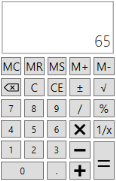
Key features
-
Value - The
Valueproperty retrieves the current value calculated by the WPF Calculator. This is a Read-Only property of typedecimal. The default value is0. -
Memory - The
Memoryproperty retrieves the value stored in memory. This is a Read-Only property of typedecimal. The default value is0. See Memory for details on memory operations. -
DefaultValue - The
DefaultValueproperty sets the initial value shown in the value TextBox. The default value is0. -
DisplayText - The
DisplayTextproperty shows a watermark in the value TextBox when no value is entered. The default value is an empty string. - Operators - Supports standard arithmetic operators (+, −, ×, ÷), percent (%), sign change (±), square root (√), and backspace.
-
Memory operations - Supports
MS,MR,M+,M-, andMCmemory keys. See Memory. - Theming - Supports various built-in themes. See the Theme section.
Starting with Syncfusion® version 16.2 (2018 Vol 2), the
Syncfusion.Licensing.dllis added as a reference for all Syncfusion WPF controls. Refer to the licensing help topic for more information.