About Syncfusion® .NET MAUI Switch Control
18 Nov 20185 minutes to read
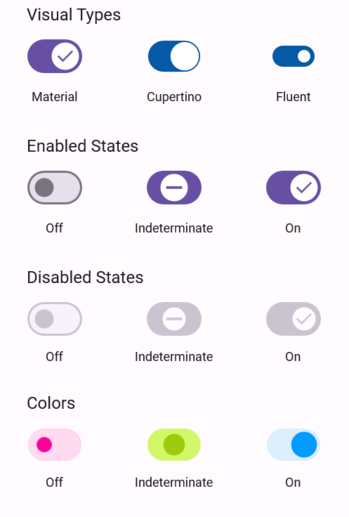
The Syncfusion® .NET MAUI Switch) control provides an efficient way to toggle between states based on the selected value.
Business use cases
- Settings screens that allow users to enable or disable application features using toggle switches.
- Mobile and desktop applications that require quick on and off interactions for preferences or options.
- Forms and configuration panels that manage boolean inputs such as notifications, permissions, or visibility.
- Business applications that require clear and immediate state changes for user-driven actions.
Key features
- Binary state allows toggling between on and off values with visual feedback.
- Indeterminate state allows representing intermediate or undefined states when needed.
- Theme customization allows applying styles such as Material, Cupertino, and Fluent for consistent UI design.
- Visual state management allows controlling appearance changes based on different interaction states.
- Thumb customization allows modifying the thumb content and visual appearance for enhanced UI flexibility.
Globalization
The following table summarizes the globalization support available in this control.
 Full Support
 Not Applicable
| Control | Localization | RTL | Time zone | Screen reader | Keyboard navigation |
|---|---|---|---|---|---|
| Switch | |
|
|
|
|
Related controls
- Radio Button for selecting one option from a group of choices.
- CheckBox for handling multiple selection inputs.
- Segmented Control for grouped button-based selection.
See Also
- Getting Started shows a step‑by‑step guide to begin using the Switch control.
- Customization explains how to customize appearance and themes.
- States helps configure states and behavior.
- UI Kit provides interactive demos and ready‑made UI examples.
Resources
Feature Tour
Get a quick overview of key features and capabilities to kick start your journey.
Explore Features
Tutorial Videos
Watch step‑by‑step video guides to quickly understand concepts and implementation.
Watch now
Knowledge Base
Find practical solutions, troubleshooting tips and how‑to guides for common scenarios.
Search KB's
Use Case Sample
Explore a real-world application that demonstrates the practical use of the Switch.
View Sample