Liquid Glass Support in .NET MAUI Radial Menu (SfRadialMenu)
29 Jul 20262 minutes to read
The Liquid Glass Effect introduces a modern, translucent design with adaptive color tinting and light refraction, creating a sleek, glass-like user experience that remains clear and accessible while maintaining readable contrast. This section explains how to enable and customize the effect in the Syncfusion® .NET MAUI Radial Menu (SfRadialMenu) control.
Prerequisites
Before using the SfRadialMenu, Install the Syncfusion.Maui.RadialMenu and Syncfusion.Maui.Core NuGet packages in your .NET MAUI project. The Syncfusion.Maui.Core package is required for the SfGlassEffectView container used to host the Liquid Glass Effect.
For step-by-step setup, refer to the Getting Started documentation.
NOTE
- The Liquid Glass Effect is supported only on .NET 10 targeting macOS 26 or higher and iOS 26 or higher.
- It is not supported on Android or Windows.
Enable the Liquid Glass effect
The Radial Menu supports a liquid glass effect when you enable the EnableLiquidGlassEffect property. The following samples show the minimum code required to enable the Liquid Glass effect. Place the menu inside a layout that has colorful background content (an image, a gradient, or a colored block) so the blur is visible.
<Grid>
    <!-- Place an image in Resources/Images with the MauiImage build action to act as the background. -->
    <Image Source="wallpaper.jpg" Aspect="AspectFill" />
    <radialMenu:SfRadialMenu EnableLiquidGlassEffect="True" />
</Grid>
Content = new Grid
{
Children =
{
new Image { Source = "wallpaper.jpg", Aspect = Aspect.AspectFill },
new SfRadialMenu { EnableLiquidGlassEffect = true }
}
};Behavior and tips
- The glass effect is applied to the Radial Menu at render time and during user interaction.
- Place the Radial Menu over visually rich content (images, gradients, or color blocks) to better showcase the transient glass effect.
- Visual output and performance may vary by device/platform; keep backgrounds moderately detailed to maintain clarity during interaction.
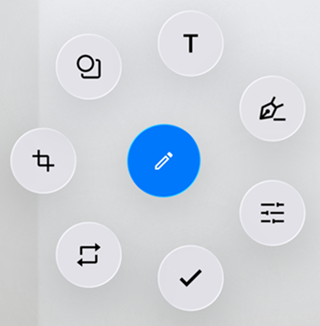
The following image demonstrates the liquid glass effect of Radial Menu.