Overview of .NET MAUI DockLayout
18 Nov 20184 minutes to read
The Syncfusion® .NET MAUI SfDockLayout is a versatile and powerful layout control that enables developers to arrange and dock child elements in a defined area, providing a robust framework for complex UIs across mobile and desktop.
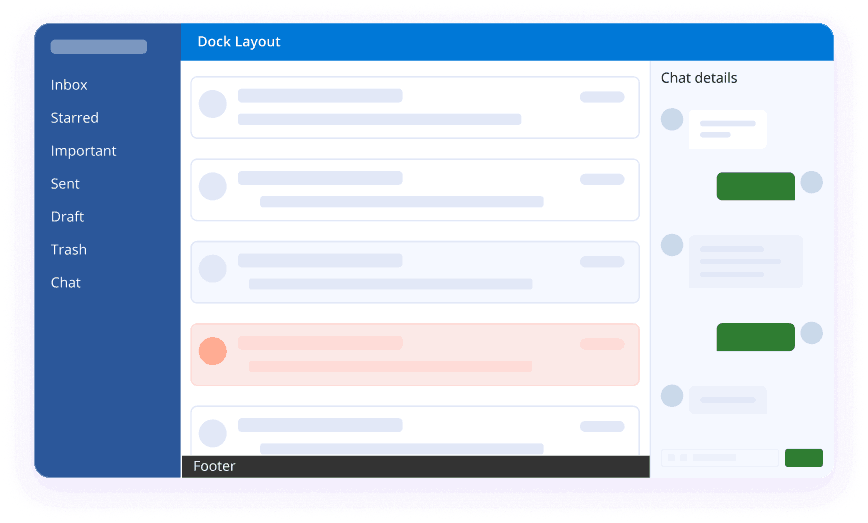
Business use cases
- Dashboard applications that require structured layout arrangement with header, footer, and side panels.
- Enterprise applications that use multi-region layouts for navigation, content, and action panels.
- Mobile and desktop applications that need responsive layout behavior across different screen sizes and orientations.
- Complex UI designs that require precise placement of elements in docked positions for better usability.
Key features
- Flexible docking support allows placing child elements at top, bottom, left, right, or center positions within the layout.
- Adaptive layout behavior allows the layout to automatically adjusts based on screen size and orientation.
- Custom spacing support allows configuring horizontal and vertical spacing between docked elements for better layout control.
Globalization
The following table summarizes the globalization support available in this control.
 Full Support
 Not Applicable
| Control | Localization | RTL | Time zone | Screen reader | Keyboard navigation |
|---|---|---|---|---|---|
| DockLayout | |
|
|
|
|
Related controls
- Backdrop Page for creating layered layouts with front and back panels.
- Accordion for displaying vertically collapsible sections.
- Expander for creating single expandable/collapsible sections.
See Also
- Getting Started shows a step‑by‑step guide to begin using the DockLayout control.
- Features explains how to dock elements to any side or center for clean, flexible layouts.
- UI Kit provides interactive demos and ready‑made UI examples.
Resources
Feature Tour
Get a quick overview of key features and capabilities to kick start your journey.
Explore Features
Tutorial Videos
Watch step‑by‑step video guides to quickly understand concepts and implementation.
Watch now
Knowledge Base
Find practical solutions, troubleshooting tips and how‑to guides for common scenarios.
Search KB's