Multiple Choice in .NET MAUI CheckBox
18 Nov 20189 minutes to read
The .NET MAUI CheckBox can be used as a single or as a group. A single CheckBox is mostly used for a binary yes/no choice, such as “Remember me?”, login scenario, or a terms of service agreement.
<buttons:SfCheckBox x:Name="checkBox"
                    Text="I agree to the terms of services for this site"
                    IsChecked="True"/>
SfCheckBox checkBox = new SfCheckBox();
checkBox.Text = "I agree to the terms of services for this site";
checkBox.IsChecked = true;
this.Content = checkBox;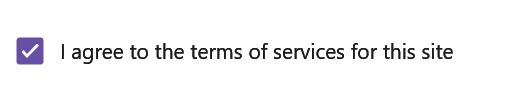
Prerequisites
Before using the SfCheckBox, ensure the following NuGet package is installed in your .NET MAUI project:
Syncfusion.Maui.Buttons
For a step-by-step setup, refer to the Getting Started documentation.
Multi-select group
Multiple CheckBoxes can be used as a group for multi-select scenarios where a user selects one or more of several non-mutually-exclusive options. CheckBox itself is a single-value control; group behavior is implemented by your code, by binding to a collection, or by hosting the CheckBoxes in a layout.
<StackLayout Padding="20">
    <Label x:Name="label" Text="Pizza Toppings" Margin="0,10"/>
    <buttons:SfCheckBox x:Name="pepperoni" Text="Pepperoni"/>
    <buttons:SfCheckBox x:Name="beef" Text="Beef" IsChecked="True"/>
    <buttons:SfCheckBox x:Name="mushroom" Text="Mushrooms"/>
    <buttons:SfCheckBox x:Name="onion" Text="Onions" IsChecked="True"/>
</StackLayout>
StackLayout stackLayout = new StackLayout() { Padding = 20 };
Label label = new Label();
label.Text = "Pizza Toppings";
label.Margin = new Thickness(0, 10);
SfCheckBox pepperoni = new SfCheckBox();
pepperoni.Text = "Pepperoni";
SfCheckBox beef = new SfCheckBox();
beef.Text = "Beef";
beef.IsChecked = true;
SfCheckBox mushroom = new SfCheckBox();
mushroom.Text = "Mushrooms";
SfCheckBox onion = new SfCheckBox();
onion.Text = "Onions";
onion.IsChecked = true;
stackLayout.Children.Add(label);
stackLayout.Children.Add(pepperoni);
stackLayout.Children.Add(beef);
stackLayout.Children.Add(mushroom);
stackLayout.Children.Add(onion);
this.Content = stackLayout;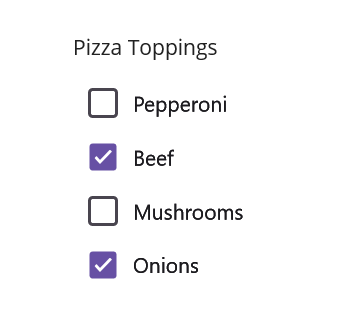
Intermediate state
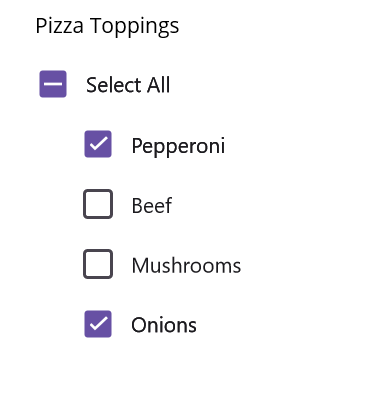
The CheckBox supports an indeterminate (intermediate) state in addition to checked and unchecked. The indeterminate state is enabled by setting the IsThreeState property to true. When IsThreeState is true, the IsChecked property is treated as bool? so it can hold a third null value.
When the
IsThreeStateproperty is set tofalseand theIsCheckedproperty is set tonull, the CheckBox displays in the unchecked state.
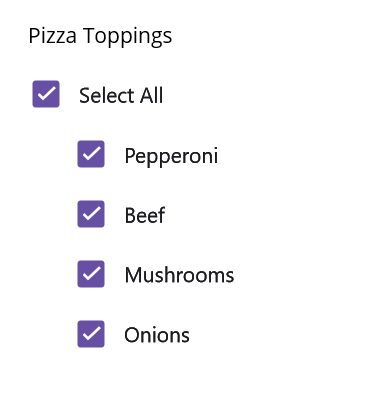
The indeterminate state indicates that a group of sub-choices contains both checked and unchecked items. In the following example, the “Select all” CheckBox has the IsThreeState property set to true. The “Select all” CheckBox is checked if all child items are checked, unchecked if all child items are unchecked, and indeterminate otherwise.
The example listens to the StateChanged event to keep the parent in sync. A shared skip flag is used to prevent the cascading StateChanged events raised by programmatic child updates from re-entering the handlers.
<StackLayout Padding="20">
    <Label x:Name="label" Margin="10" Text="Pizza Toppings"/>
    <buttons:SfCheckBox x:Name="selectAll"
                        Text="Select All"
                        IsThreeState="True"
                        IsChecked="{x:Null}
                        StateChanged="SelectAll_StateChanged"/>
    <buttons:SfCheckBox x:Name="pepperoni" Text="Pepperoni"
                        StateChanged="CheckBox_StateChanged" Margin="30,0"/>
    <buttons:SfCheckBox x:Name="beef" Text="Beef" IsChecked="True"
                        StateChanged="CheckBox_StateChanged" Margin="30,0"/>
    <buttons:SfCheckBox x:Name="mushroom" Text="Mushrooms"
                        StateChanged="CheckBox_StateChanged" Margin="30,0"/>
    <buttons:SfCheckBox x:Name="onion" Text="Onions" IsChecked="True"
                        StateChanged="CheckBox_StateChanged" Margin="30,0"/>
</StackLayout>
// Field shared by both event handlers to guard against re-entrant StateChanged calls.
bool skip = false;
SfCheckBox selectAll, pepperoni, beef, mushroom, onion;
StackLayout stackLayout = new StackLayout() { Padding = 20 };
Label label = new Label();
label.Text = "Pizza Toppings";
label.Margin = new Thickness(10);
selectAll = new SfCheckBox();
pepperoni = new SfCheckBox();
beef = new SfCheckBox();
onion = new SfCheckBox();
mushroom = new SfCheckBox();
pepperoni.StateChanged += CheckBox_StateChanged;
pepperoni.Text = "Pepperoni";
pepperoni.Margin = new Thickness(30, 0);
beef.StateChanged += CheckBox_StateChanged;
beef.Text = "Beef";
beef.IsChecked = true;
beef.Margin = new Thickness(30, 0);
mushroom.StateChanged += CheckBox_StateChanged;
mushroom.Text = "Mushrooms";
mushroom.Margin = new Thickness(30, 0);
onion.StateChanged += CheckBox_StateChanged;
onion.Text = "Onions";
onion.Margin = new Thickness(30, 0);
onion.IsChecked = true;
selectAll.StateChanged += SelectAll_StateChanged;
selectAll.Text = "Select All";
selectAll.IsThreeState = true;
selectAll.IsChecked = null;
stackLayout.Children.Add(label);
stackLayout.Children.Add(selectAll);
stackLayout.Children.Add(pepperoni);
stackLayout.Children.Add(beef);
stackLayout.Children.Add(mushroom);
stackLayout.Children.Add(onion);
this.Content = stackLayout;The StateChanged event can be handled in C# as follows:
// When the "Select all" CheckBox changes, mirror its state to every child CheckBox.
private void SelectAll_StateChanged(object sender, Syncfusion.Maui.Buttons.StateChangedEventArgs e)
{
    if (!skip)
    {
        skip = true;
        pepperoni.IsChecked = beef.IsChecked = mushroom.IsChecked = onion.IsChecked = e.IsChecked;
        skip = false;
    }
}

// When any child CheckBox changes, update the "Select all" CheckBox to reflect the group state.
private void CheckBox_StateChanged(object sender, Syncfusion.Maui.Buttons.StateChangedEventArgs e)
{
    if (!skip)
    {
        skip = true;
        bool allChecked = pepperoni.IsChecked == true && beef.IsChecked == true && mushroom.IsChecked == true && onion.IsChecked == true;
        bool allUnchecked = pepperoni.IsChecked == false && beef.IsChecked == false && mushroom.IsChecked == false && onion.IsChecked == false;
        if (allChecked)
            selectAll.IsChecked = true;
        else if (allUnchecked)
            selectAll.IsChecked = false;
        else
            selectAll.IsChecked = null;
        skip = false;
    }
}
You can download the multiple-choice checkbox project for this demo from GitHub.