Stamp Annotation in JavaScript (ES6) PDF Viewer
25 Sep 202620 minutes to read
The PDF Viewer control provides options to add, edit, delete, and rotate the following stamp annotations in PDF documents:
- Dynamic
- Sign Here
- Standard Business
- Custom Stamp
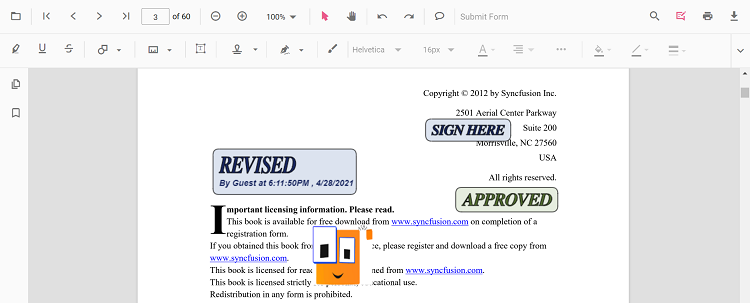
Add Stamp Annotation
Add Stamp annotations in UI
Use the annotation toolbar to:
- Click the Edit Annotation button.
- Open the Stamp Annotation dropdown.
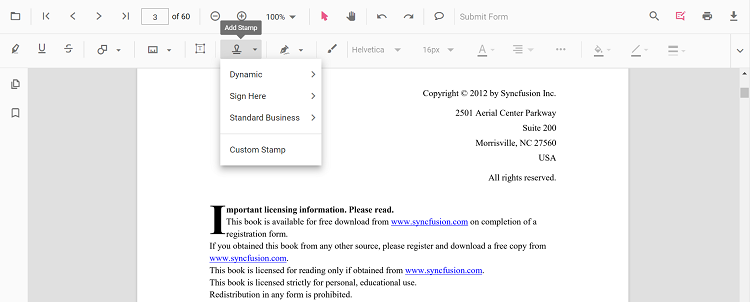
- Choose a stamp type and place it on the page.
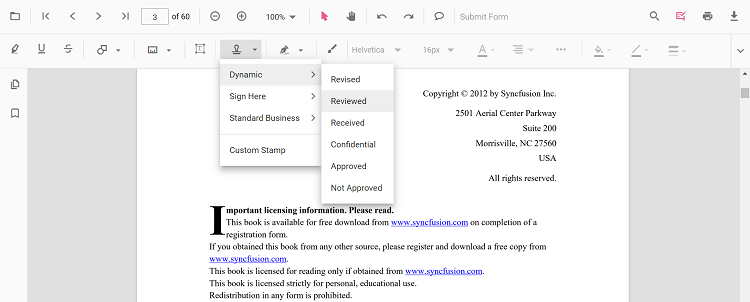
When in pan mode and a stamp tool is selected, the viewer switches to text select mode automatically.
Switch to specific stamp modes
<button id="dynamicStamp">Dynamic Stamp</button>
<button id="signStamp">Sign Stamp</button>
<button id="standardBusinessStamp">Standard Business Stamp</button>
<button id="customStamp">Custom Stamp</button>import { PdfViewer, Toolbar, Magnification, Navigation, Annotation, LinkAnnotation, ThumbnailView, BookmarkView, TextSelection, TextSearch, FormFields, FormDesigner, PageOrganizer, SignStampItem, StandardBusinessStampItem, DynamicStampItem, StampSettings } from '@syncfusion/ej2-pdfviewer';
PdfViewer.Inject(Toolbar, Magnification, Navigation, Annotation, LinkAnnotation, ThumbnailView, BookmarkView, TextSelection, TextSearch, FormFields, FormDesigner, PageOrganizer);
let pdfviewer: PdfViewer = new PdfViewer();
pdfviewer.documentPath = 'https://cdn.syncfusion.com/content/pdf/pdf-succinctly.pdf';
pdfviewer.resourceUrl = 'https://cdn.syncfusion.com/ej2/31.1.23/dist/ej2-pdfviewer-lib';
pdfviewer.appendTo('#PdfViewer');
document.getElementById('dynamicStamp')?.addEventListener('click', () => {
pdfviewer.annotationModule.setAnnotationMode('Stamp', DynamicStampItem.NotApproved);
});
document.getElementById('signStamp')?.addEventListener('click', () => {
pdfviewer.annotationModule.setAnnotationMode('Stamp', undefined, SignStampItem.Witness);
});
document.getElementById('standardBusinessStamp')?.addEventListener('click', () => {
pdfviewer.annotationModule.setAnnotationMode('Stamp', undefined, undefined, StandardBusinessStampItem.Approved);
});
document.getElementById('customStamp')?.addEventListener('click', () => {
pdfviewer.annotation.addAnnotation('Stamp', {
offset: { x: 100, y: 440 },
width: 46,
height: 100,
pageNumber: 1,
isLock: true,
author: 'Guest',
customStamps: [{
customStampName: 'Image',
customStampImageSource: 'data:image/jpeg;base64,/9j/4AAQSkZJRgABAQAAAQABAAD...'
}]
} as unknown as StampSettings);
});import { PdfViewer, Toolbar, Magnification, Navigation, Annotation, LinkAnnotation, ThumbnailView, BookmarkView, TextSelection, TextSearch, FormFields, FormDesigner, PageOrganizer, SignStampItem, StandardBusinessStampItem, DynamicStampItem, StampSettings } from '@syncfusion/ej2-pdfviewer';
PdfViewer.Inject(Toolbar, Magnification, Navigation, Annotation, LinkAnnotation, ThumbnailView, BookmarkView, TextSelection, TextSearch, FormFields, FormDesigner, PageOrganizer);
let pdfviewer: PdfViewer = new PdfViewer();
pdfviewer.serviceUrl = 'https://document.syncfusion.com/web-services/pdf-viewer/api/pdfviewer/';
pdfviewer.documentPath = 'https://cdn.syncfusion.com/content/pdf/pdf-succinctly.pdf';
pdfviewer.appendTo('#PdfViewer');
document.getElementById('dynamicStamp')?.addEventListener('click', () => {
pdfviewer.annotationModule.setAnnotationMode('Stamp', DynamicStampItem.NotApproved);
});
document.getElementById('signStamp')?.addEventListener('click', () => {
pdfviewer.annotationModule.setAnnotationMode('Stamp', undefined, SignStampItem.Witness);
});
document.getElementById('standardBusinessStamp')?.addEventListener('click', () => {
pdfviewer.annotationModule.setAnnotationMode('Stamp', undefined, undefined, StandardBusinessStampItem.Approved);
});Add Text Stamp and Image Stamp
The Stamp tool includes both Text Stamp and Image Stamp options alongside the built-in dynamic and business stamps. These features belong to the same Stamp annotation category and are documented on this page instead of as separate pages.
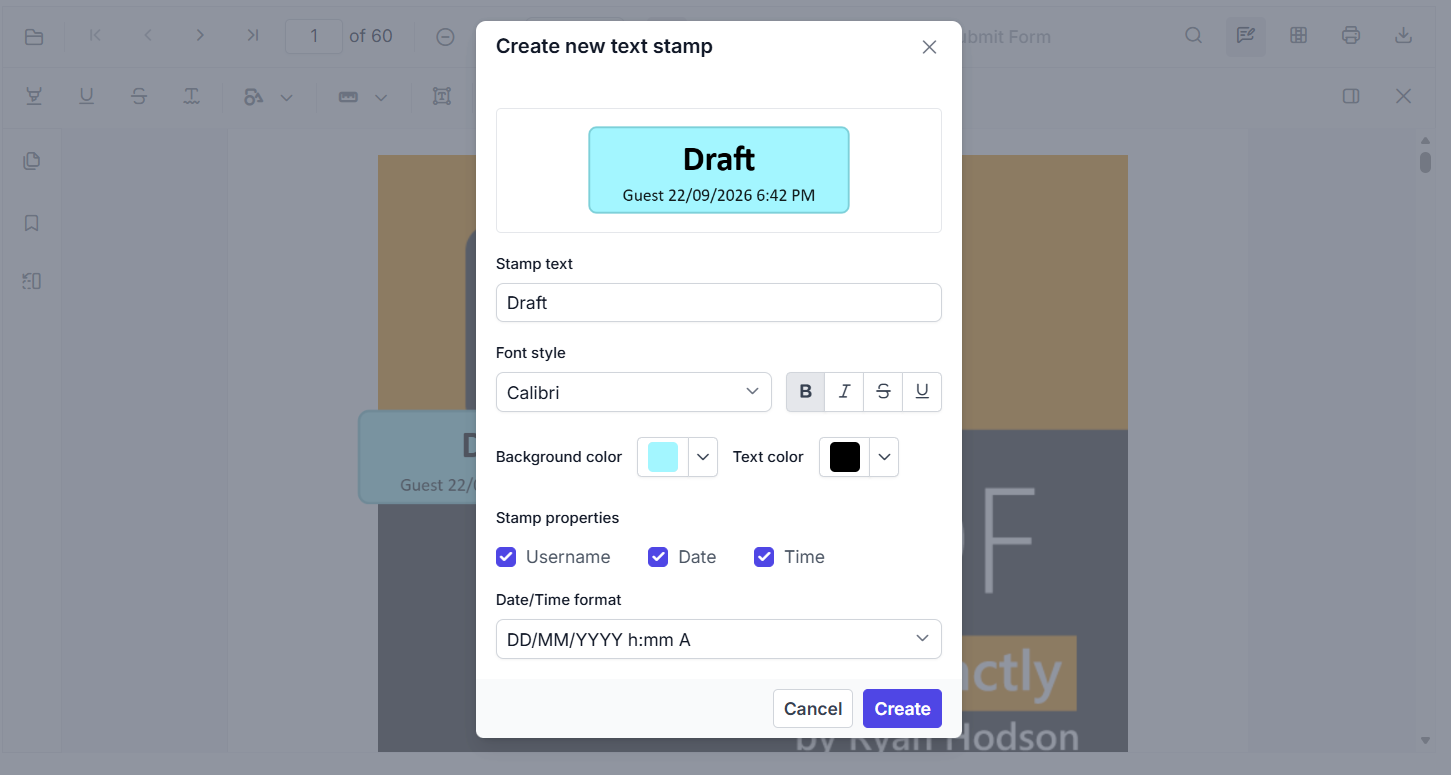
Add a text stamp in the UI
- Open the Annotation Toolbar.
- Click Stamp to open the stamp gallery.
- Select Text Stamp.
- In the Create new text stamp dialog, configure the title, subtitle, font, color, background, date/time format, and styling options such as bold, underline, and strikeout.
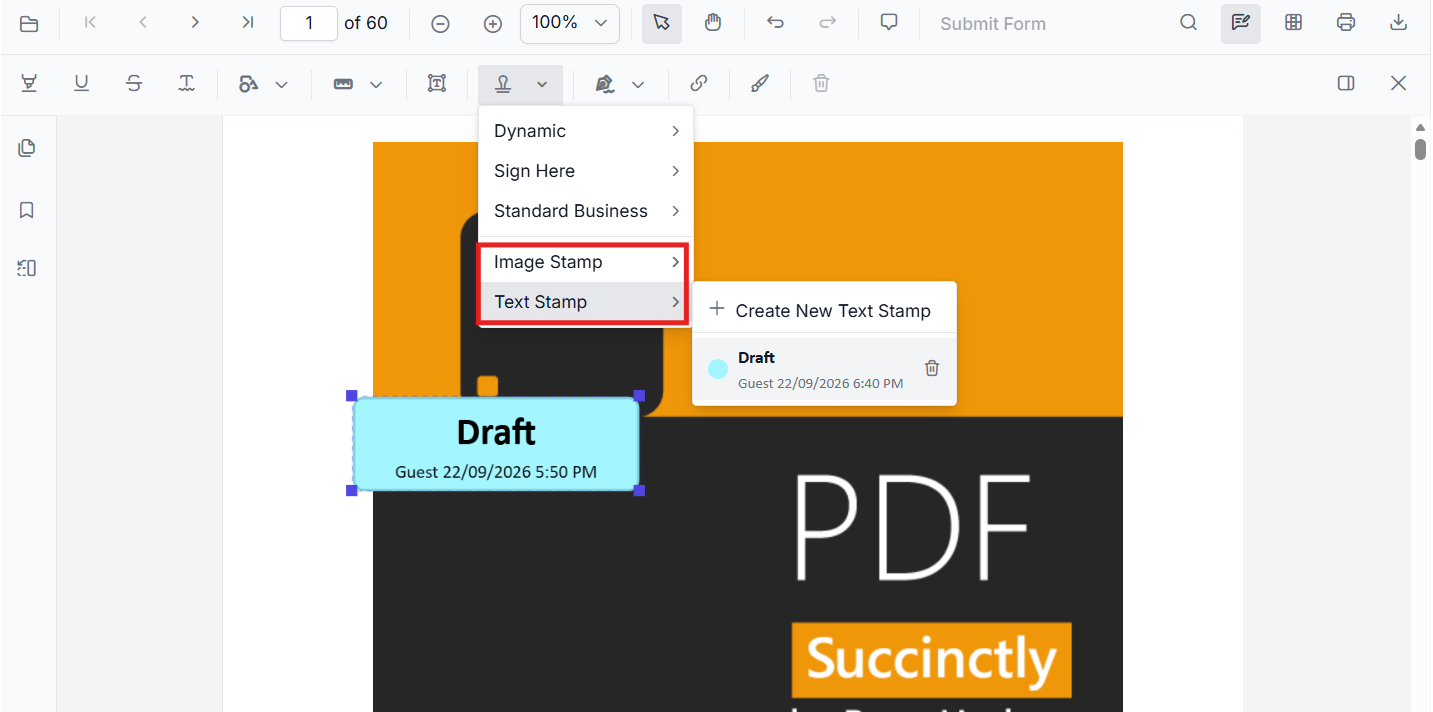
- Click Create to place the stamp on the page.
Add an image stamp in the UI
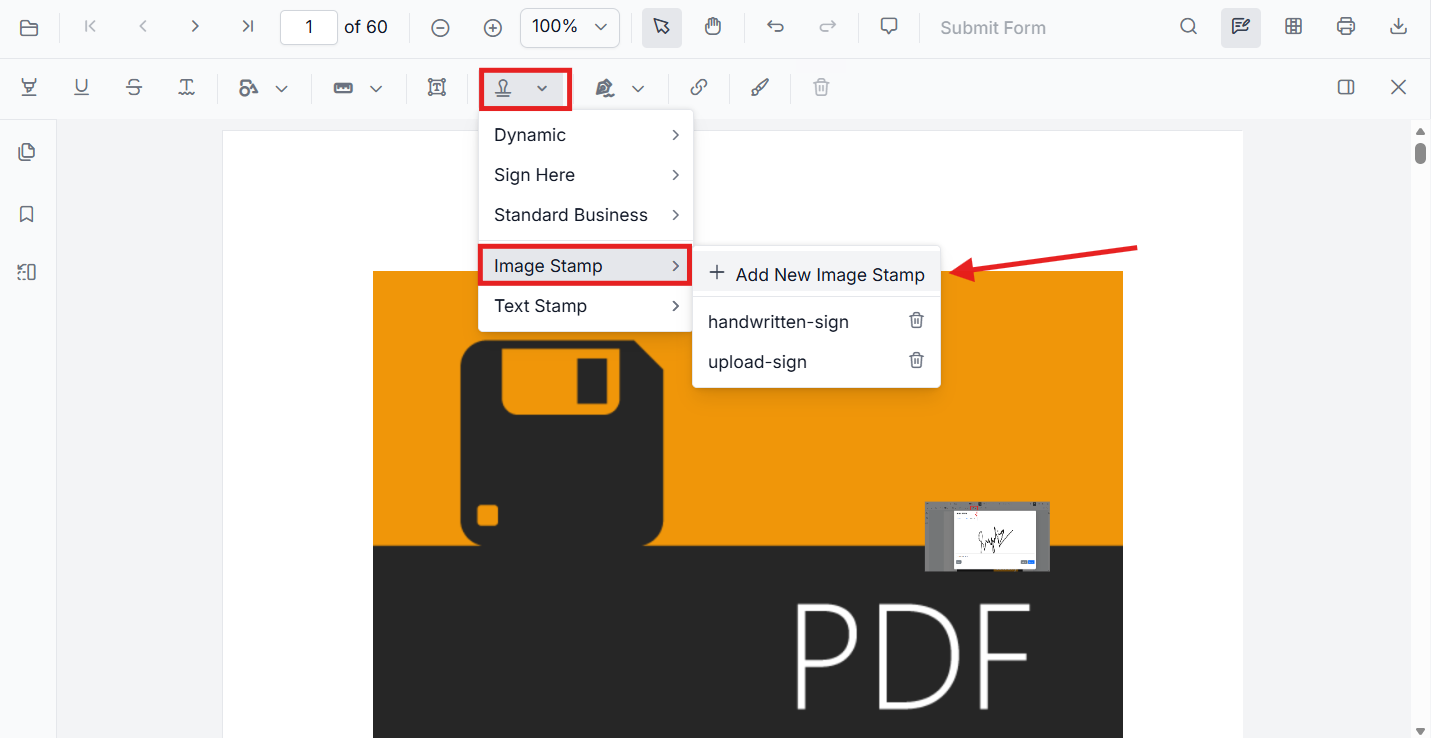
- Open the Annotation Toolbar.
- Click Stamp to open the stamp gallery.
- Select Image Stamp.
- Choose an image source or upload the required image.
- Click the PDF page to place the image stamp.
Add predefined text stamps to the submenu
You can add predefined text stamps and show them in the Text Stamp submenu by configuring customTextStamps in the viewer settings. Use fontFamilyCollection to provide the font list that should be available for text stamp styling in the UI.
pdfviewer.customStampSettings = {
  fontFamilyCollection: ['Arial', 'Times New Roman', 'Courier New'],
  customTextStamps: [{
    title: 'Draft',
    subtitle: '[$author] DD/MMMM/YYYY, h:mm A',
    bold: true,
    textColor: '#000000',
    backgroundColor: '#1693f8',
    fontFamily: 'Arial'
  }]
};
Add custom text stamp annotation programmatically
Use addAnnotation('Stamp', ...) with customTextStamps to create a text stamp at a specific location.
pdfviewer.annotation.addAnnotation('Stamp', {
  offset: { x: 100, y: 200 },
  pageNumber: 1,
  customTextStamps: [{
    title: 'Draft',
    subtitle: '[$author] DD/MMMM/YYYY, h:mm A',
    bold: true,
    textColor: '#000000',
    backgroundColor: '#1693f8',
    underline: true,
    fontFamily: 'Arial',
    strikeout: true
  }]
});
Add image stamp annotation programmatically
Use addAnnotation('Stamp', ...) with an image source to insert a custom image stamp.
pdfviewer.annotation.addAnnotation('Stamp', {
  offset: { x: 100, y: 300 },
  pageNumber: 1,
  width: 160,
  height: 80,
  customStamps: [{
    customStampName: 'Image',
    customStampImageSource: 'data:image/png;base64,REPLACE_WITH_YOUR_BASE64_IMAGE_DATA'
  }]
});
The new Image Stamp and Text Stamp capabilities belong to the same Stamp annotation feature set and are best documented in the existing Stamp annotation page under a dedicated subsection.
Add Stamp annotations programmatically
Create stamps programmatically using the addAnnotation method.
<button id="addDynamic">Add Dynamic Stamp</button>
<button id="addSign">Add Sign Stamp</button>
<button id="addStandard">Add Standard Business Stamp</button>
<button id="addCustom">Add Custom Stamp</button>import { PdfViewer, Toolbar, Magnification, Navigation, Annotation, LinkAnnotation, ThumbnailView, BookmarkView, TextSelection, TextSearch, FormFields, FormDesigner, PageOrganizer, StampSettings, DynamicStampItem, SignStampItem, StandardBusinessStampItem } from '@syncfusion/ej2-pdfviewer';
PdfViewer.Inject(Toolbar, Magnification, Navigation, Annotation, LinkAnnotation, ThumbnailView, BookmarkView, TextSelection, TextSearch, FormFields, FormDesigner, PageOrganizer);
let pdfviewer: PdfViewer = new PdfViewer();
pdfviewer.documentPath = 'https://cdn.syncfusion.com/content/pdf/pdf-succinctly.pdf';
pdfviewer.resourceUrl = 'https://cdn.syncfusion.com/ej2/31.1.23/dist/ej2-pdfviewer-lib';
pdfviewer.appendTo('#PdfViewer');
document.getElementById('addDynamic')?.addEventListener('click', () => {
pdfviewer.annotation.addAnnotation('Stamp', {
offset: { x: 200, y: 140 }, pageNumber: 1
} as StampSettings, DynamicStampItem.Approved);
});
document.getElementById('addSign')?.addEventListener('click', () => {
pdfviewer.annotation.addAnnotation('Stamp', {
offset: { x: 200, y: 240 }, pageNumber: 1
} as StampSettings, undefined, SignStampItem.Witness);
});
document.getElementById('addStandard')?.addEventListener('click', () => {
pdfviewer.annotation.addAnnotation('Stamp', {
offset: { x: 200, y: 340 }, pageNumber: 1
} as StampSettings, undefined, undefined, StandardBusinessStampItem.Approved);
});
document.getElementById('addCustom')?.addEventListener('click', () => {
pdfviewer.annotation.addAnnotation('Stamp', {
offset: { x: 100, y: 440 }, width: 46, height: 100, pageNumber: 1, isLock: true,
author: 'Guest',
customStamps: [{ customStampName: 'Image', customStampImageSource: 'data:image/jpeg;base64,/9j/4AAQSkZJRgABAQAAAQABAAD...' }]
} as unknown as StampSettings);
});import { PdfViewer, Toolbar, Magnification, Navigation, Annotation, LinkAnnotation, ThumbnailView, BookmarkView, TextSelection, TextSearch, FormFields, FormDesigner, PageOrganizer, StampSettings, DynamicStampItem, SignStampItem, StandardBusinessStampItem } from '@syncfusion/ej2-pdfviewer';
PdfViewer.Inject(Toolbar, Magnification, Navigation, Annotation, LinkAnnotation, ThumbnailView, BookmarkView, TextSelection, TextSearch, FormFields, FormDesigner, PageOrganizer);
let pdfviewer: PdfViewer = new PdfViewer();
pdfviewer.serviceUrl = 'https://document.syncfusion.com/web-services/pdf-viewer/api/pdfviewer/';
pdfviewer.documentPath = 'https://cdn.syncfusion.com/content/pdf/pdf-succinctly.pdf';
pdfviewer.appendTo('#PdfViewer');
document.getElementById('addDynamic')?.addEventListener('click', () => {
pdfviewer.annotation.addAnnotation('Stamp', {
offset: { x: 200, y: 140 }, pageNumber: 1
} as StampSettings, DynamicStampItem.Approved);
});
document.getElementById('addSign')?.addEventListener('click', () => {
pdfviewer.annotation.addAnnotation('Stamp', {
offset: { x: 200, y: 240 }, pageNumber: 1
} as StampSettings, undefined, SignStampItem.Witness);
});
document.getElementById('addStandard')?.addEventListener('click', () => {
pdfviewer.annotation.addAnnotation('Stamp', {
offset: { x: 200, y: 340 }, pageNumber: 1
} as StampSettings, undefined, undefined, StandardBusinessStampItem.Approved);
});
document.getElementById('addCustom')?.addEventListener('click', () => {
pdfviewer.annotation.addAnnotation('Stamp', {
offset: { x: 100, y: 440 }, width: 46, height: 100, pageNumber: 1, isLock: true,
author: 'Guest',
customStamps: [{ customStampName: 'Image', customStampImageSource: 'data:image/jpeg;base64,/9j/4AAQSkZJRgABAQAAAQABAAD...' }]
} as StampSettings);
});Edit Stamp Annotation
Edit Stamp annotations in UI
Use the viewer to select, move, resize, rotate, and delete Stamp annotations:
- Select a Stamp to show its resize and rotation handles.
- Move: drag inside the stamp to reposition it on the page.
- Resize: drag any corner or side handle to adjust the size.
- Rotate: drag the rotation handle to rotate the stamp.
- Delete or access more options from the context menu.
Use the toolbar to change appearance:
- Adjust Opacity using the Edit Opacity tool.
Edit Stamp Annotation programmatically
Use editAnnotation to change bounds or lock state.
<button id="editStamp">Edit Stamp annotation</button>import { PdfViewer, Toolbar, Magnification, Navigation, Annotation, LinkAnnotation, ThumbnailView, BookmarkView, TextSelection, TextSearch, FormFields, FormDesigner, PageOrganizer } from '@syncfusion/ej2-pdfviewer';
PdfViewer.Inject(Toolbar, Magnification, Navigation, Annotation, LinkAnnotation, ThumbnailView, BookmarkView, TextSelection, TextSearch, FormFields, FormDesigner, PageOrganizer);
let pdfviewer: PdfViewer = new PdfViewer();
pdfviewer.documentPath = 'https://cdn.syncfusion.com/content/pdf/pdf-succinctly.pdf';
pdfviewer.resourceUrl = 'https://cdn.syncfusion.com/ej2/31.1.23/dist/ej2-pdfviewer-lib';
pdfviewer.appendTo('#PdfViewer');
document.getElementById('editStamp')?.addEventListener('click', () => {
for (let i = 0; i < pdfviewer.annotationCollection.length; i++) {
if (pdfviewer.annotationCollection[i].shapeAnnotationType === 'stamp') {
const width = pdfviewer.annotationCollection[i].bounds.width;
const height = pdfviewer.annotationCollection[i].bounds.height;
pdfviewer.annotationCollection[i].bounds = { x: 100, y: 100, width, height };
pdfviewer.annotationCollection[i].annotationSettings.isLock = true;
pdfviewer.annotation.editAnnotation(pdfviewer.annotationCollection[i]);
}
}
});import { PdfViewer, Toolbar, Magnification, Navigation, Annotation, LinkAnnotation, ThumbnailView, BookmarkView, TextSelection, TextSearch, FormFields, FormDesigner, PageOrganizer } from '@syncfusion/ej2-pdfviewer';
PdfViewer.Inject(Toolbar, Magnification, Navigation, Annotation, LinkAnnotation, ThumbnailView, BookmarkView, TextSelection, TextSearch, FormFields, FormDesigner, PageOrganizer);
let pdfviewer: PdfViewer = new PdfViewer();
pdfviewer.serviceUrl = 'https://document.syncfusion.com/web-services/pdf-viewer/api/pdfviewer/';
pdfviewer.documentPath = 'https://cdn.syncfusion.com/content/pdf/pdf-succinctly.pdf';
pdfviewer.appendTo('#PdfViewer');
document.getElementById('editStamp')?.addEventListener('click', () => {
for (let i = 0; i < pdfviewer.annotationCollection.length; i++) {
if (pdfviewer.annotationCollection[i].shapeAnnotationType === 'stamp') {
const width = pdfviewer.annotationCollection[i].bounds.width;
const height = pdfviewer.annotationCollection[i].bounds.height;
pdfviewer.annotationCollection[i].bounds = { x: 100, y: 100, width, height };
pdfviewer.annotationCollection[i].annotationSettings.isLock = true;
pdfviewer.annotation.editAnnotation(pdfviewer.annotationCollection[i]);
}
}
});Default stamp settings during initialization
Set defaults using stampSettings.
import { PdfViewer, Toolbar, Magnification, Navigation, Annotation, LinkAnnotation, ThumbnailView, BookmarkView, TextSelection, TextSearch, FormFields, FormDesigner, PageOrganizer } from '@syncfusion/ej2-pdfviewer';

PdfViewer.Inject(Toolbar, Magnification, Navigation, Annotation, LinkAnnotation, ThumbnailView, BookmarkView, TextSelection, TextSearch, FormFields, FormDesigner, PageOrganizer);

let pdfviewer: PdfViewer = new PdfViewer();
pdfviewer.documentPath = 'https://cdn.syncfusion.com/content/pdf/pdf-succinctly.pdf';
pdfviewer.resourceUrl = 'https://cdn.syncfusion.com/ej2/31.1.23/dist/ej2-pdfviewer-lib';
pdfviewer.stampSettings = { opacity: 0.3, author: 'Guest User' };
pdfviewer.appendTo('#PdfViewer');
import { PdfViewer, Toolbar, Magnification, Navigation, Annotation, LinkAnnotation, ThumbnailView, BookmarkView, TextSelection, TextSearch, FormFields, FormDesigner, PageOrganizer } from '@syncfusion/ej2-pdfviewer';
PdfViewer.Inject(Toolbar, Magnification, Navigation, Annotation, LinkAnnotation, ThumbnailView, BookmarkView, TextSelection, TextSearch, FormFields, FormDesigner, PageOrganizer);
let pdfviewer: PdfViewer = new PdfViewer();
pdfviewer.serviceUrl = 'https://document.syncfusion.com/web-services/pdf-viewer/api/pdfviewer/';
pdfviewer.documentPath = 'https://cdn.syncfusion.com/content/pdf/pdf-succinctly.pdf';
pdfviewer.stampSettings = { opacity: 0.3, author: 'Guest User' };
pdfviewer.appendTo('#PdfViewer');Set properties while adding Individual Annotation
Set properties for individual annotation before creating the control using StampSettings.
After editing default color and opacity using the Edit Color and Edit Opacity tools, the values update to the selected settings.
Refer to the following code snippet to set the default Stamp settings.
<button id="Stamp">Add Stamp</button>import { PdfViewer, Toolbar, Magnification, Navigation, Annotation, LinkAnnotation, ThumbnailView, BookmarkView, TextSelection, TextSearch, FormFields, FormDesigner, DynamicStampItem, StampSettings} from '@syncfusion/ej2-pdfviewer';
PdfViewer.Inject(Toolbar, Magnification, Navigation, Annotation, LinkAnnotation, ThumbnailView, BookmarkView, TextSelection, TextSearch, FormFields, FormDesigner, PageOrganizer);
const pdfviewer: PdfViewer = new PdfViewer();
pdfviewer.documentPath = 'https://cdn.syncfusion.com/content/pdf/form-designer.pdf';
pdfviewer.resourceUrl = 'https://cdn.syncfusion.com/ej2/31.1.23/dist/ej2-pdfviewer-lib';
pdfviewer.appendTo('#PdfViewer');
//Apply Stamp Settings while adding individual Annotation
document.getElementById('Stamp')?.addEventListener('click', function () {
pdfviewer.annotation.addAnnotation('Stamp', {
offset: { x: 200, y: 140 }, pageNumber: 1,
opacity: 0.3, author: 'Guest User'
} as StampSettings, DynamicStampItem.Approved);
});import { PdfViewer, Toolbar, Magnification, Navigation, Annotation, LinkAnnotation, ThumbnailView, BookmarkView, TextSelection, TextSearch, FormFields, FormDesigner, DynamicStampItem, StampSettings} from '@syncfusion/ej2-pdfviewer';
PdfViewer.Inject(Toolbar, Magnification, Navigation, Annotation, LinkAnnotation, ThumbnailView, BookmarkView, TextSelection, TextSearch, FormFields, FormDesigner, PageOrganizer);
const pdfviewer: PdfViewer = new PdfViewer();
pdfviewer.documentPath = 'https://cdn.syncfusion.com/content/pdf/form-designer.pdf';
pdfviewer.serviceUrl = 'https://document.syncfusion.com/web-services/pdf-viewer/api/pdfviewer/';
pdfviewer.appendTo('#PdfViewer');
//Apply Stamp Settings while adding individual Annotation
document.getElementById('Stamp')?.addEventListener('click', function () {
pdfviewer.annotation.addAnnotation('Stamp', {
offset: { x: 200, y: 140 }, pageNumber: 1,
opacity: 0.3, author: 'Guest User'
} as StampSettings, DynamicStampItem.Approved);
});