Export Annotations in JavaScript (ES6) PDF Viewer
14 Aug 20264 minutes to read
PDF Viewer provides support to export annotations. You can export annotations from the PDF Viewer in two ways:
- Using the built-in UI in the Comments panel (JSON or XFDF file)
- Programmatically (JSON, XFDF, or as an object for custom handling)
Export using the UI (Comments panel)
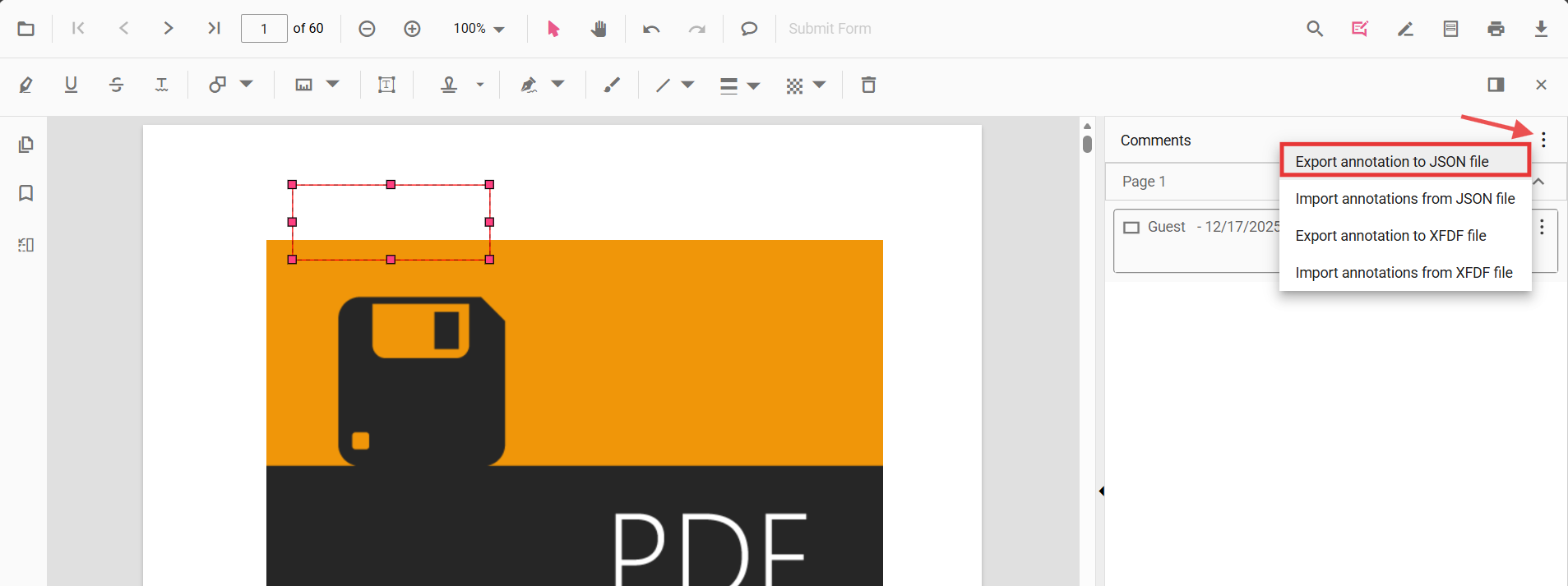
The Comments panel provides export actions in its overflow menu:
- Export annotation to JSON file
- Export annotation to XFDF file
Follow the steps to export annotations:
- Open the Comments panel in the PDF Viewer.
- Click the overflow menu (three dots) at the top of the panel.
- Choose Export annotation to JSON file or Export annotation to XFDF file.
This generates and downloads the selected format containing all annotations in the current document.
Export programmatically
You can export annotations from code using exportAnnotation, exportAnnotationsAsObject, and exportAnnotationsAsBase64String APIs. Use exportAnnotation to download as a file, exportAnnotationsAsObject to retrieve the annotation data as a JavaScript object, and exportAnnotationsAsBase64String to get a Base64-encoded string for embedding in JSON payloads or database storage.
Use the following example to initialize the viewer and export annotations as JSON, XFDF, or as an object.
<!-- Container and action buttons -->
<div id="pdfViewer" style="height:650px;"></div>
<div style="margin-top: 12px; display: flex; gap: 8px;">
  <button id="ExportJSON">Export JSON</button>
  <button id="ExportXfdf">Export XFDF</button>
  <button id="ExportAsObject">Export as Object</button>
  <button id="ExportAsBase64">Export as Base 64</button>
</div>
import { PdfViewer, Toolbar, Magnification, Navigation, LinkAnnotation, ThumbnailView, BookmarkView,
TextSelection, TextSearch, Print, Annotation, FormFields, FormDesigner, AllowedInteraction, AnnotationDataFormat } from '@syncfusion/ej2-pdfviewer';
// Inject required modules
PdfViewer.Inject(
Toolbar,
Magnification,
Navigation,
LinkAnnotation,
ThumbnailView,
BookmarkView,
TextSelection,
TextSearch,
Print,
Annotation,
FormFields,
FormDesigner
);
// Initialize the viewer
let viewer: PdfViewer = new PdfViewer();
viewer.resourceUrl = 'https://cdn.syncfusion.com/ej2/31.1.23/dist/ej2-pdfviewer-lib';
viewer.documentPath = 'https://cdn.syncfusion.com/content/pdf/pdf-succinctly.pdf';
viewer.appendTo('#pdfViewer');
// Wire up export actions
//Export Annotation as JSON
const btnJson = document.getElementById('ExportJSON');
btnJson?.addEventListener('click', () => {
viewer.exportAnnotation(AnnotationDataFormat.Json);
});
//Export Annotation As XFDF
const btnXfdf = document.getElementById('ExportXfdf');
btnXfdf?.addEventListener('click', () => {
viewer.exportAnnotation(AnnotationDataFormat.Xfdf);
});
//Export Annotation As Object
const btnObject = document.getElementById('ExportAsObject');
btnObject?.addEventListener('click', () => {
viewer.exportAnnotationsAsObject().then((value: any) => {
// Persist or transmit the object as needed (DB/API). Keep for future import.
console.log('Exported annotation object:', value);
});
});
//Export Annotation as Base64
var exportObject1;
document.getElementById('ExportAsBase64')?.addEventListener('click', function () {
viewer.exportAnnotationsAsBase64String(AnnotationDataFormat.Json).then(function (value: any) {
exportObject1 = value;
console.log(exportObject1);
})
});Common use cases
- Archive or share annotations as portable JSON/XFDF files
- Save annotations alongside a document in your storage layer
- Send annotations to a backend for collaboration or review workflows
- Export as object for custom serialization and re-import later