Strikethrough Annotation in JavaScript (ES5) PDF Viewer
15 Aug 202622 minutes to read
The PDF Viewer provides options to add, edit, and delete Strikethrough annotations on text. You can add strikethrough via the UI (context menu or annotation toolbar) and programmatically. You can also customize color, opacity, author/subject, and default settings, and use undo/redo, save, print, or disable them as needed.
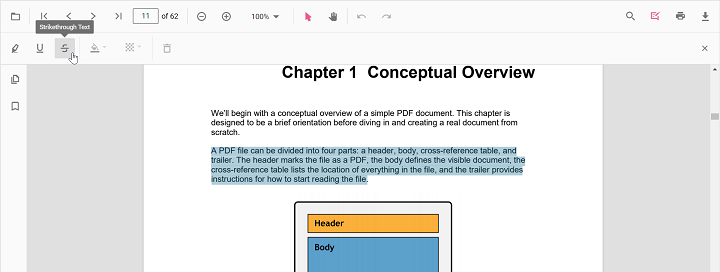
Add strikethrough annotations
Add strikethrough annotations via UI
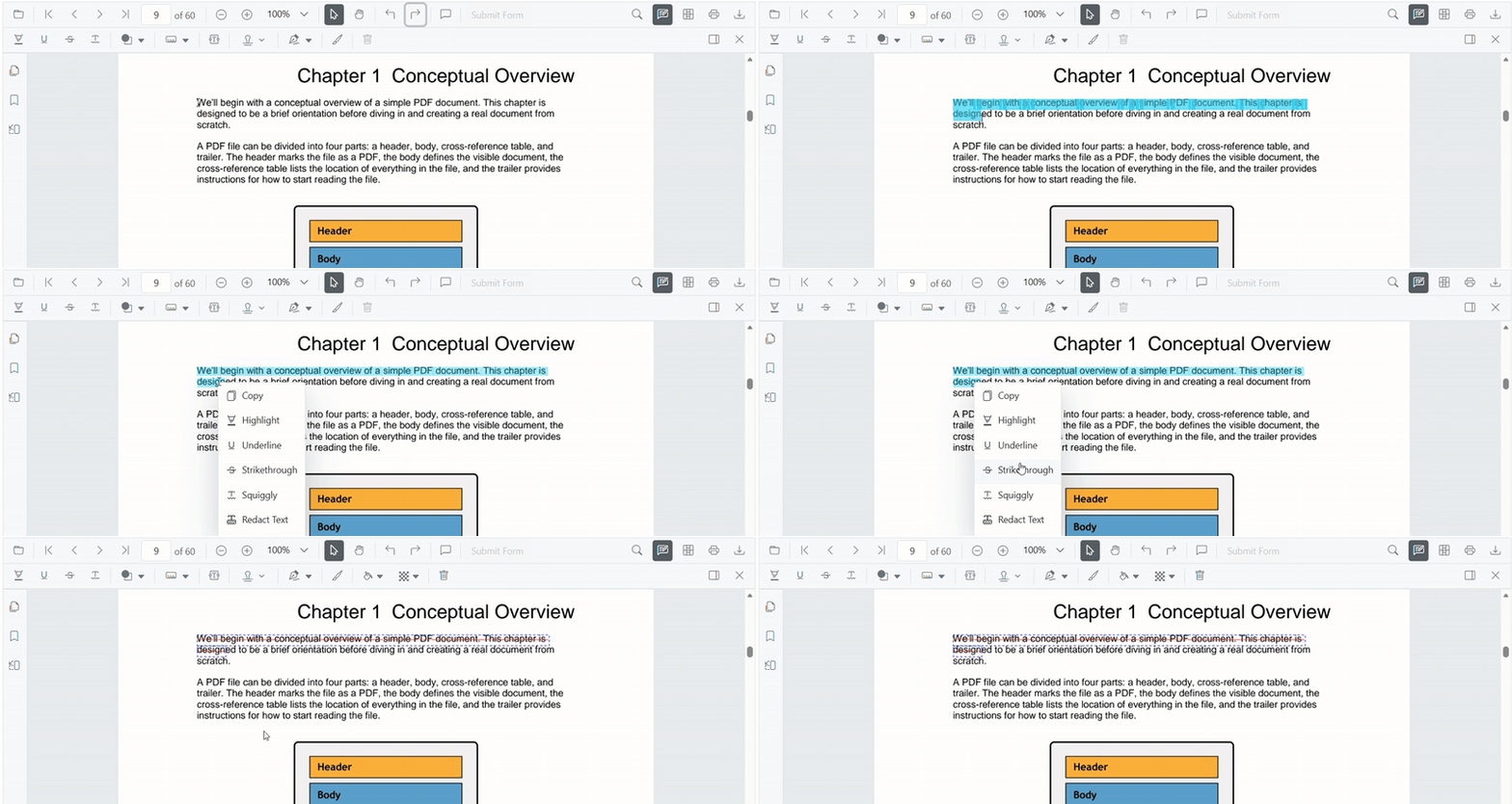
You can add strikethrough in two ways:
- Using the context menu
- Select text in the PDF document and right-click it.
- Choose Strikethrough in the context menu.
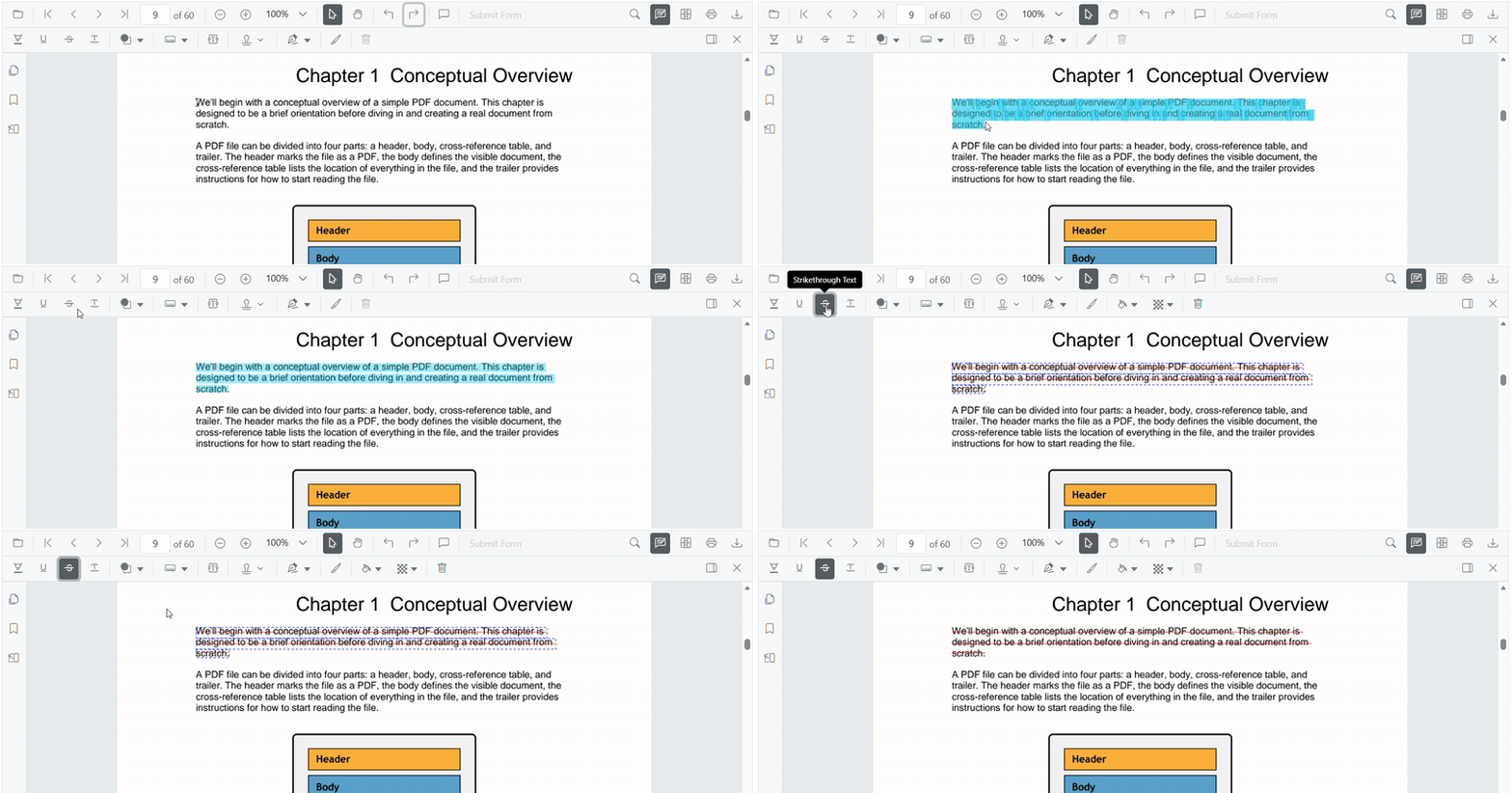
- Using the annotation toolbar
- Click the Edit Annotation button in the PDF Viewer toolbar to open the annotation toolbar.
- Select Strikethrough to enable strikethrough mode.
- Select text to add a strikethrough annotation.
- Alternatively, select text first and then click Strikethrough.
When pan mode is active and a text markup mode is entered, the PDF Viewer switches to text selection mode to enable selection.
Enable strikethrough mode
Use the following code to switch the viewer into strikethrough mode.
var PdfViewer = ej.pdfviewer.PdfViewer;
PdfViewer.Inject(
    ej.pdfviewer.Toolbar,
    ej.pdfviewer.Magnification,
    ej.pdfviewer.Navigation,
    ej.pdfviewer.LinkAnnotation,
    ej.pdfviewer.ThumbnailView,
    ej.pdfviewer.BookmarkView,
    ej.pdfviewer.TextSelection,
    ej.pdfviewer.Annotation,
    ej.pdfviewer.FormDesigner,
    ej.pdfviewer.FormFields
);

var pdfviewer = new PdfViewer({
    documentPath: 'https://cdn.syncfusion.com/content/pdf/pdf-succinctly.pdf',
    resourceUrl: 'https://cdn.syncfusion.com/ej2/31.1.23/dist/ej2-pdfviewer-lib'
});
pdfviewer.appendTo('#PdfViewer');

document.getElementById('set').addEventListener('click', function () {
    pdfviewer.annotation.setAnnotationMode('Strikethrough');
});
<!DOCTYPE html>
<html lang="en">
<head>
<title>EJ2 PDF Viewer</title>
<meta charset="utf-8" />
<meta name="viewport" content="width=device-width, initial-scale=1.0" />
<meta name="description" content="JavaScript PDF Viewer Control" />
<meta name="author" content="Syncfusion" />
<link href="index.css" rel="stylesheet" />
<link href="https://cdn.syncfusion.com/ej2/31.1.23/material.css" rel="stylesheet" />
<script src="https://cdnjs.cloudflare.com/ajax/libs/systemjs/0.19.38/system.js"></script>
<script src="systemjs.config.js"></script>
</head>
<body>
<div id="loader">Loading....</div>
<!--Element to set text markup annotation mode-->
<button id="set">Strikethrough</button>
<div id="container">
<div id="PdfViewer" style="height:500px;width:100%"></div>
</div>
<script src="index.js" type="text/javascript"></script>
</body>
</html>To set up the server-backed PDF Viewer,
Add the belowserviceUrlin theindex.jsfile
pdfviewer.serviceUrl = 'https://document.syncfusion.com/web-services/pdf-viewer/api/pdfviewer/';
Exit strikethrough mode
Use the following code to switch back to normal mode.
var PdfViewer = ej.pdfviewer.PdfViewer;
PdfViewer.Inject(
    ej.pdfviewer.Toolbar,
    ej.pdfviewer.Magnification,
    ej.pdfviewer.Navigation,
    ej.pdfviewer.LinkAnnotation,
    ej.pdfviewer.ThumbnailView,
    ej.pdfviewer.BookmarkView,
    ej.pdfviewer.TextSelection,
    ej.pdfviewer.Annotation,
    ej.pdfviewer.FormDesigner,
    ej.pdfviewer.FormFields
);

var pdfviewer = new PdfViewer({
    documentPath: 'https://cdn.syncfusion.com/content/pdf/pdf-succinctly.pdf',
    resourceUrl: 'https://cdn.syncfusion.com/ej2/31.1.23/dist/ej2-pdfviewer-lib'
});
pdfviewer.appendTo('#PdfViewer');

document.getElementById('set').addEventListener('click', function () {
    pdfviewer.annotation.setAnnotationMode('Strikethrough');
});

document.getElementById('setNone').addEventListener('click', function () {
    pdfviewer.annotation.setAnnotationMode('None');
});
<!DOCTYPE html>
<html lang="en">
<head>
<title>EJ2 PDF Viewer</title>
<meta charset="utf-8" />
<meta name="viewport" content="width=device-width, initial-scale=1.0" />
<meta name="description" content="JavaScript PDF Viewer Control" />
<meta name="author" content="Syncfusion" />
<link href="index.css" rel="stylesheet" />
<link href="https://cdn.syncfusion.com/ej2/31.1.23/material.css" rel="stylesheet" />
<script src="https://cdnjs.cloudflare.com/ajax/libs/systemjs/0.19.38/system.js"></script>
<script src="systemjs.config.js"></script>
</head>
<body>
<div id="loader">Loading....</div>
<!--Element to set text markup annotation mode-->
<button id="set">Strikethrough</button>
<!--Element to set normal mode-->
<button id="setNone">Normal Mode</button>
<div id="container">
<div id="PdfViewer" style="height:500px;width:100%"></div>
</div>
<script src="index.js" type="text/javascript"></script>
</body>
</html>To set up the server-backed PDF Viewer,
Add the belowserviceUrlin theindex.jsfile
pdfviewer.serviceUrl = 'https://document.syncfusion.com/web-services/pdf-viewer/api/pdfviewer/';
Add strikethrough annotations programmatically
Programmatically add strikethrough annotations using the addAnnotation method.
Example:
<button id="strikethrough">Add TextMarkup annotation programmatically</button>var PdfViewer = ej.pdfviewer.PdfViewer;
PdfViewer.Inject(
ej.pdfviewer.Toolbar,
ej.pdfviewer.Magnification,
ej.pdfviewer.Navigation,
ej.pdfviewer.Annotation,
ej.pdfviewer.LinkAnnotation,
ej.pdfviewer.ThumbnailView,
ej.pdfviewer.BookmarkView,
ej.pdfviewer.TextSelection,
ej.pdfviewer.TextSearch,
ej.pdfviewer.FormFields,
ej.pdfviewer.FormDesigner,
ej.pdfviewer.PageOrganizer
);
var pdfviewer = new PdfViewer();
pdfviewer.documentPath = 'https://cdn.syncfusion.com/content/pdf/pdf-succinctly.pdf';
pdfviewer.resourceUrl = 'https://cdn.syncfusion.com/ej2/31.1.23/dist/ej2-pdfviewer-lib';
pdfviewer.appendTo('#PdfViewer');
var strikethrough = document.getElementById('strikethrough');
if (strikethrough) {
strikethrough.addEventListener('click', function () {
pdfviewer.annotation.addAnnotation('Strikethrough', {
bounds: [{ x: 97, y: 110, width: 350, height: 14 }],
pageNumber: 1
});
});
}var PdfViewer = ej.pdfviewer.PdfViewer;
PdfViewer.Inject(
ej.pdfviewer.Toolbar,
ej.pdfviewer.Magnification,
ej.pdfviewer.Navigation,
ej.pdfviewer.Annotation,
ej.pdfviewer.LinkAnnotation,
ej.pdfviewer.ThumbnailView,
ej.pdfviewer.BookmarkView,
ej.pdfviewer.TextSelection,
ej.pdfviewer.TextSearch,
ej.pdfviewer.FormFields,
ej.pdfviewer.FormDesigner,
ej.pdfviewer.PageOrganizer
);
var pdfviewer = new PdfViewer();
pdfviewer.serviceUrl = 'https://document.syncfusion.com/web-services/pdf-viewer/api/pdfviewer/';
pdfviewer.documentPath = 'https://cdn.syncfusion.com/content/pdf/pdf-succinctly.pdf';
pdfviewer.appendTo('#PdfViewer');
var strikethrough = document.getElementById('strikethrough');
if (strikethrough) {
strikethrough.addEventListener('click', function () {
pdfviewer.annotation.addAnnotation('Strikethrough', {
bounds: [{ x: 97, y: 110, width: 350, height: 14 }],
pageNumber: 1
});
});
}Edit strikethrough annotations
Edit strikethrough annotations in UI
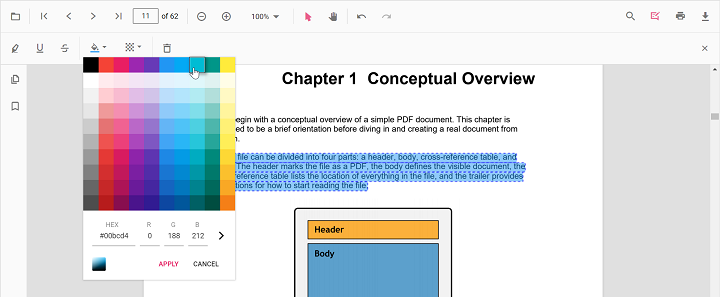
The color and opacity of strikethrough annotations can be edited using the Edit Color and Edit Opacity tools in the annotation toolbar.
Edit color
Use the color palette in the Edit Color tool to change the annotation color.
Edit opacity
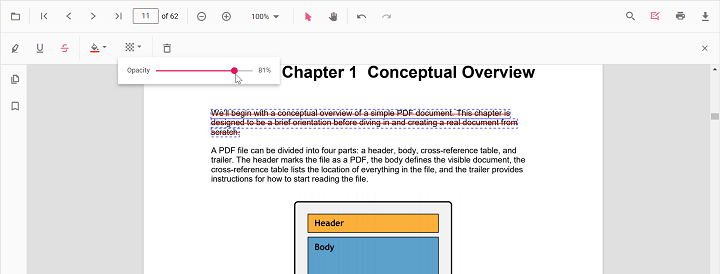
Use the range slider in the Edit Opacity tool to change annotation opacity.
Delete strikethrough annotations
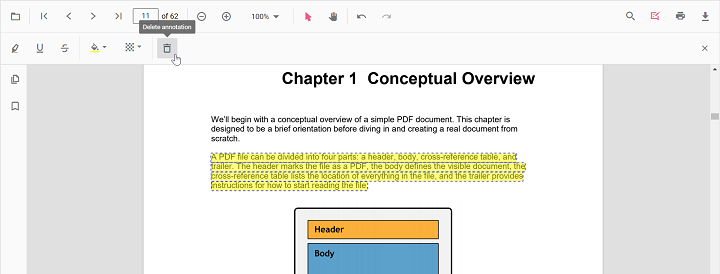
- Select the annotation and press Delete, or
- Click Delete Annotation in the annotation toolbar.
Edit existing strikethrough annotations programmatically
To modify existing strikethrough annotations programmatically, use the editAnnotation() method. Example:
<button id="editStrikethroughAnnotation">Edit Strikethrough annotation Programmatically</button>var PdfViewer = ej.pdfviewer.PdfViewer;
PdfViewer.Inject(
ej.pdfviewer.Toolbar,
ej.pdfviewer.Magnification,
ej.pdfviewer.Navigation,
ej.pdfviewer.Annotation,
ej.pdfviewer.LinkAnnotation,
ej.pdfviewer.ThumbnailView,
ej.pdfviewer.BookmarkView,
ej.pdfviewer.TextSelection,
ej.pdfviewer.TextSearch,
ej.pdfviewer.FormFields,
ej.pdfviewer.FormDesigner,
ej.pdfviewer.PageOrganizer
);
var pdfviewer = new PdfViewer();
pdfviewer.documentPath = 'https://cdn.syncfusion.com/content/pdf/pdf-succinctly.pdf';
pdfviewer.resourceUrl = 'https://cdn.syncfusion.com/ej2/31.1.23/dist/ej2-pdfviewer-lib';
pdfviewer.appendTo('#PdfViewer');
var editStrikethroughAnnotation = document.getElementById('editStrikethroughAnnotation');
if (editStrikethroughAnnotation) {
editStrikethroughAnnotation.addEventListener('click', function () {
for (var i = 0; i < pdfviewer.annotationCollection.length; i++) {
// Update the first available Strikethrough annotation
if (pdfviewer.annotationCollection[i].textMarkupAnnotationType === 'Strikethrough') {
pdfviewer.annotationCollection[i].color = '#ff0000';
pdfviewer.annotationCollection[i].opacity = 0.8;
pdfviewer.annotation.editAnnotation(pdfviewer.annotationCollection[i]);
break;
}
}
});
}var PdfViewer = ej.pdfviewer.PdfViewer;
PdfViewer.Inject(
ej.pdfviewer.Toolbar,
ej.pdfviewer.Magnification,
ej.pdfviewer.Navigation,
ej.pdfviewer.Annotation,
ej.pdfviewer.LinkAnnotation,
ej.pdfviewer.ThumbnailView,
ej.pdfviewer.BookmarkView,
ej.pdfviewer.TextSelection,
ej.pdfviewer.TextSearch,
ej.pdfviewer.FormFields,
ej.pdfviewer.FormDesigner,
ej.pdfviewer.PageOrganizer
);
var pdfviewer = new PdfViewer();
pdfviewer.serviceUrl = 'https://document.syncfusion.com/web-services/pdf-viewer/api/pdfviewer/';
pdfviewer.documentPath = 'https://cdn.syncfusion.com/content/pdf/pdf-succinctly.pdf';
pdfviewer.appendTo('#PdfViewer');
var editStrikethroughAnnotation = document.getElementById('editStrikethroughAnnotation');
if (editStrikethroughAnnotation) {
editStrikethroughAnnotation.addEventListener('click', function () {
for (var i = 0; i < pdfviewer.annotationCollection.length; i++) {
if (pdfviewer.annotationCollection[i].textMarkupAnnotationType === 'Strikethrough') {
pdfviewer.annotationCollection[i].color = '#ff0000';
pdfviewer.annotationCollection[i].opacity = 0.8;
pdfviewer.annotation.editAnnotation(pdfviewer.annotationCollection[i]);
break;
}
}
});
}Default strikethrough settings during initialization
Set default properties before creating the control using strikethroughSettings.
After editing default color and opacity using the Edit Color and Edit Opacity tools, the values update to the selected settings.
Refer to the following code snippet to set the default strikethrough settings.
var PdfViewer = ej.pdfviewer.PdfViewer;
PdfViewer.Inject(
    ej.pdfviewer.Toolbar,
    ej.pdfviewer.Magnification,
    ej.pdfviewer.Navigation,
    ej.pdfviewer.LinkAnnotation,
    ej.pdfviewer.ThumbnailView,
    ej.pdfviewer.BookmarkView,
    ej.pdfviewer.TextSelection,
    ej.pdfviewer.Annotation
);

var pdfviewer = new PdfViewer();
pdfviewer.documentPath = 'https://cdn.syncfusion.com/content/pdf/pdf-succinctly.pdf';
pdfviewer.resourceUrl = 'https://cdn.syncfusion.com/ej2/31.1.23/dist/ej2-pdfviewer-lib';
pdfviewer.strikethroughSettings = { author: 'Guest User', subject: 'Not Important', color: '#ff00ff', opacity: 0.9 };
pdfviewer.appendTo('#PdfViewer');
var PdfViewer = ej.pdfviewer.PdfViewer;
PdfViewer.Inject(
ej.pdfviewer.Toolbar,
ej.pdfviewer.Magnification,
ej.pdfviewer.Navigation,
ej.pdfviewer.LinkAnnotation,
ej.pdfviewer.ThumbnailView,
ej.pdfviewer.BookmarkView,
ej.pdfviewer.TextSelection,
ej.pdfviewer.Annotation
);
var pdfviewer = new PdfViewer();
pdfviewer.serviceUrl = 'https://document.syncfusion.com/web-services/pdf-viewer/api/pdfviewer/';
pdfviewer.documentPath = 'https://cdn.syncfusion.com/content/pdf/pdf-succinctly.pdf';
pdfviewer.strikethroughSettings = { author: 'Guest User', subject: 'Not Important', color: '#ff00ff', opacity: 0.9 };
pdfviewer.appendTo('#PdfViewer');Set properties while adding Individual Annotation
Set properties for individual annotations before creating the control using StrikethroughSettings.
After editing default color and opacity using the Edit Color and Edit Opacity tools, the values update to the selected settings.
Refer to the following code snippet to set the default strikethrough settings.
<button id="Strikethrough">Add Strikethrough</button>ej.pdfviewer.PdfViewer.Inject(ej.pdfviewer.Toolbar, ej.pdfviewer.Magnification, ej.pdfviewer.Navigation, ej.pdfviewer.Annotation, ej.pdfviewer.LinkAnnotation, ej.pdfviewer.ThumbnailView, ej.pdfviewer.BookmarkView, ej.pdfviewer.TextSelection, ej.pdfviewer.TextSearch, ej.pdfviewer.FormFields, ej.pdfviewer.FormDesigner, ej.pdfviewer.PageOrganizer);
var pdfviewer = new ej.pdfviewer.PdfViewer();
pdfviewer.documentPath = 'https://cdn.syncfusion.com/content/pdf/pdf-succinctly.pdf';
pdfviewer.resourceUrl = 'https://cdn.syncfusion.com/ej2/31.1.23/dist/ej2-pdfviewer-lib';
pdfviewer.appendTo('#PdfViewer');
//Apply Strikethrough Settings while adding individual Annotation
document.getElementById('Strikethrough')?.addEventListener('click', function () {
pdfviewer.annotation.addAnnotation('Strikethrough', {
bounds: [{ x: 97, y: 110, width: 350, height: 14 }],
pageNumber: 1,
author: 'User 1',
color: '#ffff00',
opacity: 0.9
});
pdfviewer.annotation.addAnnotation('Strikethrough', {
bounds: [{ x: 107, y: 220, width: 350, height: 14 }],
pageNumber: 1,
author: 'User 2',
color: '#ff1010ff',
opacity: 0.9
});
});ej.pdfviewer.PdfViewer.Inject(ej.pdfviewer.Toolbar, ej.pdfviewer.Magnification, ej.pdfviewer.Navigation, ej.pdfviewer.Annotation, ej.pdfviewer.LinkAnnotation, ej.pdfviewer.ThumbnailView, ej.pdfviewer.BookmarkView, ej.pdfviewer.TextSelection, ej.pdfviewer.TextSearch, ej.pdfviewer.FormFields, ej.pdfviewer.FormDesigner, ej.pdfviewer.PageOrganizer);
var pdfviewer = new ej.pdfviewer.PdfViewer();
pdfviewer.documentPath = 'https://cdn.syncfusion.com/content/pdf/pdf-succinctly.pdf';
pdfviewer.resourceUrl = 'https://cdn.syncfusion.com/ej2/31.1.23/dist/ej2-pdfviewer-lib';
pdfviewer.appendTo('#PdfViewer');
//Apply Strikethrough Settings while adding individual Annotation
document.getElementById('Strikethrough')?.addEventListener('click', function () {
pdfviewer.annotation.addAnnotation('Strikethrough', {
bounds: [{ x: 97, y: 110, width: 350, height: 14 }],
pageNumber: 1,
author: 'User 1',
color: '#ffff00',
opacity: 0.9
});
pdfviewer.annotation.addAnnotation('Strikethrough', {
bounds: [{ x: 107, y: 220, width: 350, height: 14 }],
pageNumber: 1,
author: 'User 2',
color: '#ff1010ff',
opacity: 0.9
});
});Disable strikethrough annotation
Disable text markup annotations (including strikethrough) using the enableTextMarkupAnnotation property.
var PdfViewer = ej.pdfviewer.PdfViewer;
PdfViewer.Inject(
    ej.pdfviewer.Toolbar,
    ej.pdfviewer.Magnification,
    ej.pdfviewer.Navigation,
    ej.pdfviewer.LinkAnnotation,
    ej.pdfviewer.ThumbnailView,
    ej.pdfviewer.BookmarkView,
    ej.pdfviewer.TextSelection,
    ej.pdfviewer.Annotation
);

var pdfviewer = new PdfViewer();
pdfviewer.documentPath = 'https://cdn.syncfusion.com/content/pdf/pdf-succinctly.pdf';
pdfviewer.resourceUrl = 'https://cdn.syncfusion.com/ej2/31.1.23/dist/ej2-pdfviewer-lib';
pdfviewer.enableTextMarkupAnnotation = false;
pdfviewer.appendTo('#PdfViewer');
var PdfViewer = ej.pdfviewer.PdfViewer;
PdfViewer.Inject(
ej.pdfviewer.Toolbar,
ej.pdfviewer.Magnification,
ej.pdfviewer.Navigation,
ej.pdfviewer.LinkAnnotation,
ej.pdfviewer.ThumbnailView,
ej.pdfviewer.BookmarkView,
ej.pdfviewer.TextSelection,
ej.pdfviewer.Annotation
);
var pdfviewer = new PdfViewer();
pdfviewer.serviceUrl = 'https://document.syncfusion.com/web-services/pdf-viewer/api/pdfviewer/';
pdfviewer.documentPath = 'https://cdn.syncfusion.com/content/pdf/pdf-succinctly.pdf';
pdfviewer.enableTextMarkupAnnotation = false;
pdfviewer.appendTo('#PdfViewer');